Sign In













Here’s a topic I bet you haven’t thought much about: mobile keywords.
If you haven’t been focusing on this, don’t beat yourself up over it. It’s only in the last few years that SEOs and marketers have even thought about mobile keywords as different from desktop keywords.
But mobile and desktop keywords should definitely be treated as two separate things.
We’re moving more and more toward a mobile-first world. According to Smart Insights, mobile devices account for 51% of all digital media time. For many people, mobile Internet is the only Internet.
What does that mean for you? One of the most important consequences is that you’ll have to spend a lot more time on mobile marketing, and that includes mobile keyword research.
If you want people to find your site more easily, you’ll need to not only optimize your site for mobile but also start thinking mobile.
Mobile keyword research is one of the ways you can start thinking mobile. You’ll be able to give your site a mobile SEO boost so it gets seen by more people.
I’ll be honest––it’s been a challenge for me to think about mobile before desktop. It still feels weird for me. But I’ve been getting used to it and seeing some results.
Here’s how you can start performing mobile keyword research that will get you some great results like mine.
Learn how I grew my mobile search traffic to over 100,000 visitors a month through mobile SEO.
First, what’s the difference between mobile keywords and desktop keywords?
To start off, let’s take a look at exactly how the search process is different for mobile and desktop, and we’ll also look at how the keywords are different.
By “mobile keywords,” I mean keywords that are optimized for a mobile platform. For example, mobile keywords tend to be shorter because shorter keywords are easier to type on a phone or tablet.
Simply put, people use different search queries on mobile than they do on desktop.
There are three main differences:
- Typo errors vs. typo-free queries
- Spoken queries vs. typed queries
- Local queries vs. informational queries
Let me explain each one.
Spoken queries vs. typed queries: This is one of the key differences on mobile vs. desktop queries.
Very few people use voice commands when searching on their desktop. It’s much easier to type.
But when we’re on the go — driving, walking, etc. — it’s often easier (and safer) to use voice commands.
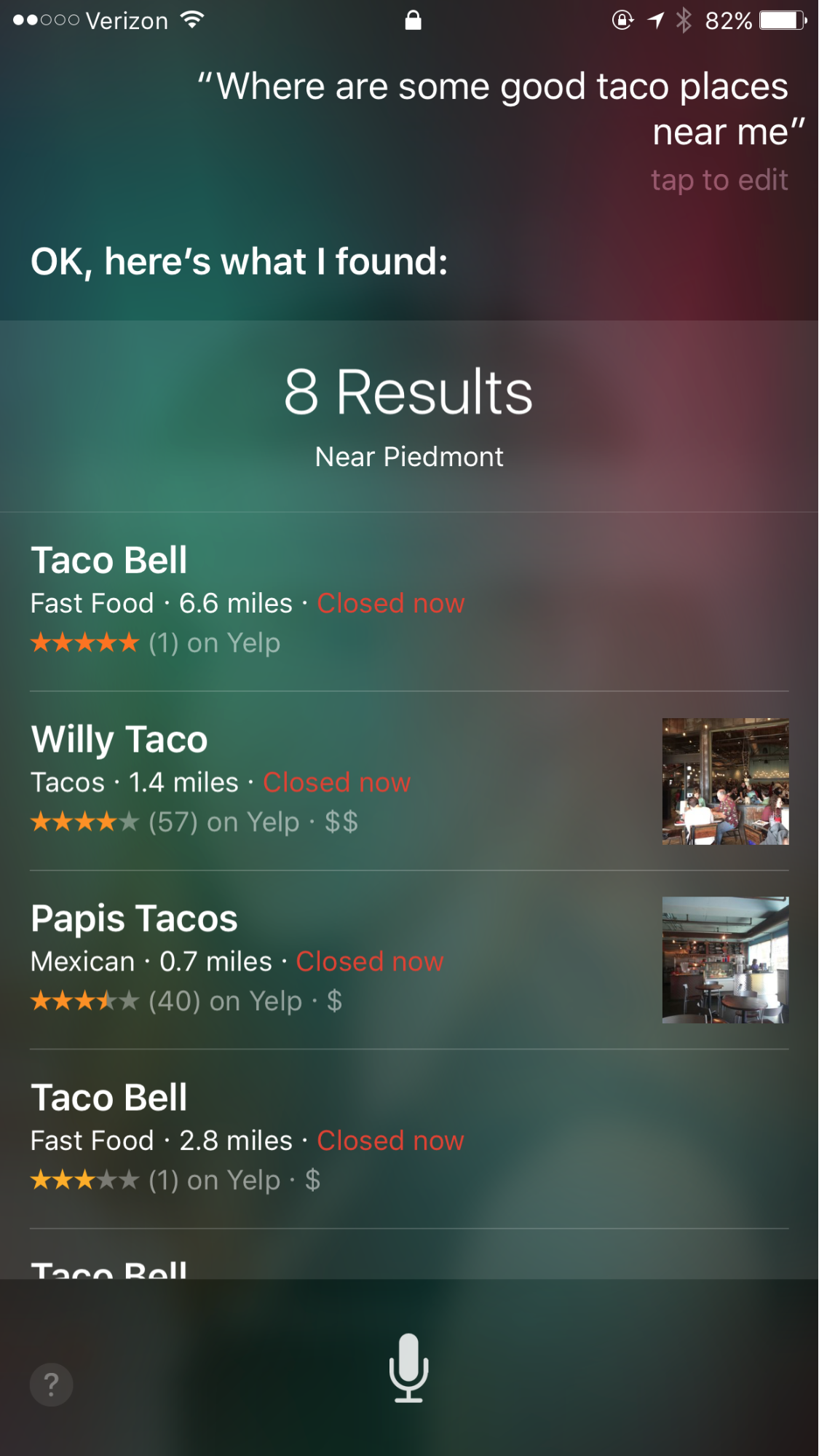
Typo errors vs. typo-free queries: On a mobile device, it’s more likely that you’ll make typographical errors. This is the nature of typing with thumbs and fingers on a screen as opposed to typing with a keyboard.
Local queries vs. informational queries: The biggest difference of all is the type of query that we use our devices for.
I discuss this in detail below, but it’s far more common to use a mobile device for local queries than it is to use that device for in-depth long tail informational queries.
For example, you may have found this article after typing in “tips for doing mobile keyword research.”
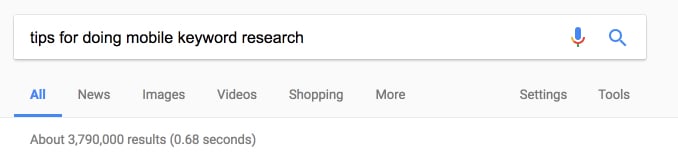
Is it possible that you would do a query like that on your mobile device?
Of course! But it’s way less common.
The nature of queries on mobile vs. desktop is a significant difference, and that’s why it’s crucial to optimize for mobile queries.
But why mobile? Why is mobile keyword optimization even a thing?
First, mobile search creates much faster results. A 2013 study by Google and Nielsen found that mobile search has a lot of immediate power.
Take a look at the numbers for yourself:
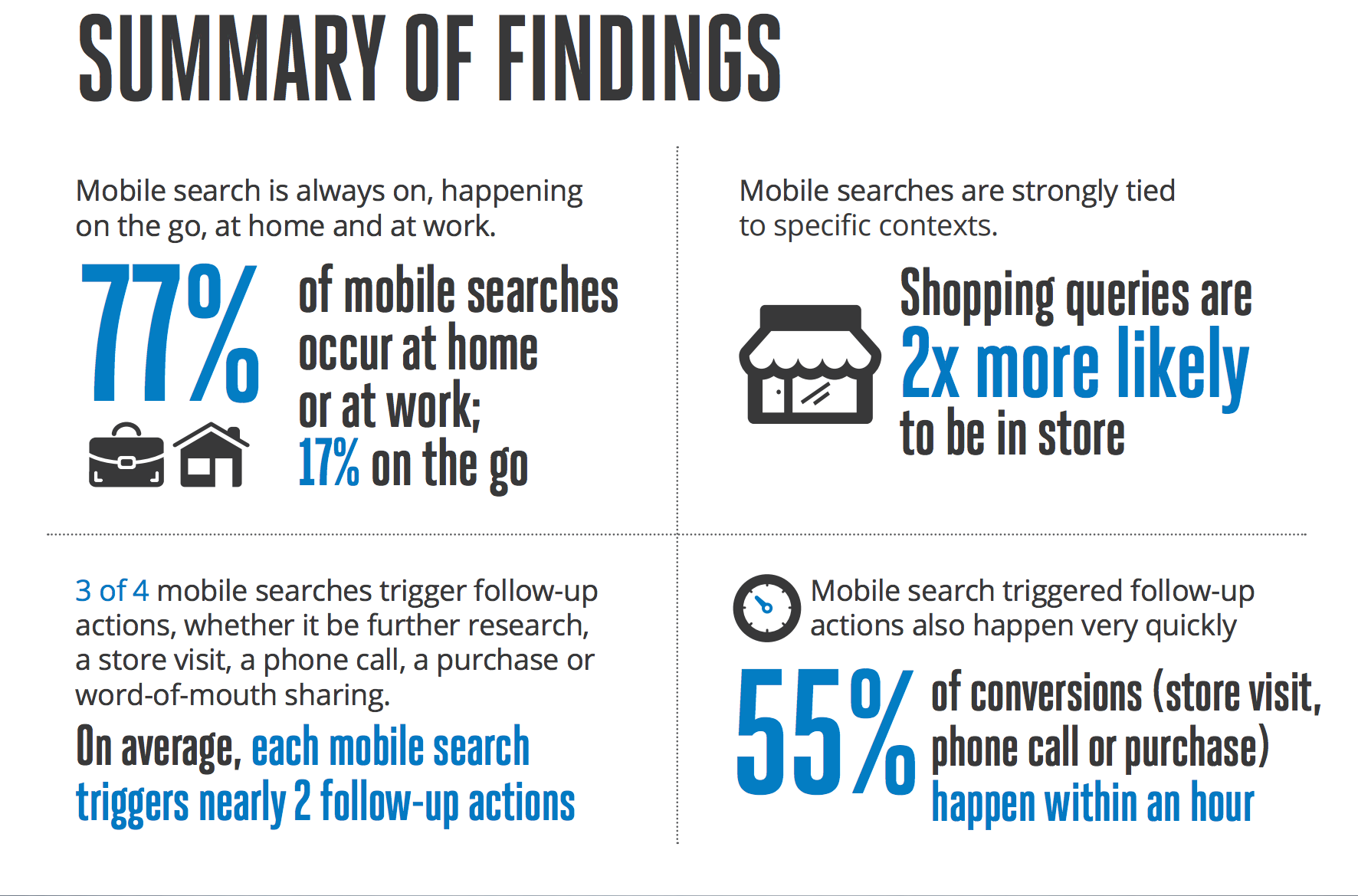
And here’s something surprising: 77% of mobile searches happen in environments where people probably have access to a desktop computer.
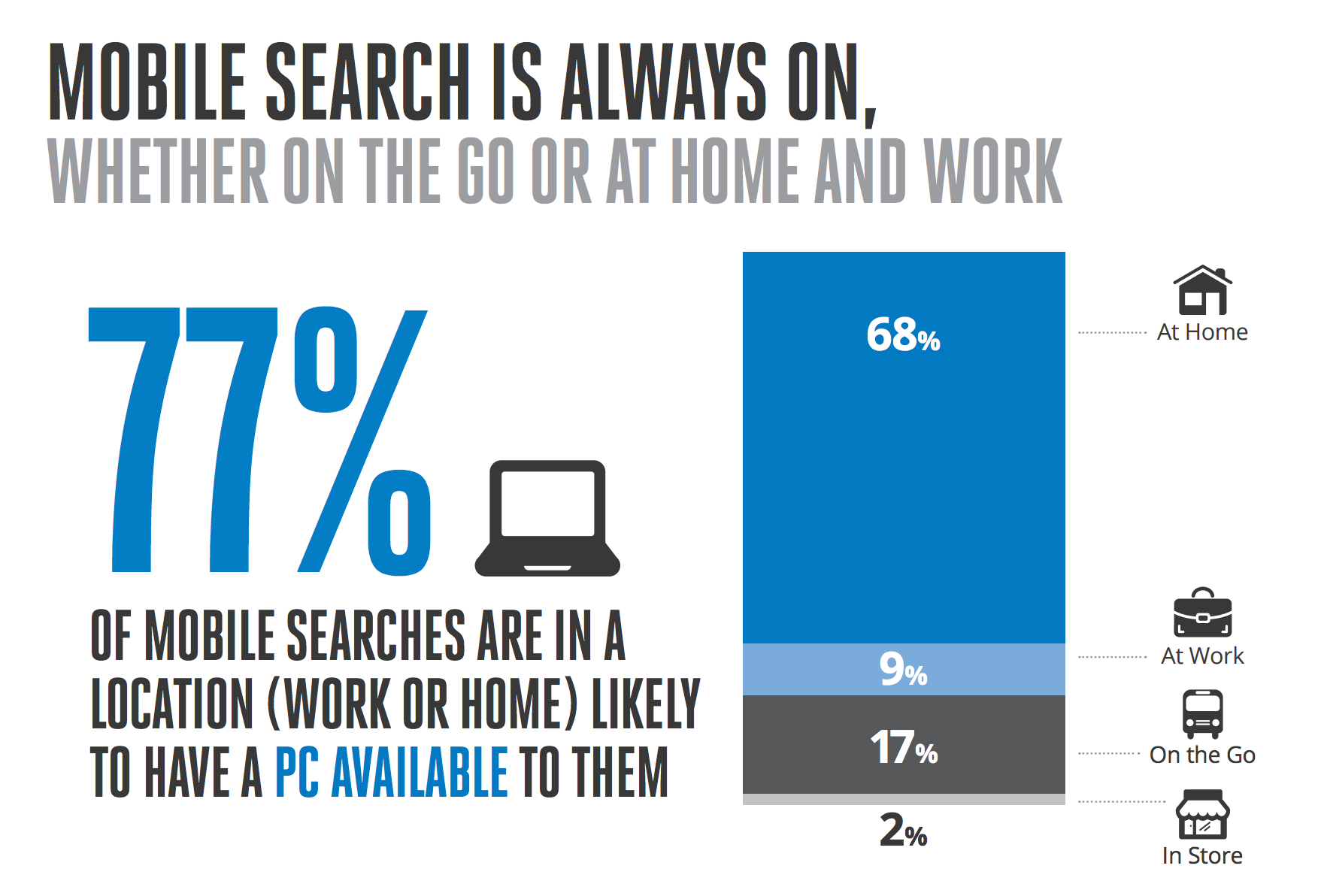
That means people are consciously choosing to use mobile for searching. The study found that this is probably because people perceive mobile searches as faster than desktop:
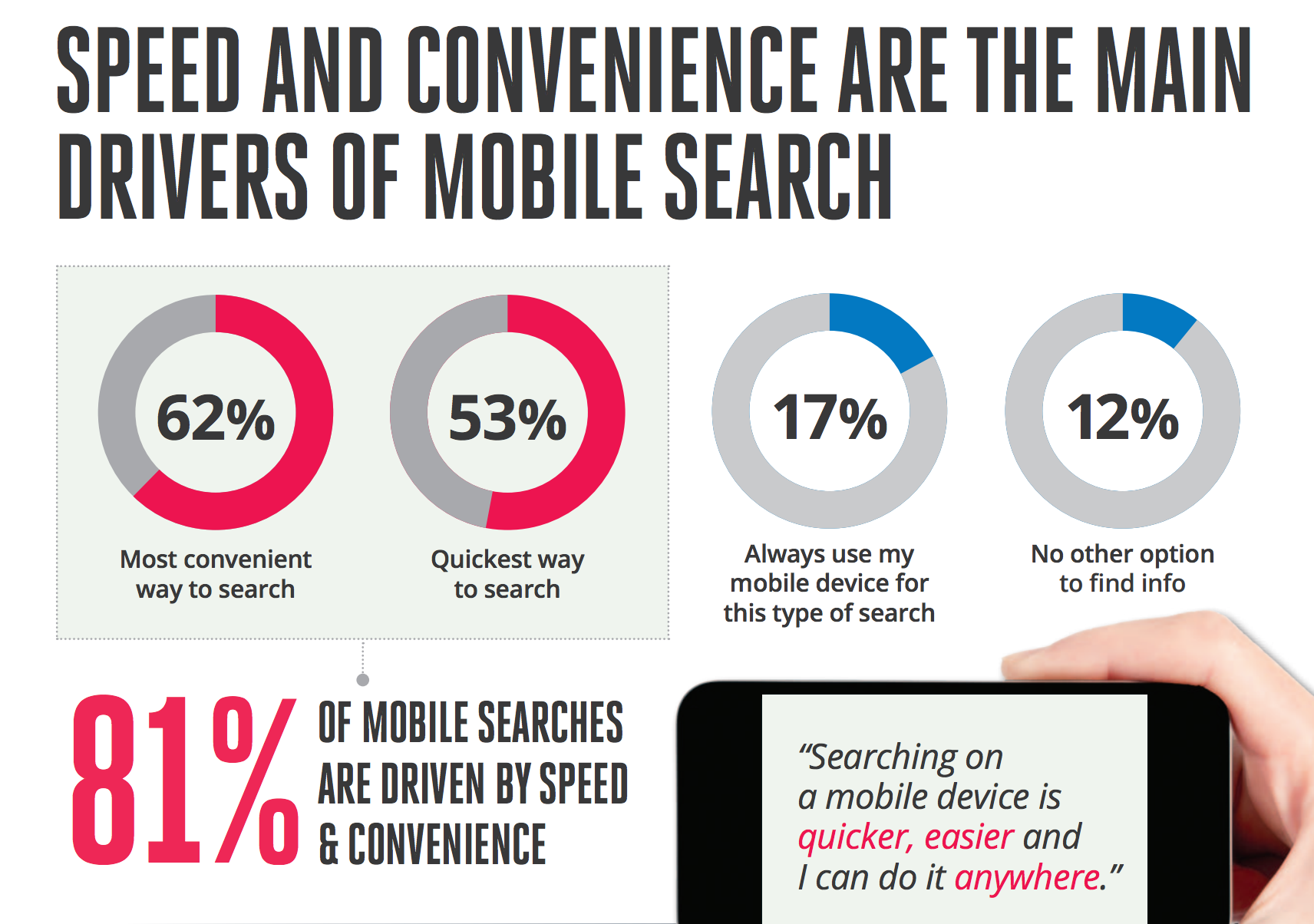
Mobile searches aren’t really any faster than desktop searches, but they are much more convenient. That’s a big factor that makes people gravitate toward mobile searches more than desktop searches.
So in a nutshell, that’s why people search on mobile.
Now let’s look at the types of keywords they’re using. These differ from desktop keywords in many ways, and you need to be aware of these differences if you want to optimize for mobile.
There are a few components that you might see in mobile keywords: shortness, location, and voice search.
Let’s take an in-depth look at each category.
Keep It Short
This should come as no surprise––shorter keywords are really common with mobile search.
No one wants to type super long keywords on their mobile device. It’s a heck of a lot easier to use the minimum amount of words that will get you what you’re looking for.
If you want to have the best chance of ranking well on mobile, keep your keywords short.
This means that you should search out shorter keywords in your niche. We’ll be using Ubersuggest to analyze these keywords.
First, head to Ubersuggest and type in a keyword related to your niche and click “Search.” For the sake of example, we’ll use a longer keyword so you can see shorter alternatives. Let’s use “Mexican restaurants near me that deliver.”

Now, click “Keyword Ideas” in the left sidebar.
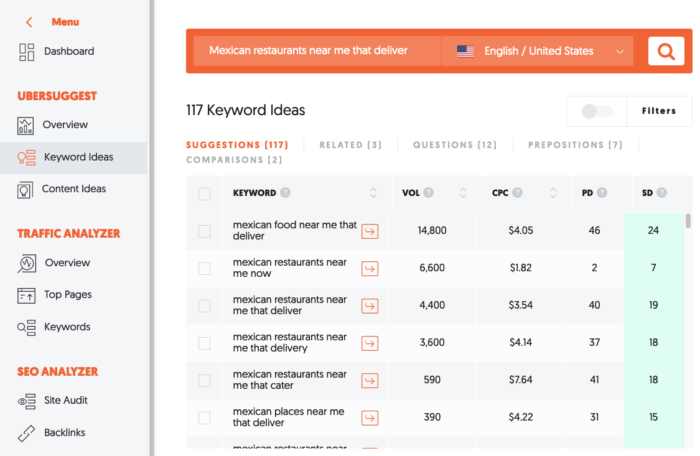
This section shows you keywords that people are using as alternatives to the keyword you input into Ubersuggest.
Here, some people are using “Mexican restaurants near me now” and “Mexican restaurants near me that deliver,” to name a couple.
As noted above, mobile keywords tend to be shorter. Search this list of 117 keywords, along with those included in the related, questions, prepositions, and comparisons tabs.
Focus on those that are five or fewer words, such as “Mexican food near me delivery” and “Mexican that delivers near me.” (That keyword doesn’t even mention food or restaurants!)
You can see how the keywords become shorter and more basic in a mobile environment. The word “restaurant” is replaced with “food,” for example.
This small case study shows how mobile users as a group approach searching. It’s a very functional thing for them. They want a certain result, and they’re looking for the straightest path to that result.
These shorter keywords are the types of keywords that people are going to use on mobile. Focus on these types of keywords, and then dominate those keywords.
Location, Location, Location
In most cases, mobile searches have a location component. To put that into perspective, Google has reported that 94% of smartphone users search for location-based info.
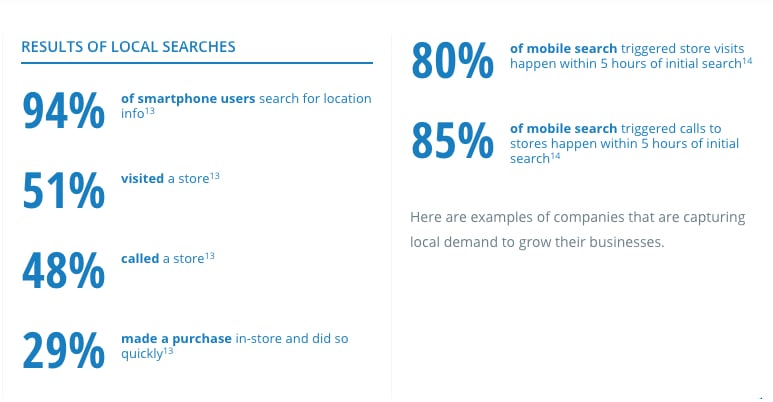
That’s because a lot of mobile searches happen on the go. People can search wherever they are as long as a mobile device is nearby.
There are a couple of important elements of location-based keywords that you should be aware of.
If you have a physical office in a certain city, this information will apply directly to you. If you don’t, you can still leverage location, and we’ll talk about that later.
First, it’s imperative to do local SEO. Local SEO is its own animal, but here are a few tips to get you started.
Start by claiming your Google My Business page. Head to https://google.com/business and click the big “Start Now” button in the middle of the page.

On the next page, fill in your information and hit “Continue.”
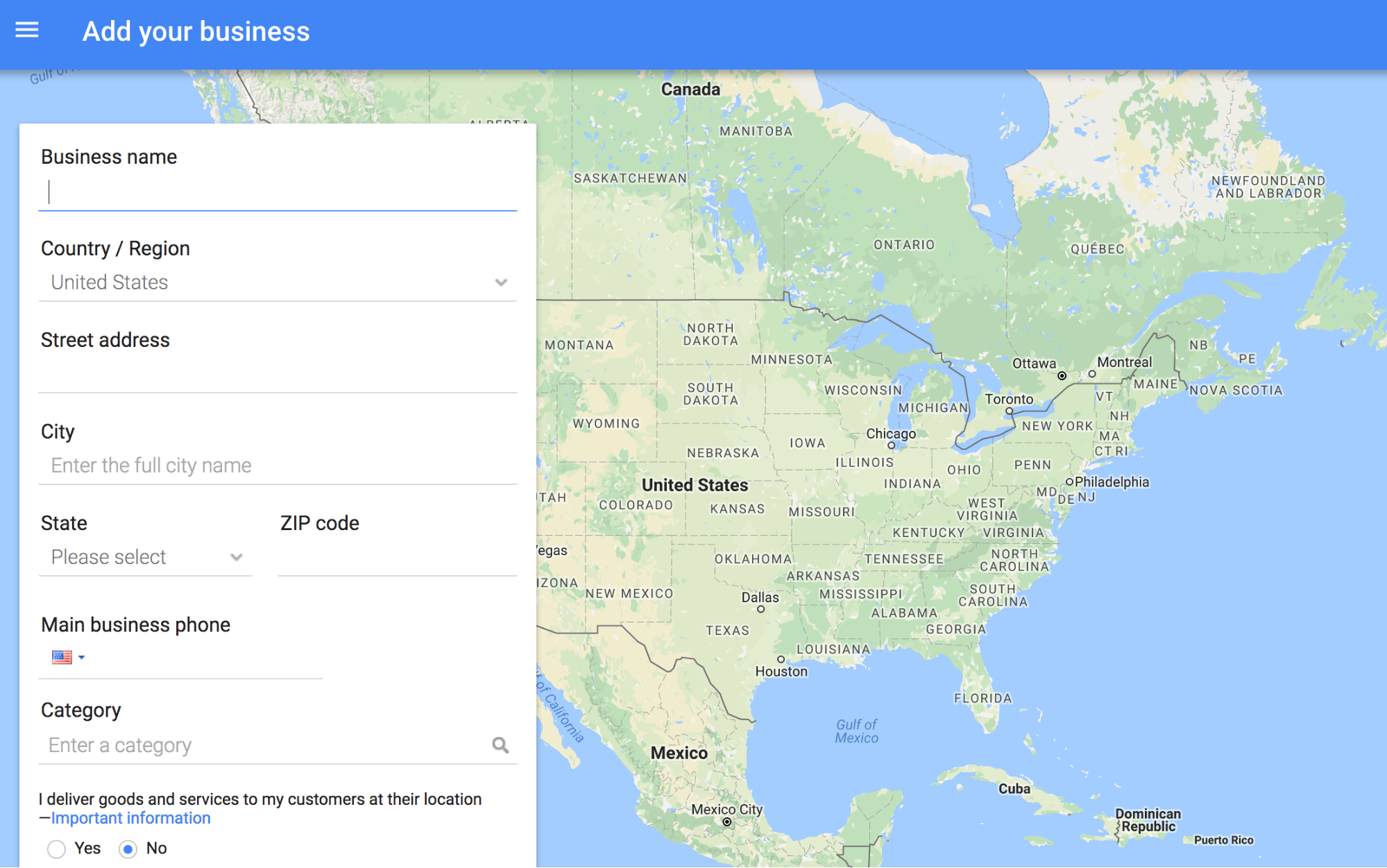
Then verify your info on the next page and click “Continue.”
For a complete guide to hacking local search using Google tools, check out this step-by-step guide.
You can now manage your Business page, and best of all, people using Google will see a lot more information about your company.
Another important aspect of local SEO is your NAP (name, address, phone number). You’ll want to have your NAP on every page of your website, and your NAP has to be consistent across all websites and platforms you use.
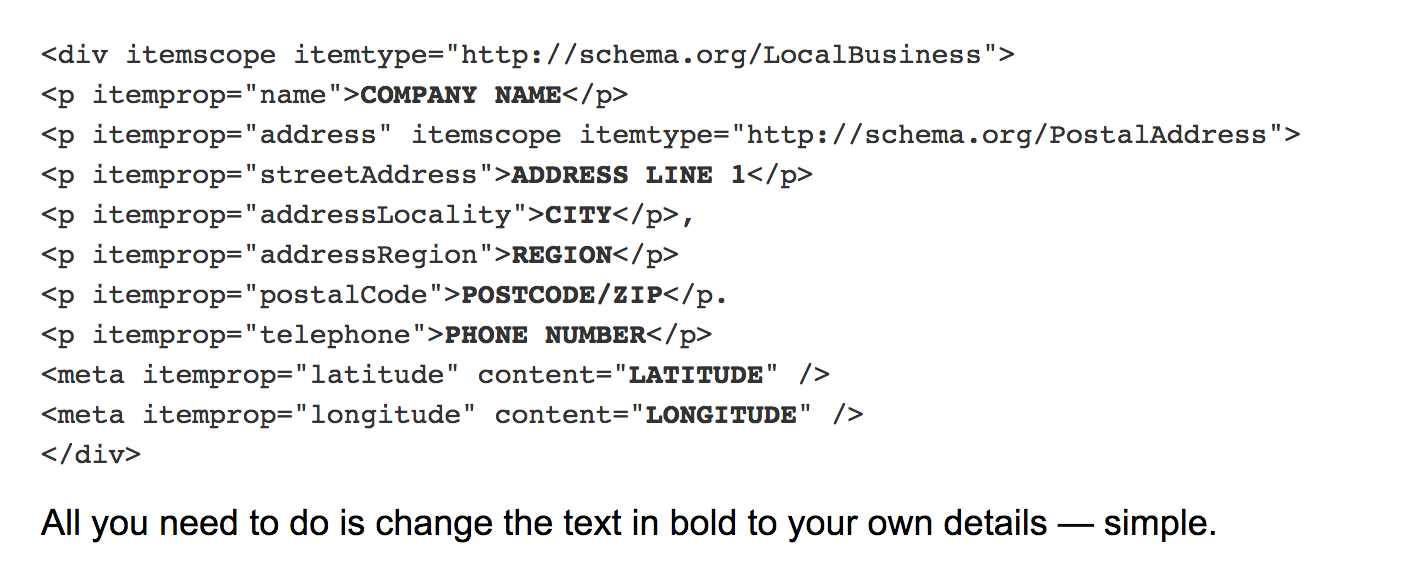
You’ll also want to use Schema markup for your NAP so that search engines can understand the information well.
Here’s the exact code you can use, courtesy of Search Engine Land:
Second, be aware of two important keywords: “nearby” and “near me.” These are two location-based words that often appear in mobile keywords.
You’ll typically see this for service businesses. For example, if I start to Google “construction company,” look at what pops up:
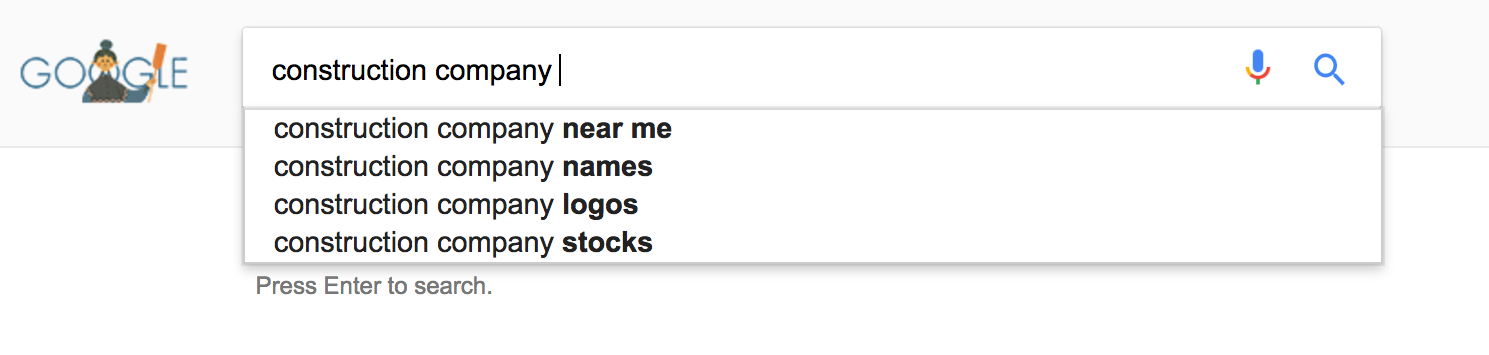
These are incredibly common in mobile searches. Since mobile searches are often local, this makes perfect sense.
If you’re a locally based business, then this is really good news for you. But if you’re a remote business, don’t worry. If you can say you’re based in a city (for example, New York City or Taipei), you’ll be able to show up for local results in that city.
And here’s something interesting. You might think there’s no difference between “nearby” and “near me,” but there is!
Marketing Land found that lots of people use “nearby,” but 16 times as many people use “near me.”
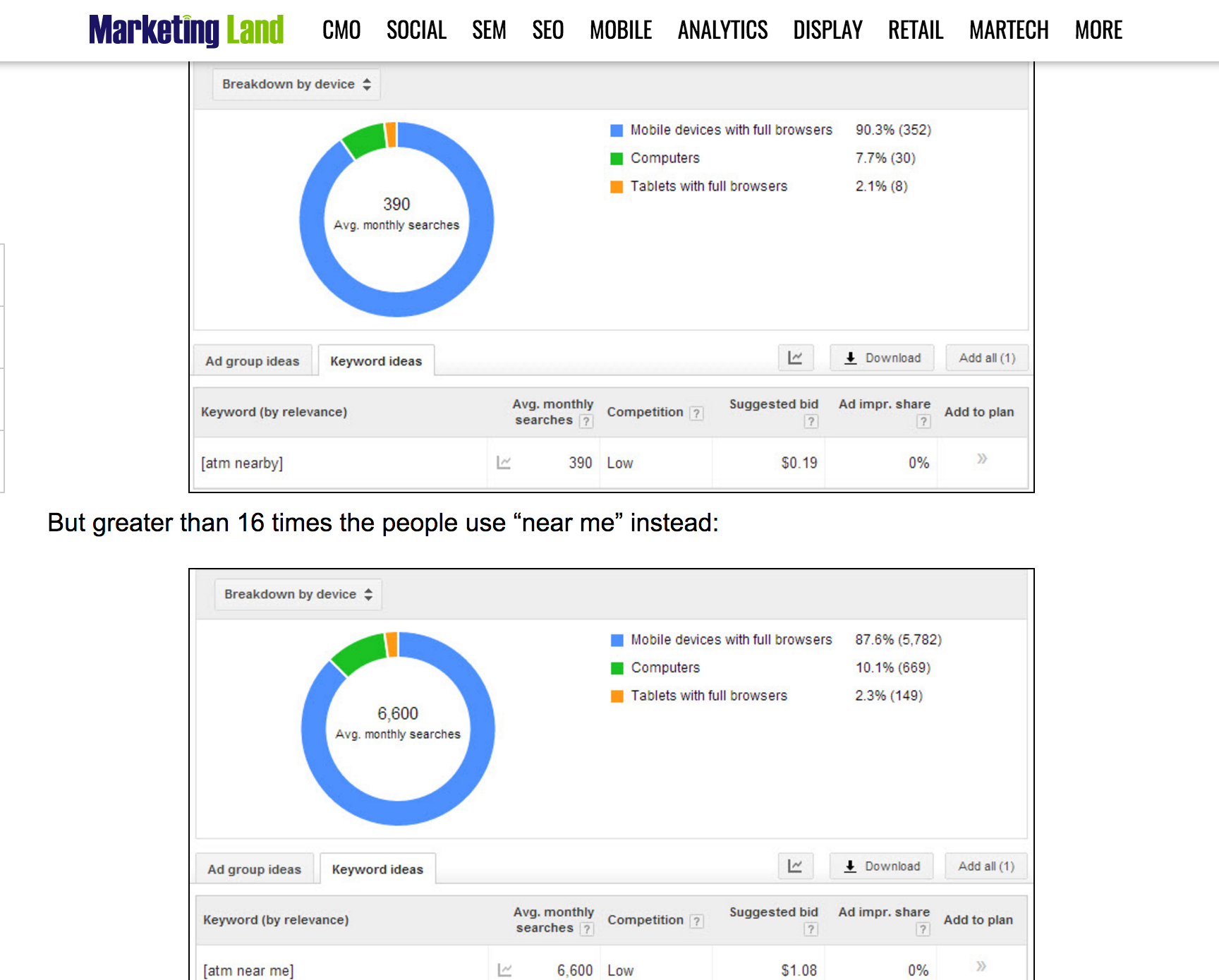
But this presents a problem. “Near me” and “nearby” aren’t traditional keywords. You can’t rank for them because they depend on the user’s specific location.
So to “rank” for these keywords, your best bet is to make sure you’re signed up with Google My Business so your company shows up when users Google businesses in your niche.
Your address and business information should be clearly displayed on Google when someone Googles your business name or your niche. Here’s an example:
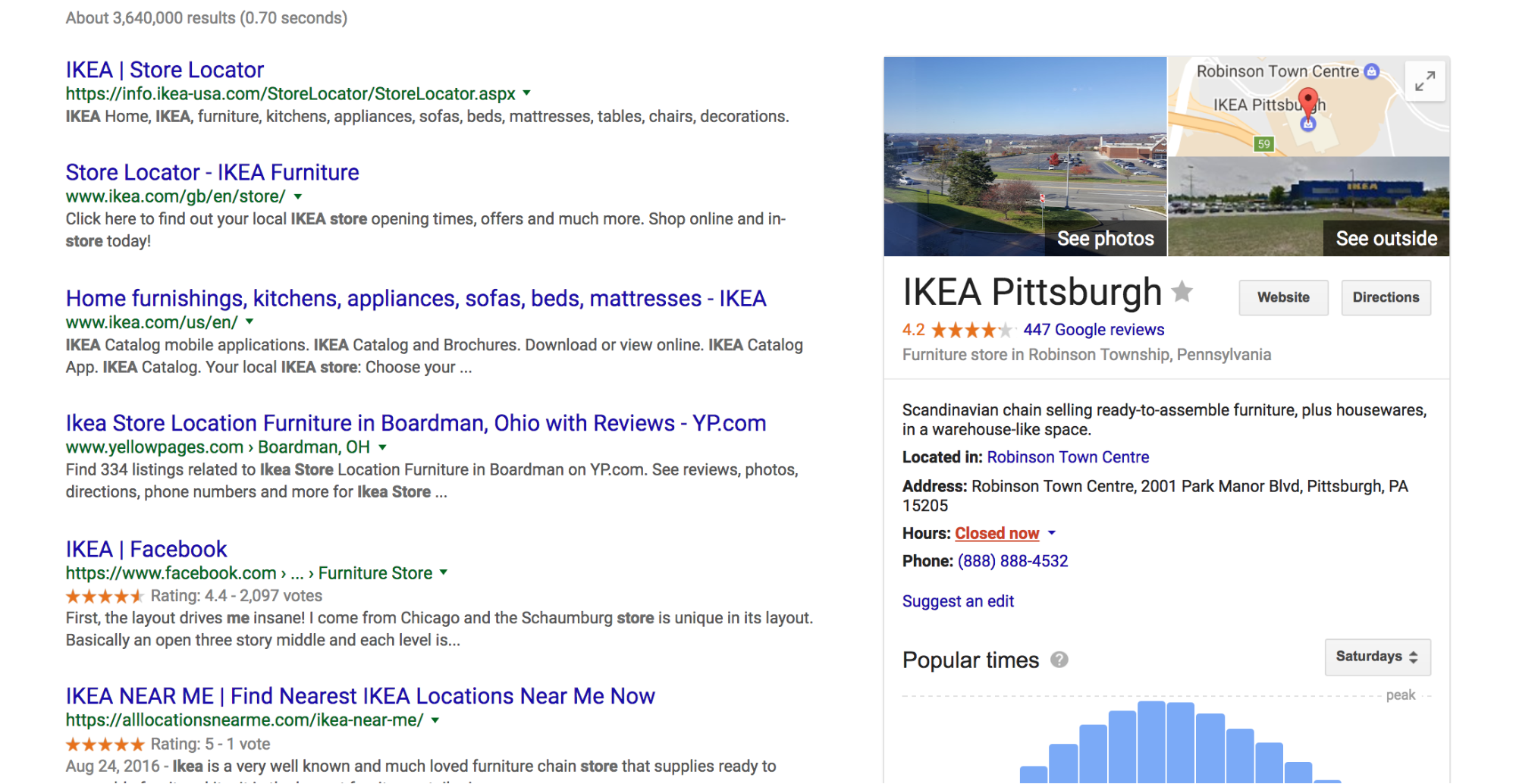
Your business should also appear on Google Maps.

If you follow these steps, you’ll be well on your way to being found when someone searches locally.
I’m only scratching the surface of local SEO. It’s an entire field of study that should almost be separate from other types of SEO.
If you want to learn more about best practices for local SEO, I recommend checking out this article by Search Engine Land.
Thinking About Alternative Searches
When people use their mobile devices to search, there’s a good chance they might not even be typing anything at all.
I know that sounds a little strange, but it could just be the wave of the future when it comes to mobile search.
Non-text-based search methods have become more and more popular lately. Voice search is one big piece of the puzzle. Programs like Siri and Cortana make it easy for someone to find what they’re looking for just by speaking.
There are also other forms of search, like Google Goggles and Google Gesture Search.

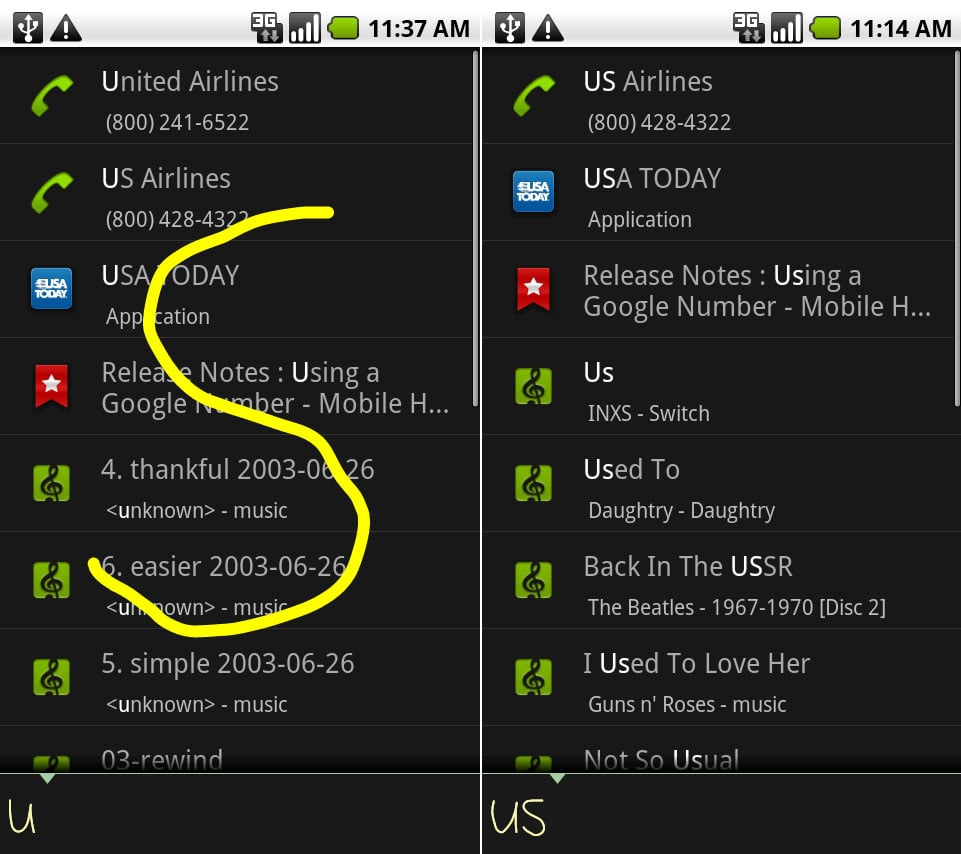
This means that many people aren’t even going into their browsers to search. Instead, they’re using apps or features, which means they may never search by typing.
This presents a problem for SEOs and marketers: How can you rank well for non-text-based search programs?
In other words, how can you rank for keywords when there are no keywords? It might sound impossible, but there are actually several ways of “ranking” well for forms of search that aren’t based on text.
Let’s tackle voice search first.
When I wrote about voice search, I wrote about 3 important elements that are still as important.
First, voice search keywords are shorter. The average word length in a Cortana search is just 3 words.
While that might sound a little bit intimidating at first, it’s actually really beneficial. Why? We saw earlier that mobile users are also using shorter keywords.
This means that aiming for shorter keywords will help you optimize for both mobile and voice search.
If you spend some time using SEMrush to find short keywords in your niche, you’ll be way ahead of your competitors for all kinds of search.
Second, questions are the most popular type of voice search queries.
This is because people speak more naturally than they type. Most people won’t say “hotels in Orlando.” They’ll say, “Where are hotels in Orlando?”
Questions can also reveal user intent. This is great because it allows you to tailor content specifically for your users, and you can be aware of the different intents your users have.
Take the question: “Where is Orlando?” This is a rather vague question, so it’s likely the user wants to know how to get to Orlando or determine its geographic position.
Now think about the question: “Where are Orlando hotels?” This reveals a completely different type of user intent.
The user wants to make a conversion and a purchase, and this will probably happen quickly.
Remember, most mobile conversions happen within an hour:
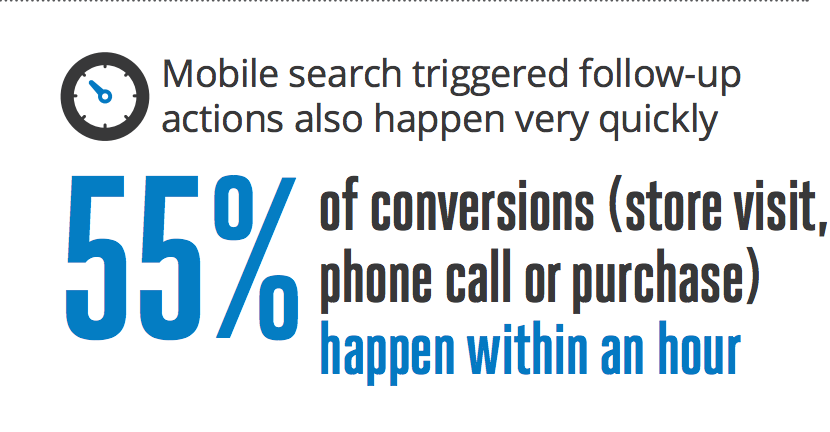
So in addition to short keywords, you’ll want to focus on short question search queries.
Third, local SEO is crucial. We’ve already gone over this, but it’s so important that I had to say it twice.
Local SEO is going to be even more important in the coming years. Since so many mobile searches are local, SEOs and marketers need to pay special attention here.
Those are the basic steps you’ll want to take to make sure your business is visible on voice search.
Now let’s talk about other methods of searching.
There are two other search programs that are quite popular right now: Google Goggles and Google Gesture Search.
Google Goggles is basically an image recognition app. You open the program, point it at a picture, and the app will show you results based on that image.
For example, if you were to open Google Goggles and snap a picture of the Golden Gate Bridge, Google Goggles would provide you with related results like the bridge’s location and information about it:
This also works with other types of images, such as company logos.
If you were to scan a bag of Baked Lay’s chips, here’s what Google Goggles would show you:
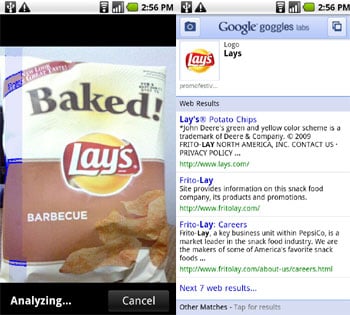
This screenshot is from PCWorld.com.
If you have a logo, you can utilize Google Goggles and other reverse image search programs to gain more visibility and drive more traffic to your site.
If someone sees your brand image and wants to learn more about your company, they can simply scan the photo and get a wealth of information about your business.
This raises the question: “How can I rank well for an image-based search program?”
As of right now, there’s no big secret to being visible on Google Goggles (or any other kind of image search). The best thing you can do is to make sure your logo is associated with your brand name.
First, you’ll want to feature your logo in a prominent place on your homepage like Walmart does:

Second, don’t forget to use alt tags for all of your images! This is one of the best ways to let search engines know your image is directly related to your brand name.
If you hover over Walmart’s logo, you’ll see the brand name in the alt text:

I recommend doing this whenever you use your logo. (Actually, I’d suggest using alt text for all of your images.)
As for other methods of search like Gesture Search, the hard truth is that you can only do so much. That said, the steps I’ve outlined so far will also help you rank well on alternative search programs like these.
In the future, it’s possible we’ll learn more about these specific search algorithms, and we might be able to take more actions to improve ranking. But until then, follow the steps in this article and you’ll be in the clear.
Conclusion
If you want to take SEO seriously, mobile keyword research should play a large role in your marketing strategy.
The world of SEO is changing, and it’s going mobile. If you’re unprepared for a mobile world, you could suffer some huge SEO consequences.
But mobile keyword research isn’t complicated. In fact, it’s a lot easier than desktop keyword research in many ways.
However, it requires some dedicated research, a thorough knowledge of your audience, and the ability to create dynamic SEO strategies that change as your users do.
It sounds like a tall order, but if you implement the advice in this article, I can guarantee you that your mobile SEO will improve. You’ll be more visible on search engines, and more people will find your business.
Search behavior is changing. Whether people are using actual text-based searches or programs like Siri or Google Goggles, you’ll want them to quickly and easily find out about you.
If you take these steps and adapt to these new types of search, you’ll have a huge advantage.
How are you optimizing for mobile SEO?