Sign In








Key Takeaways
- Claude Design is an experimental AI-powered design workspace from Anthropic, built on Claude Opus 4.7.
- The tool is built for rapid ideation and early-stage prototyping, not final production design.
- A standout capability lets the tool ingest a company’s codebase and design files to apply brand guidelines automatically.
- Users can iterate through conversation, direct edits, and comments, then export to PDF, PPTX, Canva, or Claude Code workflows.
- Claude Design is a complement to tools like Figma and Canva, not a replacement for them.
Most design tools are built for designers. That’s been the assumption for decades, and it’s created a bottleneck that marketers, product managers, and content teams know well: you have an idea, but getting it into a visual form means waiting on someone else’s schedule.
Claude Design is Anthropic’s attempt to change that. Launched in April 2026, the AI-powered design workspace lets you turn a natural language prompt into a polished mockup, prototype, slide deck, or one-pager. No design background required. For user experience (UX) teams and the non-designers who work alongside them, the implications are worth paying attention to.
What Is Claude Design?
On April 17, 2026, Anthropic rolled out Claude Design as an experimental AI-powered design workspace. The tool runs on Claude Opus 4.7 and targets two audiences: professional designers who want to move faster during early-stage work, and non-designers who need to turn ideas into visual assets without going through a full design cycle.
The outputs it can produce include prototypes, slide decks, mockups, and one-pagers. All of it is driven by natural language prompts, meaning you describe what you want and the tool builds a working draft.
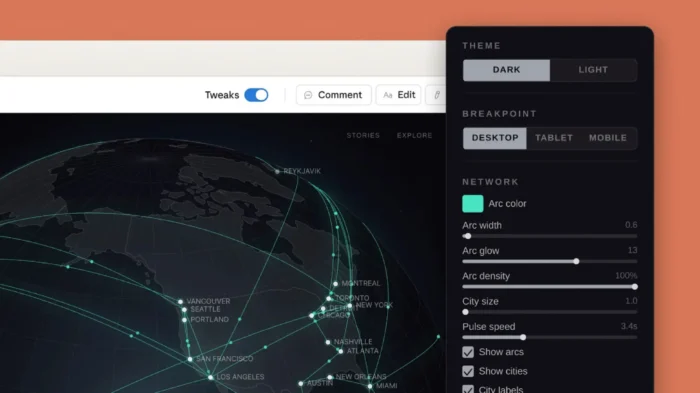
Iteration happens through conversation. You can refine outputs by typing follow-up instructions, making direct edits, leaving comments, or adjusting built-in controls. When you’re ready to move the work downstream, export options include PDF, PPTX, Canva, and Claude Code workflows.
Anthropic is positioning this as a complement to existing design tools, not a replacement. The pitch is efficiency at the ideation stage, not a takeover of the production workflow.
How Claude Design Fits Into a UX Workflow
UX work has always had a front-loaded bottleneck. The ideation phase, where teams explore directions before committing to a concept, is time-intensive and resource-heavy. A designer has to be involved from the start, even when the work is exploratory and could change completely by the next round.
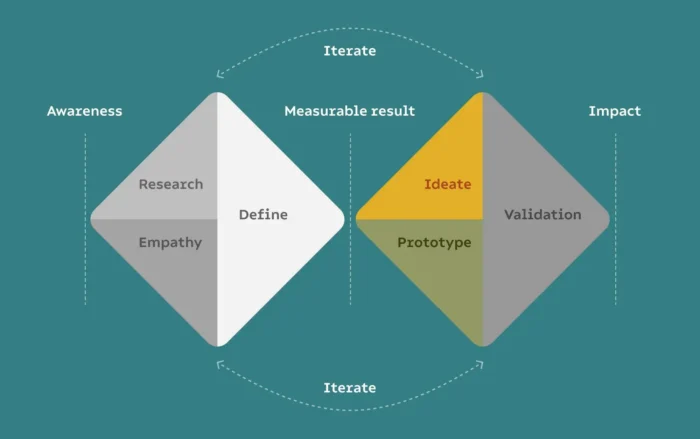
Claude Design targets that specific problem. The ability to generate a working mockup or wireframe-level prototype from a prompt shortens the gap between having an idea and being able to react to something concrete. Teams can evaluate directions earlier, kill weak concepts faster, and give designers cleaner briefs when they do get involved.
The ability for Claude Design to operate at any point during the UX workflow means design teams can focus more on optimizing their product for real user needs.
That’s the practical value. Not replacing the designer, but moving the starting line.
The Brand Consistency Feature
The most notable capability in Claude Design for teams working at scale is its ability to ingest a company’s codebase and design files to automatically apply brand guidelines to all outputs.
For anyone managing campaigns across multiple channels or coordinating between an in-house team and external agencies, visual consistency is a constant problem. Guidelines get interpreted differently. Templates drift. New team members make judgment calls.
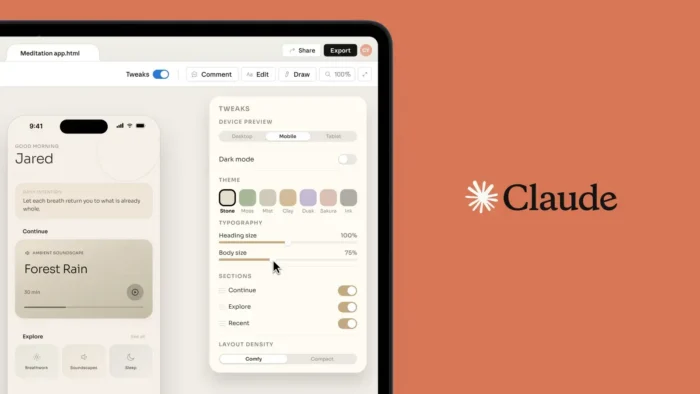
Claude Design’s ingestion feature gives the tool a reference point so that outputs stay on-brand from the first draft. That matters most during ideation, when speed tends to come at the cost of consistency.
What It Means for Non-Designers
Marketing teams, product managers, and founders regularly need to communicate visual ideas without a designer in the room. A competitive analysis needs a one-pager. A product pitch needs a slide. A new campaign concept needs something more than a paragraph in a doc.
Claude Design lowers the barrier for producing those assets. You don’t need to know how to use Figma. You describe what you need, refine it through conversation, and export something usable. That’s a real change in how quickly a non-designer can get an idea out of their head and in front of other people.
The caveat worth noting: Claude Design does consume tokens at a meaningful rate. For teams working within usage limits, it’s worth being selective about where you deploy it. Early-stage ideation and internal presentations are good candidates. Final client-facing deliverables probably aren’t, at least not without a designer’s review.
Where Claude Design Fits in the Broader AI Design Space
AI design tools have been proliferating fast. Canva has added generative features. Adobe has Firefly. Figma has integrated AI into its core workflow. Claude Design is entering a crowded category.
What sets it apart is the conversational interface and the brand ingestion capability. Most AI design tools work from templates or style presets. Claude Design works from a description, and can theoretically hold the logic of your brand in memory for a session. That’s a different kind of flexibility.
The broader signal here is Anthropic’s push into enterprise productivity. Claude Design is part of a larger pattern: AI moving beyond text generation into the full range of knowledge work, including design, code, and creative assets. For UX practitioners and the teams they work with, that shift is going to keep accelerating.
How to Start Using AI Design Tools in Your Workflow
If you want to test Claude Design or similar tools in a practical context, here’s a straightforward approach:
- Start with low-stakes assets. Internal presentations, early-round mockups, and concept sketches are good starting points. These are outputs that benefit from speed and don’t require production polish.
- Feed in your brand guidelines upfront. If the tool supports file ingestion, use it. Starting with your brand reference reduces back-and-forth in the iteration phase.
- Treat outputs as drafts, not finals. AI design tools produce starting points. Plan for a designer review before anything goes to a client or ships publicly.
- Test it as a brief-writing tool. Even if you don’t use the visual output directly, generating a mockup can help you communicate to a designer exactly what you’re looking for. That alone can cut revision cycles.
- Track time saved in the ideation phase. The value is in speed, not in replacing human judgment. Measure it there.
FAQs
What is Claude Design?
Claude Design is an AI-powered design workspace from Anthropic. It runs on Claude Opus 4.7 and lets users create mockups, prototypes, slide decks, and one-pagers through natural language prompts. Outputs can be exported to PDF, PPTX, Canva, and Claude Code workflows.
Who is Claude Design built for?
Anthropic designed it for both professional designers who want to move faster during ideation and non-designers who need to produce visual assets without full design expertise. Marketing teams, product managers, and founders are natural users.
Does Claude Design replace Figma or Canva?
No. Claude Design is positioned as a complement to existing tools, not a replacement. Anthropic is targeting the ideation phase of design work, not production-level output. Final deliverables will still benefit from a professional designer’s review and tools built for that purpose.
What can Claude Design export?
Outputs can be exported to PDF, PPTX, Canva, or Claude Code workflows. This makes it straightforward to hand off early-stage work to existing design or development pipelines.
What is the main limitation of Claude Design?
The tool consumes tokens at a meaningful rate, which is worth keeping in mind for teams working within usage limits. For now, it works best for early-stage ideation rather than high-volume production work.
Conclusion
AI design tools are no longer a future consideration. Claude Design is live, and it’s targeting one of the most persistent inefficiencies in creative work: the time between having an idea and being able to react to it visually.
For UX teams, the case for testing it is straightforward. If it shortens ideation cycles and helps non-designers communicate more clearly, it earns its place in the workflow. For the rest of us, it’s another signal that the tools available to knowledge workers are changing faster than most teams are adapting.
Want to understand how AI tools fit into a broader digital marketing strategy? My guide to AI in marketing is a good place to start. You can also consult with the NP Digital team to figure out which emerging tools are worth prioritizing for your specific goals.