
 Sign In










Merging Facebook accounts seems to be a convenient option for companies undergoing consolidation or acquisition.
Unfortunately, merging accounts is not possible at the moment. However, marketers can request to merge Facebook accounts if they have an identical name or represent a similar product or service.
Now, what if your accounts don’t fit these criteria? Sadly, it won’t be possible to actually merge your Facebook accounts, but there are some possible workarounds.
In this article, we’ll discuss tips and tricks on how you can merge Facebook accounts, but before that, we’ll go over the benefits of this strategy.
Why Should You Merge Facebook Accounts?
Merging accounts isn’t for everyone, but there are a few cases when it could be beneficial.
Ease of Management
In the past, it may have been logical for businesses to have separate accounts, but circumstances can change.
A corporation with multiple businesses may prefer to merge accounts for ease of management. After all, it’s more convenient to post content from one account rather than managing several.
For marketers, handling a social media marketing calendar for two or more accounts can be a hassle. Each account likely has a distinct brand voice, content guidelines, or design. It can also be challenging to monitor social media metrics and create effective brand strategies for multiple entities.
When faced with these circumstances, combining everything in one account could mean saving a lot of time and effort.
Improve Customer Experience
Posting content from one account could be beneficial to your engagement results.
Your target audience simply needs to follow your main account to interact with your content.
An alternative option is to browse multiple accounts to view content about a specific department, service, or product, which isn’t always ideal.
If your audience wants to get in touch with your brand, they only need to message the main account. No need to browse through your different accounts to find the right people to speak to.
Add Diversity
Combining two or more accounts means more diversity for your content.
Let’s say you manage a fashion website, and your sister company runs a travel website. Rather than sharing strictly fashion-related content, you can spice it up with travel content.
As time passes, you may be able to gain followers interested in both travel and fashion. The combination could lead to improved social media engagement and a boost in your follower count.
How to Manage Your Facebook Accounts When a Business Consolidation Occurs
A business consolidation occurs when two separate businesses combine to form one entity.
Let’s say Marketing Agency A and Marketing Agency B were consolidated to make Marketing Agency C.
Agency A and Marketing Agency B both have separate Facebook accounts.
In the months to come, you’ll want to merge Facebook accounts or create a new account. This way, the new account for Marketing Agency C will combine followers, posts, and pictures from the previous accounts.
Again, you cannot merge Facebook accounts in most cases. What are some strategies for handling this situation? Here are some tips to help you out:
Create a Brand Migration Process
Consolidation doesn’t happen overnight, and it may take time for current followers to adjust to the transition. Before deleting your separate accounts and creating a new account, plan a brand migration process.
Get in touch with the brand manager of the parent firm to learn more details about the consolidated brand’s future.
Here are some questions to keep in mind:
- How will the consolidated business communicate with customers?
- What will be the new brand voice and aesthetic?
- Who are your target customers?
- How would you describe your buyer personas?
Take the answers into account when creating a social media strategy that is aligned with your new brand identity. The end goal is to build a brand voice and aesthetic that resonates with both audiences from your previous accounts.
Build a Transition Timeline
When you’re creating a new brand identity and account, you must give customers the time to ease into the transition.
Here’s how this might look:
- Month 1: Launch a social media marketing campaign announcing the consolidation and your new account. Cross-post some content from the new account to the old accounts to encourage customers to follow your new account.
- Month 2: Cross-post more often and adopt a brand voice and aesthetic mimicking the consolidated firm’s new brand identity.
- Month 3: Before abandoning your social media account, create a final post in your old accounts that includes a link to your new consolidated account. This way, customers who check out your old brand account in the upcoming months know where to find you.
Of course, the key to success is launching social media marketing campaigns to boost awareness of the consolidation. You can also encourage your current followers to stick around in your new consolidated account so they can receive relevant updates.
Merge Brand Identity
Each business has a distinct identity and target audience. The key to a successful consolidation is to understand the characteristics of the two separate companies and how to merge them post-consolidation.
For example, let’s say Business A is a travel website, and Business B is a fashion brand. Business A’s tone is fun and whimsical, while Business B is fashion-savvy and feminine. Instead of choosing one brand identity over the other, you could consider adopting key characteristics in your brand voice and content post-consolidation.
Next, think about when a specific target audience or buyer persona is more active.
Maybe you find fashion-savvy audiences are more likely to interact with your content on weekday nights, so then you post content from Business B at this time. In contrast, travel-focused content may be more appropriate during weekday afternoons or weekends.
During the initial stages of the brand transition, keep accounts updated, link to each other’s accounts often, and link to the new company. Share the same posts so people know the brands are now associated.
In the beginning, the brand identity might not be perfect, so make sure you modify your strategy until you find what works best. Eventually, your audience will get used to your new brand identity, and you can successfully merge Facebook accounts.
How to Manage Your Facebook Accounts When a Business Acquisition Occurs
A business acquisition happens when one company acquires the shares to own another company. In this case, the acquired company no longer exists.
How do you merge Facebook accounts if one company technically does not exist? Consider the following tips:
Decide the Next Steps
Assess the number of followers in the Facebook account of the acquired company. If the acquired company has a low number of followers and your leads or buyer personas overlap, then simply encourage current followers from the acquired company to follow your new account.
When the acquired company has a valuable amount of followers, you must build a migration plan to absorb them into the parent Facebook account. Share posts from your main Facebook account to the acquired company’s social media account.
In time, loyal brand advocates will end up following the main account so you can shut down the Facebook account of the acquired company.
Create Relevant Content
Consider the characteristics of the followers of the acquired company and include them in your buyer persona.
Rather than sharing all content from the parent company on the get-go, think about the content that appeals to the acquired company’s target audience. Use blog posts or graphics that appeal to the target audience of the acquired company’s social accounts.
Of course, you don’t have to overhaul your entire content strategy to appeal to this new customer base. Create content that appeals to this audience occasionally so they’ll be encouraged to stay and check out what the parent company offers.
How to Manage Your Facebook Accounts When You Change Your Business Name
Changing your Facebook business name is a fairly simple process. According to Facebook, you can simply make the changes in the Business Manager.
Here’s how it’s done:
- Visit Business Settings.
- Select Business Info and choose Edit.
- Replace the current business name with your desired business name.
- Click Save.
While these steps are very straightforward, building awareness for your new business name takes time.
If not done well, engagement may drop because current followers won’t be able to find your business. Moreover, social media engines won’t be able to index your new URL in an instant, and it could take weeks or months to get your old traffic back.
To avoid these disadvantages, here are some tips you need to know:
Inform Followers About the Name Change
The obvious step is to inform followers about the name change.
Before you take the leap, include the new business name in your promotional materials, such as emails or blog posts. This way, you can boost awareness for the upcoming change.
Include the Old Name
You don’t have to ditch the old business name immediately.
Instead of choosing between the old and the new, your new name could still include your old business name. A good tip is to follow this format, “New Business Name (formerly Old Business Name).”
Freshworks Customer Relationship Management (CRM) company changed its Business Name from “Freshsales” to “Freshworks CRM.” So they don’t lose out on the SERPs, their website is listed as “Freshworks CRM (Formerly Freshsales).”

With this strategy, customers familiar with your old business name will still be able to find your page on Facebook and remain aware of your rebranding.
How to Manage Facebook Accounts if Your Business Has Multiple Accounts for Different Departments
Sometimes businesses have multiple accounts to accommodate specific purposes of different departments.
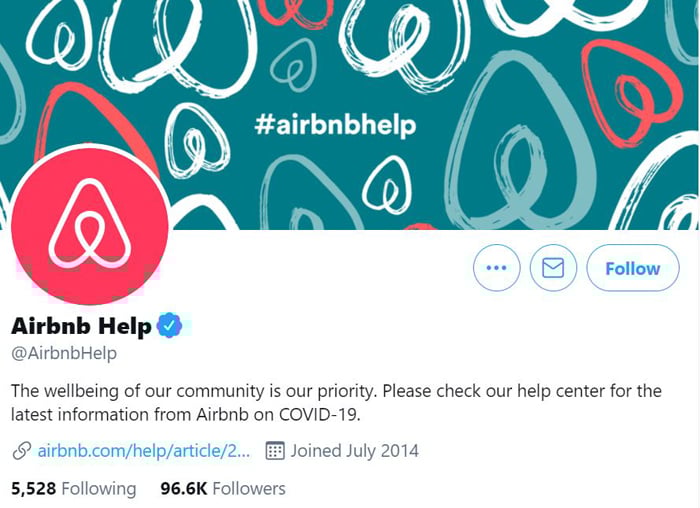
For instance, take Airbnb, which has two separate Twitter accounts: @Airbnb and @AirbnbHelp.
The general Airbnb account is used for marketing purposes, while their Help account is primarily used by their support team for customer complaints.
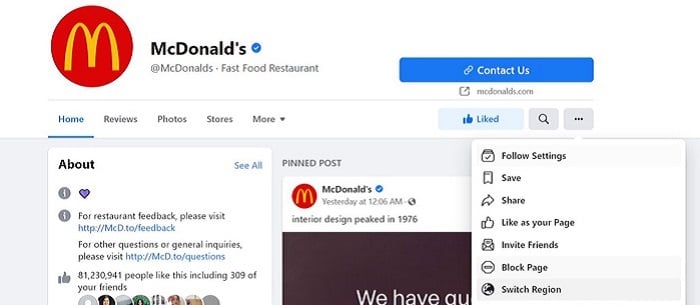
A business could also have region-specific Facebook accounts.
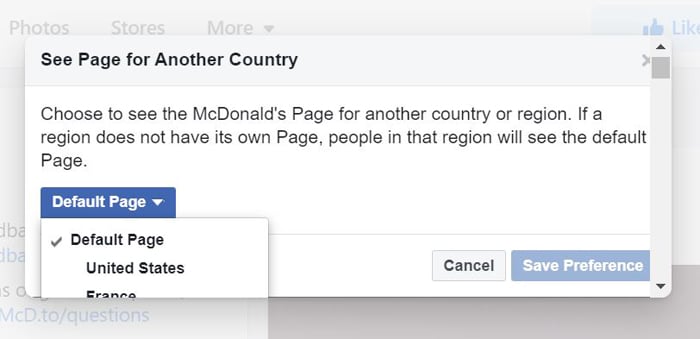
For example, McDonald’s Facebook posts may differ based on your country or region. You can find this by navigating to the “Switch Region” option.
Here, you can choose whether to view McDonald’s local posts from the US or opt for posts from a specific location or country.
How to manage multiple Facebook accounts across different departments or regions? Here are some tips to know:
Implement Brand Guidelines
The account may differ, but the main brand is still the same. To ensure every department is on the same page, implement brand guidelines that include the tone, feeling, and aesthetic to guarantee the customer experience remains consistent.
Follow Communication Guidelines
Whether the Facebook page is for your marketing, sales, or support team, your communication strategy should remain the same. Employees managing the accounts, regardless of their department, should follow the brand’s preferred tone of voice or language when responding to messages or comments.
Monitor Different Accounts
In this day and age, a social media misstep could cause you to lose out on potential customers.
To guarantee a premium customer experience, marketing teams should monitor accounts of various departments, too.
Have a primary team or person monitor all social media accounts. When various departments make their social media calendars or strategies, the changes must require approval from the main social media team.
An alternative option is to invite a representative from the different departments’ social media teams in the monthly marketing plan meeting. This ensures everyone in the company is on the same page.
Conclusion
How do you merge Facebook accounts? While it’s not possible in most cases, there are workarounds you can use.
Companies undergoing consolidation and acquisition are advised to create a migration plan and transition timeline to ensure existing followers remain with the business. Meanwhile, those with different accounts across various departments should ensure consistency by sticking to the brand’s guidelines.
There are various reasons you may feel the need to merge Facebook accounts, but the key to success is to remember your brand identity and buyer persona. Always remember to create relevant content and strategies that cater to your audience.
As long as you keep this in mind, you’ll be on the road to success.
Are you looking for ways to merge Facebook accounts? What strategies will you use to make the transition to a new account easier?