Sign In













Google Analytics is supposed to help you figure out what’s working and what’s not.
It’s supposed to help you determine which campaigns are succeeding and which sources of traffic are delivering the best bang for your buck.
And it’s supposed to help you, personally, get the credit you deserve for devising strategies and tactics to deliver on your objectives.
Unfortunately, it might not be doing any of those things right now.
For example, years ago The Atlantic found that 25% of their visitor traffic was unaccounted for and unexplained. They literally had no idea where it was coming from and why it was happening.
The exact same thing is probably happening on your website right now.
Dark traffic is the problem. It’s giving you faulty information that you’re using to make big (and probably expensive) decisions. And it’s taking away from your own personal success.
Being ‘data driven’ is only good if your data is accurate. Which in many cases, it’s not.
I’m going to show you how to fix the dark traffic problem you didn’t even know you had.
But first, we need to define it, and how it happens so, you know exactly what to watch out for (and what’s at stake).
What is Dark Traffic?
Before you can understand ‘dark traffic,’ you need to understand what Direct traffic is and how it’s defined.
Direct traffic is one of the primary referring sources of traffic to your site.
It’s loosely defined as the number of people who type in your URL directly into the search bar. So they bypass Google, remembering your domain off the top of their head, and key it in before hitting Enter.
I say ‘loosely defined,’ because that’s what it’s supposed to be in theory. However, that’s not always what happens in reality.
For example, Direct traffic should usually be responsible for around 10-20% of your site’s overall sessions according to Link-Assistant.com, Aleh Barysevich. That means only around 10-20% of the people hitting your site will remember your domain.
But that’s not what happens. Instead, it’s often more common to see something like this:
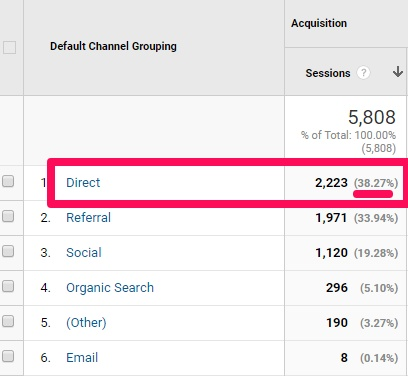
Direct traffic should be around 20% of your site’s traffic max, and yet in this example, it’s nearly double that at 38%!
What gives?!
The remaining 18 – 28% is ‘dark traffic.’ It’s technically from somewhere else (email, social, paid campaign, etc.) but being misclassified as Direct.
Here’s what’s going on.
Those of us loyal to The Onion are likely to type www.theonion.com into our search bar, resulting in a high level of direct traffic to the site’s homepage.
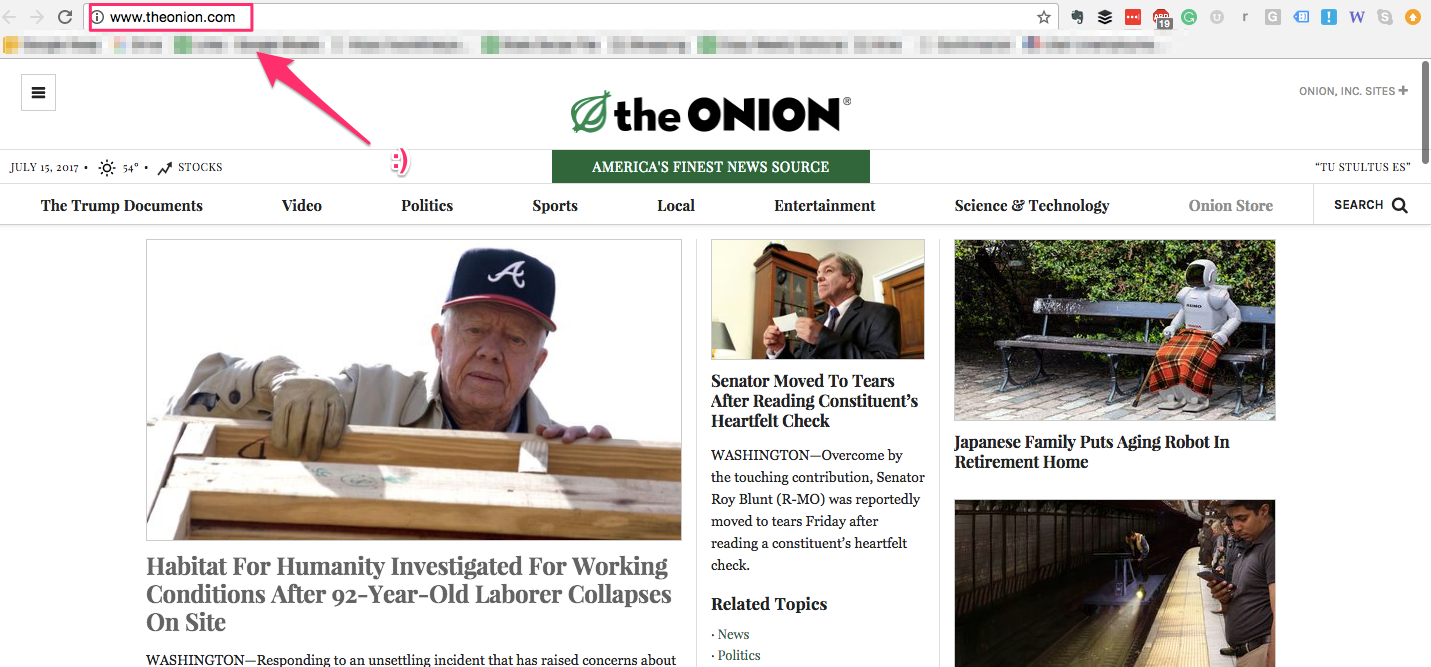
That’s totally normal human behavior.
However, the probability that even the most dedicated reader would type out something like https://www.theonion.com/article/gaunt-sickly-kirby-takes-leave-absence-video-games-56385 is considerably lower, if not nonexistent.
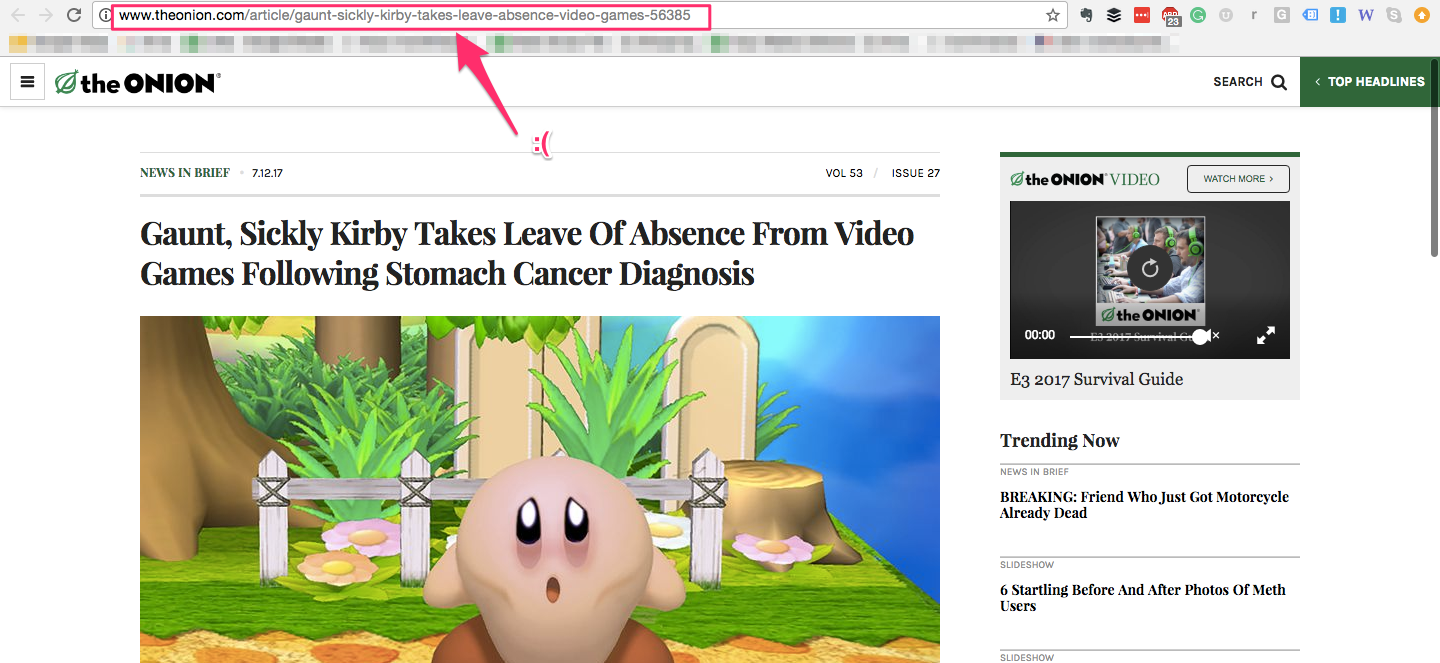
In other words, you should expect almost zero Direct traffic to this page. There’s no way people are actually typing that in from memory.
Here’s how it gets misreported.
Analytics packages look at referral data when deciding which ‘bucket’ to categorize a new session. That information often gets stripped away when using desktop or mobile programs.
So all those links you click on from Outlook, Apple Mail, Slack, etc.? They’re contributing to your problem.
Especially when those links go untagged with extra parameters that tell an Analytics program where they’re explicitly coming from. (I’ll show you how to do this in a few minutes.)
Think about the ramifications of this for a second.
Dark traffic is essentially being overreported. Which means other channels, like paid, email, or social, are being underreported.
That’s a problem. It means that those channels aren’t getting the credit they deserve for driving those new visitors and customers. Which in turn means that you, dear marketer, are not getting the credit you deserve, either.
This obviously isn’t a great problem to have, but how big of a deal is it? In an effort to answer that question, Groupon decided to put its tracking tool to the test.
How Groupon Discovered that 60% of their Direct Traffic Should be SEO
Groupon knew they had a problem. They just weren’t sure how big the problem was.
So they decided to run a little experiment to find out.
They deindexed their site for half a day to better understand where their visitors were coming from.
Note that you should not try this at home.
By deindexing themselves from Google, they could effectively rule out SEO traffic by seeing a massive drop-off from their normal level of visitors throughout the day.
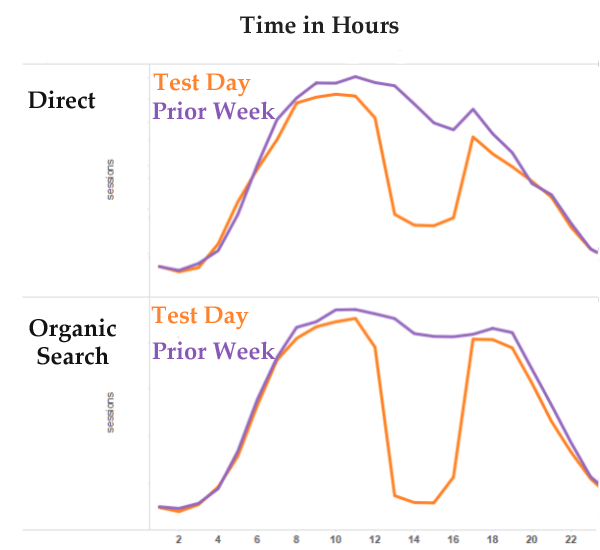
Here’s what they were looking for specifically.
It would be completely natural for Direct visits to the homepage and other key pages (like Groupon Getaways) to remain high during this search blackout. These pages have relatively short, memorable domains like www.groupon.com/getaways. 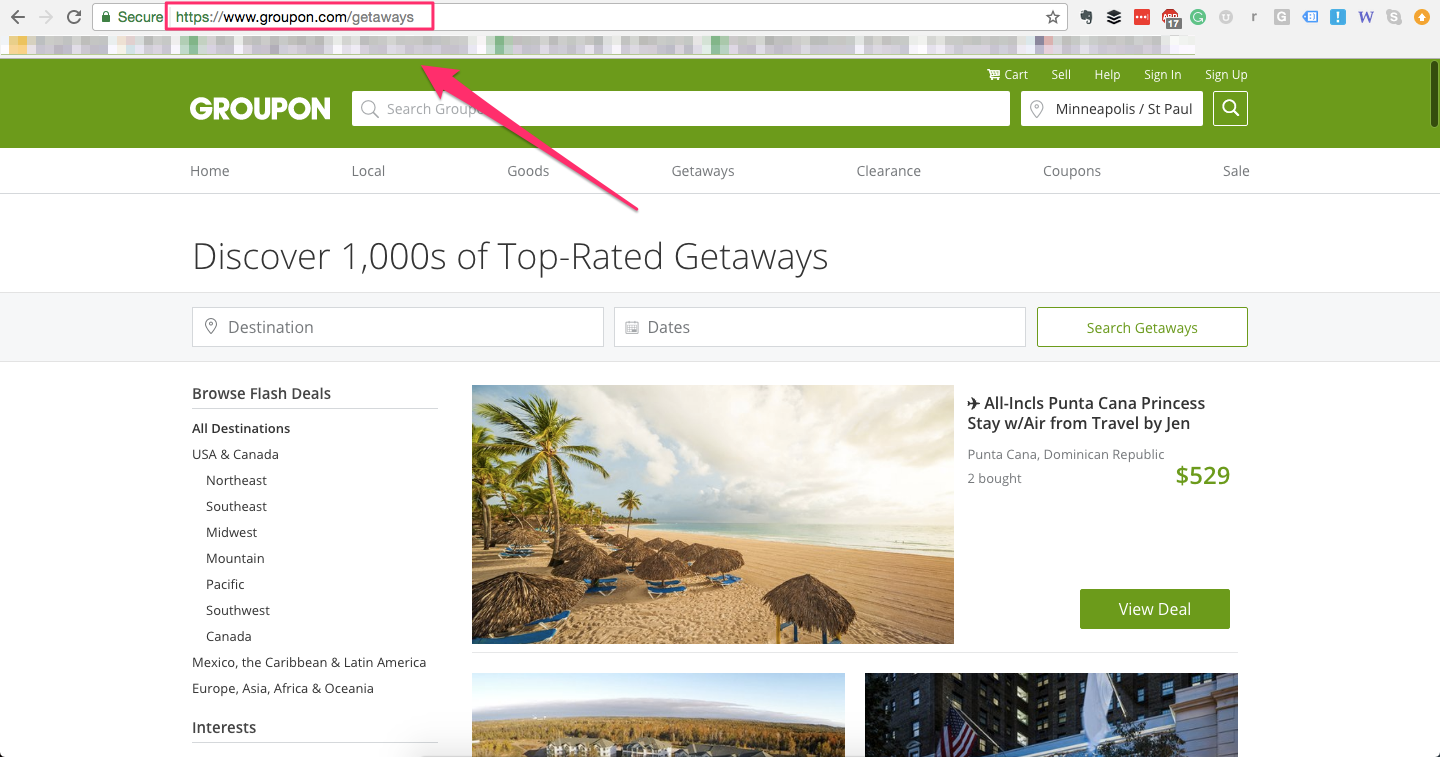
So that’s easy enough to remember!
They then compared what happened on their individual deal pages which typically featured long, complex URL strings instead. These pages shouldn’t see any Direct traffic (relatively speaking) because people wouldn’t memorize each one.
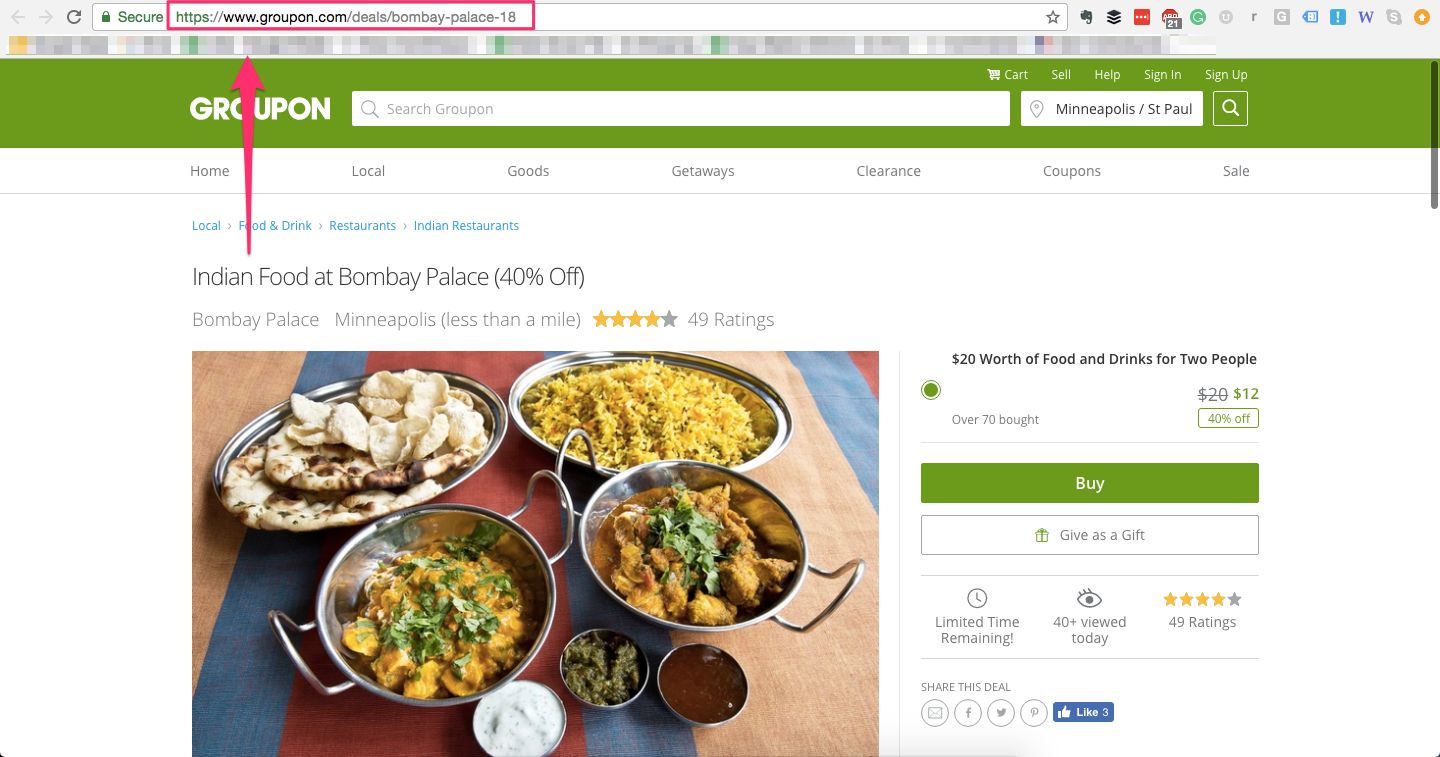
Instead, it’s much more likely they found that page from somewhere else and clicked on a link to be referred to it.
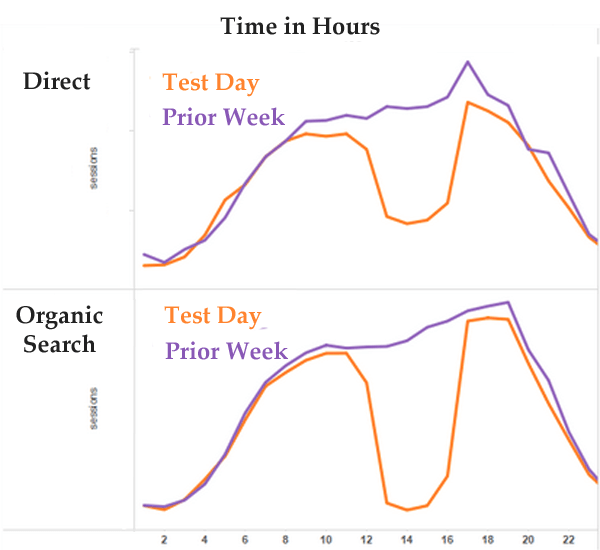
Now let’s go back to that original image from Groupon’s findings to see what they discovered.
You’ll see their findings in orange. The purple line represents the results recorded by a tracking tool for a day just one week before the site was deindexed.
By now, you’ve probably spotted the difference. Groupon noted a much lower influx of both organic search and direct traffic from 13:00 to 16:00 than had been reported the week before.
Organic search nearly zeroed out in this time period, whereas direct traffic decreased by 60%, but neither one of these drops were noted by the tracking tool.
But think about that for a moment. Direct traffic decreased by 60%, all of a sudden, without warning. When in reality, if it was truly only tracking people typing in the URL, that shouldn’t have changed.
Instead, that 60% drop in traffic was being miscategorized. It should have been organic search or SEO traffic instead.
We like organic search and SEO traffic, but it’s not the same thing as Direct traffic.
Groupon found massive problems with how different browsers and devices were miscategorized.
Internet Explorer, for instance, has a tendency to misreport organic search as direct traffic. As a matter of fact, they found as much as 75% of your alleged direct traffic could actually be getting to your site from Google search results.
Other desktop browsers inspire a bit more confidence, misreporting only 10 to 20% of direct traffic.
Meanwhile, mobile browsers also struggle to correctly report direct traffic and organic search. Just take a look at the discrepancy between Groupon’s results and the results provided by a mobile browser:
The bottom line is, thanks to Groupon’s noble efforts, we can be sure that dark traffic is not only real but that it’s probably consuming a significant number of your visits.
I don’t want this to happen to you. I want you to get the respect and credit you deserve. So here’s how you can fix this.
How to Identify the Dark Traffic on Your Site Right Now
The hard-working people at The Atlantic discovered that 25% of their traffic was dark traffic, leaving them no real way to know where these people truly came from.
Which begs the question: Where exactly did The Atlantic get that number from, anyway?
The answer this question, thankfully, is simpler than you think.
You’re going to start by creating a new segment inside Google Analytics to isolate the dark traffic on your site.
Pull up Google Analytics and open “Reports.”
Now drill down into “Audience” and “Overview.” The next thing you’ll want to do is select “Add Segments,” followed by “New Segment.”
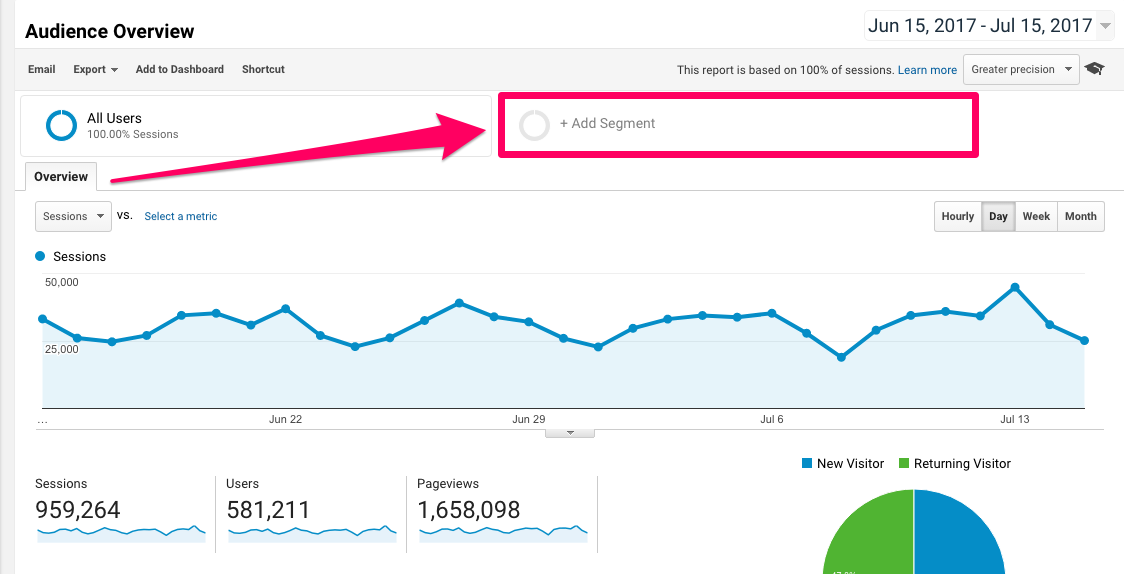
We’re basically going to replicate what Groupon did a few minutes ago. We’re going to create a new segment of traffic for all of the people who are being reported as Direct but are going to pages and posts that they are not likely to remember and key in accordingly.
Ready?
First, let’s identify the Direct traffic visitors. Look for “Traffic Sources” inside Google Analytics. Then click go to the Source and select “(direct).”
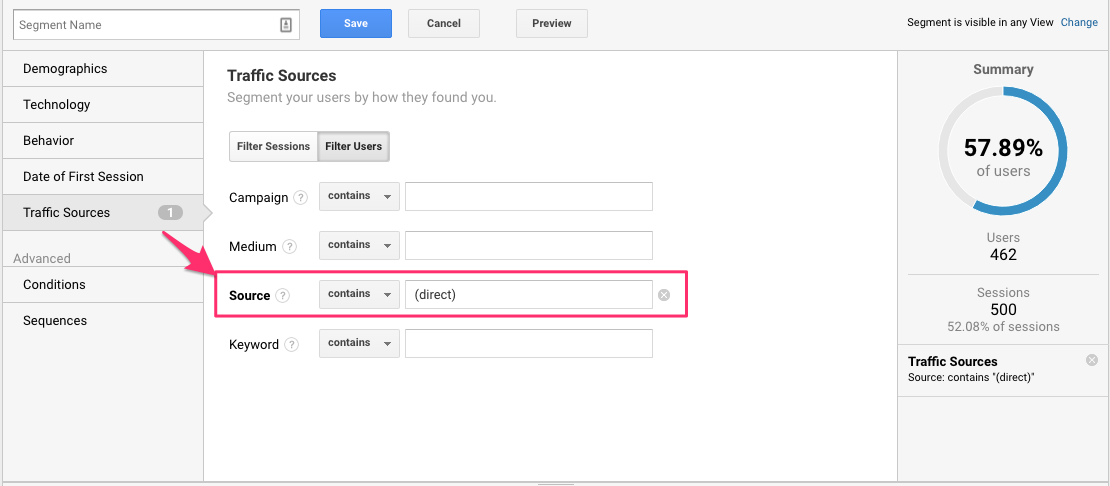
On the far right-hand side, you should see an estimate of how many sessions you’re getting based on this new selection.
So now that we’ve isolated Direct traffic, let’s filter out the ones bypassing your easy-to-remember domains.
For example, let’s start with ruling out the homepage, seeing as that will be the biggest logical source of Direct traffic.
Look for “Conditions” down on the left-hand side.
Now select “Landing Page” because these are the pages people hit when they first enter your site.
Then select “is not one of” or “doesn’t contain” and then add a forward slash “/.”
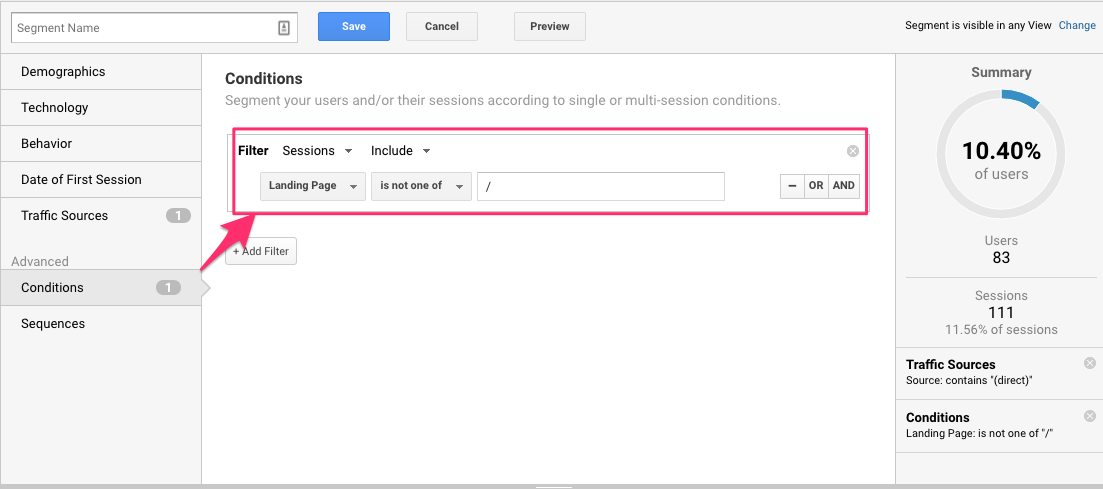
Here’s what this new segment of people is comprised of:
- Visitors from Direct traffic
- Who are NOT going to the homepage.
If you use a few key landing pages (like Groupon Getaways) you might need to add those as well. But otherwise, this will catch the bulk of your problem.
Now you can save this segment and head back to the main Audience reporting section to see how what your dark traffic is up to.
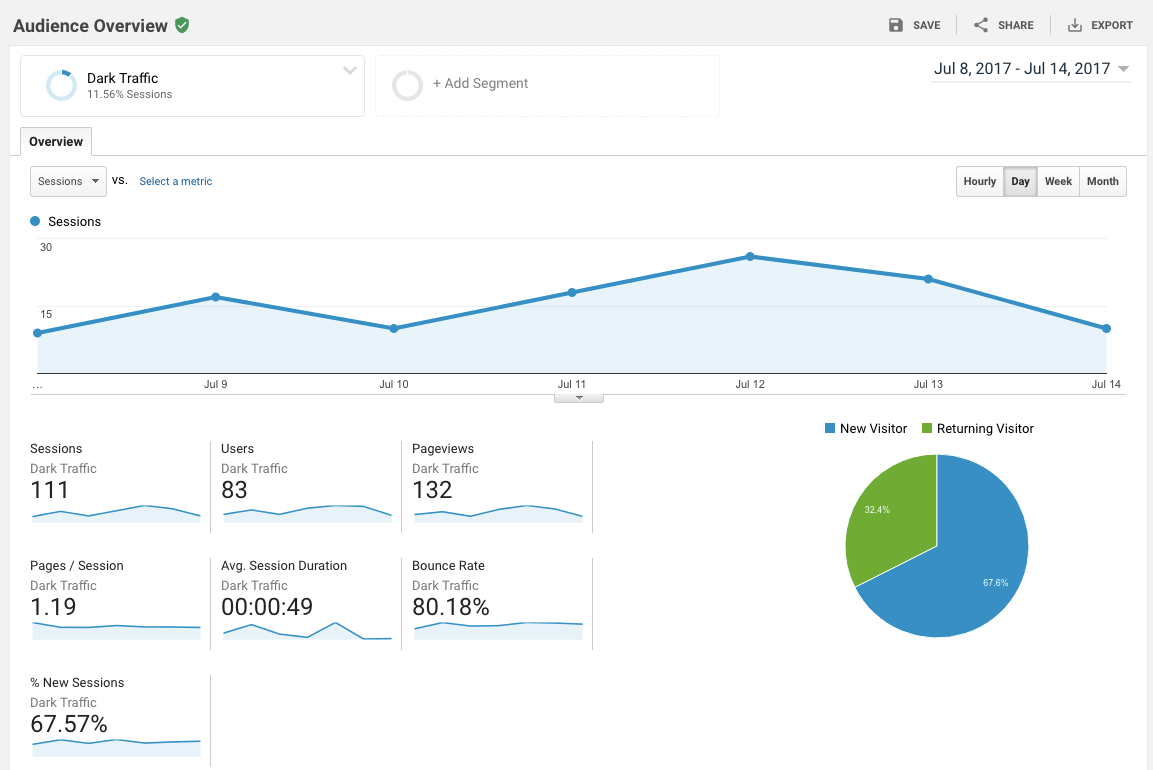
You can now dive deep into how many dark traffic converters you’re getting to see how many conversions you (as a marketer responsible for driving the other sources of traffic) are losing.
With Google on our side, we now have a good idea just how many outside routes to our site aren’t receiving the recognition they deserve.
Finally, it’s time to put a stop to that and get a better grasp on the fruit of your marketing labor thus far.
How to Get Rid of Dark Traffic Once and for All
Ruling out 100% of your dark traffic is going to be tricky.
The reason is that you can only control so much.
You have no control over how much data mobile browsers pass, for example. And you have no control over how bad Internet Explorer is (it is).
So control what you can control.
Interestingly, that starts in one unlikely source: your own visits.
Nobody knows your site better than you do.
Think about those long and hard-to-remember URLs from before.
While most normal, regular users would never visit those directly, your own developers might. They probably do on a regular basis when redesigning the page or making a few copy edits.
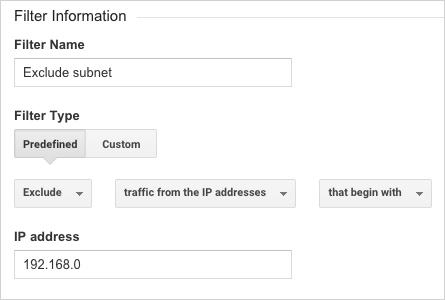
First things first, we need to make sure these people and everyone else in your office are being ruled out. You do that by finding the IP address of each major location and then blocking Google Analytics from picking up those IPs.
Just Google, “What is my IP” to get an immediate answer.
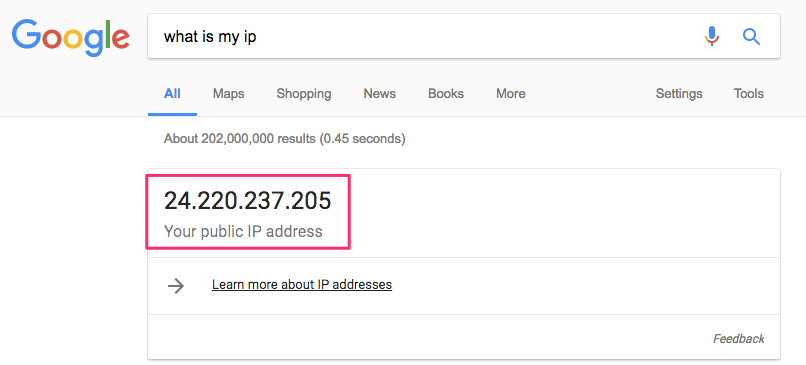
Now you can take all of those IPs back to Google Analytics and exclude them as sources of traffic.
Earlier we learned that a large majority of dark traffic gets to your site from links that are just a bit too tricky to track.
So alter the links, and you’ll alter your dark traffic numbers.
The easiest place to start is by tagging all of your links with UTM codes. These allow you to add extra parameters to your social media, emails, and paid campaigns, so a greater percentage of them will be properly attributed back to each.
For example, you can add everything from the Source and Medium to more granular details like the specific Campaign Name, Term, or Content (like ad creative).
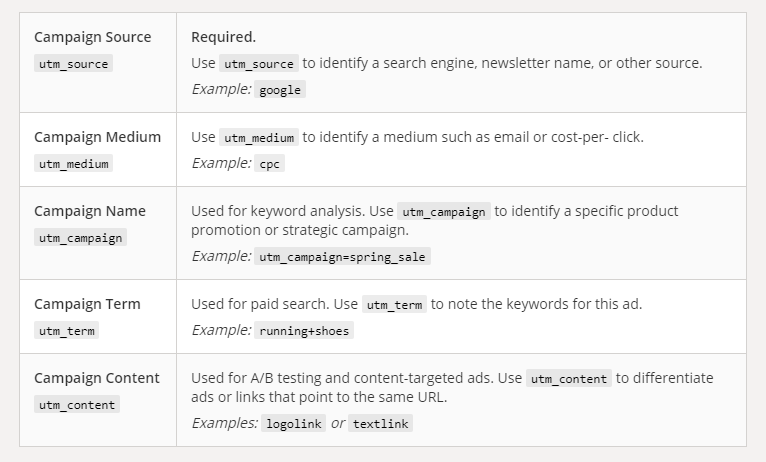
Orbit Media Marketing Manager Amanda Gant has put several of these categories in layman’s terms if you’re looking for more background information. But here’s the CliffsNotes version:
- Generally speaking, Campaign Source is referring to the exact location on which your visitor saw and clicked on your link.
- Campaign Medium provides a less specific version of campaign source, stating what kind of platform the visitor came from.
- Campaign Name is asking for a short description of your campaign.
Not so keen on typing this all out for every single link you want to tag?
You may consider using Google’s URL builder instead.
This easy-to-use form asks for nothing but the URL of your page, the campaign source of the link, and any of the other four campaign categories you would like to include in your new URL.
When you’re done filling out the appropriate fields, Google will generate your URL just below your form.
Here’s an example of what that will look like for a Spring AdWords campaign:
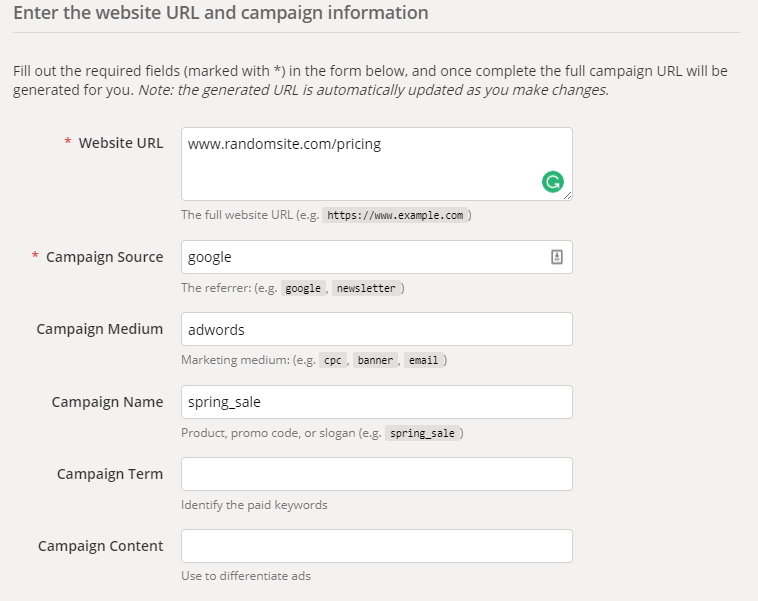
On a time crunch? Check out the Chrome extension to speed up the URL building process.
But let’s be honest.
Think about the time it takes to create one proper UTM code like this. Now multiply that by every single email, social, and paid campaign you have running right now!
Some companies tweet up to a dozen times a day. Are you really going to be prudent, tagging each and every one before it goes live? (Be honest.)
Maybe, maybe not. Thankfully there are a few alternatives to help you manage this workload.
Terminus is just one example that will help you categorize bulk URLs to keep them all straight. You can quickly see how newly tagged links fall into different campaign types or each Source and Medium.
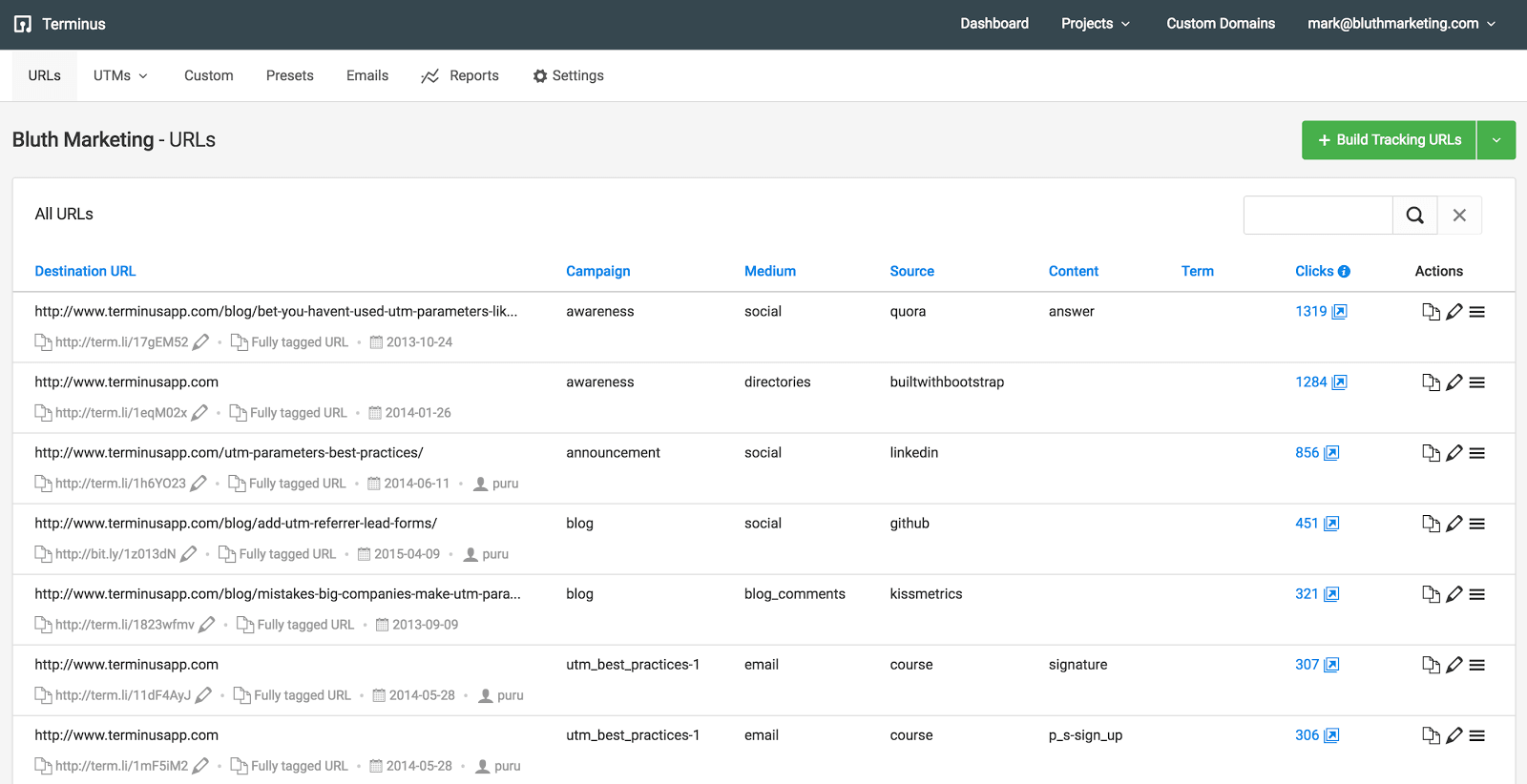
They also have their own tagging tool that automatically adds tracking URLs to new campaigns you’re running.
For example, you can copy and paste your new email campaign into the tool to receive a new version complete with auto-generated tracking links (that are then also added back to your library to manage going forward).
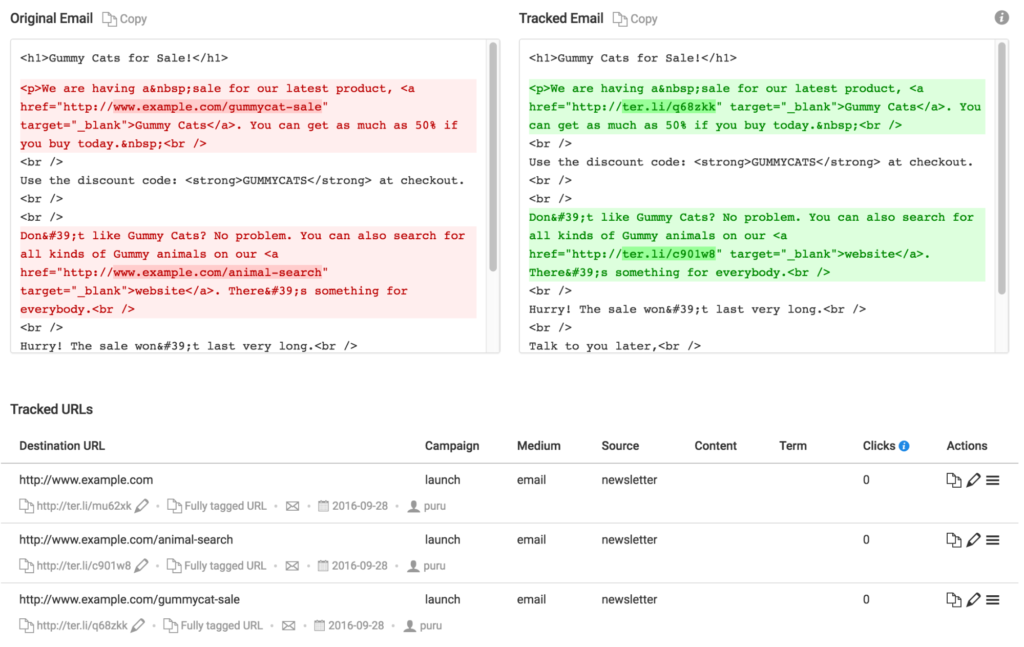
Pretty handy, right?!
The trick is to create an OCD-like habit of making sure each link is tagged (either manually or automatically) before it goes out the door. Otherwise, you risk having dark traffic corrupt your data.
Dark traffic is literally robbing you of the credit you deserve. And it’s time to put an end to its reign of terror so your SEO, email, social, and paid campaigns get the fruit of their labor.
Conclusion
Google Analytics tries to inform you of what is and what isn’t working.
But thanks to dark traffic, they don’t tell the whole story.
That means a lot of the data that you’re making daily decisions from is wrong or corrupted. This means your decisions based on that data is going to be wrong as well.
As The Atlantic writer Bob Cohn put it: “The challenge now is to find a way out of all this darkness.”
Start by figuring out just how bad your problem is by creating a new traffic segment inside Google Analytics.
Then you can begin fixing the problem by first ruling out your regular office and partner visitors to make sure their visits aren’t contributing to the problem.
Then start using the Google URL builder, Chrome extension, or some other tool like Terminus to make sure that all of your campaign links are being tagged properly before going live.
It’s as simple as that.
Do you tag each and every campaign link before they go live?