Sign In














A lot of marketers have written off Google Adwords as a means of collecting leads. This is often due to the fact that Google is a lot stricter in terms of the landing pages it approves.
You can’t get away with a ‘thin’ landing page that would probably work on Facebook, for example.
And, if you try to – Google will disapprove your ads and eventually ban your account if you keep making the same mistake.
Google isn’t opposed to people collecting leads, however, and the platform still has the capacity to send affordable leads your way. In light of this, we’re going to explore, in this post, how you can go about collecting leads using AdWords.
All of the strategies that we’re going to cover will center around methods that are sustainable and in line with Google’s policies.
Of course, nothing is guaranteed – you should always check current Google policies for yourself.
Still, what we’re going to cover in this post should set you on the right course if you want to collect leads using AdWords.
A few basics before we start.
If you’ve been using AdWords for some time, you’re probably familiar with the language that’s tossed around in discussions about the platform. If not, here’s a primer for this post and others you might read:
Your ‘quality score’ has a big impact on your CPC and ad rankings. For a more thorough definition and why your quality score matters, go here.
CTR, as you should know, refers to your click-through rate–another component that affects your quality score.
‘Lead gen’ is short for lead generation- that is, the process of capturing a consumer’s interest for the purpose of building a sales pipeline.
With that out of the way, let’s begin.
Setting up a Google-friendly landing page
As I mentioned in the introduction, Google has some pretty strict requirements when it comes to setting up a landing page.
In 2015 alone, Google reported that they disabled 780 million ads, due to policy violations.
Now, all of those bans might not have been brought down by poor landing pages, but that figure is indicative of Google’s willingness to crack down on advertisers who don’t meet their standard.
So, what can you do to create a Google Friendly Landing Page?
There are two key issues that you need to pay attention to, when advertising with Google.
- The ‘landing page experience’
- Google’s site policies
Both of these factors need to be taken care of if you want Google to approve your landing page.
Landing page experience refers to a landing page that is easy for a visitor to use and that doesn’t mislead the user in any way.
Here is Google’s view on landing page experience –
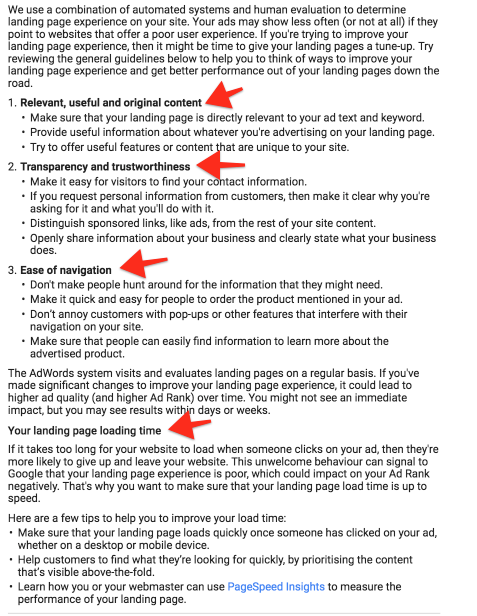
‘Point 1,’ is essentially telling you that you need to make sure that you clearly explain what is offered and why you’re offering it.
You can’t just provide a few bullet points and be done with it. You need bullet points and, ideally, a short description/paragraph, explaining your offer.
Point 2 is pretty self explanatory. In terms of making it easy for people to contact you, make sure that you display an email address, and even a phone number, on your landing page.
You can always get a phone number from Skype, if you don’t want to provide your personal number.
In relation to point 3, make sure that you don’t have ‘exit pop-ups’ or anything of the sort.
You also need to make sure that a navigation bar is present and easily accessible and that links to your Terms and Conditions and Privacy Policy pages are highly visible, too.
Page loading time also matters a lot. Thankfully, Google provides a tool, called PageSpeed Insights, that allows for you to quickly work out how you can speed up your site.
In relation to AdWords policies, there are four key areas you need to pay attention to –
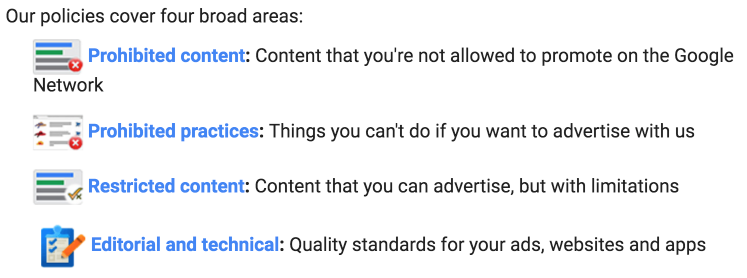
Read through their Policies page and you’ll quickly find out if you’re doing anything wrong.
A good rule of thumb is to be truthful and transparent. Don’t advertise anything you’d be ashamed to tell other people you’re promoting.
Note: Apart from the obvious topics of gambling and adult content, Google will also frown upon Health/Fitness Ads and BizOpp Ads.
That’s a little bit of the obvious stuff that you need to be aware of.
But, here are some other things that you’ll also want to pay attention to.
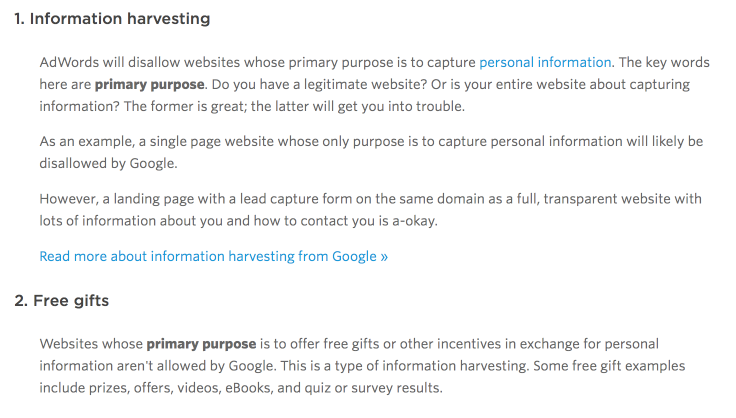
These two points essentially mean that you can’t set up a website that is solely a landing page.
Your landing page needs to be a part of a larger website that provides value.
Below are some other key issues that you also need to focus on.
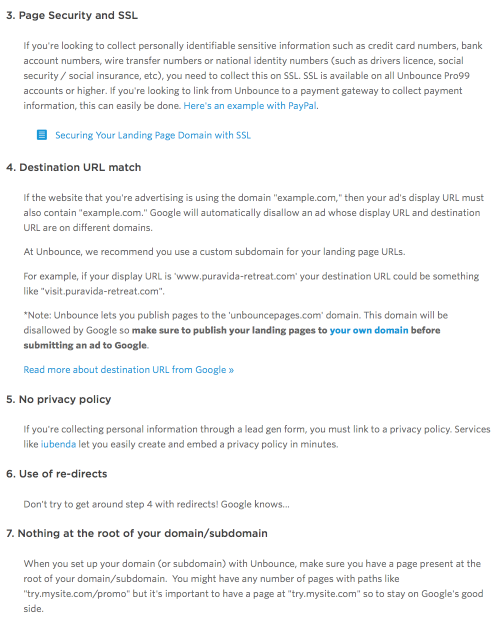
We’ve already covered some of these. However, the new points, such as using ‘redirects,’ and not having anything at the root of your domain, are equally important.
So, hopefully, that clears up a lot of the confusion that comes with creating a Google AdWords-friendly landing page.
If you’re looking for a predesigned template, Leadpages provides a landing page template that is Google-friendly.
Provided that you use their template and stick to the rules mentioned, your landing page should get approved.
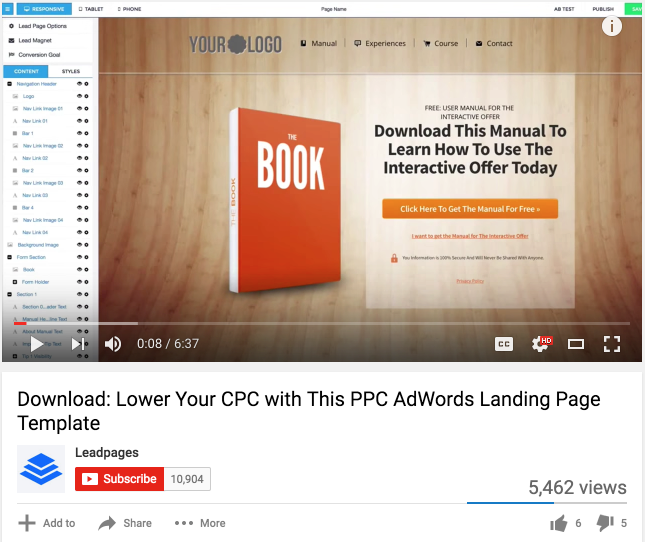
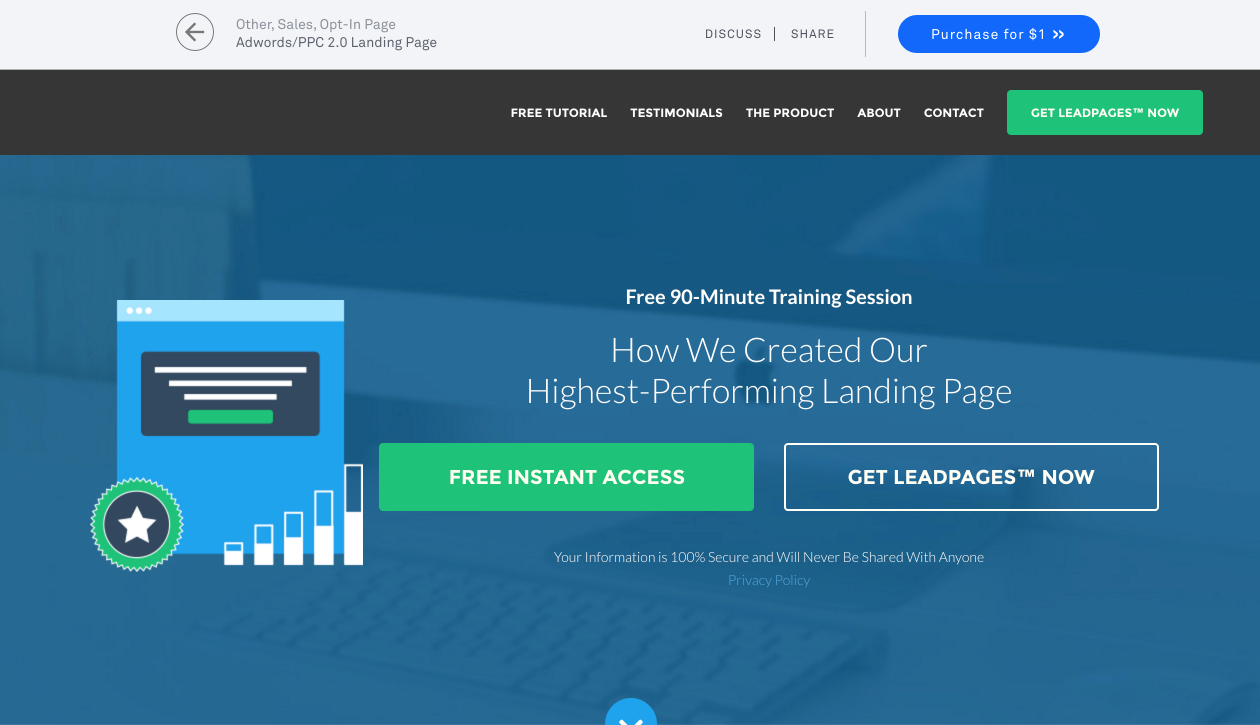
Here’s another landing page, provided by Leadpages–
Now, let’s look at how you can actually collect leads using AdWords.
Advertising your landing page
The great thing about AdWords is that it allows you to advertise on YouTube, the Google Display Network and the Google Search network.
This presents a lot of opportunity, in terms of how you can target your campaigns so that they get in front of the right people.
Odds are, one network is going to work better than the others for your campaign – and, when you find the right one, you’ll likely experience great results, since 64% of people click on Google Ads when they’re ready to buy.
However, you won’t know which network works best until you actually run some ads on each one and then compare results – you never know what results you might achieve on a different network if you guessed and only focused on one option.
If you want to set up a Google Search campaign, do the following –
Click on ‘+Campaign’ and select ‘Search Network Only.’
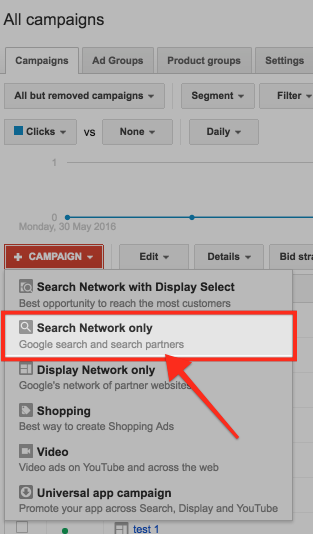
Then, go about setting up the budget, location and language for your campaign.
When it comes to deciding how you’re going to target your ads, it’s a good idea to pick keywords that are backed by ‘commercial intent.’
So, if I was selling ‘dog food,’ a keyword with commercial intent might be ‘buy dog food.’
A great way to come up with commercial intent keywords is to enter a basic commercial intent keyword, related to your niche, into the Google Keyword tool.
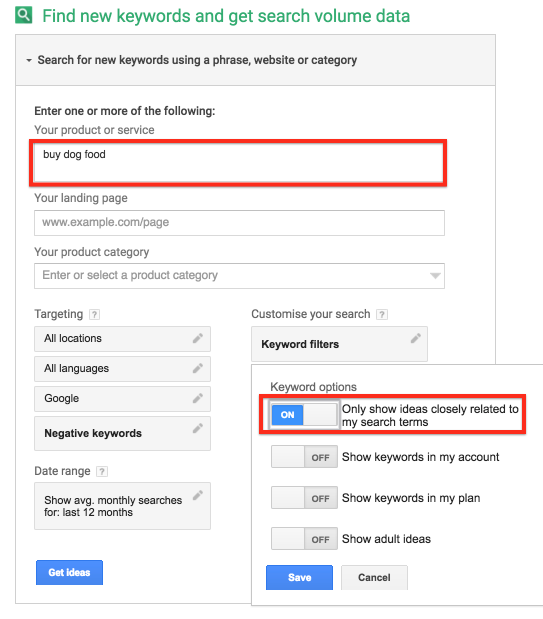
Then, in the ‘Keyword options’ section, select ‘Only show ideas closely related to my search terms.’
You’ll see some ‘commercial intent’ keywords worth targeting.
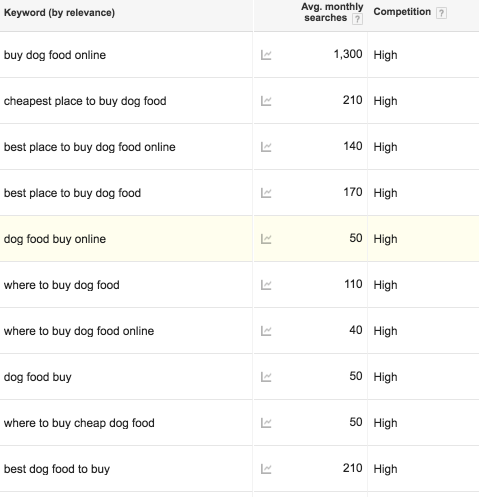
Note: When selecting your keywords, be sure to pay attention to the ‘Match Type,’ that you select.
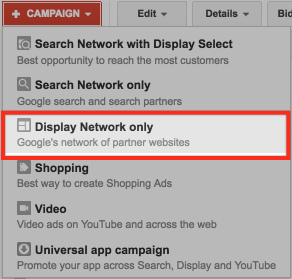
If you want to set up a Google Display Campaign, click on ‘+ Campaign’ and select ‘Display Network only.’
When adjusting the basic settings of your campaign, make sure that you select ‘No marketing objective.’

There are two ways you’ll want to target your Display campaigns.
The first is via ‘Display keywords.’ This is where you choose to display your ads on webpages that contain the keywords that you have selected.
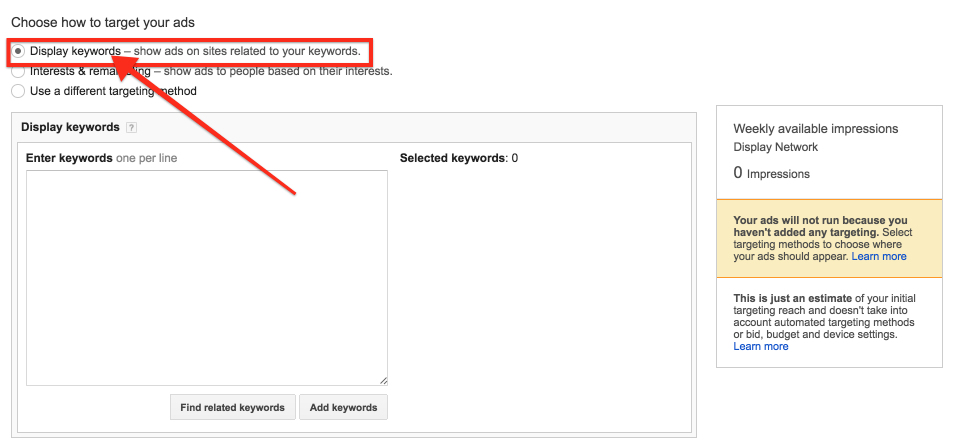
The second is via, ‘Placements.’
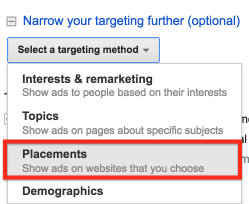
This is where you display ads based on specific sites and web pages that you select.
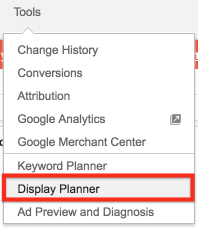
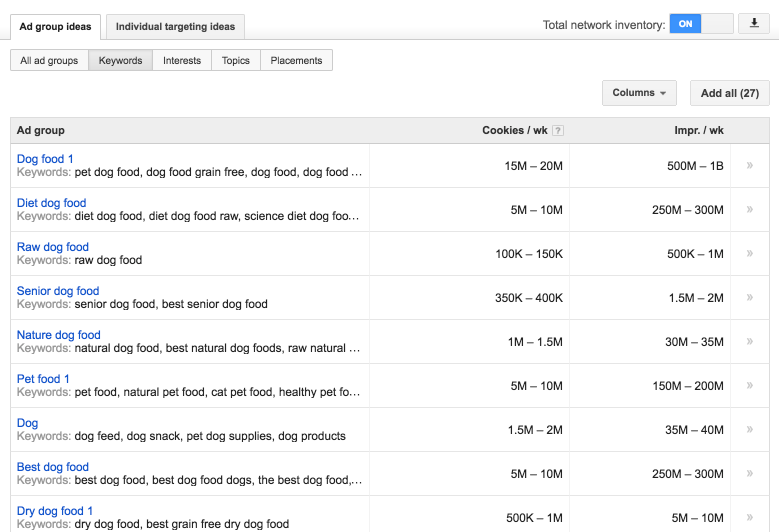
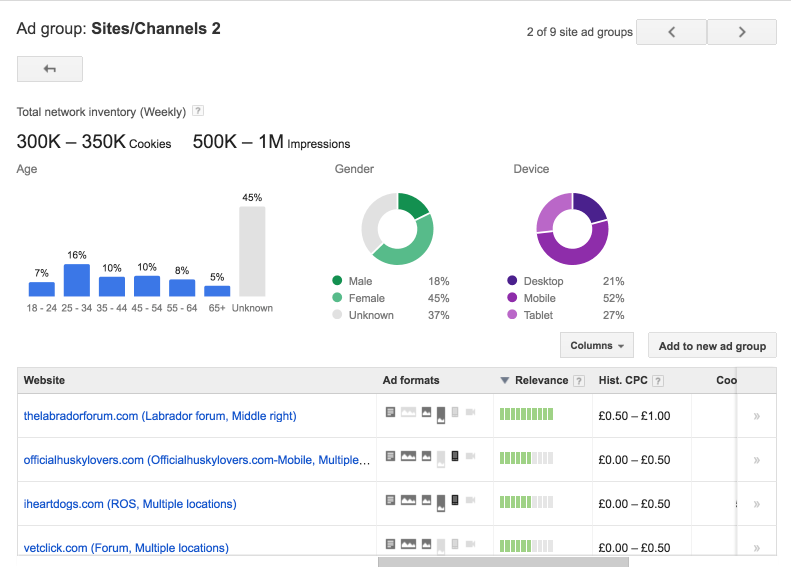
You can use the Google Display Planner to help you develop Keyword and Placement ideas.
You can find the Google Display Planner underneath the ‘Tools,’ header.
Below are some keyword ideas, related to the topic of dog food, that came up when I used the Display Planner.
And, below are some Placement ideas.
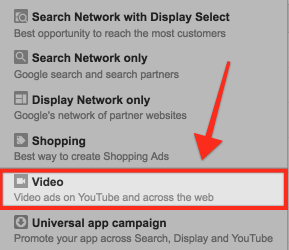
If you want to set up YouTube Ads, click on +Campaign and select ‘Video.’
When setting up the basics for your YouTube Ad campaign, you have the option of deciding what YouTube network you want to advertise on.

The YouTube Search network lets you advertise in the search results of YouTube and ‘around’ the videos of YouTube.
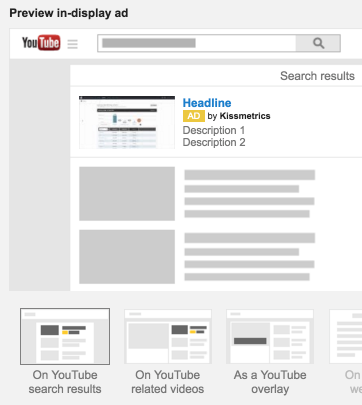
The YouTube Videos network lets you advertise at the start of YouTube videos, or during them.
You don’t want to select the option ‘Include video partners,’ as this is when you advertise on a site that is not YouTube.
This can lead to less targeted results, if you don’t have a lot of experience with advertising.
You can also pick the network that you want to advertise on when you paste your YouTube link.
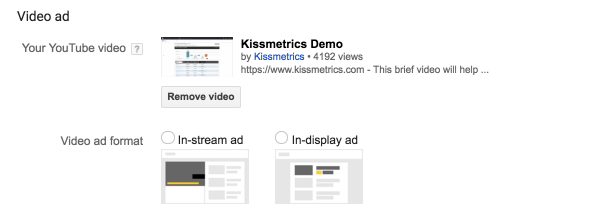
For In-stream ads, you’ll essentially want the same targeting that we discussed for Display Network Ads.
This will apply to In-display ads too – though, in this instance, you might want to borrow some of the strategies we covered for Search Network Ads.
How to improve performance over time
We’ve covered the essentials of what needs to be done when trying to collect leads, using Adwords.
But, what can you do, in the long term, to ensure that your ads are going to perform as well as they should?
After all, it shouldn’t be a case of you setting up your ads and then experiencing a gradual decline in results over time.
Rather, it should be the other way around. You should see better results, the longer a campaign runs for.
In general, there are two things that you’ll want to work on, if you want to improve long term performance– your ads and your landing pages.
In relation to your ads, we’ve already covered some of what you can do.
For example, we spoke of how you can try different networks on Google AdWords, so that you can find the best way to reach your audience.
As you saw, each network has it’s own particular type of targeting mechanism.
Once you begin to see results with one form of targeting, try experimenting with another, simultaneously, to see if you can achieve even better results.
So, if you’re using ‘Keyword’ targeting for your Display campaigns, why not see what happens when you try targeting by ‘Topics’ or even ‘Interests?’
It’s also a good idea to always split test your ads.
Doing so ensures that you’re constantly making an effort to create the best variation of any ad that you’re currently running.
Even the smallest changes can make the difference. Perry Marshall once found that the inclusion of a comma resulted in a 0.28% higher CTR.
Not much in the short term, but it adds up over time.
It’s worth mentioning that you should always double down on a campaign that is delivering results.
The world of online advertising can sometimes be fickle and you can never be sure how long an effective ad campaign is going to last.
It helps, therefore, to increase spending, should you find that you’re generating a positive ROI with a particular ad or platform.
With your landing page, you’ll again want to run some split tests on a regular basis.
In doing so, you’ll continue collecting more leads without having to increase your ad spend.
As you go about running split tests for your landing page, don’t be afraid to make some dramatic changes.
Dramatic changes can often reveal some surprising insights into how you can improve your landing page conversions.
When you’re making changes to your landing page, however, always ensure that the changes made are within the guidelines provided by Google.
Conclusion
With there being so much hype around Facebook Ads at the moment, you might’ve forgotten about the opportunity presented by Google AdWords.
A lot of marketers are worried about using Google AdWords to collect leads, because the platform has a reputation for being strict about the landing pages that it approves.
Yet, this often just means more opportunity for those who are willing to do the groundwork needed to make a AdWords-friendly landing page.
After reading this post, you should now have a keen sense of how you can collect leads, using AdWords, and boost your rate through this platform.
Put the tips I’ve mentioned into action and see for yourself how well AdWords can work, when done properly.
Do you have any tips that you can share when it comes to collecting leads with AdWords? Please let me know below!