Sign In












If you want to get traffic from Google, how would you go about it?
Chances are you are either going to leverage SEO or pay for some ads.
But what if there was another way to get traffic from Google? A way that didn’t take as long as SEO and didn’t cost money like paid ads. And no, I’m not talking about Google News… there is actually an easier way.
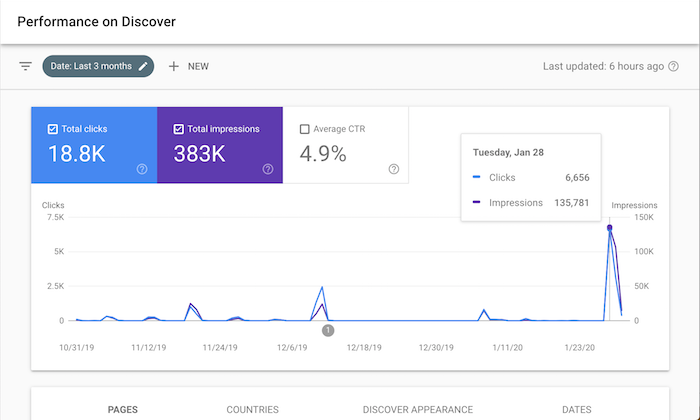
It’s so effective that it drove 18,800 visitors to my site in the last 3 months. Just look at the screenshot above.
So, what is it?
Google Discover
Similar to how you have feeds on Facebook, Instagram, and Twitter, did you know Google has a feed for you.
It’s called Google Discover.
If you mainly use Google on your laptop or desktop computer, chances are you haven’t seen it. But if you have the Google mobile app or the Chrome mobile app, you probably have already seen it.
Here’s what it looks like on an iPhone:
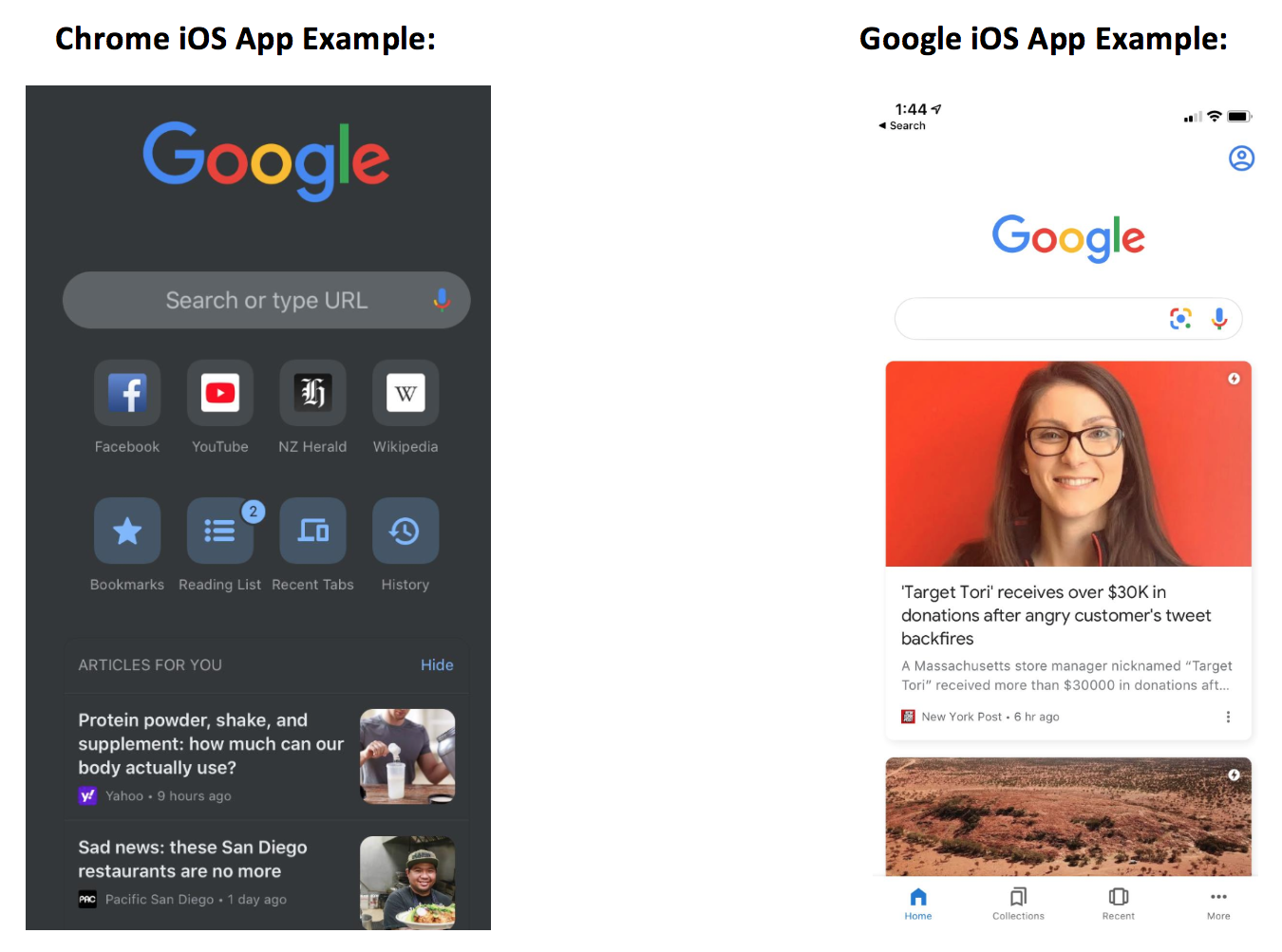
This is Google’s version of a social feed.
Here’s how it works… Google Discover results, which appear below the search box on the Google mobile app and Chrome mobile app, show a summary of web pages as cards. These cards are a scrollable list of topics, almost like a social feed, that you can browse on your mobile devices.
Tapping one of these cards from Google search home will send you directly to the page you just clicked on.
And if you are wondering why you are seeing certain stories that others may not be, it’s because the recommendations are based on search history, interactions with Google products, and who you choose to follow directly via Google Discover.
But here is where it’s getting interesting…
Google Discover is everywhere, you just don’t know it
Discover results for some topics also appear within the search engine results under the label “Interesting finds.”
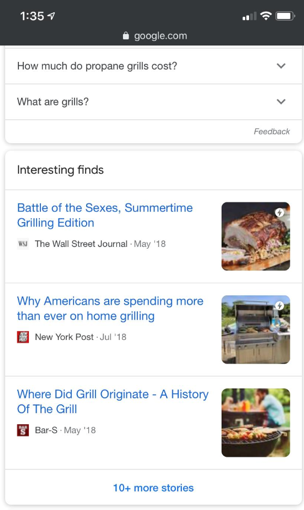
If you click one of these stories, it’ll take you directly to that web page, or, if you click to see “more stories” at the bottom of the Interesting Finds card, it’ll bring you to a new Google Discover user interface where you can follow that topic, follow related topics, and explore related Discover listings.
Now if you have a Pixel phone, you’ve seen Discover a lot, but again you just haven’t realized it.
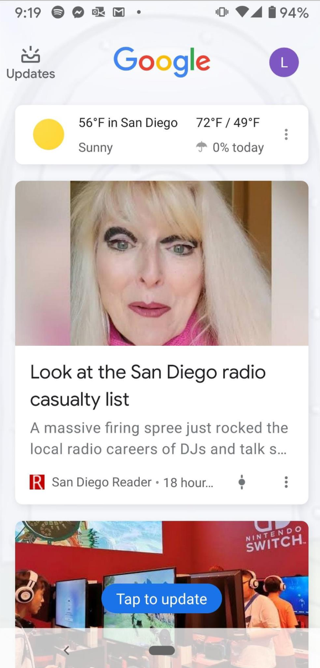
By simply swiping right on your Pixel phone home screen you get a customizable and personalized feed just like the image above.
Now, you may be wondering, how is this different than just using Google News? Because they have a top stories section which is kind of like a feed, right?
Unlike top stories, Discover doesn’t limit rankings to what’s published most recently.
If Google thinks a user would find earlier content interesting, then Discover might show it. Discover also features videos, sports scores, entertainment updates such a movie, stock prices, event info for things like a music festival, and much more.
Google is positioning Discover as a content hub for all of your interests just like Facebook is doing with their feed.
In other words, this is Google’s version of your Facebook feed.
Similar to following a hashtag on Instagram, you can follow a topic of interest on Discover. Also, similar to Instagram’s Explore Page, you don’t need to follow anything to get content you might like. Discover is aiming to show you content you’d be interested in before you even know you want it.
The key is “before you knew about it.” Just like how Facebook and Instagram do the same thing.
So, why should you care about Google Discover?
Because it can drive you a ton of traffic.
Just check out one of the clients of my ad agency, Neil Patel Digital. Look at their Discover traffic.
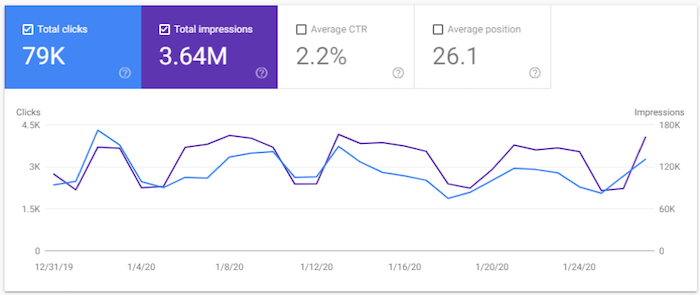
They generated 3.64 million impressions in the last 28 days and 79,000 clicks to their site.
That’s a ton of traffic. In addition, all of those impressions help with branding.
Now you may not care about branding but the larger your brand, the easier it is to rank on Google. Brand search volume is more correlated with rankings than links or domain authority.
And as Google’s ex-CEO stated:
Brands are the solution, not the problem. Brands are how you sort out the cesspool.
So, all of those impressions you can generate from Discover are great because they will help put your brand out there. It helps with the concept called the Rule of 7, in which when someone sees or interacts with your brand 7 times, they are much more likely to become a loyal customer.
This can also help with Google’s E-A-T algorithm updates. It is the best way if you want to build up your expertise and credibility as an author. Discover is a simple way to help you get there.
So, how can you get more traffic from Discover?
How to optimize for Google Discover
Luckily, it’s not as complicated as SEO and the results happen much faster. Still not instant, but over time you should see your Discover traffic continually rising.
Here are 4 simple tips that will help:
- Be sure to use high-quality images. Images appear with every Discover result, so relevant and high-quality images that accompany your content is important. And just like with your headlines and titles, try to choose images that are more likely to entice clicks. Images that are shocking or evoke curiosity will do the trick.
- Content is king, but if you don’t write about the right stuff then you won’t show up. Check which topics Google suggests following inside of Discover to see if those topics align with your website. If it does, consider using their suggested topics as a guide to what people are interested in and write similar content. Of course, you don’t want to copy others, you want to go above and beyond so you can one-up your competition. Use Brian Dean’s skyscraper technique to do this.
- Hopefully, when you’re creating your website content, you’re already taking some time to think about maximizing your content. What do I mean by that? Maximizing your content means thinking about your website as an API for your content. So yes, your content lives on your site, but hopefully, you’re creating it keeping in mind how it can be posted or promoted in other areas so you can secure backlinks and attract social engagement across other relevant channels. To do this you need to focus on topics with shareability, topics that are trending, topics with growing interest, and also focus on leveraging clickbait and enticing titles and headlines. Remember that Google Discover is like a social feed. If you’re only trying to make your content work hard for you on your site, you’re not getting enough out of it.
- Choose the right keywords. Keywords that get a lot of search traffic are more likely to get the most Google Discover traffic. So, don’t start writing until you have a keyword list to guide you. With the help of Ubersuggest, you can review the average number of monthly searches for your target keywords, while also uncovering long-tail variations that can help drive additional Discover traffic.
Once you make a deliberate effort to go after Discover traffic, it’s time to measure how you are doing.
Analyzing your traffic
Chances are, you use Google Analytics. But to see how well you are doing on Discover, it’s easier if you use Google Search Console.
Head over to Search Console and log in.
Now, on the left side, you’ll see a navigation menu.
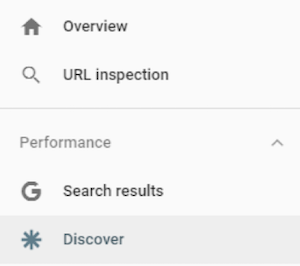
I want you to click on “Discover.” (You’ll only see this option if you hit a minimum threshold in Discover traffic)
You’ll now see a report that looks something like this.
Compared to the screenshot I showcased earlier, I barely get any Discover traffic.
Why you may ask?
Do you notice a trend with my chart? Well, I tend to publish content every Tuesday and that’s the day I get Discover traffic.
Similar to any other social network (and unlike traditional SEO), you mainly see traffic as you post new content. It’s not long-term traffic that is consistent, instead, you keep getting quick bursts of traffic.
I only blog once a week, but if I write multiple pieces of content a day, my Discover traffic would skyrocket.
Conclusion
Whether you are a fan of Discover or not, it doesn’t matter. As a marketer, you need to look at it as another channel.
Data has already shown that it is popular and as long as Google keeps pushing it, people will use it.
So why not leverage it to your advantage and harness it to drive traffic and sales for your site?
Plus, you should never rely on traffic from just one channel alone because the moment an algorithm change happens, it can crush your traffic. That’s why you need to take an omnichannel approach and leverage any relevant channel out there.
So, what do you think of Discover? Do you use it on your phone? Have you thought about leveraging it for traffic to your site?