 Sign In









Key Takeaways
- Ubersuggest’s Local SEO Checker is a Google Maps rank checker. It scans a grid of 9 to 81 points around your business and shows your rank at each one.
- Each point simulates a search from that exact location, so you see what nearby customers see.
- You do not need to connect or verify a Google Business Profile. The scan uses public Google Maps results.
- Pins are color-coded by rank, and four metrics summarize the scan: average rank, top 3 coverage, top 10 coverage, and not ranked.
- Click any pin to see up to 100 businesses in Google Maps order, including competitors.
- Export a PDF for clients or owners, and rerun the same scan later to compare.
- Local SEO is included in every paid plan, and scans use plan credits.
You search for your own business from your desk and there it is, number two on the map. Looks great.
Meanwhile, someone standing six blocks east types the same words into their phone, and you are nowhere on the list. A customer a mile north sees you at number 14. Same keyword, same business, completely different results, depending on where the searcher happens to be standing.
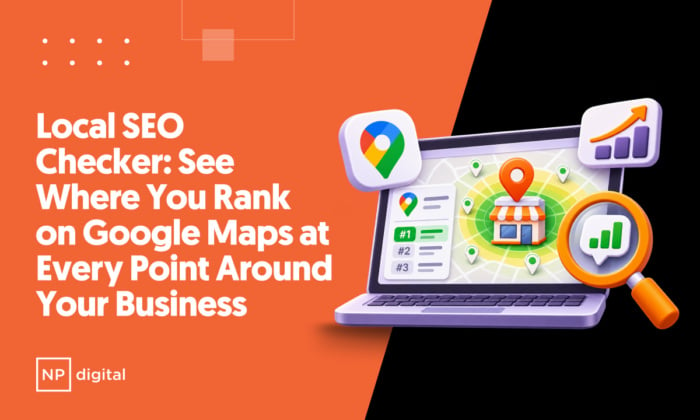
A single rank number cannot describe that. Ubersuggest built the Local SEO Checker to show the whole picture: your Google Maps rank at up to 81 points around your business, laid out on one map.
What Is a Google Maps Rank Checker?
A Google Maps rank checker shows where a business appears in Google Maps results for a keyword. Ubersuggest’s Local SEO Checker does this across a grid of points rather than from one location. It simulates a search from each point’s exact location, then plots your rank at every point on a single map, so you can see which neighborhoods find you and which ones do not.
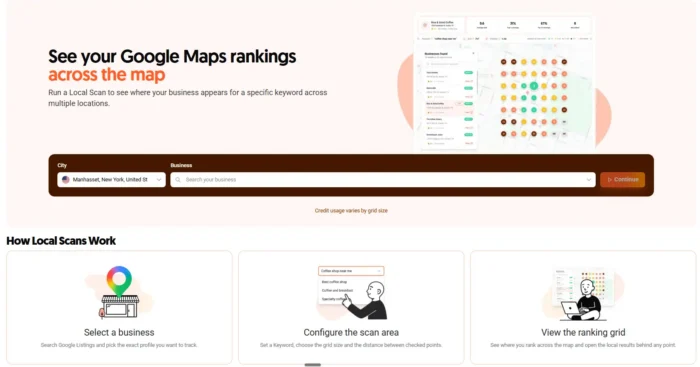
That grid matters because Google favors businesses closer to the searcher. Ranking in local results depends on relevance, distance, and prominence, and distance changes with every step the customer takes. Your rank at your front door tells you very little about your rank two miles away.
Why Does Your Local Rank Change From Block to Block?
Your rank changes by location because Google puts more weight on businesses close to the person searching. Move the searcher, and the order of results moves with them.
Picture a coffee shop. Search “coffee shop near me” from the shop’s own street and it may sit at the top of the map. Search from a neighborhood a mile away, where three other cafés sit on the corner, and the same shop might drop to the second page or vanish.
The owner who only ever checks from the shop never sees that. The result is a strange kind of blind spot: the business looks healthy from its own doorstep while whole neighborhoods of potential customers never see it.
For agencies and consultants, the problem takes a different shape. A client asks “how is my business doing on Google Maps?” and the honest answer is “it depends where.” A grid replaces that shrug with a picture.
How Does the Local SEO Checker Work?
You run a scan in four steps, and the map fills in point by point as it runs.
- Find your business. Search by name and pick it from the Google Maps suggestions. If the business is in another city, set the location field first.
- Set up the grid. Choose a grid from 3×3 to 9×9, then the distance between points. Center it on your business or on any address. Distances run from ¼ to 2 miles, or ½ to 5 kilometers.
- Enter one keyword. Each scan checks a single keyword, such as “coffee shop near me.”
- Review and run. Check the credit cost and your balance, then run the scan.
The review screen lists the business, the scan center, the grid settings, the keyword, the total pins, the total scan cost, and your current balance. Nothing is charged before you confirm.
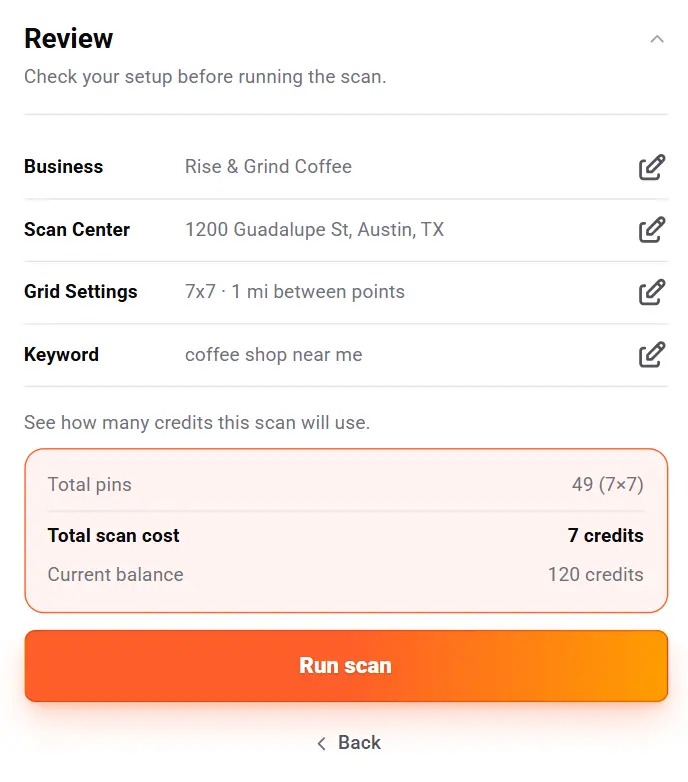
You can also center the grid on any address, including a neighborhood where you want to win customers but have not yet.
What Does the Grid Look Like, and What Do the Colors Mean?
The grid is a set of pins on a map, and each pin carries your rank at that point. The colors tell you the story at a glance:
- Green: top 3
- Yellow: 4 to 10
- Red: 11 to 20
- Dark brown: 21 or lower
- Gray: not ranked

On a pin where your business does not appear at all, the label reads “NR,” which stands for not ranked.
The grid size sets how many points you get: 3×3 is 9 points, 5×5 is 25, 7×7 is 49, and 9×9 is 81. A smaller grid is a quick check of your immediate surroundings. A 9×9 grid with wider spacing shows how far your visibility actually stretches, and where it falls off.
Which Metrics Does Each Scan Report?
Every scan summarizes the map in four numbers:
- Average rank: your average position across all grid points.
- Top 3 coverage: the share of grid points where you rank in the top 3.
- Top 10 coverage: the share of grid points where you rank in the top 10.
- Not ranked: the count of grid points where your business does not appear.
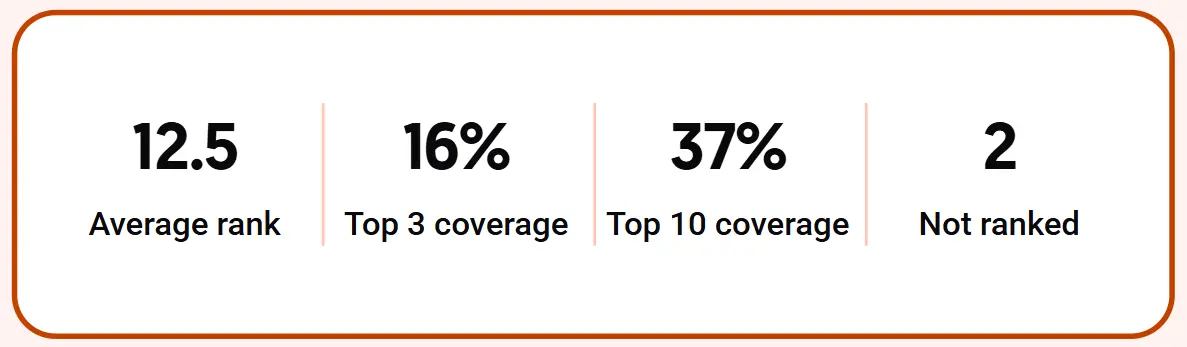
Here is how those read together, using the example scan shown on the Local SEO Checker page, a 7×7 grid with 49 pins: average rank 12.5, top 3 coverage 16%, top 10 coverage 37%, and 2 points not ranked.
That business has a clear problem. It reaches the top 3 at only 16% of its grid, and more than six in ten points sit outside the top 10. But only 2 points show no ranking at all, so Google knows the business exists almost everywhere. The work is moving it up, not getting it noticed from scratch.
A single average rank would have hidden that. Four numbers and a map do not.
Can You See Which Competitors Beat You at Each Point?
Yes. Click any pin and the Local SEO Checker shows up to 100 businesses in Google Maps order, with rank, rating, review count, and address. Your business is marked in the list, and you can search for a specific competitor to find them fast.
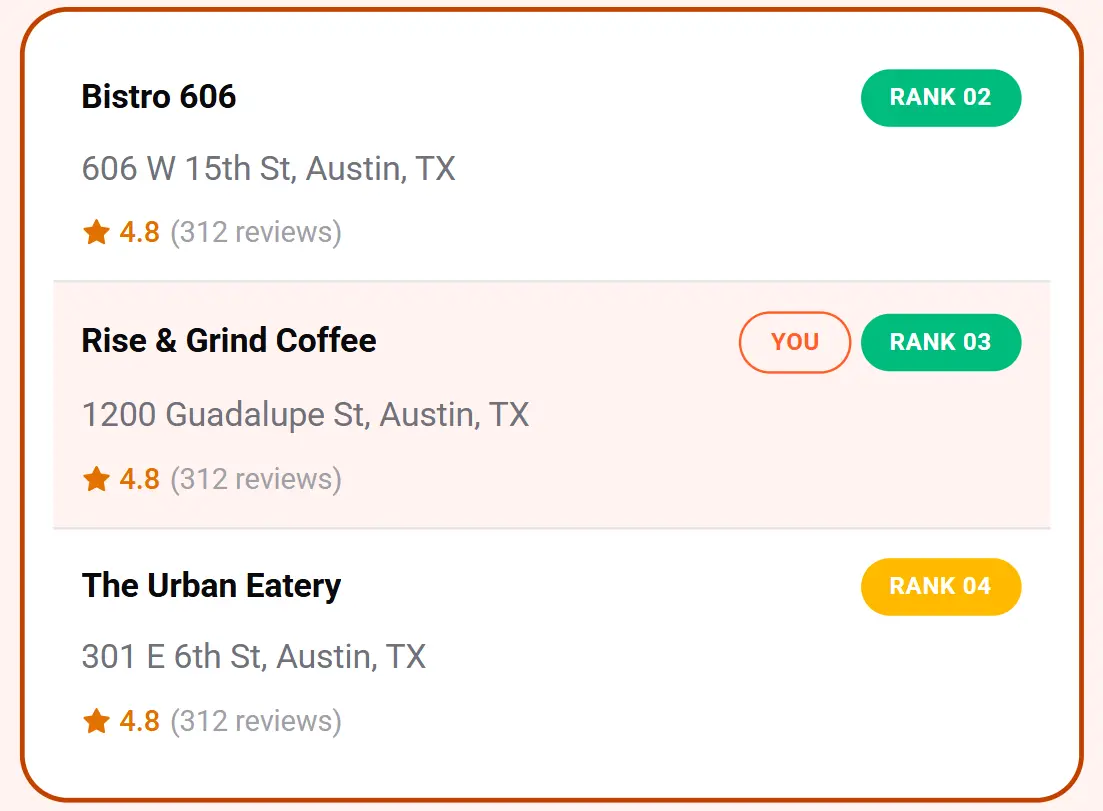
This is where the grid goes from a report card to a working tool. Click a red pin and you see exactly who sits above you in that neighborhood, how many reviews they have, and how their ratings compare to yours. Click a green pin a mile away and you can see how the order changes.
You can compare how the order shifts across the map, which tells you if one competitor dominates the whole area or a different business wins each neighborhood. Those two situations call for different plans, and you only see the difference by looking at more than one point.
Do You Need a Google Business Profile to Use It?
No. You do not need to connect or verify a Google Business Profile. The Local SEO Checker uses public Google Maps results, so you can scan your own business or any other business you can find in Google Maps suggestions.
For a business owner, that removes a setup step. For an agency, it means you can scan a prospect before they are a client, then walk into the sales conversation with their own grid on the screen.
How Do You Use the Local SEO Checker for Clients?
Agencies and SEO consultants can keep client scans in separate projects and export any scan as a PDF. The export includes the rank map, the four metrics, and the businesses found. Exporting a PDF does not use credits.
That makes a simple reporting rhythm possible:
- Run a baseline scan before you touch the listing or the site.
- Make the change.
- Rerun the same scan with the same settings and compare the two maps.
The tool saves your scans in Recent Scans with no expiration, so you can reopen an old one, export it again, or rerun it with identical settings. The business and grid settings are remembered for later scans, which keeps reruns quick.
A before-and-after pair of maps is an easier thing to show a client than a spreadsheet of positions. Green spreading across a neighborhood needs no explanation.
What Does a Scan Cost?
Local SEO is included in every paid Ubersuggest plan, and scans use your plan credits. The cost follows the grid size:
| Grid | Points | Credits |
| 3×3 | 9 | 3 |
| 5×5 | 25 | 5 |
| 7×7 | 49 | 7 |
| 9×9 | 81 | 9 |
A few details help you plan:
- The exact cost shows on the review screen before you run a scan.
- Opening saved scans, clicking pins, and exporting PDFs use no credits.
- Reruns cost the same as new scans.
- If a scan fails, the credits go back to your balance.
- Each scan checks one keyword, so tracking several keywords means running a separate scan for each.
How Does Local SEO Fit With the Rest of Ubersuggest?
Local scans sit alongside Keyword research, Site Audit, and Rank Tracking under one login and one project. The map shows you where you are weak. The other tools help you work on why.
If your pins turn red in a neighborhood, the next questions are usually about your website and your listing. A Site Audit can check the pages your local visitors land on. Keyword research can show you which terms nearby customers use, and the Local SEO Checker can then test each one on the map.
What Should You Do With Your First Scan?
Start with the keyword that matters most to your business, the one you would pay to rank for. Run a 5×5 or 7×7 grid centered on your business, then read the map in this order:
- Look at the colors first. Where does green stop? That edge is your real service area on Google Maps.
- Check the four metrics. Top 3 coverage tells you how often customers see you first. Not ranked tells you where you are invisible.
- Click a red pin. See who ranks above you and how their reviews and ratings compare.
- Save the scan. It becomes the baseline you compare against after your next change.
Then pick one neighborhood to improve and one thing to change. Rerun the scan with the same settings and see what moved.
Frequently Asked Questions
What is local SEO?
Local SEO is the work of getting a business to appear when nearby people search, in Google Maps and in local map results. Ranking depends on relevance, distance, and prominence.
How do I check my Google Maps ranking with Ubersuggest?
Open the Local SEO Checker and choose New Scan. Search for your business, set the grid, enter one keyword, and run the scan. The map fills in point by point, and each pin shows your rank at that location.
What if my business does not show up when I search for it?
Type the business name and, if it does not appear in the suggestions, set the location field to your city first. Then search again.
Do I need a Google Business Profile?
No. The Local SEO Checker uses public Google Maps results, so you do not need to connect or verify a Google Business Profile.
What can I customize in a scan?
You can choose the business, the scan center, the grid size, the distance between points, and the keyword. Grids run from 3×3 to 9×9, with distances from ¼ to 2 miles or ½ to 5 kilometers.
Why does my rank change from point to point?
Google favors businesses closer to the searcher, so your rank changes as the distance between you and the searcher changes.
What does "NR" mean on the map?
NR means not ranked. Your business did not appear in Google Maps results at that point.
How many credits does a scan use?
A 3×3 scan uses 3 credits, a 5×5 scan uses 5, a 7×7 scan uses 7, and a 9×9 scan uses 9. The exact cost appears before you run the scan. Opening saved scans, clicking pins, and exporting PDFs use no credits.
What happens if a scan fails?
You can retry it or contact support. Credits for a failed scan are returned to your balance.
Can I check more than one keyword?
Each scan checks one keyword. To check several, run a separate scan for each one.
Which plans include the Local SEO Checker?
Local SEO is included in every paid Ubersuggest plan, and scans use plan credits.
Run Your First Local Scan
Your rank at your own front door is one data point. The Local SEO Checker gives you up to 81.
Run your first local scan with Ubersuggest’s Local SEO Checker and see your rank at every point around your business, on one map. To see how many credits each plan includes, check Ubersuggest pricing.