 Sign In







Key Takeaways
- Trending Keywords is a new section in AnswerThePublic that shows the searches whose interest is growing fastest around your keyword over the last 30 days.
- It lives in two places: the Web report (Google search trends, directly under Top Organic Searches) and the YouTube report (labeled “Trending Keywords · YouTube”).
- Both sections draw on Google Trends data and show an “Updated today” label, so the list reflects what is moving this week.
- Rows tagged BREAKOUT are the steepest risers in the list.
- Each row in the Web report has a plus icon with two options, Copy and Generate Content. Generate Content takes the keyword straight into AnswerThePublic content creation.
- The Web version is available on paid plans. The YouTube version is available on Growth and Business plans, not Starter.
A keyword shows up in your research tool with a clean volume number next to it. You write the article. You publish it. And it lands on a results page that already has a dozen strong pages on it, because everyone else’s tool showed them the same number around the same time.
That is the problem with researching only what people have already searched. By the time a keyword has volume you can point to, the early window has usually closed. The people who won it were writing while the number was still small and the direction was obvious.
AnswerThePublic built Trending Keywords for that window. It shows the searches growing fastest around your topic in the last 30 days, on Google and on YouTube, so you can see a rise while it is still a rise.
What Are Trending Keywords in AnswerThePublic?
Trending Keywords is a section in the AnswerThePublic report that lists the searches whose interest is growing fastest around the keyword you entered, over the last 30 days. The data comes from Google Trends, and each section carries an “Updated today” label.
It sits next to the data you already use. The classic question wheel still shows what people ask. Top Organic Searches still shows what they search today. Trending Keywords adds the direction: what is picking up speed right now.
You will find it in two reports, and each one answers a different question.
Where Does Trending Keywords Show Up in the Web Report?
In the Web report, Trending Keywords appears as a new section directly under Top Organic Searches, with a NEW badge next to the title. It shows the Google searches rising fastest around your keyword over the last 30 days.
Read it as a second layer under Top Organic Searches. The list above shows what the top of the results already looks like. The list below shows what is climbing toward it.
The table has three columns:
- Keywords: the rising search itself.
- Search Increase: how much interest has grown over the 30 days, shown as a percentage. You can sort the list by it.
- Search Interest: a bar showing how much interest the search has right now.
The section shows the top 5 rows, and a “View results” button opens the full list.
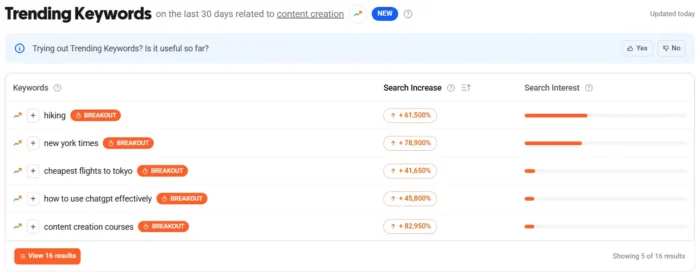
Each row has a plus icon on the left. Click it and a small menu opens with two options: Copy and Generate Content. Copy gives you the keyword to drop into a spreadsheet, a brief, or a message to your writer. Generate Content sends it to AnswerThePublic Content Studio.
What Does Trending Keywords · YouTube Show?
Trending Keywords · YouTube is a section in the YouTube report that shows the YouTube searches growing fastest around your keyword over the last 30 days. It uses the same table as the Web report, with the same NEW badge and “Updated today” label. The data is YouTube search data from Google Trends.
This one is for anyone who plans video. YouTube is a search destination of its own, and the topics rising there do not always match what is rising in Google’s results. A creator who checks only the Web report can miss a topic that is already taking off in video.
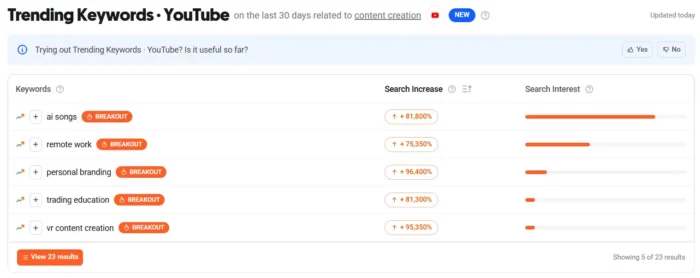
Here is what that looks like in practice.
In a sample search for “content creation,” the YouTube section listed rising searches such as “ai songs,” “remote work,” “personal branding,” “trending education,” and “vr content creation.” One row in that screenshot showed a Search Increase of +81,800%.
What Does a BREAKOUT Tag Mean?
BREAKOUT marks the steepest risers in a Trending Keywords list. It follows the Google Trends convention: Google Trends labels a rising search “Breakout” when its growth is very large, a threshold Google has described as growth above 5,000%.
A BREAKOUT search is often a new or newly popular phrase, which means its starting point was small. A huge percentage on a small base tells you to look closer before you count on big volume. That is why the percentage and the interest bar sit side by side in the YouTube table. One tells you how fast, the other tells you how much.
Some of these searches will become permanent topics in your niche and some will fade in a few weeks. Trending Keywords shows you what is moving. Deciding what fits your audience is still your call.
How Do You Use Trending Keywords to Plan Content?
Use Trending Keywords as a short weekly check on the topics you already cover. Enter a keyword you care about, scan the rising searches, and pick the ones your audience would plausibly ask next.
Here is a sequence that works for most teams.
- Start with a keyword you already own. Enter a core topic in the Web report or the YouTube report. Rising searches around a topic you know are easier to judge than rising searches around a topic you do not.
- Open Trending Keywords. In the Web report, scroll to the section under Top Organic Searches. In the YouTube report, find Trending Keywords · YouTube and click “View 10 results” for the full list.
- Look for BREAKOUT rows first. Then check the rest of the list for steady risers that fit your audience.
- Check both reports for the same topic. A search rising on Google and on YouTube at the same time tells you the interest is not confined to one format. A search rising only on YouTube is a good candidate for a video before an article.
- Pick one and move. Choose the search that fits your audience best and act on it while the 30-day window still favors you.
How Does Generate Content Turn a Rising Search Into a Draft?
Generate Content is one of the two options in the plus-icon menu on each row in the Web report. Selecting it takes the keyword directly into AnswerThePublic content creation part, so you can go from a rising search to a draft without retyping the keyword or switching tools.
That connects Trending Keywords to the rest of the workflow. AnswerThePublic already takes you from what people are asking to published content in one platform. Trending Keywords adds a faster way in: instead of starting from a topic you chose, you start from a search that is already gaining ground.
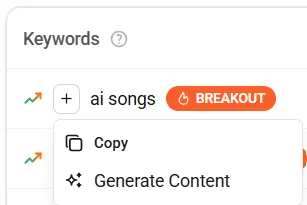
The sequence is short. Spot a rising search, click the plus icon, choose Generate Content, then shape the outline, refine the draft, and publish.
Frequently Asked Questions
What is Trending Keywords in AnswerThePublic?
It is a section in the AnswerThePublic report that shows the searches growing fastest around your keyword over the last 30 days, using Google Trends data. It appears in the Web report for Google searches and in the YouTube report for YouTube searches.
Where does the data come from?
Both sections draw on Google Trends. The Web report shows Google search trends, and the YouTube report shows YouTube search data from Google Trends. Each section shows an “Updated today” label.
What time period does Trending Keywords cover?
The last 30 days. That window keeps the list focused on what is moving now instead of what peaked months ago.
What does BREAKOUT mean?
BREAKOUT marks the steepest risers in the list, following the Google Trends convention. Google Trends uses the label for very large growth, which Google has described as more than 5,000%. A BREAKOUT search often starts from a small base, so check the Search Interest bar before you commit to a topic.
Which plans include Trending Keywords?
The Web report version is available on paid plans. Trending Keywords · YouTube is available on Growth and Business plans, and it is not included on Starter.
Can I filter Trending Keywords by language or country?
In the YouTube report, yes. The report has filters for language, such as English, and country, such as United States.
What happens when I click Generate Content?
The keyword goes straight into AnswerThePublic content creation, where you can build the outline, refine the draft, and publish. The option sits in the plus-icon menu on each row in the Web report, next to Copy.
Where This Leaves You
A keyword with proven volume is a keyword other people can see too. Trending Keywords gives you an earlier read on what is climbing around your topic, on Google and on YouTube, and a direct path from that signal to a draft.
Open the Web report or the YouTube report for a keyword you already cover, scroll to Trending Keywords, and see what has picked up in the last 30 days. If something fits your audience, hit Generate Content and publish while it is still early.