 Sign In













Do you want to skip the read and get right to my top picks? The best web hosting service for most people in 2025 is Hostinger.
Getting your website up and running has never been easier. You can have a great idea on Thursday and start making money online by Saturday. But you need a web hosting service to do it.
The cool thing is you no longer need to be a web developer to buy and set up hosting. Most hosting providers (including the ones I list below) do all of the technical work for you and have detailed setup guides. You can have a website up and running within an hour or less, even if you’ve never done it before.
But finding the right hosting provider is tricky. There are so many to choose from; how can you make sure you’re picking the best provider for your website?
That’s why I’m here to help.
Based on my experience and research, here are my recommendations for the best web hosting services of 2025 for you:
- Hostinger: Best for hosting a lot of sites on a budget
- Bluehost: Best for new WordPress websites
- Cloudways: The best for cloud hosting
- HostGator: The most affordable option for startups
- Web.com: Best for absolute beginners
- WP Engine: The best-managed WordPress host
- Nexcess: The best ecommerce host
- DreamHost: The best option for quick and responsive website changes
- InMotion: The best option for scaling big
- SiteGround: The best WooCommerce host
- GreenGeeks: The best for always-on support
- A2 Hosting: The best host for sites with lots of visual content
Keep reading for information on why these hosts are my top picks, and how much it will cost to host your site on each of them.
#1 – Hostinger Review — The Best for Hosting a Lot of Sites on a Budget
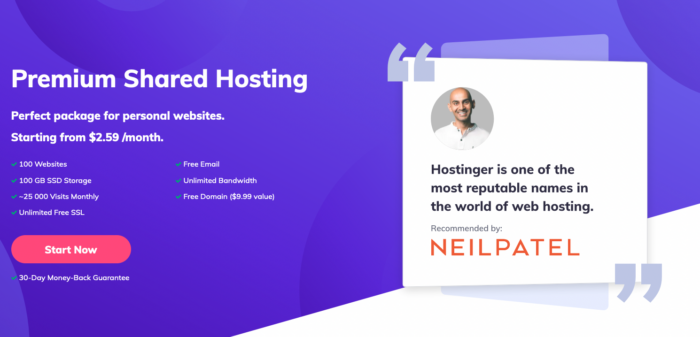
Hostinger offers some of the most affordable shared hosting solutions on the market. Their cheapest prices literally start at just $1.99/month. That’s a stellar deal.
Another reason I really like Hostinger is that you can host up to 100 websites—with 100 GB of SSD storage and unlimited bandwidth—for $2.99 per month if you choose the Premium plan. It’s a great choice if you need to host a ton of different sites but have a super tight budget.
You’ll have to sign a four-year contract to get those low rates, but both plans will cost you less than just a single year with many other hosts.
Pros
- Unlimited bandwidth for just $2.99 per month
- 24/7/365 support via live chat and email
- As many free SSL certificates as you need
- Free WordPress Acceleration tool on every plan
- Backups and email on every plan
- 99.9% uptime SLA
Cons
- Only one email on the cheapest plan
- No free domain on the cheapest plan
- No dedicated hosting plans
Pricing
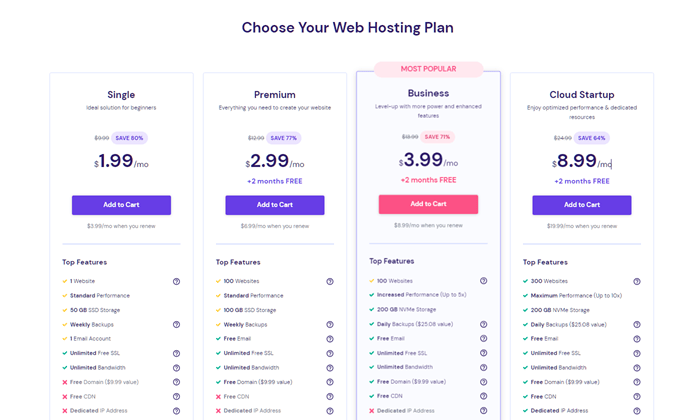
Hostinger offers three shared plans, starting at just $1.99 per month. For an extra $1 per month, you’ll get double the storage space, support for up to 100 websites, a free domain name, and free WHOIS privacy. For an additional $1, Hostinger offers 200 GB of NVMe storage—even faster than SSD, a free CDN, advanced WordPress tools, and enhanced DDoS protection.
Whether you’re paying $1.99 or $3.99, Hostinger offers rock-bottom prices, especially if you’re hosting multiple websites. Sign up today to get started!
#2 – Bluehost Review — The Best for New WordPress Websites

Bluehost is one of the best web hosting options for new WordPress sites. Thanks to Bluehost’s reliability and long history of WordPress hosting, they’re one of just three hosting providers officially recommended by WordPress.org.
With plans starting at just $2.95 per month, it’s an affordable way to get quality web hosting. If you’d like to move beyond the entry-level plans, Bluehost’s mid-tier and professional plans are priced competitively as well.
When you compare Bluehost’s features to other web hosts on the market, you’ll quickly see that you’re getting exceptional value for your investment.
If you need some help or run into problems, the Bluehost customer support team is there for you via phone support and live chat. Page loading times are solid, too. Just make sure you don’t overwhelm your site with too many unnecessary WordPress plugins.
Pros
- 1-click WordPress install
- 24/7 support
- Over $175 available in exclusive offers
Cons
- Prices rise fast after the first year
- Small storage on basic plans
Pricing
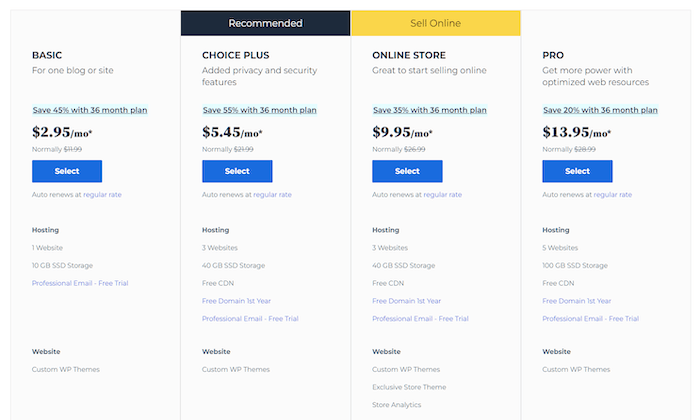
Pricing starts at $2.95 per month for Bluehost’s Basic plan. It supports one website and comes with 10 GB of storage, which is plenty to start. There are multiple plans to scale as your needs change, with the most expensive shared hosting plan—Pro—starting at $13.95 per month.
#3 – Cloudways Review — The Easiest Way to Get the Performance Boost of Cloud Hosting

A lot of my picks on this list focus on getting the best deal for shared hosting. But what if you know shared hosting isn’t going to cut it for your site?
You don’t need to spring for dedicated hosting, nor do you need to go with a difficult option that requires serious technical know-how. Cloudways makes it stupendously easy to get all the performance benefits of better hosting without sacrificing ease of use.
Cloudways, true to its name, delivers the exceptional speed, reliability, and scalability with cloud hosting. With cloud hosting, your site can pull from a wider infrastructure of servers spread across the country or globe. That way, if there are load time or uptime troubles with one, your site can pull the same data from another without a dip in visitor experience.
Scalability is another prominent virtue of cloud hosting, and Cloudways makes it easy to tweak resources to your site’s exact needs.
Start with selecting your initial package. Choose your preferred server provider, selecting from DigitalOcean, AWS, Linode, Vultr, or Google Cloud.
Then, select your plan. For each server provider, there are either four or eight options that scale up in terms of RAM, processing power, storage, and allotted bandwidth.
DigitalOcean and Vultr are unique in that they have parallel plans for standard and more powerful server configurations. With DigitalOcean, you can opt for premium droplets, which sport better processors and storage drives. Vultr’s high-frequency options are similar, also adding higher-quality memory.
With Cloudways, you get the benefits of fully managed hosting. That means Cloudways will take care of automated backups, caching, monitoring, and server maintenance for you. You never have to get your hands dirty to ensure you’re getting top performance.
That’s further supported by their always-on customer support. Get live chat help any time of any day.
Pros
- Cloud hosting
- Managed environment
- Choice of cloud providers
- Very scalable
Cons
- Can be more expensive than other options
- No free domain name
- Email not included
Pricing
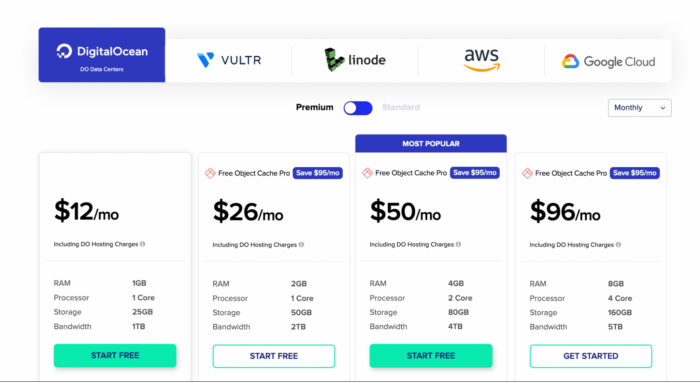
Cloudways’ hosting plans start as low as $10 per month for the most basic DigitalOcean package.
And, since Cloudways is a pay-as-you-go service where you only get charged for the resources you use, you can even opt for hourly billing. That can slim down your monthly bill quite a bit if you have the type of website that experiences stark peaks and valleys of popularity.
If ever you need to adjust your specs or even switch infrastructure, Cloudways allows you to do so quickly and without incurring penalty fees.
Plus, you can even get started on that plan for free. That’s right, Cloudways offers a free three-day trial with no credit card required, allowing you to test drive it and then scale resources up when you’re ready to pay.
It’s a great total package at a reasonable price. So, if you don’t want to mess around in the shallow end of shared hosting any longer, look to Cloudways for the easiest route to getting better performance with cloud hosting. Use promo code NEILPATEL to get 25% off for 3 months.
#4 – HostGator Review — The Most Affordable Option for Startups
HostGator gives you solid web hosting for one of the lowest rates out there. They’re perfect if you’re looking for the most affordable way to begin posting content online.
Shared hosting rates start at a jaw-dropping $2.75/month. You might not get souped-up hosting features at a price like this, but you’re getting a reliable host that gives startups a cheap option to get their website up and running.
And, just like Bluehost, they have a responsive telephone line with a live chat you can access at any moment. You can also find a giant database with common questions beginners have, together with professional opinions and solutions to those problems.
HostGator works as a fantastically low-risk option for those of you who have never set up hosting for a website before. If you need to host several sites on a simple shared plan and still want a low price, HostGator’s intermediate package (called the Baby Plan) starts at only $3.50 per month.
Hostgator offers something for everyone. As well as shared hosting plans, there is also dedicated hosting, VPS (virtual private server) hosting, and a website builder. It has everything you ended to start and scale your site.
Pros
- A wide range of plans
- Very cost-effective
- Free domain and free site transfers
- Free SSL certificate
Cons
- No phone support
Pricing
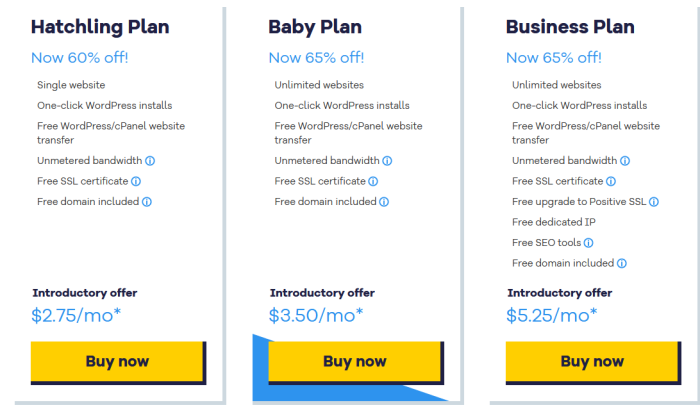
HostGator offers three shared hosting plans starting at $2.75 per month. Bear in mind, these great introductory rates are only available if you commit to three years of HostGator service upfront.
That being said, HostGator offers upgraded hosting options if you find your website is getting wildly popular. They also sport some of the best rates for more powerful VPS hosting.
If you want to get your website to start getting found for the lowest cost possible, take advantage of HostGator’s 45-day money-back guarantee and try their shared hosting today.
#5 – Web.com Review — The Best for Absolute Beginners
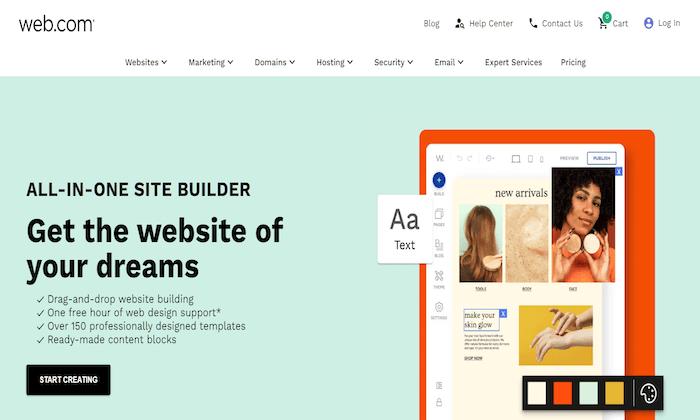
If you’re looking for the absolute easiest way to start a website, Web.com is it. With just two options to choose from—shared hosting or a website builder—it doesn’t get any easier.
The website builder’s perfect if you’ve never built a website before and want to get one live as fast as possible. With more than 150 templates to choose from, it’s basically a website in a box—you’ll get everything you need in one place.
Web.com’s shared hosting, on the other hand, is great if you want a straightforward way to set up a WordPress website. The guided onboarding process walks you through every step, making it as streamlined as possible.
The entry-level shared plan is more than enough for new sites. It supports one domain, comes with 10 GB of storage space, includes a free email account, and offers unmetered bandwidth. As you grow, you can scale up to the Premium plan, which supports 10 websites and up to 200,000 monthly visitors.
No matter what route you choose, you’ll get a free domain name for the first year, free WHOIS privacy with your domain, and a free SSL certificate.
Pros
- Built for absolute beginners
- Easy drag-and-drop website builder on all plans
- Free domain and domain privacy for the first year
- Free marketing tools on website builder plans
- Includes professional email addresses
Cons
- Not as scalable as other hosting providers
- Customer service can be hit or miss
- Website builder limits customization
Pricing
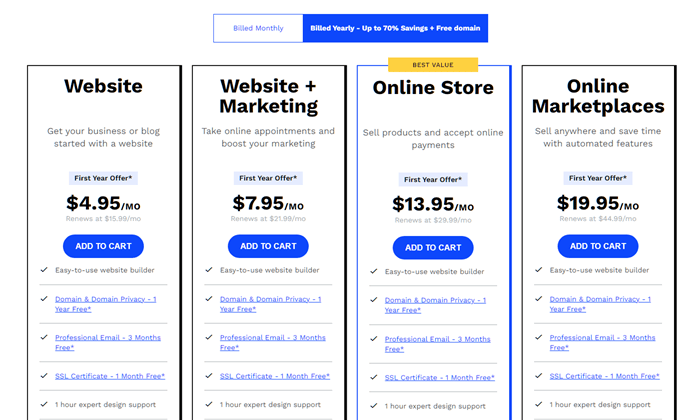
Web.com’s website builder starts at $4.95 per month. Compared to other website builders, it’s actually really affordable. If you want to sell products, however, you’ll need to go with the Online Store plan, which starts at $13.95 per month.
If you prefer traditional hosting, it starts at $2.75 per month—it’s one of the more affordable plans on my list.
Sign up now and get started with Web.com in just a few minutes!
#6 – WP Engine Review — The Best for Managed WordPress Hosting
With WP Engine, you get a blazing fast and ultra-reliable WordPress site without any work on your part. The company invented the idea of managed WordPress hosting—where the provider takes over all the backend technical work—and WP Engine is still the leader in the field.
WP Engine hosts WordPress websites exclusively. And when you reach out to customer service, you will be talking to an expert who handles WordPress issues 24/7.
Of course, the top-notch uptime, speed, and customer service means WP Engine is not as cheap as some of the others on this list. But if you don’t have to hire a WordPress developer to maintain your site’s security and performance (or spend time figuring that out yourself), going with WP Engine can actually be cost-effective.
Every plan comes with best-in-class tools to develop your WordPress site. No other host offers such a variety and depth of features, such as one-click staging areas where you can build and test your site before it goes live.
It’s a great hosting service if you’re looking to take your WordPress site to the next level without IT headaches and responsibilities. Your teams can focus on creating great sites and let WP Engine ensure everything is running correctly.
Pros
- Fully managed service
- Automatic WordPress updates
- Blazing speed and performance
- Integrated customizable themes
Cons
- Expensive compared to other hosting plans
- No domains available
- Email is separate
Pricing
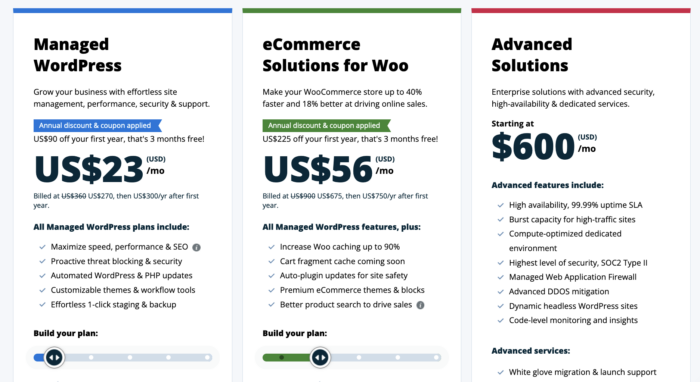
There are two core pricing plans to choose from. One is for standard managed WordPress hosting. The other is for managed WordPress with e-commerce functionality via WooCommerce. The former starts at $23 per month, while the latter’s entry-level plan starts at $56 per month. There is also an advanced plan that starts at $600 per month.
#7 – Nexcess Review — The Best for Ecommerce Hosting
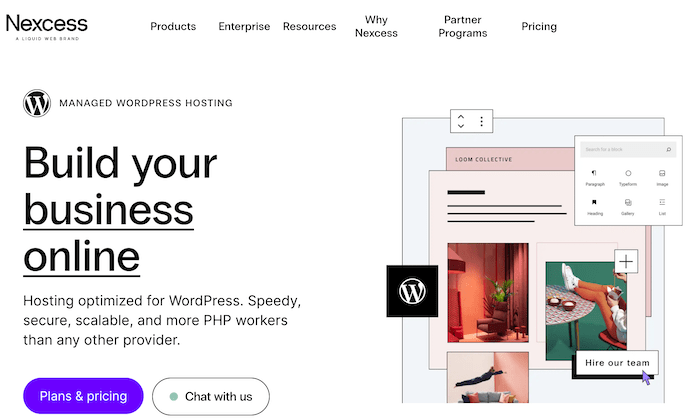
If you want a hands-off hosting solution for your online store, Nexcess is an incredibly smart choice.
They offer a fleet of fully-managed hosting options, including specialized packages for WooCommerce, BigCommerce, and Magento. Plus, you get one-click auto-scaling to handle unexpected traffic spikes, 24/7 monitoring and customer support, and premium SSL certificates to keep your site and visitors safe.
In short, you get everything you need to start, manage, and scale your online store.
With that said, it’s not the cheapest option on this list. But you do get more features, better support, and improved performance with the higher price tag.
So, if you need advanced security or expect to grow quickly, Nexcess is an excellent e-commerce hosting solution.
Pros
- Fully managed hosting
- Unlimited email accounts
- 30-day backups
- Bundled plugins included (Astra Pro, Elementor, WP Forms, and more)
- Free migration
Cons
- No free domain
- No money-back guarantee
Pricing
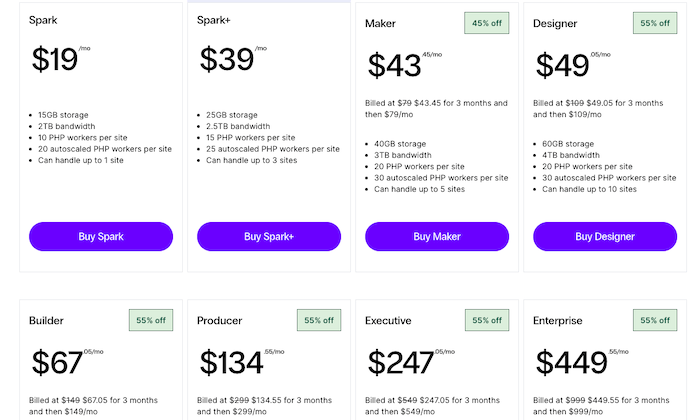
WordPress hosting plans start at $19 per month for one store, 15 GB of space, and two TB of bandwidth. You can also save money if you opt for an annual plan.
#8 – DreamHost Review — The Best Option if You Want Quick and Responsive Website Changes

DreamHost has been going above and beyond for its customers since 1996. The company offers two shared hosting packages. Both are eminently affordable while also including a boatload of useful features and benefits.
With Shared Starter, you get 50 GB of storage for one website, up to five subdomains, WordPress pre-installed and ready to go for you, and a domain, SSL certificate, and WordPress builder included for free.
Scale up to Shared Unlimited with no effort and very little extra expense to handle unlimited websites and subdomains, with unlimited storage plus free email attached to your domain. So that plan is very true to its name.
Pros
- 1-click WordPress install
- Free SSL certificate
- Free domain included
- Extra long money-back guarantee
Cons
- No phone-based support
- Email not included
Pricing
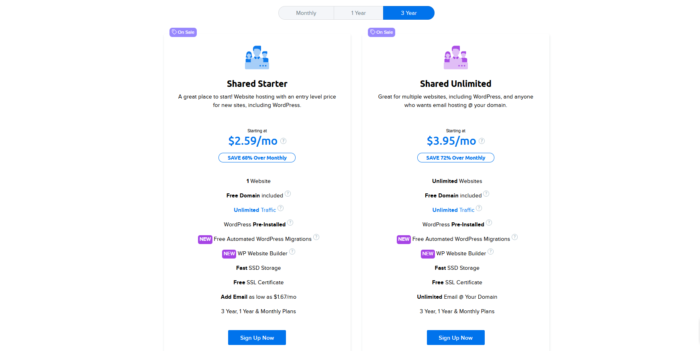
Whichever plan you choose, you’re never looking at more than $4 per month unless you choose a month-to-month plan.
#9 – InMotion Review — The Best Option for Scaling BIG
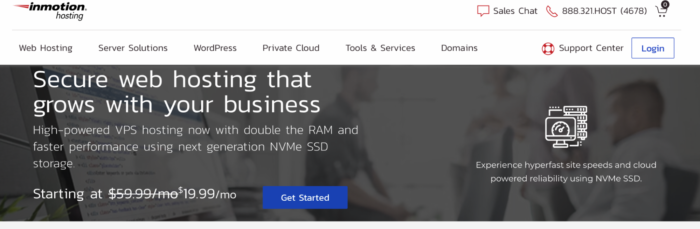
Are you positive that your website is going to dominate the online space? Then you should definitely take a closer look at InMotion.
Their VPS and Dedicated hosting services are far from cheap, but few providers are at this level of the web hosting game.
With premium prices come premium services. And it doesn’t get more premium than dedicated hosting. You’re getting a server all to yourself. So, no matter what heights of popularity your site achieves, it will always be available to visitors and will load in the blink of an eye when they want to stop by.
Don’t need to go all the way to dedicated hosting just yet? InMotion’s VPS plans are more palatable while still delivering substantially better performance overall than shared or cloud hosting.
Those plans start at just $17.99 per month. And, all of InMotion’s VPS plans are fully managed, meaning you don’t have to fret about your comfort level with server management.
VPS plans scale up in resources from a dual-core processor with 4 GB of RAM and 90 GB of storage all the way up to 8 CPU cores, 16 GB of RAM, and 360 GB of storage. So, you can get a really souped-up hosting plan this way, too.
You don’t have to pay a premium to use InMotion, though. The company also offers a range of affordable shared hosting plans to get you started.
Pros
- 24/7/365 customer support
- Free SSL certificate
- 90-day money-back guarantee
Cons
- Expensive compared to other hosting options
- Most shared hosting plans don’t have monthly billing options
Pricing
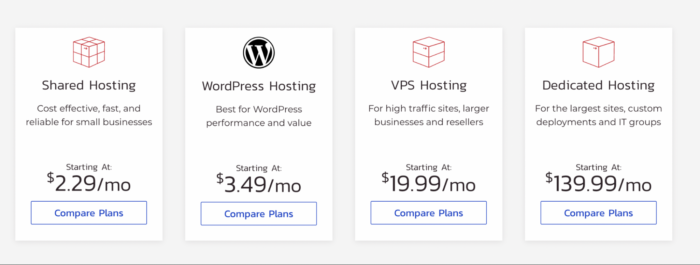
InMotion hosting can come with a big price tag, but it does offer a lot. Dedicated hosting starts at $139.99 per month. That sounds like a lot, but it still represents excellent value. Shared hosting is as cheap as any provider on this list, starting at $2.29 per month.
#10 – SiteGround Review — The Best for WooCommerce Hosting

Do you want to sell your products online? Then you’re probably in need of a good, reliable WooCommerce hosting service.
If that’s the case, then you should take a look at SiteGround. They have a dedicated set of hosting plans that will make it easy to get your WooCommerce site off the ground.
SiteGround really wants to overdeliver, even if you choose their cheapest options. You get unmetered traffic and 10 GB of storage space on their lowest-cost hosting plan.
You also get a bunch of useful extras for free, like a CDN, SSL certificate, email, and daily backups, as well as a free site migration and one-click WordPress installation.
That all comes in the StartUp plan, which costs just $2.99 per month. That only requires you to commit to a year, as well. A lot of other hosts only give introductory pricing this good on two- or three-year upfront commitments.
If you’re looking to launch and host a fleet of web stores, SiteGround’s two higher-octane plans allow for unlimited websites. GrowBig and GoGeek give you progressively more storage space and monthly visits while also adding power user and agency features.
So if you’re looking for the best WooCommerce solution, SiteGround is the hosting service for you.
Pros
- Specialist WooCommerce hosting
- Excellent customer support
- Unmetered traffic on all plans
- Free SSL, CDN, email, and other extras
- 30-day money-back guarantee
Cons
- No dedicated or VPS hosting
- Prices can rise quickly after the first year.
Pricing
- StartUp – $2.99/mo
- GrowBig – $4.99/mo
- GoGeek – $7.99/mo
SiteGround WooCommerce hosting starts at $2.99. The GrowBig plan will be sufficient for the vast majority of stores.
#11 – GreenGeeks Review — The Best for Always-On Support

Nothing is more frustrating than having something go wrong, and there’s no one available to ask for help. And, in the high-stakes world of web hosting, not having a support center to contact is unacceptable. Just think of the lost revenue and frustrated visitors (who may never come back) if your site is down at a crucial time.
With GreenGeeks, you get a robust knowledge base, 24/7/365 live chat support, email support that gets back to you within 15-20 minutes and live phone support available Monday through Sunday from 9 a.m. to midnight (Eastern Standard Time).
That’s not only a lot of options to get help when you need it—that’s support that’s always available in the moment. Which is better than a lot of other web hosts out there.
“Sure, the support’s great,” I hear you asking, “but what about the, you know, actual hosting?”
Well, not only does GreenGeeks offer the full array of hosting options—from basic and WordPress-specialized options to VPS and reseller hosting—but they provide an eco-friendly hosting option. The hosting platform has been made as efficient as possible and runs on renewable energy. What’s more, the company matches three times the energy it uses in the form of renewable energy credits via Bonneville Environmental Foundation and plants a tree for every hosting account.
Pros
- Environmentally-friendly option
- Cost-effective
- Free migration
Cons
- Phone support is not 24/7
Pricing
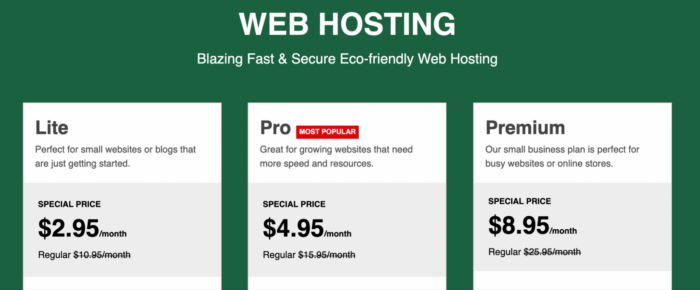
GreenGeeks hosting plans start at $2.49/month (including WordPress and WooCommerce hosting).
If you want a bit more power, GreenGeeks’ VPS hosting plans start a little pricier than others ($39.95/month), but don’t require an annual commitment to secure. So, no price hikes after a year and no surprises.
Check out their hosting options and sign up with GreenGeeks today.
#12 – A2 Hosting Review — The Best for Sites with Lots of Visual Content
Among the factors that differentiate one hosting plan from another, speed and uptime grab all the headlines. And, for good reason—no one wants a slow or unavailable site.
But if you have ambitious plans for displaying lots of media on your website, or large files like videos and 3D renderings, don’t sleep on judging web hosts by the amount of storage they offer.
If that resonates with you, give A2 Hosting a serious look as your next web host. They come with some of the most generous storage space allotments in all of web hosting.
This applies no matter what type of hosting you’re in the market for.
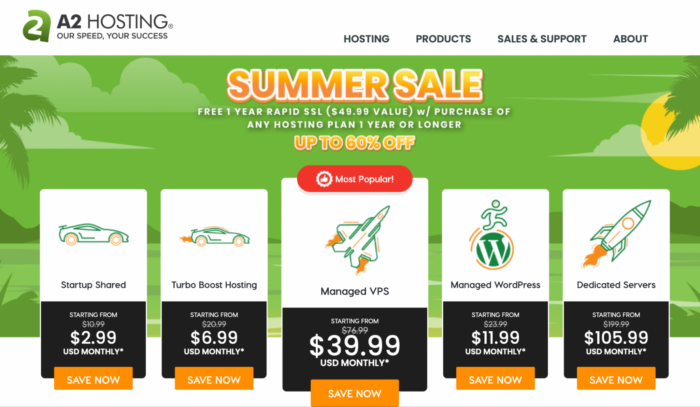
A2’s entry-level shared hosting, called the Startup plan, starts as low as $2.49 per month yet comes with 100 GB of SSD disk space. Most other providers’ cheapest shared plans might go as high as 50 GB. Right off the bat, A2 is leading the pack and giving you more room for videos, images, GIFs, and more.
Any of A2’s shared plans above Startup come with unlimited storage, and its highest two tiers upgrade you from SSD to NVMe drives which tend to be at least three times faster.
“Unlimited” storage might set off some alarm bells to you if you’ve done some web hosting research. And, truly, that doesn’t mean you can just start uploading terabytes worth of files to your A2 website willy-nilly.
But they are generous with their acceptable use policy regarding your plan’s disk space. Your primary limit to keep in mind is the raw number of files you can upload. As of this writing, their total limit is 600,000 files—that should be more than enough for most of you.
And, heck, if you’re approaching half a million media and other files on your website, it might be time for some spring cleaning anyway.
The other thing to keep in mind is any limits on your backups and server rewinds. A2’s emergency site recovery service only covers up to 50 GB of site data. If you’re blowing past that, make sure to stay vigilant about storing your own backups.
But that’s really it for stipulations. A2 sets you up for media-rich websites on every plan better than any other hosting provider.
That applies, too, to their WordPress and VPS hosting options. The former gives you NMVe storage on every plan, starting at 50 GB on the cheapest one. That means you can have plenty of content on your WordPress site and know that it will load faster for visitors than it would on comparable WordPress hosts.
With VPS, you have three standard and three turbo plans to select from, with the former utilizing SSD and the latter employing NVMe.
Any way you slice it, A2 Hosting brings the goods for people who want to make their websites pop with images and video—or even if you want to let your site visitors upload pics and videos of their own.
Pros
- Unlimited storage on most plans
- 24/7/365 support
- Free migration
- Money-back guarantee
Cons
- Can be expensive in comparison
- Turbo Boost option only available on more expensive plans
Pricing
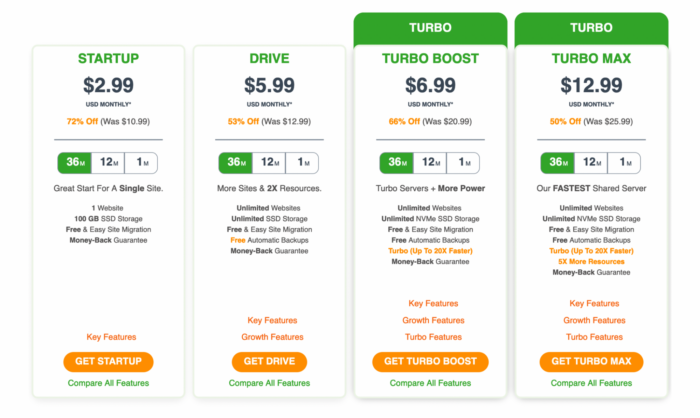
A2 Hosting’s plans start at just $2.99 per month. But anyone with a website that has a lot of images will want to choose one of the two plans that come with Turbo Boost, A2’s speed and performance optimization tool. Those start from $6.99 per month.
FAQs
What is the difference between web hosting and web server?
A web server is a computer that stores your website and transmits it to the internet. A web host is a company or service that uses web servers to store and display your website.
What's the difference between host and domain?
The host is the computer server where your website’s files are stored. The domain is the address of the website.
Can I host a website without a domain name?
You can host a website without your own domain name by piggybacking off another provider, like WordPress.com. But having your own domain name gives you much more control over your web presence.
How many types of web hosting are there?
There are four major types of web hosting: shared, dedicated, VPS, and cloud. Shared hosting stores your website on a server with other websites. Dedicated hosting gives your website its own private server. VPS or virtual private server is similar to dedicated hosting, but it doesn’t rely on a physical server. Cloud hosting uses cloud resources to host your website.
How is a website hosted?
A website is hosted on a web server, a dedicated computer that stores your website’s files and transmits them to the internet when a user requests them by going to your website’s URL.
Conclusion
You’re most likely going to have a long-term relationship with the hosting service you choose. So carefully look into every option that caught your eye today and select the one that fits your needs best.
To recap my top picks:
- Hostinger – Best for hosting a lot of sites on a budget
- Bluehost – Best for new WordPress websites
- Cloudways – The best for cloud hosting
- HostGator – The most affordable option for startups
- Web.com: Best for absolute beginners
- WP Engine – The best managed WordPress host
- Nexcess – The best ecommerce host
- DreamHost – The best option for quick and responsive website changes
- InMotion – The best option for scaling big
- SiteGround – The Best WooCommerce host
- GreenGeeks – Best for always-on support
- A2 Hosting – The best for sites with lots of visual content
These are all dependable hosting providers with a record of quality service. Whether you choose one of my top recommendations or scout out your own, use the tips and best practices we talked about to make an educated decision.
Having a reliable web host is a must in today’s world. Make this decision like the future of your business depends on it.
Because it does!
Have you worked with any website hosting companies in the past? How did it go and did you get the results you hoped for?