Sign In










Facebook has been in hot water lately. If you’ve been keeping up with the latest news, you know what I’m talking about.
And it doesn’t help that 62% of small business advertisers on Facebook don’t find success. More specifically, they “miss their targets.”
Their audience targeting is flawed, and they can’t reach the right users to sell their products and services.
Facebook simply doesn’t work, right? Wrong.
I’d be willing to bet that the number one cause of failing or giving up on Facebook Ads is audience-related.
After all, you can’t sell PPC agency services to an audience that only cares about SEO.
Audience targeting is the bread and butter of Facebook. While that sounds like an enticing feature, your entire campaign will depend on it.
Even simple mistakes in targeting will throw your audience off, potentially targeting the wrong segment or users too early in the funnel for sales.
Thankfully, I’ve been there and done that. I wasted tons of money on Facebook Ads that never reached my targets.
But I also found a surefire way to reach the right audience on Facebook:
Customer lifetime value lists.
What is customer lifetime value and why should you care?
What even is customer lifetime value anyways? Does it matter? Why should you care?
Well, I am here to answer those for you.
Customer lifetime value is perhaps the most important metric you can ever track.
According to Google, it’s defined as the prediction of net profit associated with the entire relationship for a single customer.
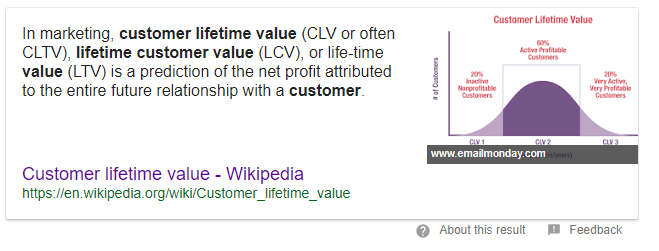
In more simple terms:
Customer lifetime value is how much a single customer spends with you before leaving.
It’s that simple, but it’s of the utmost importance.
Lifetime value literally guides every decision you make in business.
Let me give you an example:
You run an online e-commerce store, and you sell relatively cheap products like discounted sunglasses and cheap style items like necklaces.
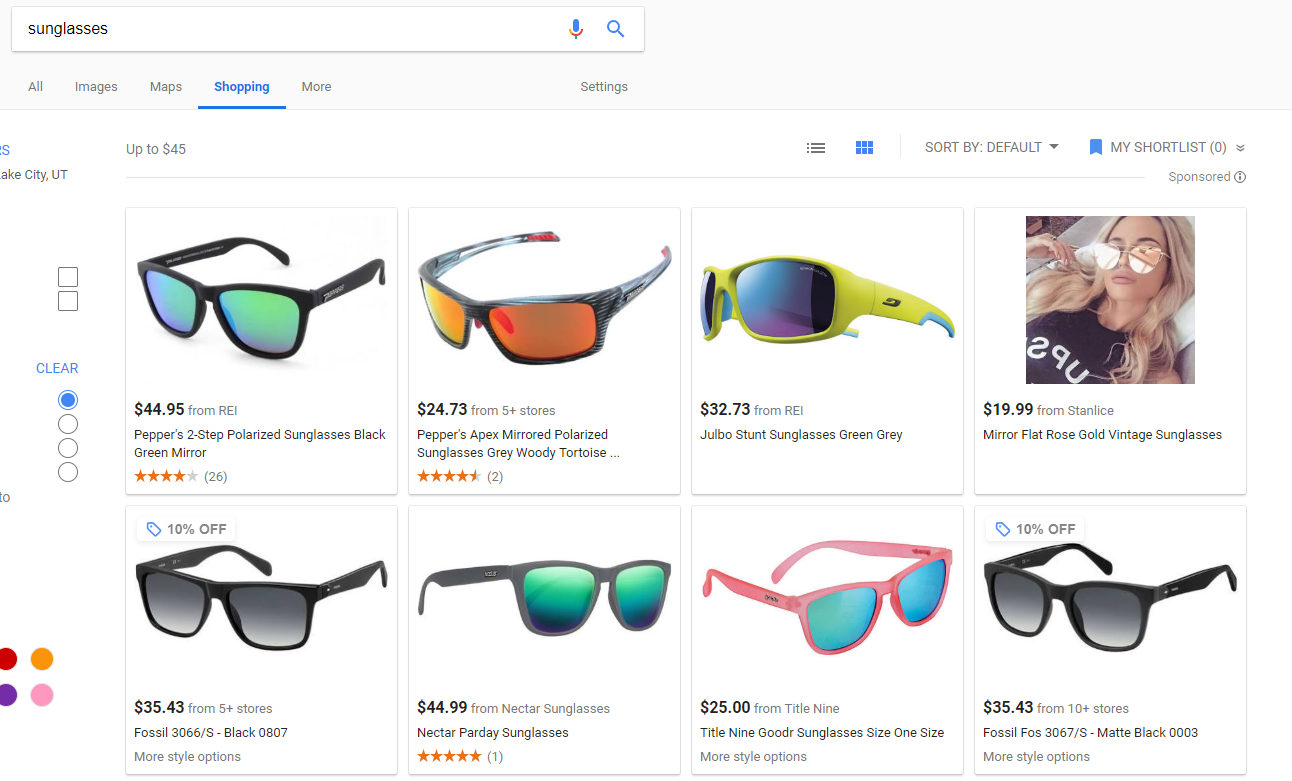
Your average product costs about $25.
So you begin advertising with PPC to drive some traffic and hopefully convert some sales.
You realize that the average cost per click for retail sales is $1.35. Doesn’t seem too bad at first, right?
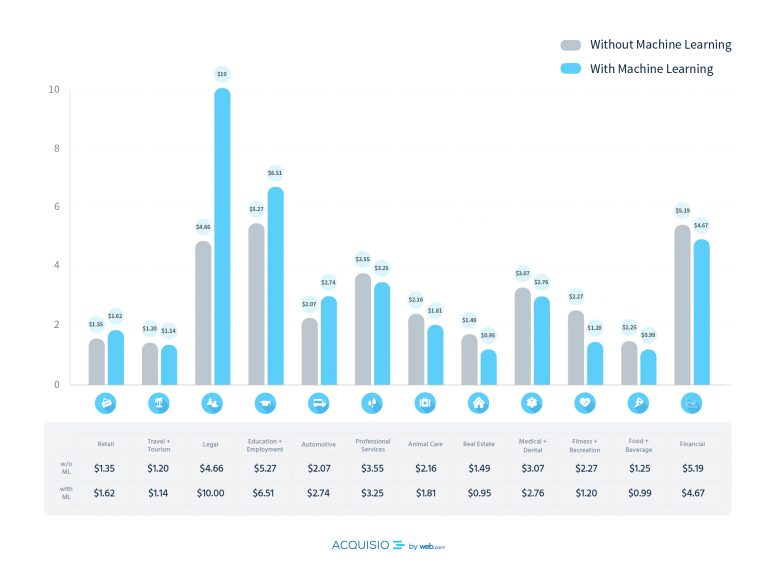
But the cost per click doesn’t matter. It’s actually irrelevant.
Why? Just look at the conversion rate for retail advertising: 3.86%
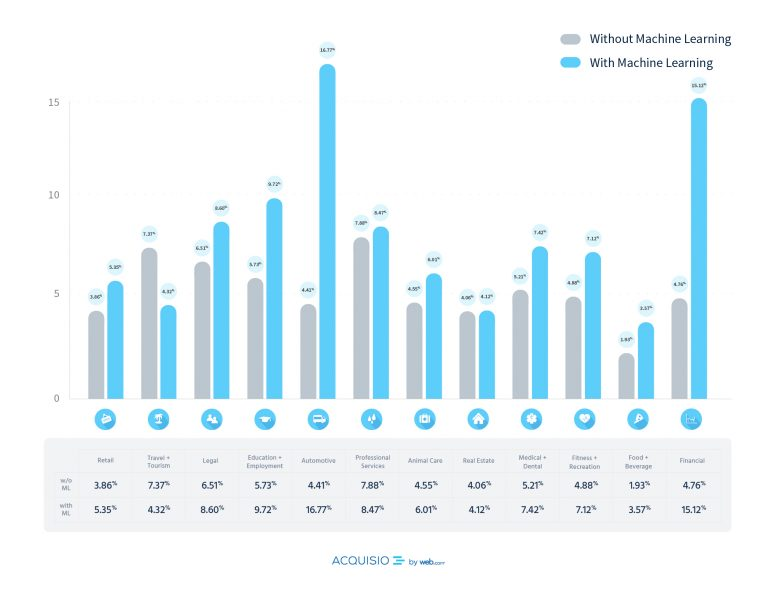
That’s a pretty low conversion rate compared to other segments.
For the sake of this example, let’s round the conversion rate up to 4%.
It would take 25 clicks to drive a single conversion if your conversion rate is 4%.
Now multiply the clicks needed (based on the conversion rate) with the cost per click:
25 * $1.35 = $33.75
Oops.
Now you can’t expect to turn a profit because your average sale is just $25.
And this is where lifetime value comes into play.
This is why lifetime value is the most important metric in any campaign:
Doing the simple math on a single order, you can’t afford to bid on AdWords for what you sell.
But that’s not true if you have a good lifetime value. For instance, how many times a year does that customer return? Two? Three times? Ten times?
If they do, you’ve only paid $33.75 to acquire them one time. And if they spend $25 multiple times, you’ve quickly doubled, tripled or exploded your original acquisition costs.
And then it becomes easier and easier to sell to them. You’ve already acquired them, giving you tons of free ways to sell: email, phone, etc.
You can launch a new email campaign to existing customers for free in just minutes to increase sales and drive up their CLTVs.
Increasing the lifetime value of your current customers is the key to driving massive profits.
Once you’ve done that, you begin to see compounding effects in every other metric.
Increased lifetime values mean you can spend more on acquiring customers because you know that they will spend $XX over their lifetime with you.
And you can begin to ignore CPC.
When it’s all said and done, lifetime value reigns at the top and should always be your guiding metric.
But Neil, what does this have to do with Facebook audience targeting?
Let me show you.
Lookalike audiences on Facebook are key
Using CLTV as a metric, you can create lookalike audiences on Facebook that target only the best of the best customers you currently have.
Lookalike audiences are simple in nature, yet highly effective:
They utilize your current customer data to find new, alike targets on Facebook.
Matching demographic data with affinities, interests, and more, you can create whole new audiences with the same background as your current customers.
It’s one of the best ways to generate an audience quickly.
And they work.
AdEspresso conducted a $1500 test on Facebook to analyze the performance of lookalike audiences. To do this, they tested 1%, 5%, and 10% audience matching:
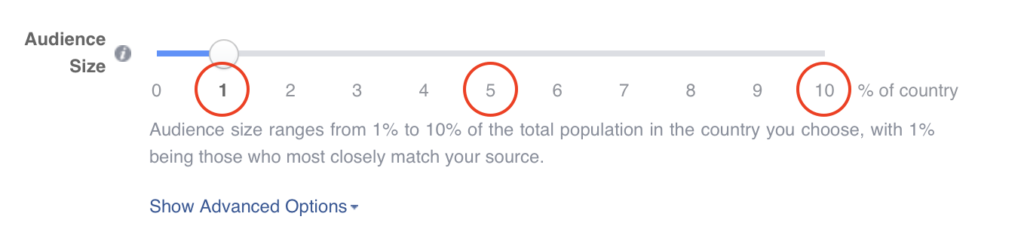
With lookalike audiences, you can customize the audience size by % of the country/area you are targeting.
For instance, selecting “1” would be 1% of the country you advertise in.
AdEspresso put these to the test, finding that 1% audiences, while obviously smaller in nature, converted best.
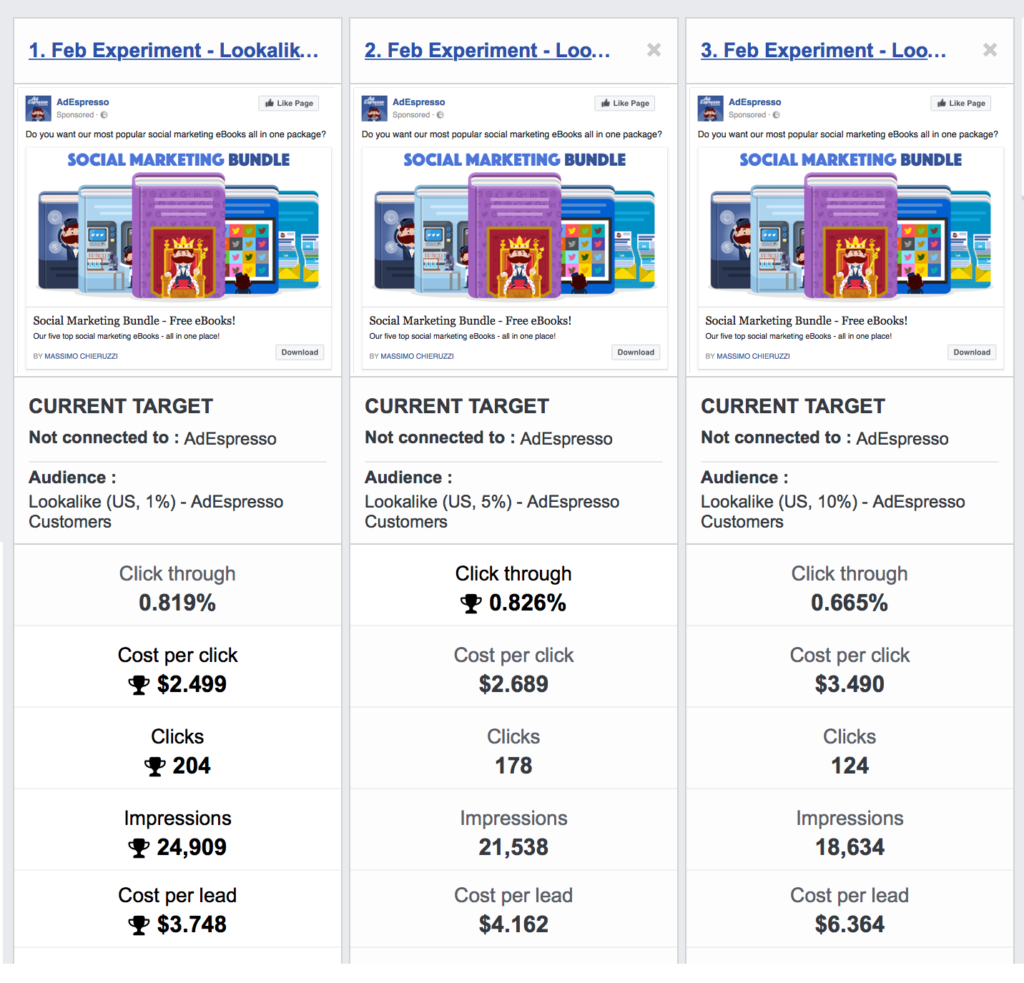
According to AdEspresso, the lookalike audience at 10% had a 70% higher cost per conversion than the 1% size audience.
Because of the extra costs, the 10% audience produced 40% fewer clicks, too.
The 1% audience drove 115 leads with just $500 in ad spend.
That’s a cost per lead of just under $4. That’s pretty cheap for high-quality leads.
One company found a 2x increase in conversions and an overall ROI of 186% using lookalike audiences to grow their sales.
By incorporating lookalike audiences, Andrew Hubbard was able to produce nearly $40,000 in revenue from $4,159 in ad spend, generating an 876% return on investment.
Simply put:
Lookalike audiences are amazing.
Here’s how you can set them up using lifetime value to increase their effectiveness and create a Facebook audience that finally converts.
Step 1. Set up your custom audience
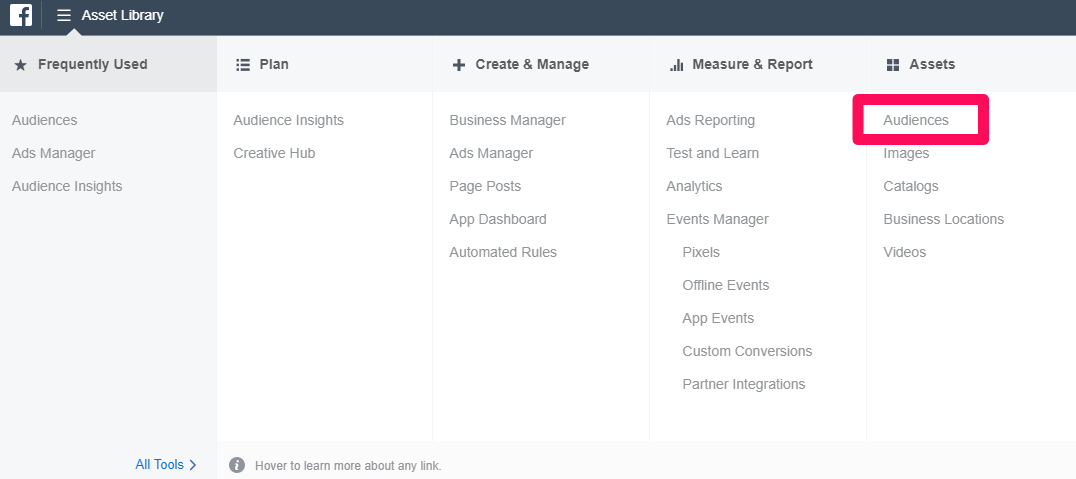
To get started with using lifetime value to create a Facebook audience, head to your Facebook Business Manager dashboard and navigate to the “Audiences” section:
In the audience manager, create a new custom audience, not a lookalike audience:
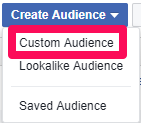
While you can do it either way, I prefer creating a custom audience first, as you can select LTV right off the bat instead of after creating your audience.
Next, select “Customer File” as the type of audience you want to create:
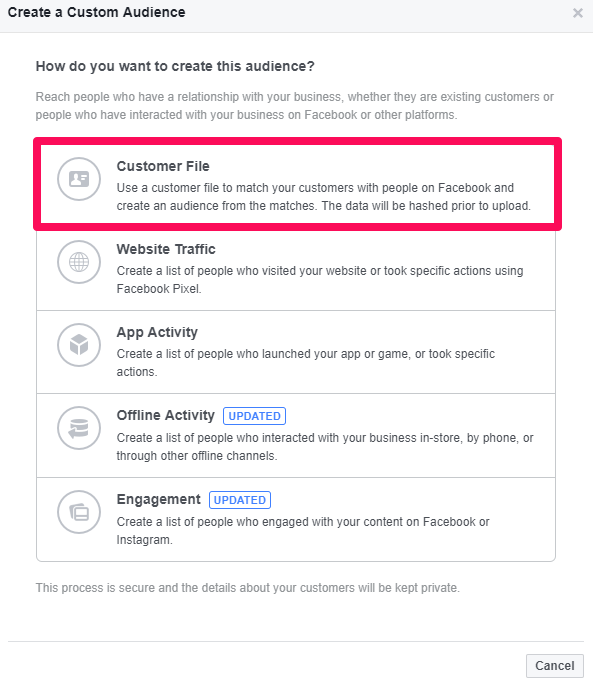
Customer file simply means that you will upload a batched list of customer data on your current customers.
This is the file that Facebook will then take to match other customers and potential audiences for your campaign.
Next, select “Include LTV for better performing lookalikes.” This option will allow you to create a file with lifetime value metrics.
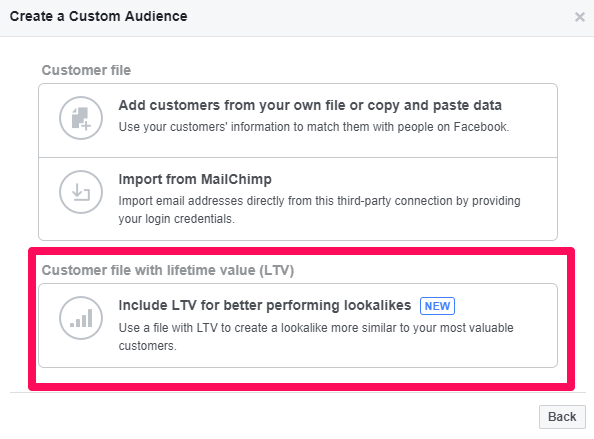
So, how does that work?
Essentially, you will be assigning each customer on your list a different value.
Depending on what platforms and products you sell, this will either be very fast and easy or somewhat time-consuming.
If you run an online e-commerce store with Shopify or BigCommerce, you can find your lifetime value data easily:
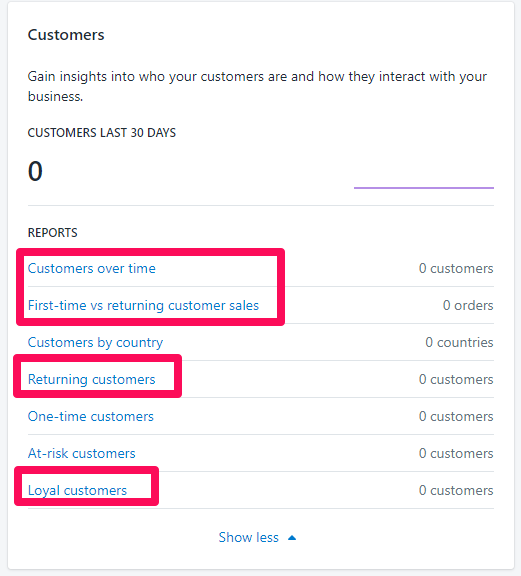
In any of these customer data sections of Shopify (or BigCommerce, if you use that) you can find customer data on lifetime value and how much they have spent.
If you can do this, you’ll be able to export your customer data easily.
If your business is more consulting or lead-based and focused on landing clients or accounts, you will have to do a bit of digging.
Look at your current clients and see how much they spend with you per month. For instance, does their current contract with you show a spend of $1,000 a month on services?
Or maybe you sell software online. You can then look at their current tool plan to see how much they spend each month and how long they have been a customer.
That’s lifetime value.
Once you have lifetime value for your customers, you will plug that data into your spreadsheet and Facebook will target the highest lifetime values in their matching process.
This simply means that customers on your customer file with high LTVs will be matched first. Facebook will look at their individual data and match to similar users who have a high chance of spending a ton with your business.
Next, read through the lifetime value information that Facebook gives you if you still need a clear understanding of how it works. It’s sometimes complex:
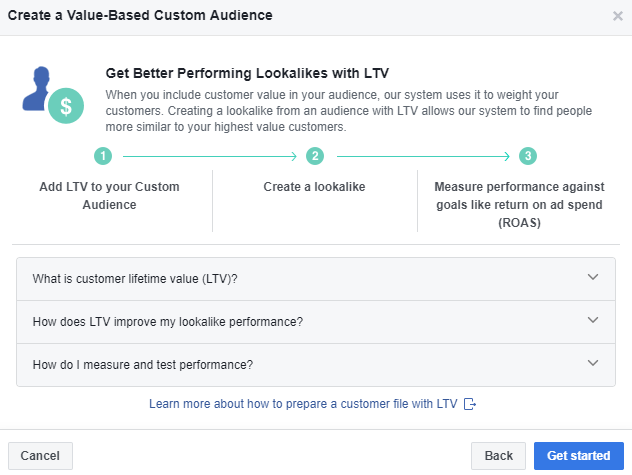
After you’ve accepted the terms and conditions, you can now begin to create your custom audience.
In this step, you will need to create a list that you can export in CSV or TXT file formats. These are the only two formats that Facebook currently accepts for uploading a custom file.
The data that goes into your customer file should be plentiful:
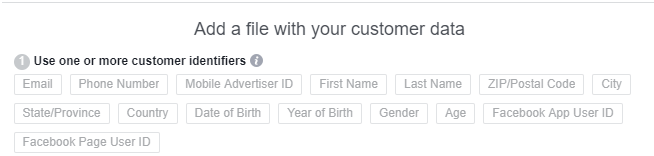
Try to fill in as many of the custom identifiers as you possibly can.
Remember: more metrics and identifiers = higher specificity and better matching.
This may take some time to get depending on what systems you use, but it’s going to be well worth the effort.
When adding this data into a spreadsheet, you want to follow Facebook’s Customer Data Prep Guide.
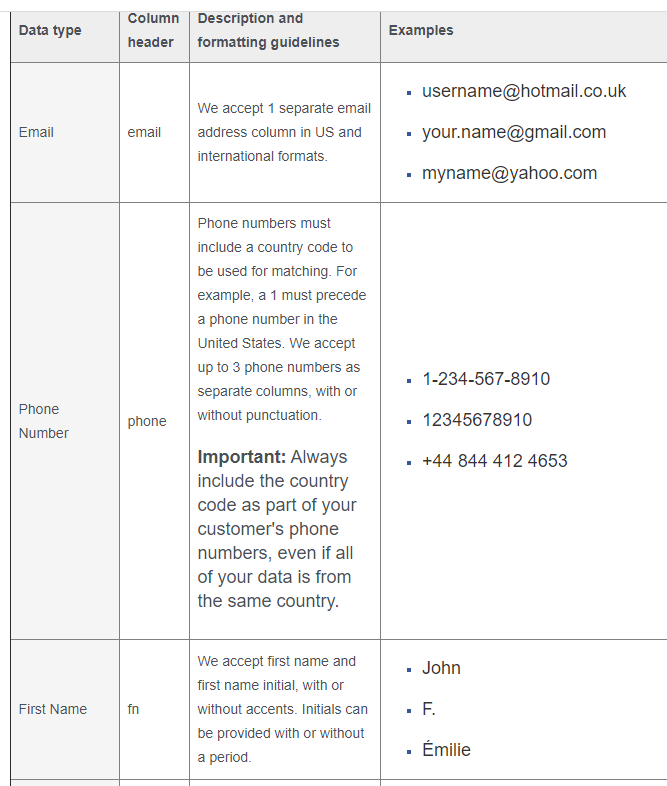
In each new column for each data type, enter the column header first, followed by the format of each under “Examples.”
Be sure to format correctly according to their guide and the image above.
Once you’ve added all of the data that you need, you can create a final column for customer lifetime value:
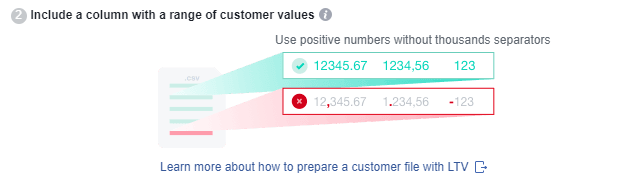
For this data type, your column header in your spreadsheet should be: “value.”
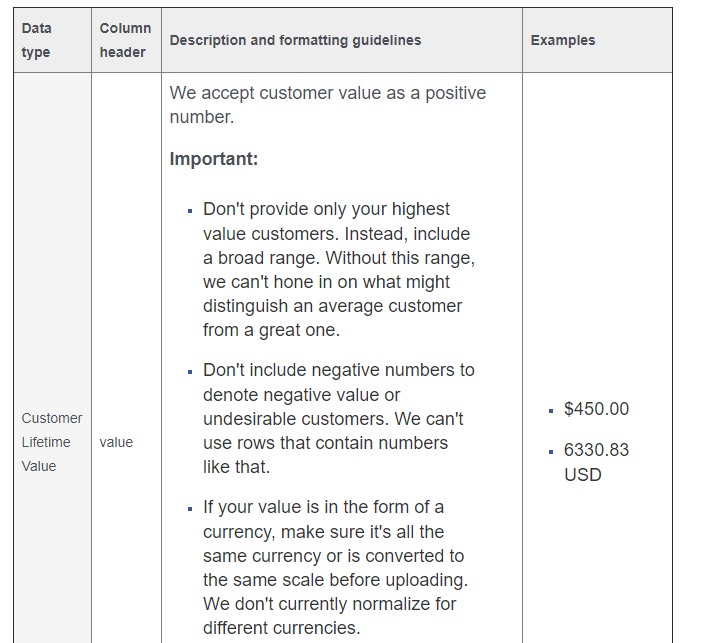
Under the “value” column, enter the customer lifetime value for each customer in the following two formats:
- $500
- 500.00 USD
Either one of these will work just fine. Keep the data consistent if you can.
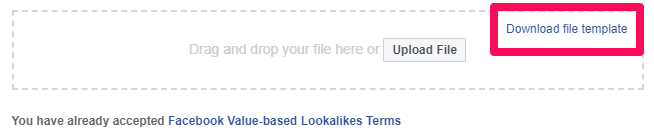
If you are struggling to format your spreadsheet, you can always use Facebook’s file template to your advantage:
Once you’ve created your list, you can take a deep breath! The hard part is finally over.
Give your new audience a familiar name to ensure that you can find it in your account:

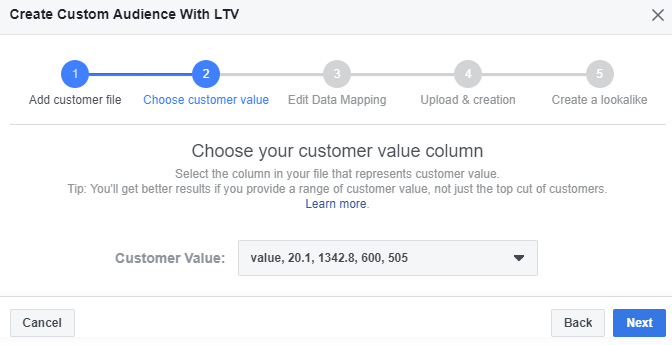
In the second step of audience creation, select the value column you created for your list as the “Customer Value” type:
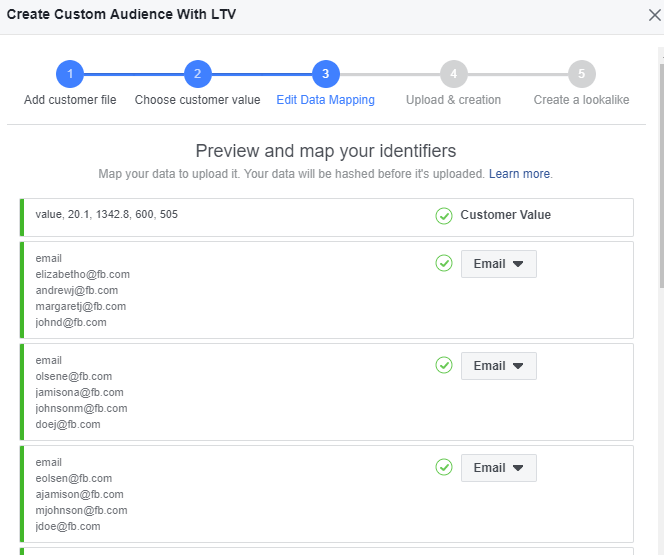
Next, confirm on the “Edit Data Mapping” screen that all of your identifiers are cleared and ready to go with the green checkmark:
Now upload and create your audience!
Now comes the fun part: creating amazing ads that will speak to your new audience.
Step 2. Ad creation for your new lookalike audience
The first part of the process is done. Creating your lookalike audience with LTV as the main factor is the perfect starting point.
But now the second part requires you to get a bit more creative:
Creating ads that appeal to your new audience.
But before you jump into ad creation or default to what you have done before, here is something critical to keep in mind:
Funnel stages.
Since you are targeting a brand new audience that likely hasn’t heard of your brand before, the creation of your ads along with your calls to action will be critical for success.
Sending this new audience an ad that asks them to buy from you immediately probably won’t work that well.
Why? Well, they aren’t brand aware. They haven’t engaged with you enough to know about your products or consider them yet.
The key here is to warm them up. To get them familiar with your brand and get them engaging with your content.
Keep in mind, since this audience is a lookalike, they will have knowledge of your industry. They have probably even researched products that you sell before.
Meaning you can offer them something in the middle of the funnel.
That means anything from lead magnets to coupons to webinars and more.
Anything that incentivizes them to sign up for your email list or to get them to become a lead without asking them to buy too fast.
For example, you could start off by sending them ads for a webinar if you sell digital products and services:
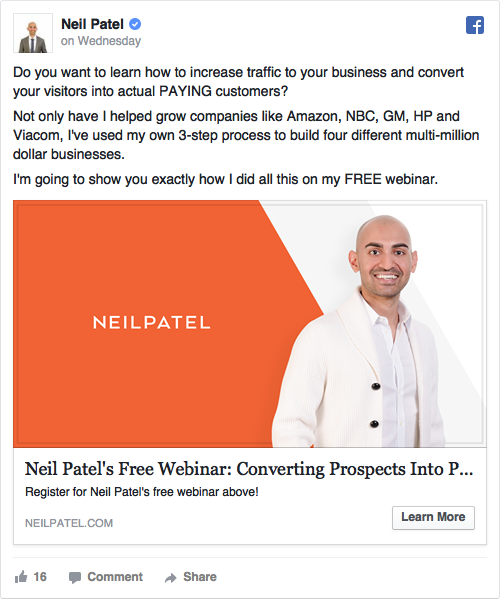
I use this strategy all of the time.
It’s a great way to offer tons of value to new people without over-selling in the beginning stages of their journey.
If you sell too fast, you risk them opting out quick.
Another great example of a successful middle-of-the-funnel Facebook Ad is from HubSpot:
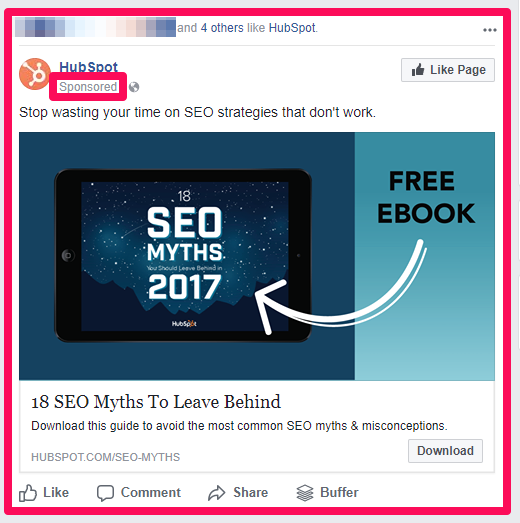
Offering free, value-based content, they can hook in users to give them their email information.
It’s the perfect lead magnet that doesn’t ask the audience for too much but provides tons of value in return.
Brainstorm ideas that will promote engagement with your brand without selling too hard.
Once you’ve done that, it’s time to split test your ideas with ease.
Step 3. Split test your creative to find your perfect value proposition
Thanks to Facebook, A/B testing has never been easier. With ad split testing directly on Facebook, you can quickly test multiple ad variants against the same audience to see which resonates better.
This is one of my favorite tactics when brainstorming new ideas to see how an audience reacts.
When it comes to lookalike audiences for LTV, you know they’ve done research in your space. But they aren’t brand aware.
This means you are skating a thin line between the awareness and consideration stages of the buying process.
While it sounds good, it also makes it difficult to nail down the proper call to action that will resonate with them.
And that’s why split testing is key. With split testing you can find the right value proposition for the audience, leading to massive wins.
Split testing works, too: One company split tested ad types to the same audience, finding that one variant outperformed the other by 336%.
To start split testing on Facebook, head to your Ads Manager and create a new ad set based on your goals, enabling the split test feature:
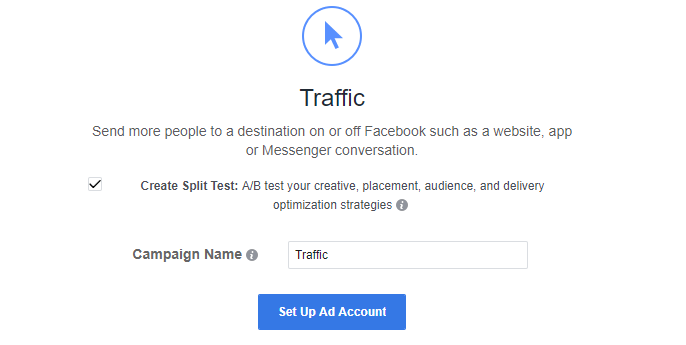
After selecting “Create Split Test,” choose the variable that you want to test:
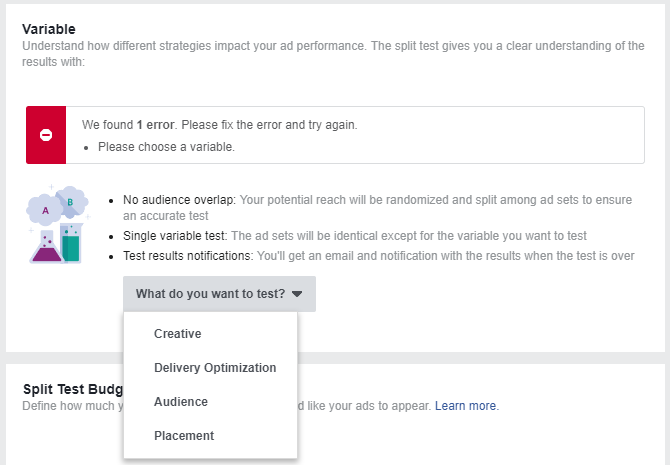
In this case, “Creative” is what you want to select.
On the left-hand side, you should now see the following:
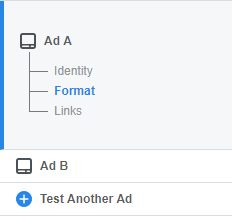
You can begin to create different ad variants for Ad A and Ad B.
If you want, you can even test another ad.
If you have multiple ideas that you want to explore with your new audience, run 2-3 (maximum) at a time. Otherwise, you risk spreading the results too thin.
When running this A/B split test, be sure that you only tweak the creative.
Don’t mess with your audience or placements. Keep the same lifetime value lookalike audience and the same placements, and you will get clear results on how each offer was received.
Run this test until you get a minimum of 250 conversions. That’s the formal guideline from CRO experts at ConversionXL.
Having a minimum of 250 conversions will result in better statistical significance in your tests.
At the end of the test, analyze which ad drove more revenue and profit and proceed with that creative.
Step 4. Remarket non-converting users to close the gaps
Remarketing is one of my most favorite ways to bring back users that didn’t convert.
And while this lookalike lifetime value audience is going to convert great for you, it’s unfortunately not possible to convert everyone.
Trust me. I sure wish it was.
To combat this, remarket the audience you just created, capturing traffic from all non-converting prospects.
In the Ads Manager, you can create a new custom audience based on your lookalike audience.
Depending on how you structured your ads in the lookalike audience campaign, you will choose how you want to create the new audience:
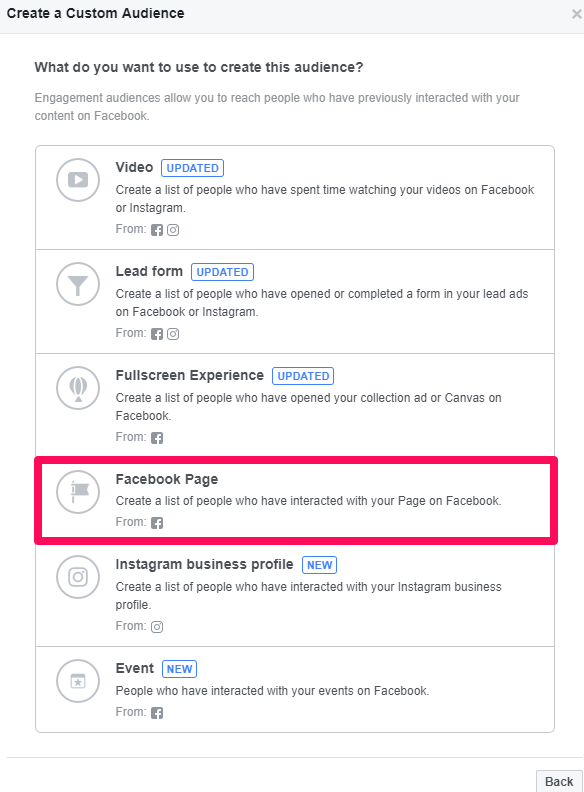
One of my top ways to remarket on Facebook is by targeting people who engaged with my Facebook Ads in the past few days.
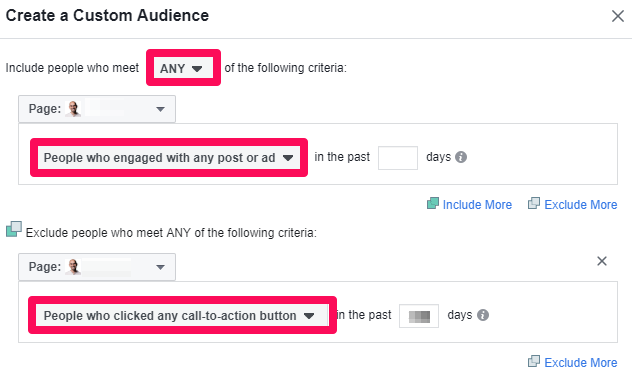
I then exclude anyone who interacted with my CTA button to weed out potential converters.
If you want, you can also create a secondary remarketing list of just people who engaged with your call-to-action button but didn’t convert.
These two remarketing options can go a long way in regaining lost traffic and potential conversions.
After you create those, you have just created a fullscale funnel-optimized lifetime value audience.
You can’t go wrong with this setup, and you’ll be driving conversions faster than you thought possible.
By targeting for LTV, you are ensuring that your new lookalike audience is primed and ready to convert.
Warming them up with split testing will help you narrow down your value proposition and find the right creative elements that appeal to users.
Then, close the gaps with remarketing to ensure you get the most bang for your buck.
Conclusion
Facebook is the biggest social media platform in the world.
And it packs amazing features to reach your target audience.
But even so, missing your audience is still relatively “easy” to do.
Most small businesses report having this problem of “missing their targets.”
And I’ve had the same thing happen to me: wasting advertising money on audiences that don’t convert.
But I’ve found a surefire way to drive sales on Facebook from all of that testing:
Customer lifetime value audiences.
Lifetime value is the most important metric there is. It can inform acquisition and all of your advertising spend.
Try creating this customer lifetime value audience on Facebook to capture the most interested users and drive your profits through the roof.
Set up your new lookalike audience with the lifetime value feature on Facebook. This will help you target customers most like your top spenders for increased revenue.
Next, create the most compelling ads and split test them for better performance.
What audiences have you tried and found success with on Facebook?