Sign In













On most sites, over 90% of visitors leave without converting.
That’s an estimate for all traffic to your site.
As bad as that might sound, the numbers are even worse for first-time visitors. You can expect that only 2% of your site’s visitors will convert on their first visit.
Regardless of what your goals are for your website, these statistics are a bit depressing.
It might be enough to lead you to despair. After all, if you don’t do anything to bring these visitors back, many of them will never return.
But that’s only if you don’t take any further action. Thankfully, you can take matters into your own hands to get conversions from these once-lost visitors.
That’s where remarketing comes in.
Remarketing is one of the best ways to avoid losing potential customers.
When you do it correctly, it can be a great way to bring users back to your site and increase the percentage of your visitors who become customers or clients.
But much like any other channel, creating an effective remarketing campaign requires careful planning and a strong understanding of your target audience.
Google Analytics has long been one of the most important places to find data to help you understand your audience. And now, Google offers even more help.
The new Custom Audiences Report in Google Analytics gives you access to in-depth information on how users respond to your campaigns and help you create even more effective remarketing ads.
If you aren’t yet using it for your remarketing, now is the time to try it out. In this post, I’ll teach you how you can use your audience data to improve your remarketing efforts.
But first, you need a basic understanding of what this report is. Let’s start there.
What is the new audiences report?
If you’re familiar with Google Analytics, your first thought may be that an “audience” report is nothing new.
But it’s important to note that this new feature refers to a completely different set of data than the standard “Audience Overview” report.
If you have access to this report, you may have seen the following announcement after logging into your account over the past few weeks.
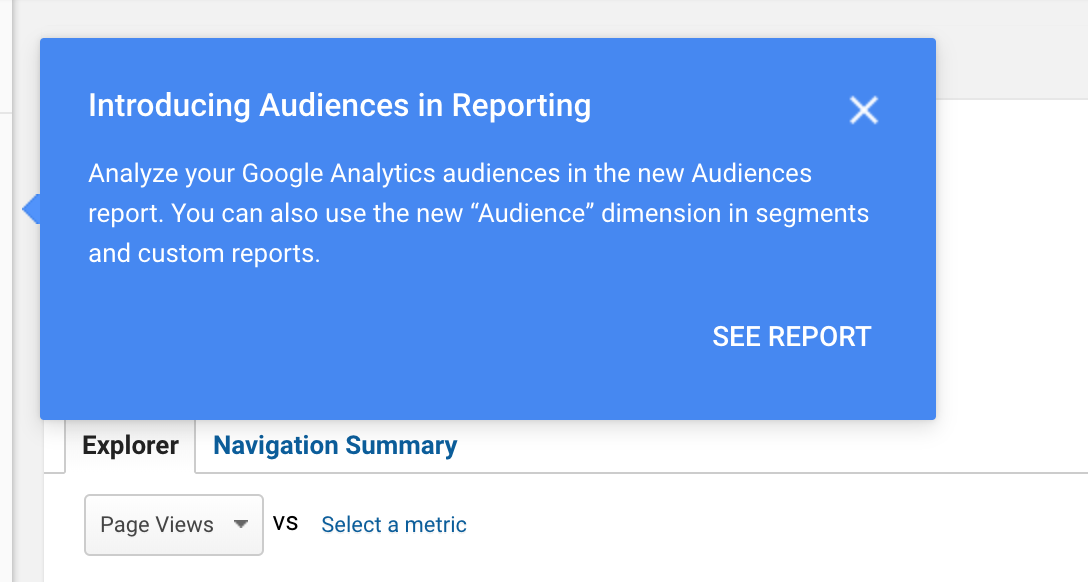
If you see this notification, you can click “See Report” to access the new audiences report.
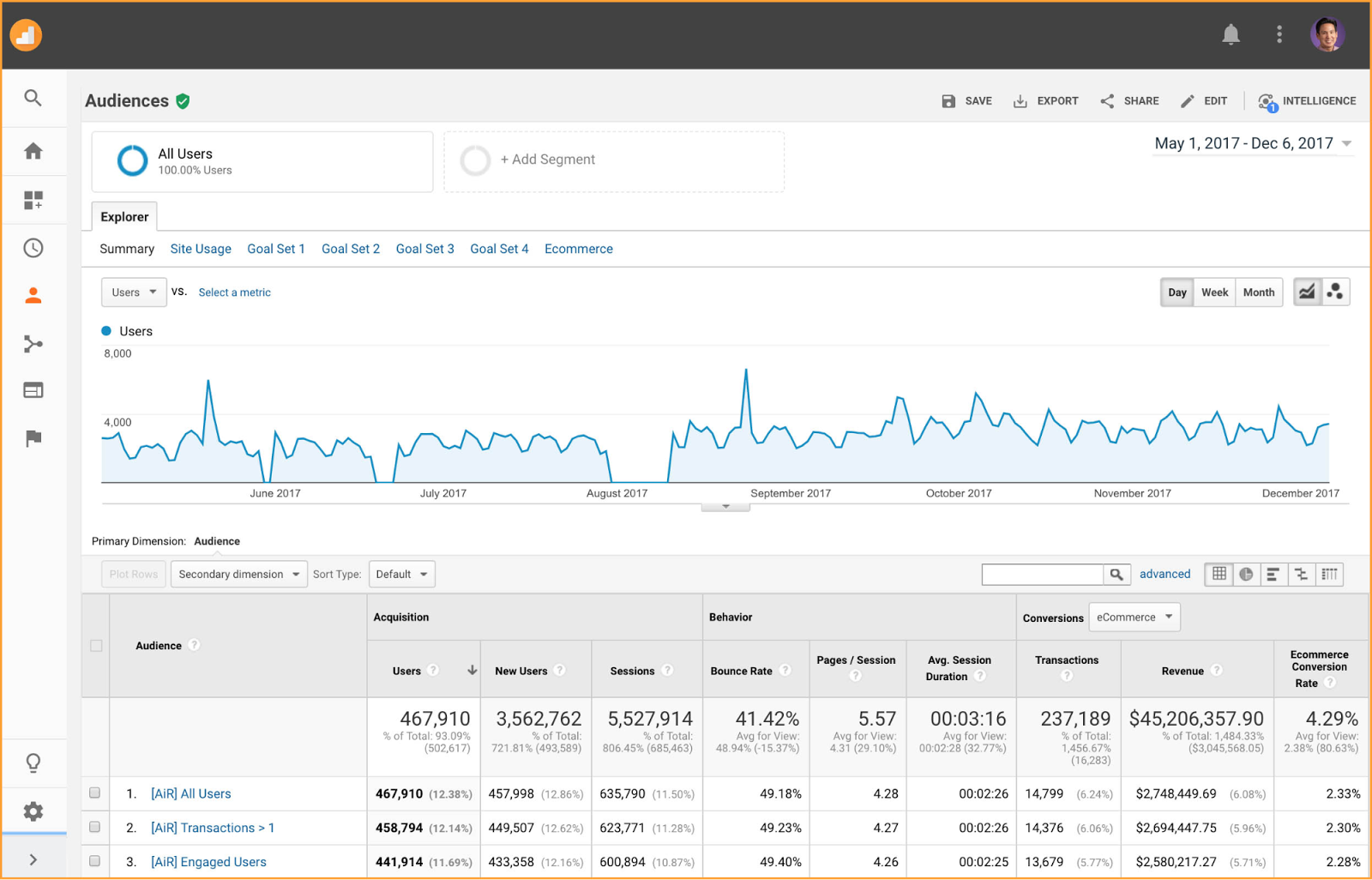
If you don’t see this notification, you can access your data manually by selecting “Audiences” from the “Audience” tab.
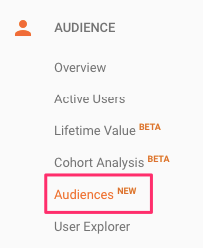
If this is the first time you’re accessing the report, you’ll see another banner that provides more detail than the first.
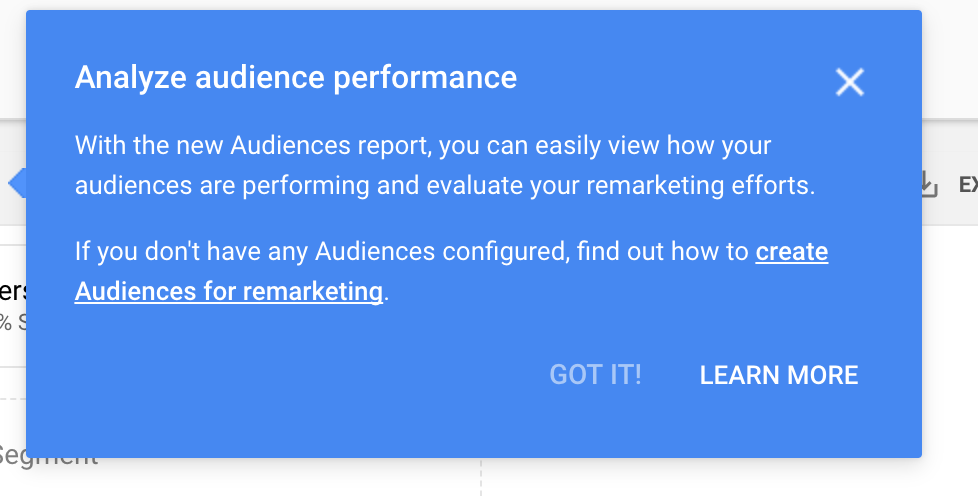
As this pop-up explains, Google designed the new audiences report to help you “easily view how your audiences are performing and evaluate your remarketing efforts.”
However, this report will only show data if you’ve enabled demographics and interests reports and have audiences configured in your Analytics account.
So if you haven’t yet created audiences, you’ll need to do so before you can gain any value from this new report.
Fortunately, the process is fairly straightforward. In fact, you should be doing this anyway if you’re running any marketing campaigns with Google’s ad network.
How to create an audience in Google Analytics
First, it’s important to understand what the term “audience” means in the context of Google’s advertising platform.
Fortunately, it’s not all that complicated.
An audience is a group of users that you want Google Analytics to group together based on any combination of attributes that is meaningful to your business.
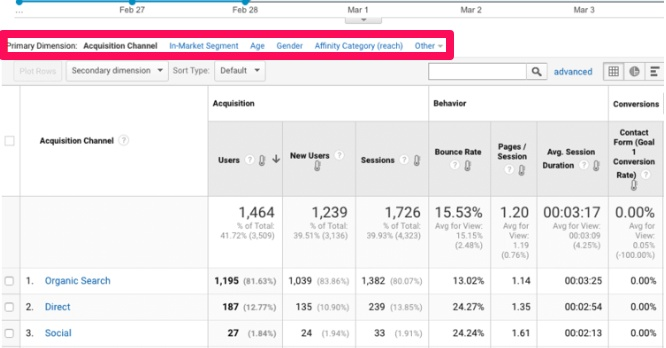
These attributes can be as broad or as specific as you’d like them to be.
These attributes allow advertisers to deliver custom ads in real time.
For example, if you want to create an ad campaign that targets all of your customers, you might create an audience that includes all of the users who have ever made a purchase on your site.
This would necessitate a fairly general ad, but it would give you a large pool of potential viewers.
Now, let’s say that you want to create an ad campaign with the goal of earning new customers.
In this case, you might want to create an audience segment with users who have downloaded a whitepaper on your site but have not yet made a purchase.
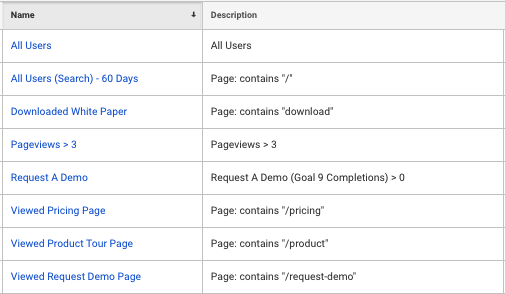
This way, you can focus your efforts on the visitors who don’t yet think that buying from your site is worth it. This will allow you to tailor your campaign toward convincing them.
Regardless of the exact qualifications you choose, this is an excellent way to focus your ads on the exact audience you want to reach.
And, if you’re ready to get started, you can create a new audience in either Analytics or AdWords.
In this article, we’ll focus on how audience creation works in Google Analytics.
But once you’ve created an audience, you can activate it on AdWords, too, as long as you log into the same Google account.
To get started, navigate to the “Admin” page of your Google Analytics property. Then, select “Audience Definitions” and then “Audiences.”
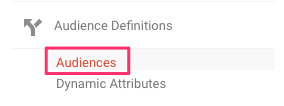
Next, click “+New Audience.” From here, you can choose from preconfigured audience types or create your own new audience definition.
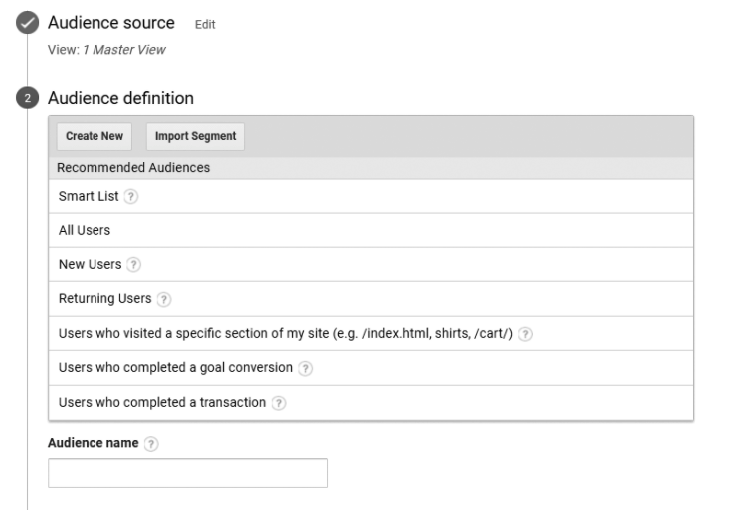
Google’s recommended audiences make it easy to create audiences based on criteria that many marketers find important. Here are some of Google’s recommendations:
- Smart List: Smart Lists use machine learning to determine which users are most likely to convert in subsequent sessions. It uses signals like location, referrer, session duration, and page depth to compile this list.
- All Users: This type of audience includes all of your visitors with necessary advertising cookies.
- New Users: This includes users who have only conducted one session on your site.
- Returning Users: These users have visited your site more than once.
- Users who visited a specific section of my site: These audiences include users who’ve visited specific pages or directories within your site.
- Users who completed a goal conversion: These users have completed a goal on your site.
- Users who completed a transaction: This type of audience is only available for e-commerce site owners. It includes all users who have made a purchase from your site.
If none of these criteria meet your needs, you can also create a new custom audience with the audience builder.
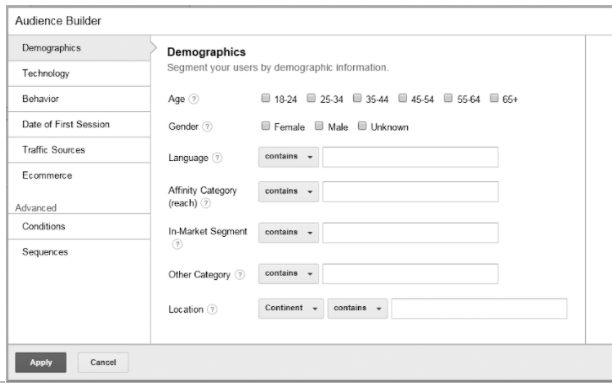
This option can take a bit longer than using one of Google’s preconfigured definitions, but it gives you much more control over which users you include in your audience.
You can determine who your audience is based on demographic information, device, behavior, date of first session, traffic sources, e-commerce actions, and more.
The criteria you use will depend on what your goals are, but it’s important to consider that you would typically want to use audiences for the purpose of remarketing.
And most remarketing campaigns center on users who visited your site but did not take the action you wanted them to take.
So whether you want to reach users who visited a specific page without converting or users who never made it to a conversion page in the first place, your audiences should reflect that goal.
Once you’ve created an audience, Analytics will populate it with up to 30 days of data and make your audiences report available within 24-48 hours.
How to use the new audiences report for your remarketing campaigns
The audiences report will give you insight into specific sets of your site’s visitors.
And that’s great!
But it’s only useful if you know what to do with that data.
So first, it’s important to understand what you can expect to learn from this report.
To put it simply, it allows you to dig into data regarding each audience’s acquisition, behavior, and conversions.
This way, you’ll be able to see how well each audience performs in comparison to other audiences and your site’s overall traffic.
And the way you respond to this data will depend on how well the specific audience you’re looking at does at moving your business closer to your goals.
Let’s look at some different scenarios of what your data can tell you about your audiences and how you can respond to that information.
Scenario 1: An audience performs well
If an audience is performing well in terms of engagement and conversions, this indicates that they’re a valuable set of users for your site.
In this case, you’ll want to allocate more of your budget to ads for those users. Or, if you aren’t yet running ads for these users, you’ll want to create ads for them.
For example, Marketo just took this approach.
Their ads were already performing well.
But, later, they defined their audience further in Google Analytics to push personalized ads through AdWords.
They saw 200% more conversions for B2C and 150% more for B2B by segmenting between two groups to create personalized ads.
If you want to see numbers like this, then follow Marketo’s example.
If an audience is performing well, don’t settle for “good enough.” When you discover that a particular audience is yielding results, it’s time to double down on your efforts to convert them.
Upping your advertising budget for them isn’t a blind risk. It’s a reasonable investment in light of real data.
You also may want to consider expanding the number of sites on which you advertise to those users to maximize your chances of bringing them back to convert.
Unfortunately, not all audiences will perform well.
Let’s look at what you can do when an audience isn’t yielding the results you want.
Scenario 2: An audience performs poorly
On the flip side, if an audience shows low engagement or conversions, this indicates that it isn’t a high-performing set of users for your site.
When you discover this, how should you respond?
You’ll either want to scale back on any ads that target this audience or spend some time editing the audience.
GarentaDAY, an auto leasing website in Turkey, developed a remarketing strategy to push special discounts to previous site visitors who did not convert.
GarentaDAY segmented their audiences by location and keyword terms for their remarketing lists for search ads (RLSA).
The edits they made to their audience paid off. 30% of their revenue came from the remarketing ad campaigns.
If you decide to edit an audience, it’s important to note that one of the most common issues among remarketing campaigns is that the targeting is too broad.
For example, let’s say that you created an audience that targets all of your site’s visitors over the previous month.
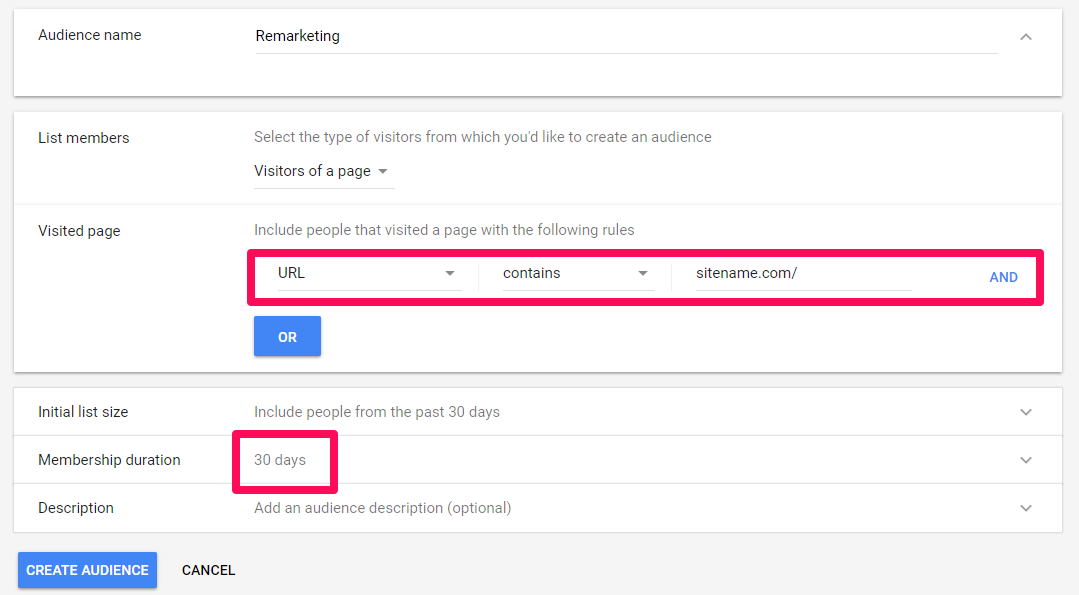
You might think that this is an effective way to target users before they forget your brand altogether.
But what if a large chunk of them found one blog post or piece of content via search, read it, and left?
These users likely have no intention of becoming a customer so targeting them with ads is a waste of your budget.
But revising this audience to only include users who visited a product page could eliminate the issue — and have a major impact on the overall performance of your ads.
Scenario 3: An audience is attracting users who don’t convert
Some audiences are clearly high or low performers.
But in many cases, it’s not quite that black and white.
For example, let’s say that you have a campaign that’s targeting a specific audience. This campaign is effective in attracting site traffic, but it doesn’t lead to many conversions.
In this case, you shouldn’t write off that audience entirely.
After all, those users are showing interest in what they’re seeing in your ads. They just aren’t following through on that interest.
And it’s up to you to figure out why that is.
Dig into your campaigns and look for any disconnects between your ads and the content they direct your audience to.
For example, you can look at which goals in Google Analytics are converting your audience more and then develop new ad campaigns and landing pages around those goals.
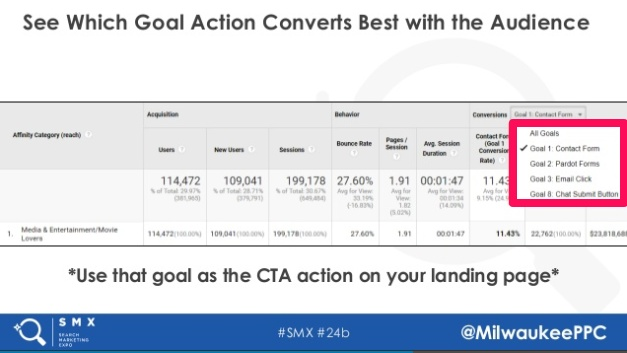
If your campaigns don’t provide this level of convenience and simplicity, you could be missing out on conversions simply because users don’t want to spend time navigating your site.
Identifying and remedying any disconnects could be the solution. It might be exactly what you need to help your high traffic numbers translate into results for your business.
Scenario 4: An audience is attracting low numbers but high conversions
On the flip side, some of your audiences may turn out to have high conversion rates but low overall numbers.
This can be extremely frustrating because it indicates that you’ve found a great set of users, but there aren’t very many of them.
Fortunately, you don’t have to limit your ad targeting to just your site’s visitors. You can also use your high-converting audiences as a starting point for creating similar audiences.
If you’re unfamiliar with Google’s similar audiences, this feature helps you expand campaign targeting by including users with characteristics similar to a site’s visitors.
Once you’ve identified an audience that performs well for your business, you can use this feature to target other users who haven’t yet visited your site.
This way, you can expand your campaign’s overall reach. And, as you do so, you can have confidence that the new set of users you’re reaching has the potential for a high conversion rate.
Conclusion
Bringing new users to your site is challenging.
So, when those users leave without taking action, it can be extremely frustrating.
Fortunately, remarketing makes it possible to bring them back to your site and encourage them to convert.
But achieving that goal requires strategic targeting.
You need to make sure that you’re reaching the visitors who are likely to become customers and that you’re communicating with them in a way that will make them want to return.
And with the new audiences report from Google Analytics, you can access the data you need to make informed decisions about your targeting and your campaigns.
The custom audiences report offers you detailed data about how your site visitors are responding to your conversion efforts on your site.
By digging into the behaviors that each audience takes on your site, you can see if they are performing well for your business.
Then, you can use that insight to decide how to improve your results moving forward.
You may find that you should ramp up your campaigns, adjust your targeting, alter your ads, or experiment with similar audiences. Each audience will likely necessitate that you take a different course of action.
And that’s precisely why these reports are so powerful. They’ll show you how you should respond to the audiences you set up so that your marketing efforts to them will be effective.
And if you use multiple custom audiences, you may find that you need to combine all of these actions.
But with each improvement you make, you’ll become more successful at turning lost visitors into customers for your company.
How will you use Google’s new Custom Audience Report to help you with your remarketing campaigns?