Sign In











If you’ve ever done SEO, you know how good it feels to see your rankings go up.
You put a ton of hard work into moving up in the SERPs and it finally paid off.
But then the unexpected happens. Your rankings drop.
Few things in SEO are more discouraging than a drop in the rankings. It makes you feel like everything you did was useless.
You wonder what went wrong or if you made a mistake. You beat yourself up for not doing it right.
You’re back to square one again, and you have to start all over.
Or do you?
In my experience, that’s not always the case.
My rankings have dropped more times than I can count. At first, I panicked.
As I learned more, I found out that it’s not the end of the world if you go down a position or two. It’s obviously not ideal, but there’s a lot you can do to fix it.
That’s what I’m going to show you today. Even if your rankings are where you want them to be, you need to be aware of how to bring them back up when they drop (because they will).
Analyze the drop
Before you take action to raise your rankings, you need to track your rankings, ideally on a daily basis so you can see if they are increasing or decreasing.
The reason you want to track your rankings on a daily basis is that Google makes 3,200 algorithm changes per year, which is a bit more than 8 algorithm changes per day.
You don’t really have a choice but to track your rankings daily.
So how do you do that?
First, you’ll want to head to the Ubersuggest dashboard and click on “Add Your First Project.”
It’s as simple as adding in your URL.

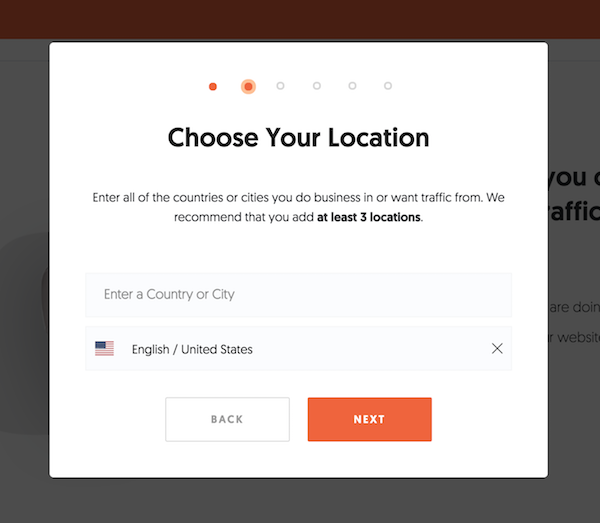
Then select the locations you do business in and want traffic from.
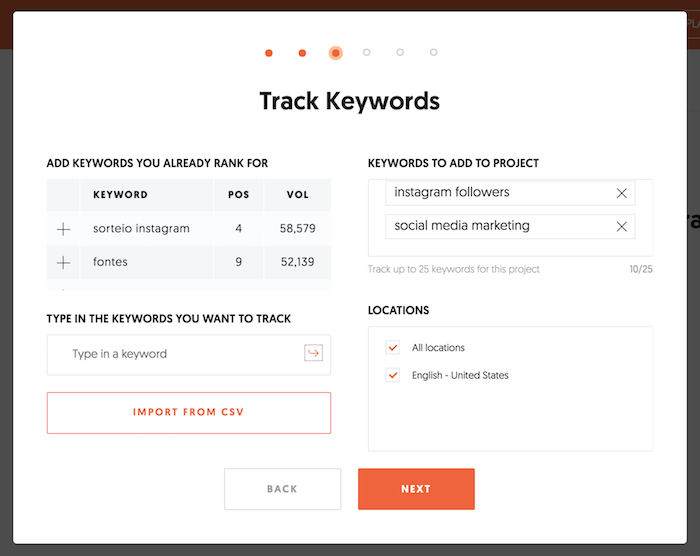
Then add in the keywords you currently rank for or want to go after.
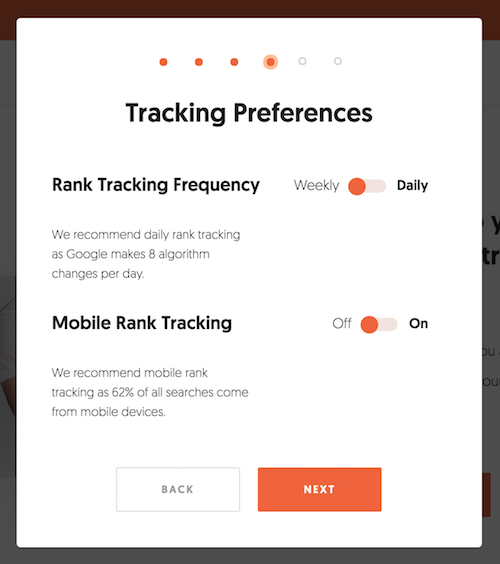
And, of course, set up your traffic preferences. Make sure you select “daily” rank tracking and you turn on mobile rank tracking.
And then you’ll be good to go.
You will be notified via email when your rankings go down (or up) as there is no way you are going to have the time to manually check every day.
Or when you log into your Ubersuggest dashboard you’ll see an updated view of your site:
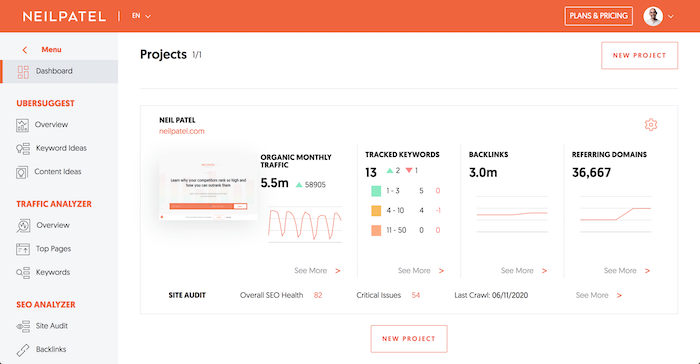
And then when you drill down into your rankings you’ll see a report of what is increasing or decreasing.
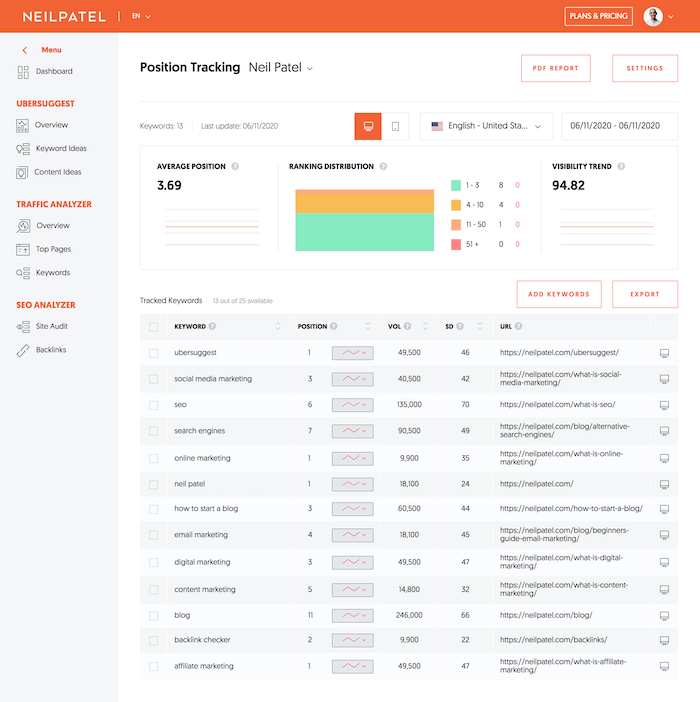
Now when looking at your rankings it is normal for them to fluctuate a few spots here or there… but if you see all of your rankings all of a sudden drop, then you know you need to do something.
Did you get penalized?
In most cases, your site has not been penalized and you don’t need to worry about this.
If you didn’t do anything fishy like buying links, you don’t really need to worry about a penalty.
If you are unsure, read through this list and ask yourself if your site is guilty of any of these SEO sins. If so, identify the problems and take steps to fix them.
Even if you haven’t done anything on that list, you could still have gotten a penalty. Google’s algorithms are updated frequently and they’re incredibly complex.
They take hundreds of factors into account when considering ranking. One day, your site might not deserve a penalty, and the next, it might.
It’s important to understand the types of penalties: manual and algorithmic.
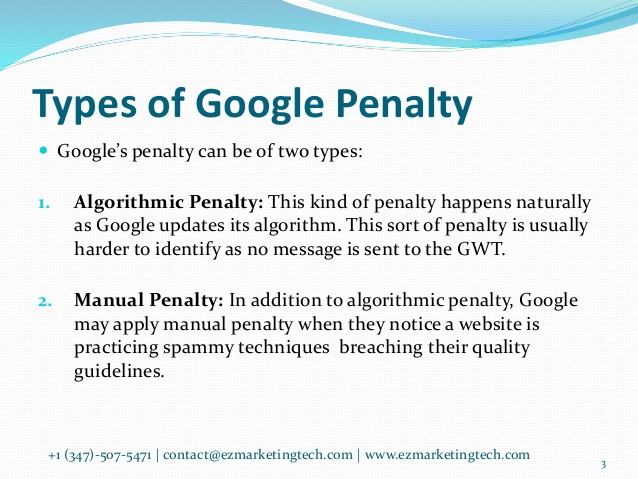
Source: Slideshare.net
Manual penalties are given out by Google’s webspam team when they get alerted of suspicious activity.
This could be the result of having unnatural links, or someone could have filed a spam report against you.
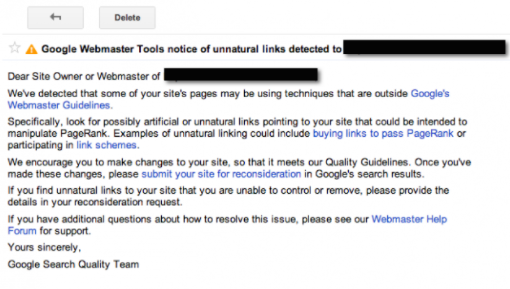
If you’ve received a manual penalty, you should have gotten a notification in Google Webmaster Tools. Here’s an example of a message about unnatural links:
The other type of penalty is an algorithmic penalty.
These penalties are harder to track because there’s no definitive way of knowing you received one.
To determine if you’ve gotten an algorithmic penalty, you have to understand how Google’s algorithm work.
If you find that you’re doing something the algorithm doesn’t like, there’s a good chance you’ve gotten a penalty. But you also have to think about new penalties.
If your rankings dropped randomly, check Moz’s handy directory of Google’s algorithm updates to see if there’s a new one at work.
A new algorithm could be the reason why you’re seeing lower rankings. If that happens, research the algorithm and find out what it’s penalizing.
One cool way to keep track of new penalties (and a bunch of other Google-related stuff) is to follow Gary Illyes, John Mueller, and Google Webmasters on Twitter.
Gary and John, in particular, give out a ton of awesome advice, and you can often find them talking with other Twitter users.
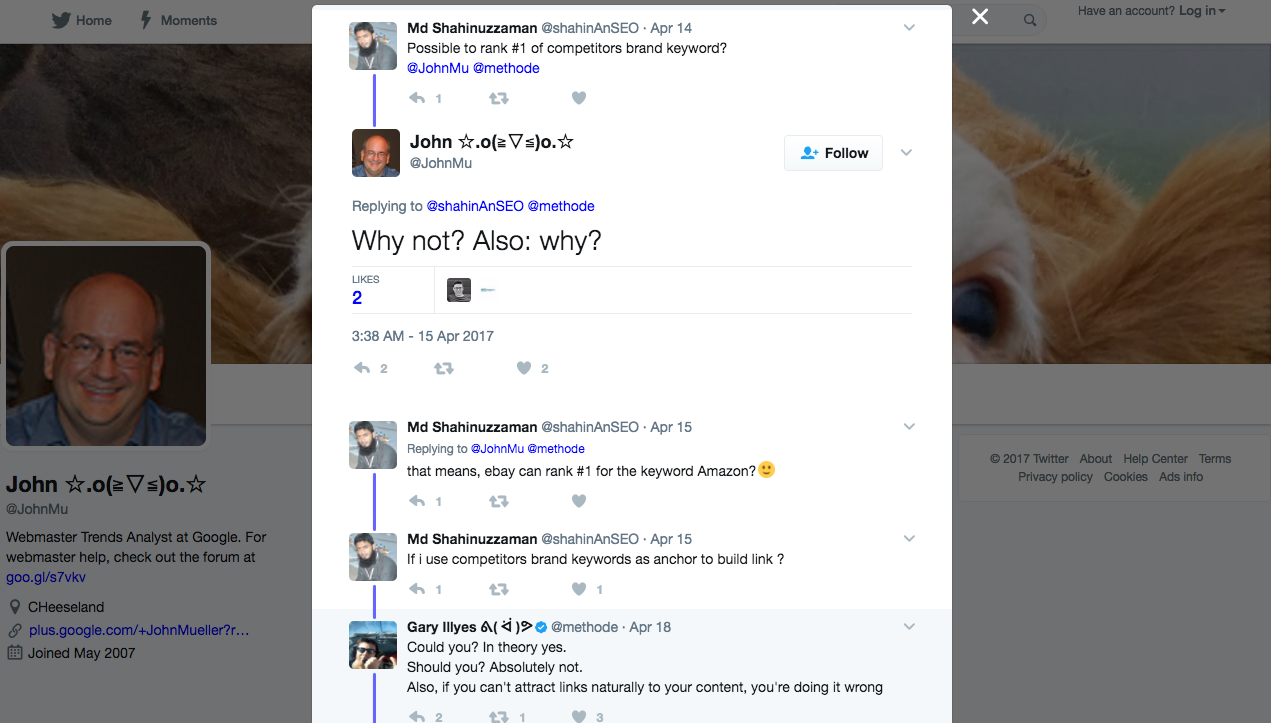
You can even ask them a question directly and get it answered… you may not get a response, but it is worth a shot.
Do you have link problems?
This is a big one.
Think of links as the currency of SEO. It’s essentially how you “gain” authority.
So it’s no surprise that a strong link profile is correlated with high rankings.
The flipside is that a weak link profile is correlated with low rankings.
I spend lots of time working with clients on SEO, and I’ve seen lots of sites that have numerous link problems.
Usually, the business isn’t aware.
That’s because weak links are the silent killer of SEO. That’s why you need to make sure your link profile is robust.
First, conduct a link audit of your site. Here’s a step-by-step guide on how to do that.
For the short version, use a backlink analysis tool like SEMrush Backlink Checker to see where your bad links are.
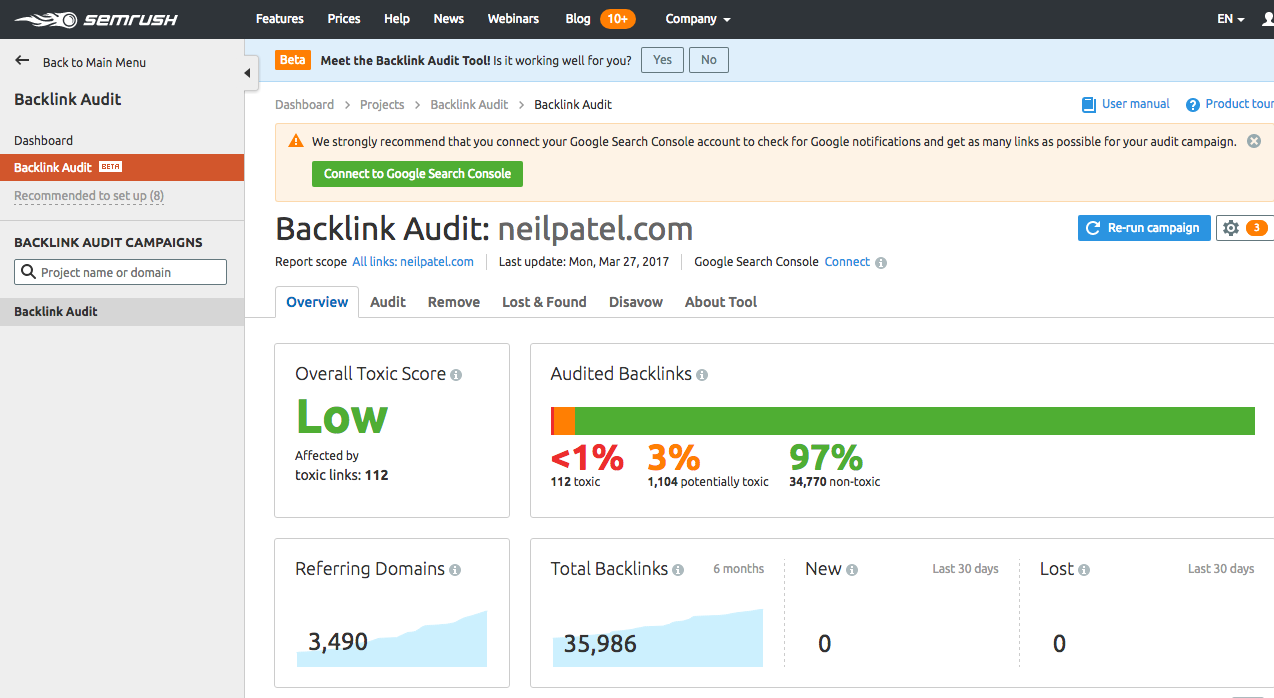
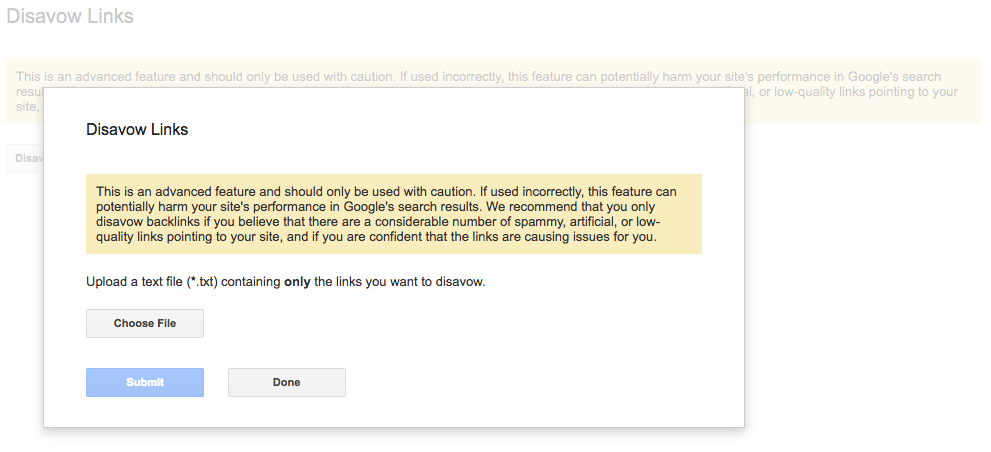
When you find bad links, contact those sites and nicely ask them to remove the link. If that doesn’t work, use Google’s Disavow tool as a last resort.
 However, I’ve found that about 90% of the time, conducting a backlink audit will help you find bad links.
But there’s a problem here. Often, the reasons behind link problems aren’t so obvious.
If your link profile looks okay after an audit, there could still be problems. Here are a few of the issues your link profile could be facing.
Losing links
Did you know you can lose links? Both internal and external links?
It could be the cause of your ranking drop as well.
Yep, you can lose internal links even if it’s to content you already own.
Let’s talk about those first.
If you often relaunch, rebrand, or redesign your site, you may lose some links along the way.
Why does this happen?
It has to do with redirects and transitioning your site over smoothly.
Let’s talk about site transitions first. If you deleted an old blog post, then links to that post aren’t going to work. In turn, this will weaken the internal linking structure of your site and compromise your SEO.
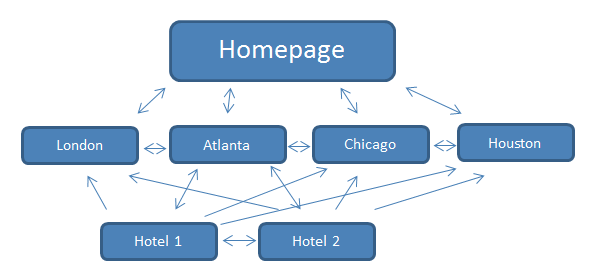
You’ll have one less link, which is removing a part of your internal linking network.
This isn’t optimal because it means two things:
- You’ll have to fix the link
- You’ll have less content on your site to link to. That’s why I recommend not deleting content unless you absolutely have to. You can always update it.
That’s just one example of a lost link.
Another reason you could lose an internal link is a faulty redirect.
This often happens with 301 redirects. I’ve talked about 301s before, but there’s a unique issue you need to be aware of.
Because a 301 is called a permanent redirect, lots of people assume that the redirect will always work.
But it doesn’t.
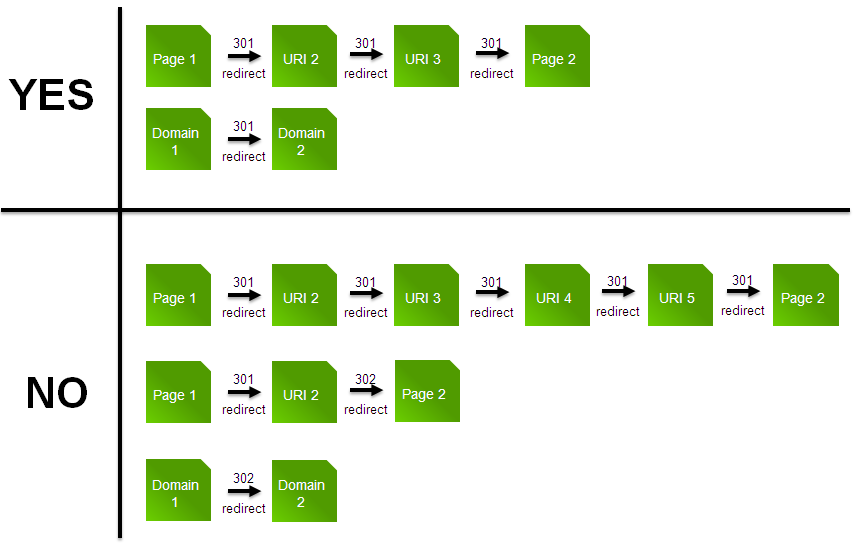
Here’s precisely how a 301 redirect works:
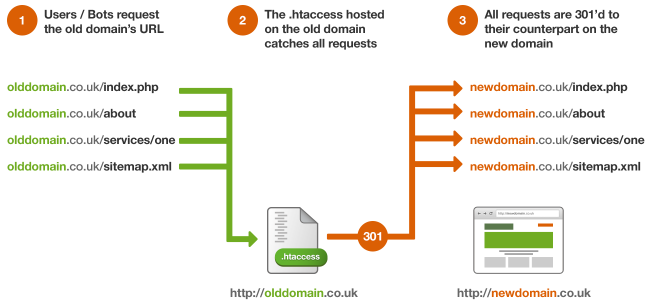
If you just set up a new site, you can 301 from the old domain to the new one without a hitch. The issue is when you revamp your site more than once.
That’s because redirects from older versions of a site are rarely passed on to newer ones.
On top of that, if you get a new domain and an older domain expires, it could cause a significant loss in traffic because the 301s will no longer work.
It’s messy.
If you discover a bad 301 giving you problems, you need to fix that.
First, you need to find the target links your 301s are trying to go to.
If those links are dead, you’ll most likely need to remove the link.
You could also put the old content back up or create new content to keep the link on your page. This is a good idea if the page in question gets a lot of traffic.
You need to do what’s best for your visitors. If they’ll miss out on great, comprehensive content, you should make sure that content is still on your site.
You should also check for broken links. You can use a tool like deadlinkchecker.com to do this:
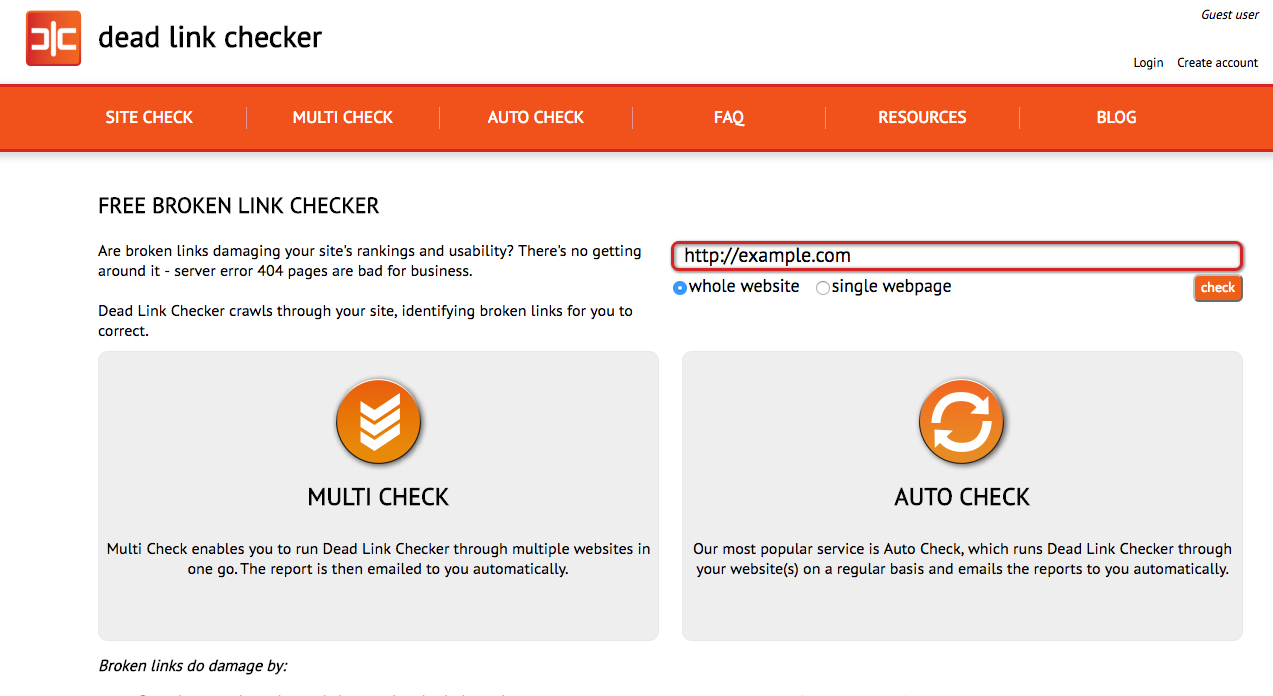
Ideally, you want to see no errors:

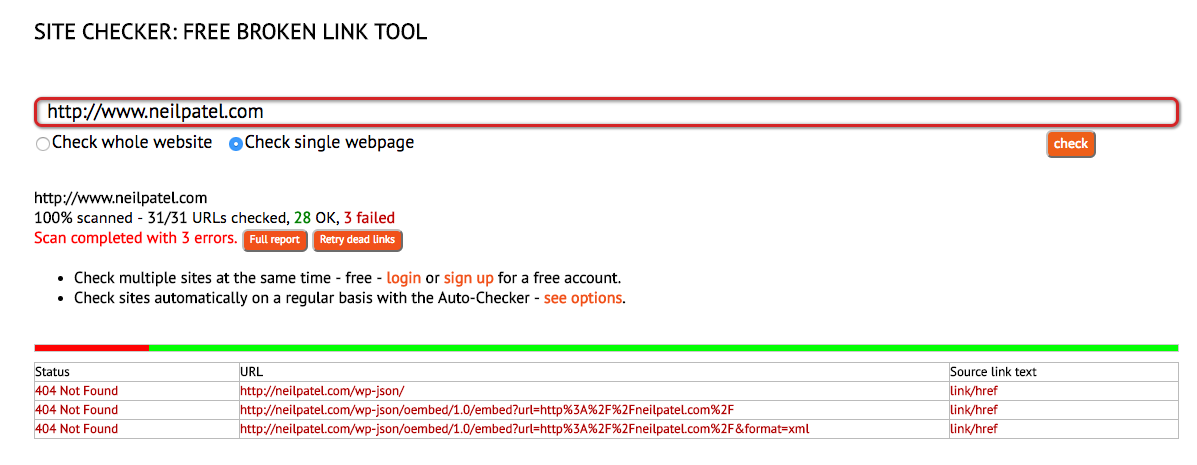
But if you do see errors, you’ll be able to see the URLs that aren’t behaving correctly:
But what about outbound links? If you find an outbound link that no longer works, just remove it and replace it by linking to another authority site.
Finally, let’s talk about backlinks you’ve gotten from other sites.
Go here and type in your URL.
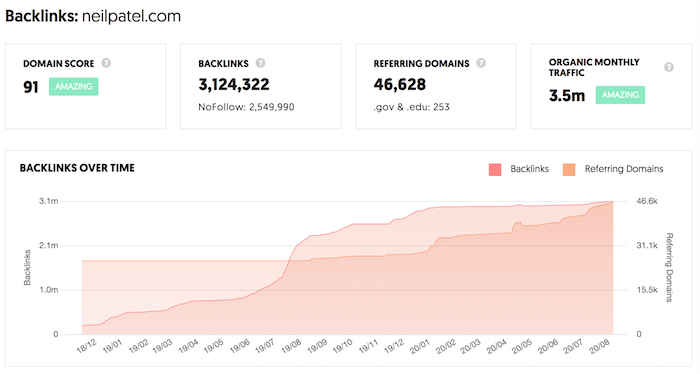
If you see your link chart going up and to the right, you are fine. If it is going down, then we have to fix it. For example, using Ubersuggest you can see which sites don’t link to your anymore.
And for those sites, you can use a template like this one to get those links back:
Hi [Name of site owner],
I hope you’re doing well!
You linked to my site a while back, and I want to thank you for that. However, it looks like the link is actually gone.
The link appeared in your [piece of content/page here], but it seems that it’s not there anymore.
Here’s the page on my site you linked to: [Link URL here]
If you could put the link back up, I’d really appreciate it. I’m a big fan of your site, and it’d be my pleasure to return the favor if I can.
Sincerely,
[Your name]
Most people will ignore you, but a percentage of the people you email will link back.
Polish up your site
If all else fails, you might need to spend some time improving your site.
I’m talking about design, user experience, and speed. Each of these is integral to a site that performs and ranks well.
I’ll go over each category briefly:
Design
Having a mobile-friendly design is important as there are more searches on mobile devices using Google than there are for desktop.
If you’re not considering mobile users first, you need to start doing that.
Having a mobile-optimized site isn’t as simple as making sure your site is responsive. That’s definitely important, and you should do that, but it’s not enough by itself.
Think about making all of your content mobile-friendly.
There’s one big reason you should focus on this. Google has a mobile-first index. That alone should be more than enough to persuade you to focus on mobile-first design.
You might want to read my article on mobile usability for more information on this.
User experience (UX)
This is another reason why a responsive design is so important.
Your mobile users should have a great experience that’s designed for mobile devices. Similarly, your desktop users should have a great experience that’s designed for desktops.
If your UX is bad either way, you will lose visitors.
If you take a look at the most popular sites in your niche, you’ll notice that 9 times out of 10, they’ll have great UX.
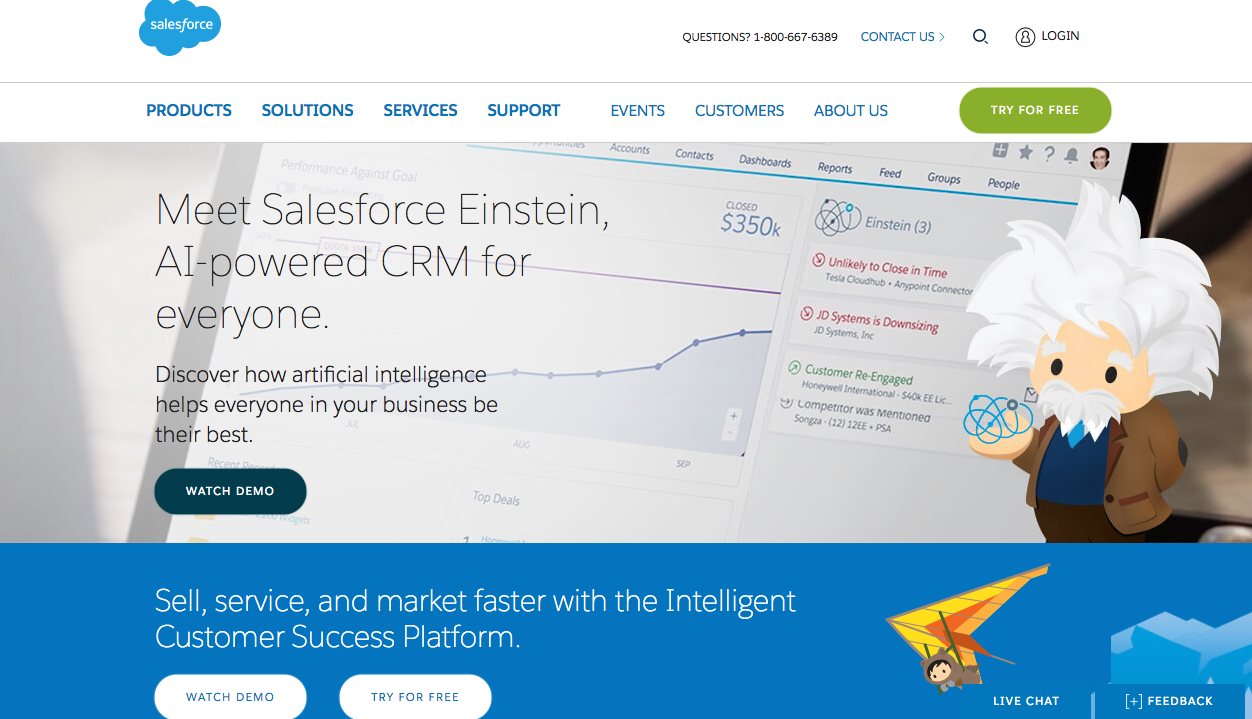
Say you’re in SaaS. Without a doubt, Salesforce is one of the biggest SaaS players in the niche.
And sure enough, their desktop and mobile UX is fantastic.
Desktop:
Mobile:

This is what you should strive for when polishing your own site.
Speed
Search engines (and people) love fast-loading pages. In fact, 47% of customers expect a page to load in 2 seconds or less.
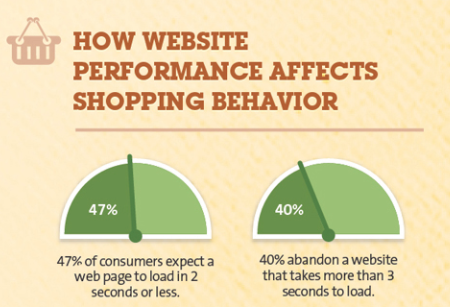
So if your site speed is longer than 2 seconds, you could lose traffic.
Yikes.
Making your site faster is a long-term strategy. You have to monitor your site and make sure nothing’s dragging it down.
Start by adding compression.
Next, make sure your server has adequate speed. It should be no longer than 200 milliseconds.
You can test your site speed by using Ubersuggest’s “Site Audit” feature. Type in your URL and click “Search.”

From there, click “Site Audit” in the left sidebar and scroll down to “Site Speed.” Here’s what you’ll see:
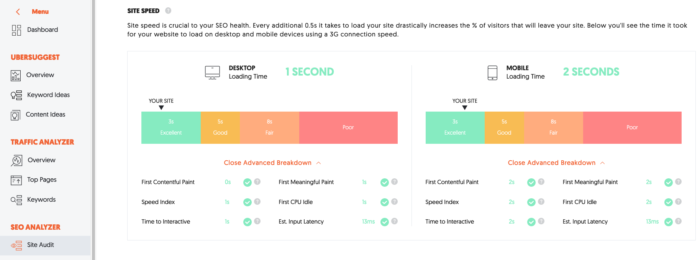
There are tons of factors that can cause slow site speed, so the best way to prevent slowness is to keep your site as lightweight as possible. And Ubersuggest will break down how to do that and what to fix.
As a rule of thumb, if you have anything unnecessary on your site, remove it so your speed is the best it can be.
Don’t forget about content
Through Ubersuggest we track millions of popular sites around the world to get better data insights on algorithm changes.
We know for certain that 641 sites we track are updating old content on a daily basis.
Can you guess how many of them saw a search traffic dip of 10% or more from the last algorithm update?
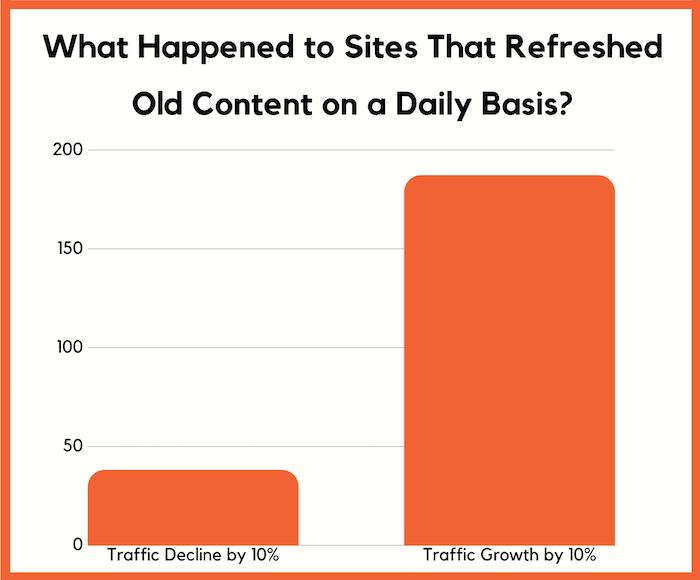
Only 38! That’s 5.92%, which is extremely low.
What’s crazy, though, is that 187 sites saw an increase in their search traffic of 10% or more.
So make sure you are keeping your old content up to date. Because why would Google want to rank old, stale content, when they can rank something fresh and useful for people?
Another strategy I love to deploy is to expand my content that is already ranking well.
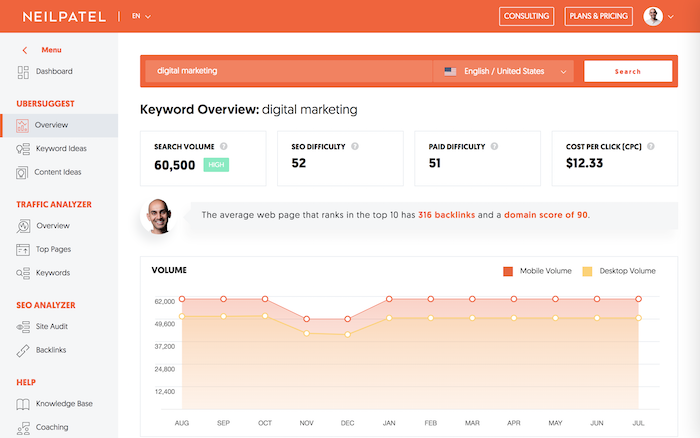
For example, lets say you rank for the term “digital marketing”.
You’ll want to head to Ubersuggest and type in the phrase “digital marketing”. You’ll see a report that looks like this:
From there in the left navigation bar, click on “keyword ideas”.
You should now see a report that looks like:
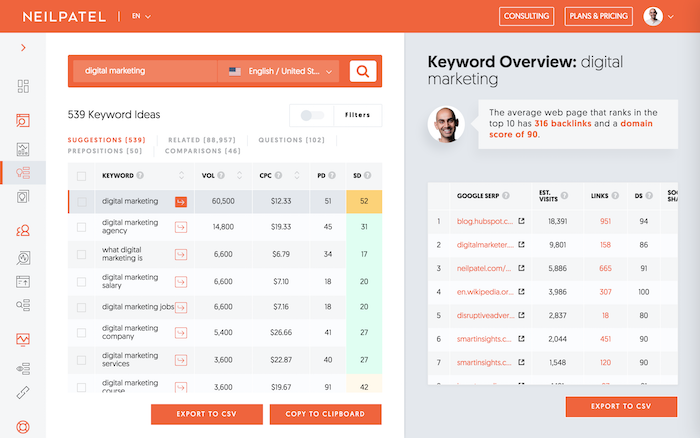
This will give you a list of keywords that are similar, longer tail terms that also are searched frequently.
If you rank for the main term, it is easy to also rank for the longer tail terms. So make sure you add the relevant ones to your content.
It may seem tedious, but go through 100s if not 1000s of keywords in the keyword ideas report as it will allow you to get quick traffic gains.
When adding in the new keywords into your content, don’t just stuff them in there. It has to flow naturally and make sense for your website visitor.
And if you can’t make it make sense for a particular keyword, don’t do it… put the user first. Remember you are writing for humans, not Google.
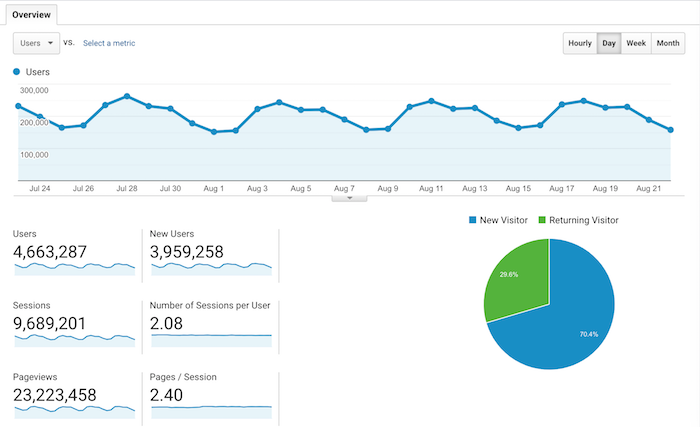
Now the strategy I broke down here may seem simple and silly, but it’s one of the big reasons on why I am getting roughly 9 million visitors a month.
Conclusion
Going down a position or two in the rankings happens to the best of us.
It’s even happened to me.
If this happens, don’t panic.
Almost every client I’ve had who’s experienced a loss of rankings got really scared when it happened.
You probably felt this way too. But you don’t need to worry.
You can easily bounce back from a ranking drop.
Don’t believe me? Give these strategies a try. These aren’t just little tips. They’re tried-and-true methods that will help you reclaim your spot on Google.
No one deserves to lose ranking when they have an amazing site that users love. What’s more, it’s easy to fix.
Don’t let the initial shock stop you from getting your ranking back.
So, when was the last time your rankings dropped?