 Sign In





Key Takeaways
- With total e-commerce sales expected to reach $8 trillion by 2027, your retail business has a great deal of opportunity to grow.
- According to Capital One, there are tens of millions of online retail stores, which means fierce competition.
- SEO can help your e-commerce website rank higher in search engine results, increasing visitors and conversions.
- Some e-commerce SEO best practices you can introduce include product page optimization, using long-tail keywords, having a simple URL structure, and implementing a link-building strategy.
- 82 percent of marketers say SEO has a positive effect on their marketing performance.
If you sell products and want to reach the broadest possible audience, you need a well-optimized e-commerce website.
Why? Well, the most obvious reason is the rapid growth of e-commerce worldwide, which Statista says will reach $8 trillion by 2027. E-commerce optimization can get you in front of that hungry audience who are ready to buy online.
But first, you need to get visible, and you can do that with SEO for e-commerce.
This piece will explain how to implement SEO for your e-commerce website and attract customers.
Ready to learn more? Awesome! Let’s go.
What Is SEO for E-Commerce?
· A well-designed and optimized website with high-quality content will rank better in search engines like Google, increasing your store’s visibility and driving traffic.
In other words, SEO for e-commerce concentrates on optimizing your site, making getting leads and conversions easier.
However, unlike SEO for content-focused websites, optimizing your online store is more than just adding keywords, writing blog posts, and gaining links. You need to understand how search engines work and what they reward.
That means having a working knowledge of SEO for e-commerce, considering Google’s guidelines, analyzing buyer intent, and implementing it strategically.
Why Does SEO Matter for E-Commerce?
Why is SEO for e-commerce sites important, you ask? Because it can help you achieve your business aims, and I have proof to back this up.
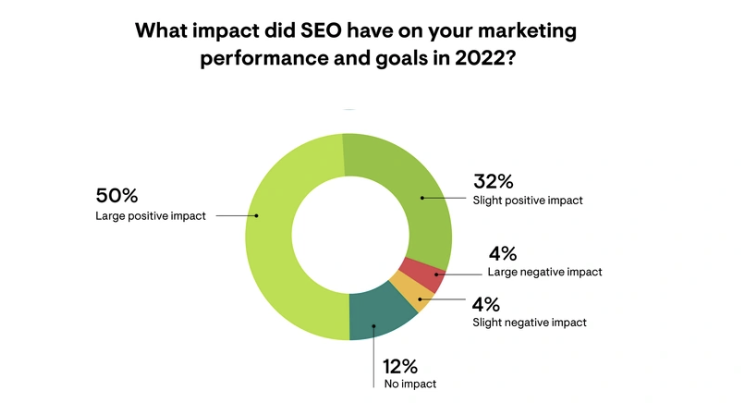
According to the 2023 Impact of SEO & Content Marketing Survey, a whopping 82 percent of marketers believe SEO positively affects their marketing performance and goals and 50 percent say SEO had a significant, positive effect.
I anticipate this will likely increase in the coming years due to the long-term impact of SEO and how cost-effective it is compared with paid search advertising, which provides instant results but is expensive to maintain over extended periods.
You see, the extra visibility SEO gives you in search results is ultra-important because searchers don’t bother looking beyond the first page of Google; Up to 99 percent of searchers stick to page one of the world’s biggest search engine, while the top result snags 27.6 percent of Google traffic.
The bottom line is this: If you’re not ranking high on the search engines, you’re missing out on traffic, leads, and conversions.
E-Commerce SEO Best Practices
E-commerce optimization for online retailers is a complex field. With tens of millions of online retail sites, making your site stand out is not always easy.
But while increasing your SEO rankings might seem like a huge challenge, you can make a positive start by applying the best practices I detail below.
If you haven’t optimized your e-commerce website, I highly recommend following this guide in order. If you have optimized your site in the past, feel free to implement my advice as you wish.
Ready? Then, let’s learn how to do e-commerce optimization.
1. Perform Keyword Research the Right Way
· If there’s one thing absolutely every e-commerce business owner should do, it’s perform in-depth keyword research (finding the terms searchers use when looking online for products/services) for their store.
Your goal should be twofold.
First, you want to find your niche’s most relevant and popular keywords. Second, you must understand the user or search intent (the reason why a person is searching) behind each keyword.
There are several ways you can do this. Let’s dive into some options next.
Using Ubersuggest for Long-tail Keywords
A long-tail keyword is a longer and more specific search phrase, usually with at least three words. Sure, they might not bring in tons of traffic, but for e-commerce stores, they’re pure gold. These specific phrases tend to lead to way higher conversion rates, bringing in a surprising number of sales despite the lower traffic.
If you want long-tail keywords, my tool, Ubersuggest, is your friend.
Here’s how to use Ubersuggest for long-tail keyword research:
Head over to the Keyword Ideas tab on Ubersuggest, which you’ll find under the Keyword Research heading. Enter your seed keyword. I’ve used “hiking boots” as an example. The tool then generates thousands of related keywords.
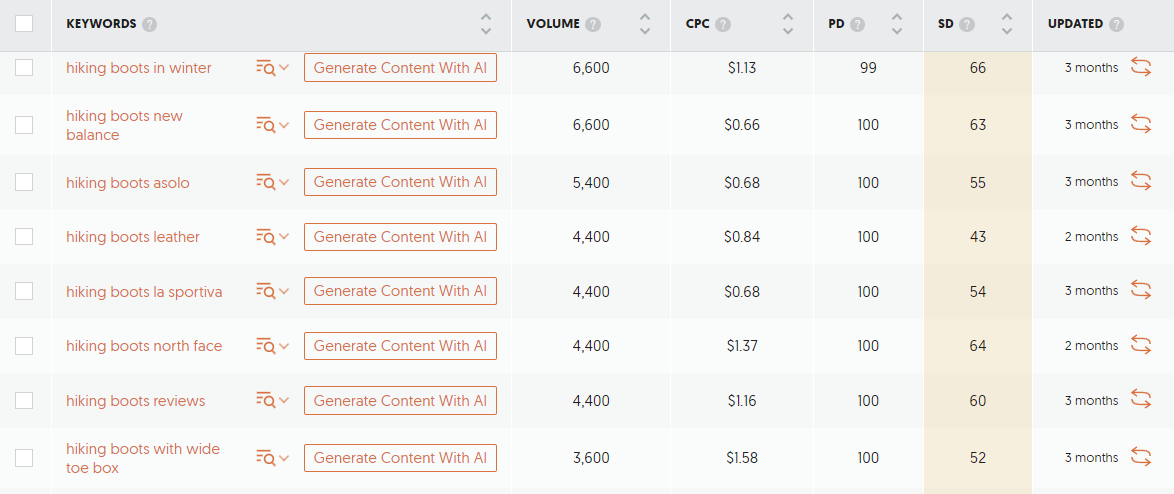
You can also find long-tail keywords by changing the SEO Difficulty filter to “easy” since they are less competitive.
Alternatively, you can use the Ubersuggest keyword generator. This tool can help you find related keywords and expand your keyword list.

Just enter your location, website domain, and competitor URLs. Ubersuggest will then list relevant keywords, including those your competitors rank for.
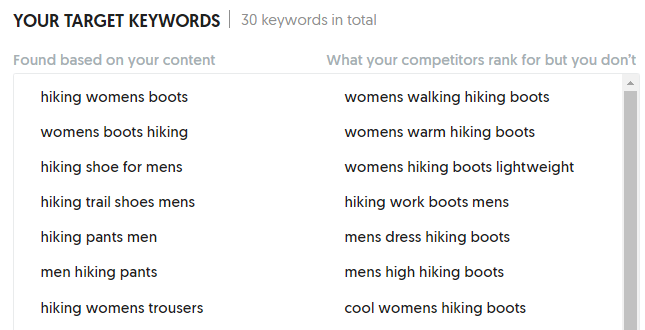
You can also:
- Begin with a head term. A broad term related to your niche should bring up long-tail keyword ideas.
- Use Ubersuggest’s filters to narrow your options. You can refine results by search volume, SEO difficulty, paid difficulty, and more.
- Analyze competitor pages: Enter the URLs of competitor pages into Ubersuggest to see their keyword rankings and find long-tail keywords.
- Look at search volume and difficulty: Ubersuggest provides search volume and keyword difficulty metrics.
Using Google Tools
No budget for keyword research? No worries! You can use Google Search Console and Google Keyword Planner as your starting place.
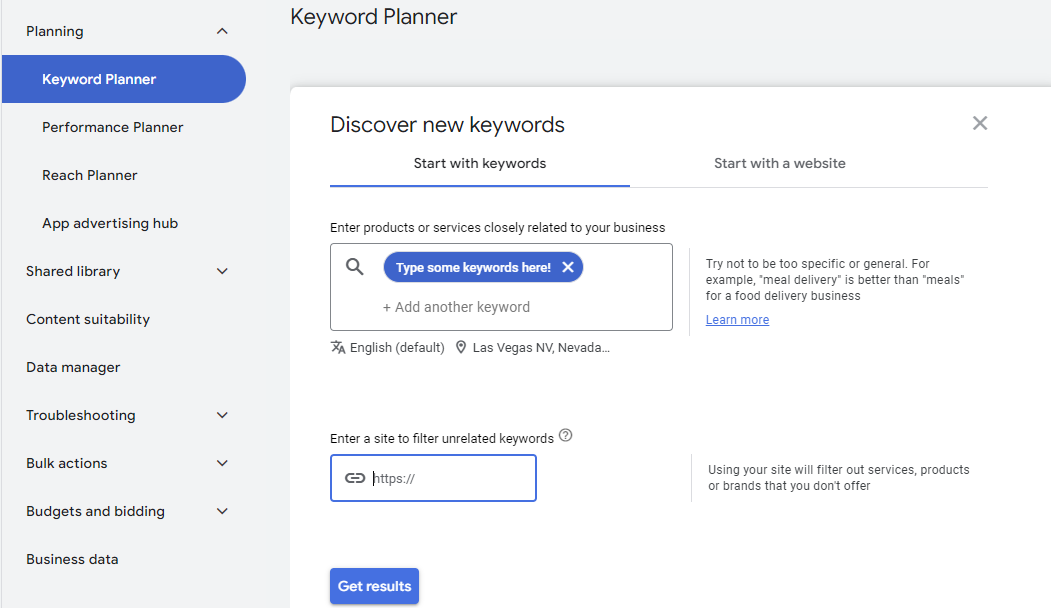
Keyword Planner lets you find new keywords, search estimates, and check out the costs for targeting them. You can also organize keywords and kickstart new campaigns.
With Google Search Console, you can find low-hanging fruit keywords (terms that have low competition and high SEO value) by:
- Heading to the “Performance” tab to see the clicks and impressions from organic traffic.
- Going to “Queries” and “Pages,” find the page that you want to analyze and give it a click. You’ll then get a report showing the keywords and impressions.
- Using the keyword(s) with the most impressions to optimize your content.
Simple!
Using Autocomplete Predictions
Wondering what search terms people are using? Well, you can soon find out using the autocomplete features on platforms like Google and Amazon.
Autocomplete features speed up the search process, and search engines base their predictions on past searches.
To produce its results Google uses trending queries, locations, and freshness.
Let’s look at an example:
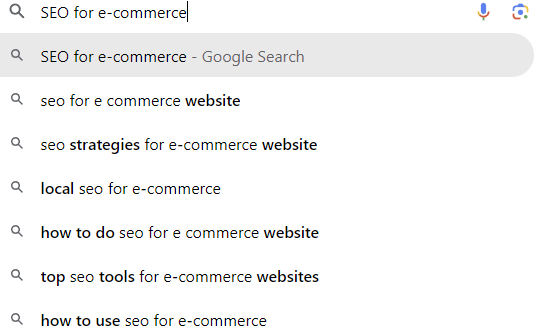
Can you see the potential there? You could use any of the above terms as longtail keyword targets.
You’d get similar results if you entered a search term on Amazon, and this method is excellent for finding niche keywords and what users are actively searching for.
A similar method is using AnswerThePublic.
This search listening tool finds the top questions people ask on sites like Google, Amazon, Bing, TikTok, and YouTube. All you need to do is enter a topic, brand, or product, select your country and language, and click “search.”
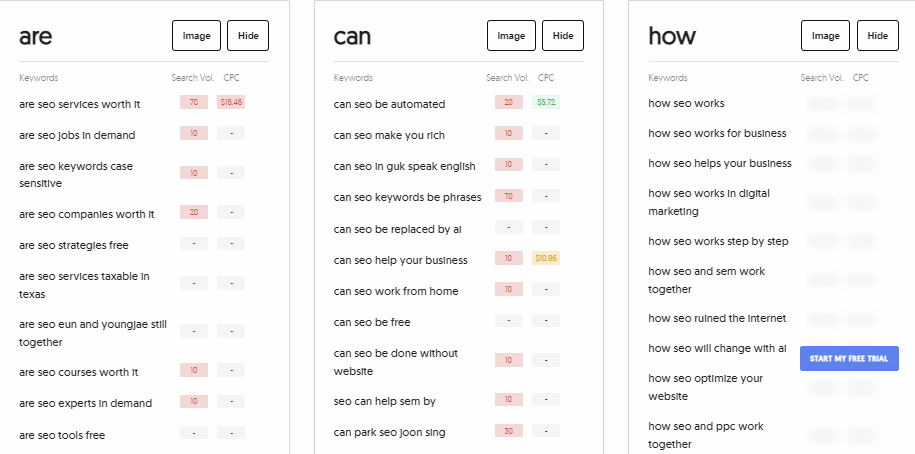
You can use these questions as long-tail keywords, subheadings, or titles for your articles.
Using Search Intent
Search intent is about understanding what people are looking for when searching online. You can spot it by looking at the search phrases people use and the results Google serves. Realizing a searcher’s intent is a big deal in SEO because search engines want to deliver and show folks the most relevant content.
Once you identify search intent, you can find content gaps, discover ways to outperform competitors, and gain qualified, targeted traffic.
You can break down keyword intent into three primary steps:
- Analyzing SERPs: Pay special attention to paid ads, knowledge graph results, and organic listings.
- Looking at Google ads for commercial intent: Seeing bid prices for keywords gives an idea of how competitive keywords are.
- Reviewing your analytics: Look for content with high bounce rates, as it may mean it doesn’t match with search intent.
There are two main types of keyword intent you’ll see most often. These are informational and commercial keyword intent.
Informational keyword intent is when users search for an answer to a question or to understand a topic in more detail.
They aren’t quite looking to make a purchase yet. Instead, they might want to understand your niche in better detail or get an answer to a question that isn’t related to a product. For instance, if you owned an outdoor clothing store, an informational keyword might be “best hikes near San Francisco.”
Commercial keyword intent is when people seek information to help them make a purchase. You see this when typing specific terms into Google, like “buy a digital camera” or “find new laptop deals.”
They may also use review-based queries such as “What is the best digital camera?”
2. Optimize Product Pages to Improve Ranking
· Every business wanting to grow its search traffic and acquire new customers needs to work on e-commerce site optimization. Think of it like sprucing up your storefront to make it super inviting for all the potential customers passing by. For an online store, this is where on-page SEO comes in.
On-page SEO covers fine-tuning your site structure, crafting attention-grabbing meta descriptions, and using heading tags to organize content.
We’ll go deeper into this in the next few sections.
Title Tags and Meta Descriptions
Write more compelling meta descriptions to increase CTRs on organic search and boost your SEO for e-commerce. This won’t directly impact your rankings, but raising your CTR can.
Use terms like “buy online” to give the user an idea of how to get your product before they click. Many e-commerce stores do this to increase their organic CTR.
Optimize your title tag to be 60-70 characters and always include the keyword to grab user attention. The more enticing it is, the more users will click on it.
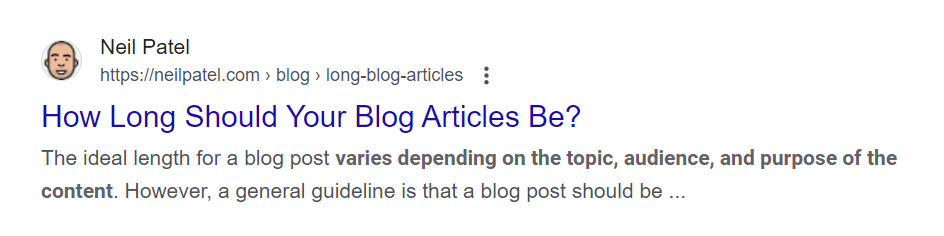
Always use the product name in your meta titles to give the searcher want.
Headings
Use header tags correctly on your product pages.
They are easy to add and improve your HTML structure. For example, use the product name as the H1 header tag.
Product description, delivery information, and returns-related headings can be H2s. Using header tags this way organizes your content for readers and SEO.
Product Descriptions
Product page descriptions are crucial for e-commerce site optimization for several reasons.
Firstly, they provide vital, keyword-rich content that Google uses to rank your site. Second, they entice users to buy your products once they’ve landed on the page.
Here’s an example from Huel:
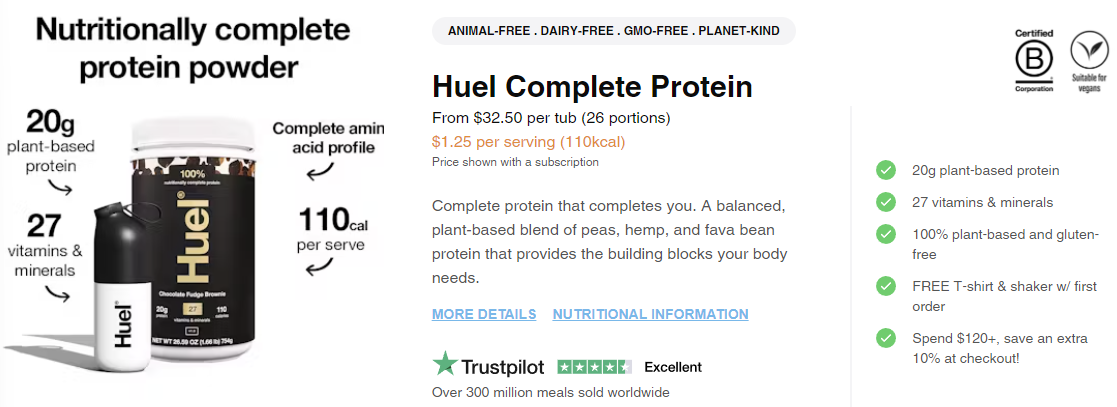
It’s safe to say Huel nails it with product descriptions. Here’s how you can do the same:
- Highlight the benefits: See the green ticks on the right? That’s perfect!
- Add keywords and a brief description. Like Huel, you can add hyperlinks to take buyers to further information if you need to.
- Use images to sell for you: Huel’s image gives you the essentials about the product at a glance.
- Add testimonials: Huel highlights its Excellent Trustpilot rating to help seal the deal.
- Sing your own praises: Huel has sold over 300 million meals and isn’t scared to shout about it.
Product Images
As Megan Dalke-Mitchel, Sr. SEO Strategist at NP Digital, explains
“Image optimization is crucial for your site to load quickly. If users wait for your pages to render completely due to large image sizes, they may bounce and shop at a competitor. This will impact YOUR bottom line.”
Here are some more pointers for optimizing your images:
- Provide captions with alt tags.
- Keep your images as small as possible without impacting image quality.
- Use keywords in file names.
Take this example from Tiffany&Co:

As you can see, the background matches Tiffany & Co. brand coloring (Tiffany blue) and uses high-quality, clutter-free images. It also uses keywords in file names.
Reviews
There’s no denying the importance of online reviews. Just ask shoppers. One survey from Power Reviews found that 90 percent of consumers consider reviews when making a buying decision.
Why? Well, it’s likely because reviews provide much-needed information that helps shoppers decide. In addition, they help you build trust among potential customers, and a positive review might be all it takes to secure a sale.
A great way to encourage customer reviews is by sending a prompt after they buy from you. For example, send an automated message expressing appreciation for the purchase and ask for feedback there.
Once a customer leaves a review, you could follow up with an email thanking them and highlighting special offers or discounts to encourage further engagement.
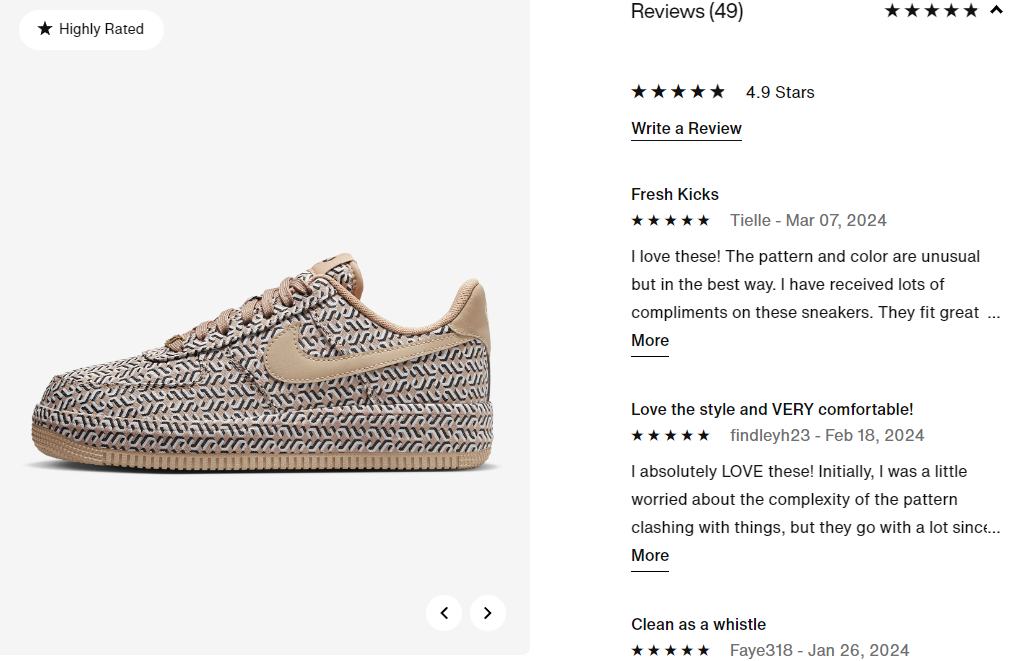
Here’s an example from Nike’s website showing how it uses reviews:
Links and CTAs
When you optimize your CTAs and include internal links, you signal relevance to search engines and improve your website’s SEO performance through added visibility.
Descriptive CTAs and well-placed internal links also guide buyers through the conversion funnel, improving the user experience and potentially increasing conversions.
Optimized internal links and CTAs also make it easier for users to navigate your website, while internal linking delivers targeted traffic.
You should frequently change your site’s calls to action . To boost conversions, optimize conversions for specific holidays, promotions, and sales.
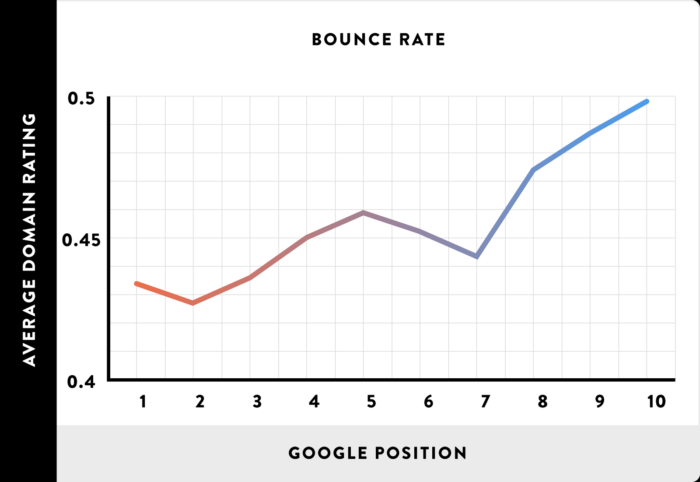
You can reduce your site’s bounce rate by increasing internal linking. This helps you rank higher and ensures users spend more time browsing your store.
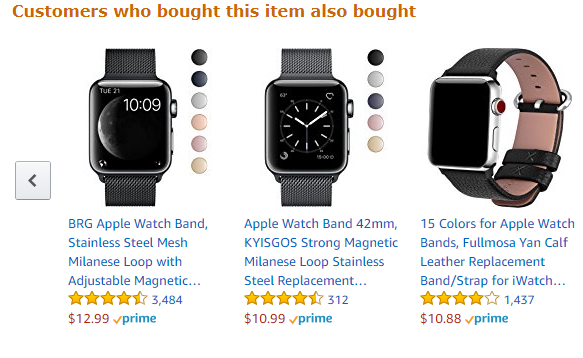
Use internal links to suggest related products or products that other users bought to drive more relevant sales and better your site structure:
Schema Markup
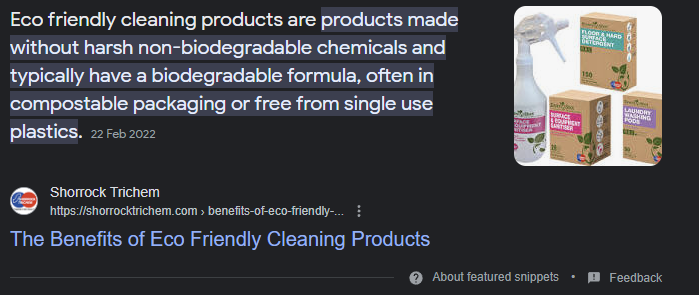
Schema markups are HTML tags that provide additional information to search bots about the content on web pages. By using these markups, you can improve your SEO for e-commerce efforts.
When you use schema markup, it can produce rich snippets. These are a way for search engines to show more information about specific queries at the top of search results.
They also help people find what they are looking for faster and easier by showing different types of information.
There are many different types of rich snippets, such as:
- product markup snippets
- music snippets
- review snippets
The kinds of e-commerce schema are:
- Product schema: This enables discovering new products and services in web search queries by providing rich product information such as images, price, and availability. Product schema also allows the display of product ads on the SERPs.
- Review schema: This enables online reviews. The author and title filters allow you to find specific people who have written reviews on your website or blog post and for searchers to find product reviews.
- Product availability schema: The product availability schema lists available products. It can be a single page, or it can be within an online store. Such lists typically detail the product name, description, price, images, and variants.
- Video schema: Video schema is metadata used to describe the content and format. It may include the video’s audio language, video resolution, or age rating.
- Price schema: Price schema is a technique for pricing products or a price range.
- FAQ schema: FAQ schema is a type of markup that adds a list of questions and answers. You’ll find an example in the FAQs section at the bottom of this article.
3. Make Sure Your Site Is User Friendly
UX stands for user experience. Good design, a better site structure, and more visually appealing aesthetics can enhance UX.
However, it’s not just about making a website look good; it’s about making it work well. UX includes everything from:
- Navigation
- Ease of use
- The overall “feel” of the website
- Keeping visitors engaged during browsing.
Basically, giving visitors the best experience possible.
You may not think UX affects SEO, but the experience you provide for users can directly correlate with how well you rank. Further, UX is a ranking factor. Just ask Google:

UX includes Core Web Vitals, a set of factors Google uses to grade a page’s user experience. It considers the factors pictured below.
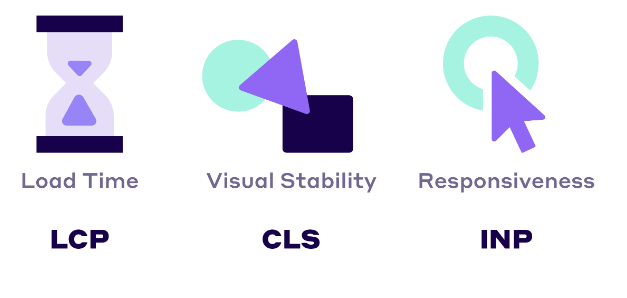
From a site owner’s perspective, there are several things you can do to improve your Core Web Vitals:
- Improve your site load time
- Make sure any ads don’t interfere with the user experience
- Make sure your site is interactive with clear CTAs.
Consider Your Site Architecture
Breadcrumbs are a navigational tool. They allow website visitors to retrace previous steps and return to where they started. Breadcrumbs are not just a usability technique but also provide additional SEO benefits.
For example, if you visit a blog post from your main homepage, the breadcrumb for that post would be “Home > Blog > This Post.”
Breadcrumbs are found in many web design tools, and you can add them using markup tags or JavaScript.
Always offer category-level navigation on your e-commerce store. This helps Google crawl your website and makes it easier for users to find what they’re looking for, which means more sales.
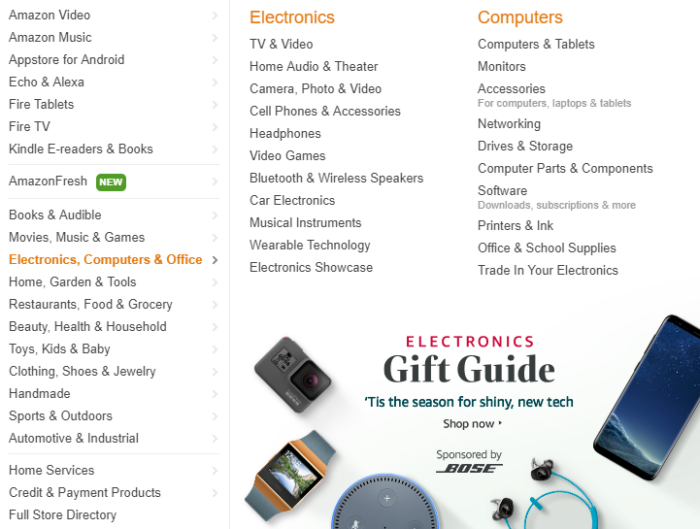
This helps Google crawl your website and makes it easier for users to find what they’re looking for, which can mean more sales.
Use a Simple URL Structure
A simple URL structure enhances the user experience and improves SEO e-commerce efforts.
Additionally, a simple URL structure makes it easier to share products on social media and other websites.
For the best results, URLs should be as readable as possible.
For instance, here’s an example of what NOT to do:
It would be much better to use this URL structure:
If you get stuck, Google also has some advice on improving URL structure, and I’ve written a detailed guide on the subject.
Other tactics can help out as well when it comes to improving your URL structure, like using keywords and avoiding stop words.
Search engines can scan your URLs and use the content as a ranking factor. For example, if people search for “men’s sneakers,” including that keyword phrase in your page’s URL can help rank your category page.
Common stop words are “the,” “and,” “of,” and “a.”. Stop words can decrease your URL’s readability and may lower your SEO rankings. A URL without stop words looks like this:
https://example.com/best-hiking-shoes
Avoid Duplicate Pages and Content
· Have you ever visited a website and felt you’ve read it all somewhere before? That’s common with product and category descriptions when online retailers use duplicate product catalogs and images.
It’s understandable why e-commerce sellers just republish the same descriptions. Usually, it’s simply because they don’t have the time to produce fresh content.
But even if you don’t have time to rewrite everything, you can still significantly reduce the content on your site in product descriptions and other areas.
For instance, by:
- adding canonical tags on every page that you know might have duplicates (pages with similar titles, pages that share an identical URL, etc.)
- adding a suffix to the URL
- using different product images
- Do some keyword research and add unique keywords on other pages
You can also stand out from other e-commerce sellers by using storytelling to create an emotional connection with your audience and detailing the benefits rather than just highlighting the features.
Finally, you should focus on creating unique images rather than stock images that other e-commerce sites may use. Consider adding videos to show how a product works or to show how an item of clothing fits. Don’t forget alt text to give search engines context and aid accessibility.
Consider Your Redirects
Turn your 404 error pages into a sales-driving machine. Rather than just letting 404 errors occur, head into Google Search Console, find the 404 error pages, and 301 redirect these pages to the most relevant pages on your site. That way, you don’t lose an opportunity to sell to customers.
You can even customize your 404 message to link to the most popular pages on your e-commerce store.
Watch the video below to learn more.
If you have expired or discontinued products, use 301 URL redirects customers to a newer product page. All SEO value will transfer to the latest page, and you may get a nice little rankings boost.
Additionally, redirects improve UX by seamlessly directing visitors to updated pages. They also let Google search and visitors know your page has a different location. This means you won’t lose your old URL’s SEO value or negatively impact your e-commerce optimization.
4. Optimize Your Technical SEO
· If you want to take your e-commerce website optimization to another level, work on your technical SEO.
You’ve likely taken the time and effort to ensure your website looks fantastic, but your customers will notice if your website isn’t technically sound.
You’ll soon see the impact, too, as poor-performing websites get less traffic because they’re harder for search engines to crawl and visitors to navigate.
Common technical issues include slow loading times, a lack of a site map, and the lack of an SSL certificate.
We’ll discuss these points next and provide tips for fixing these problems.
Don’t Let Page Speed Kill Your Ranking
· Page loading time measures how long it takes for an internet user to open a web page.
Page speed is a ranking factor, and survey after survey shows consumers aren’t willing to wait around while a site loads. A recent study found that 53 percent of people will abandon a page that takes longer than two to three seconds to load. As your buyers won’t wait for slow sites, speed has to be part of your SEO strategy for your e-commerce website.
If you’re unsure about your current speeds, you can test it with GTmetrix or Google’s PageSpeed Insights.
What should you do if your site is too slow? First, you need to find the reason. It could be:
- Your site has too much content for your server to handle.
- Too many scripts are slowing down load times.
- Images take an excessive amount of time to load.
- There’s a problem with your web host.
While a perfect 100 percent on PageSpeed Insights is extremely rare:
- having fewer images on the pages
- compressing files
- using fewer social media widgets
- optimizing your images
- avoiding clutter and using plenty of white space
- limiting redirects and HTTP requests
- fastening your server response time
Additionally, you might want to consider changing web hosts or upgrading your hosting package to better accommodate your needs.
Add a Sitemap
A sitemap is a file on your website containing information about all the pages, videos, images, and other content. Search engines use your sitemap to crawl your e-commerce store more efficiently.
Your sitemap should include all your site’s pages, from category to product pages. It should also include all the subcategories, products, and other content within those sections.
You can develop a sitemap manually or use an automated tool such as Google’s Webmaster Tools to generate one. Sitemaps can be XML or HTML, although HTML sitemaps are more helpful to visitors.
You can also use the Lucidchart sitemap generator, a user-friendly tool for creating a sitemap. It has many features, such as adding categories and subcategories.
Then there is Powermapper. This web-based, easy-to-use tool for creating and updating sitemaps allows you to generate one-click checkouts.
Get an SSL Certificate
Your e-commerce store needs to have an SSL certificate. That means users see “https://” before your URL, which gives customers confidence.
But what about its impact on SEO? The lack of an SSL won’t get you dropped from search engines. As Google’s John Mueller says:
“…HTTPS is not a factor in deciding whether or not to index a page at all.
We use HTTPS as a lightweight ranking factor, and having HTTPS is great for users.
A free certificate from Let’s Encrypt works just as well.”
While an SSL certificate doesn’t help with SEO, it protects customer information and can help loyalty, so it needs to be there.
5. Remember Content Still Matters for E-Commerce
E-commerce isn’t just about images and keywords. Written content also needs to be a cornerstone of SEO for e-commerce.
Posting regular content attracts organic traffic, gains your customers’ trust, boosts your website rankings, and solidifies your reputation as an expert in your niche.
Additionally, content increases brand awareness, gives you valuable backlink opportunities, delivers customer value, and offers long-term SEO benefits.
Sounds pretty good, doesn’t it?
If you’re ready to start producing content, you can focus on:
- sharing how-to pieces and answering FAQs
- new product launches and anything newsworthy
- a glossary page
- including user-generated content (UGC)
- testimonials and launches
- video demonstrations and Q and As
- webinars
Keep Your Audience In Mind
Now let’s step your e-commerce for SEO strategy up a notch by learning how to connect with your audience so you understand what makes them tick. This will allow you to write content that matches their pain points and offer solutions that make their lives easier.
Here are some tips to help you do that:
- Get to know your customers better by crafting buyer personas.
- Check out your content stats to see which content types get the most engagement and go with it.
- Establish a content calendar and create the content.
- Serve up the right content at the right time; tailor it to the various stages of the buying cycle.
- Use A/B testing in critical areas like titles.
- Keep your finger on the pulse by measuring the results and tweaking them as needed.
Develop Blog Content
One of the best ways to improve SEO for e-commerce websites is blogging. And the best thing about it? There’s pretty much no limit to what you can write about. In fact, it’s a great idea to mix up your content with different formats.
Want some ideas? Here goes:
Compare Products to Boost Traffic
Create product-focused SEO content by crafting “versus” style posts in which you compare trending products.
If you’re stuck for ideas, enter your keyword into Google and let Autosuggest do its stuff:
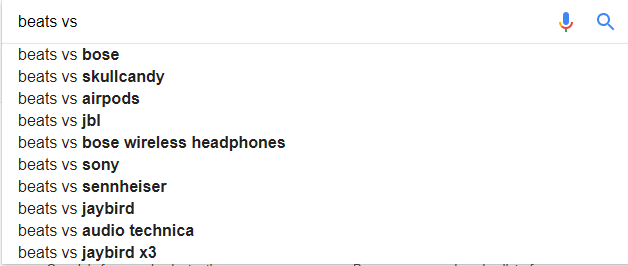
You could create gift guides, too.
Gift Guides
Round-up posts of popular products in your niche make excellent gift guides and can drive tons of organic traffic to your site. Just add links to the featured products in your blogs to steer people where you want them to go.
Video Content
Want to supercharge your sales? Then, add videos and show shoppers how to get the most from your products/services. According to Brightcove, 76 percent of consumers surveyed say they’ve bought after watching a video.
<h4>Share on Social Media</h4>
Social media sharing may not directly affect your SEO, but it’s pretty good for getting your name out there and making people more familiar with your business. The result? More visibility and organic traffic.
And there’s more.
When you get regular mentions on social media saying how awesome you are, this can boost your SEO game by:
- improving local SEO
- expanding your content reach and enhancing brand recognition
- increasing backlinks
Check out tools like Buffer or Hootsuite if you want an easy way to increase your social shares. These tools automatically post content from your site across your social media accounts at scheduled intervals.
6. Build Links for Your E-Commerce Site
· Link building is vital for your e-commerce website optimization strategy. Quality links tell Google that your site has credibility. Backlinks also influence how your website ranks for keywords.
Sounds great, doesn’t it? But how do you go about creating these all-important backlinks?
A few ways to do this are:
- creating internal backlinks
- writing guest posts
- using social media ads
- sharing content on social media
- issuing press releases
- writing blog comments and sharing on forums (if allowed)
- creating infographics and sharing them online
- issuing whitepapers and case studies
These are all legitimate ways to build quality links. Although they can take time, you shouldn’t take shortcuts by buying links.
Paid links violate Google’s guidelines, and the quality is usually questionable if you buy cheap links. Poor quality links lead to lower SERP rankings, reduced traffic, and a potential negative impact on your site’s reputation
E-Commerce Website Optimization Tools
Aside from Ubersuggest, which we mentioned earlier, there are other free SEO tools that can simplify e-commerce website optimization.
You could install the Yoast SEO Plugin for WordPress to clean up any missed on-page SEO tasks. Additionally, you can use Yoast for technical SEO, such as tag optimization, XML sitemaps, breadcrumbs, and speeding up loading times.
Other features include rank tracking and keyword research, and you can access Yoast’s generative AI features if you sign up for premium.
Then there is ScreamingFrog, which crawls for 404 errors, duplicate content, and more. Use it to analyze page titles and metadata, too. You can scan 500 pages for free.
If you’re willing to splash some cash, you’ll get extra features like Google Analytics integration and audit scheduling.
Avada SEO offers tools for Shopify users. It has some nifty tools for Shopify, like a free subscription covering product optimization for up to 50 items monthly, a speed boost, an SEO checklist, and even an HTML sitemap.
Before we wrap up, here’s one more tool to consider.
SEO Ant is an AI SEO optimizer for Shopify stores. It covers just about everything you could want for top-notch SEO, including alt text and auto-scanning for indexing, tag errors, and speed.
It also scans for broken links, does SEO, and offers eight 8 ChatGPT credits monthly.
FAQs
How Do I Start E-commerce for SEO?
Start e-commerce for SEO by optimizing the on-page elements of your website, like your product descriptions, UX, and page speed. Once you have optimized your website, you can build backlinks and other advanced e-commerce SEO strategies.
How Is SEO for E-commerce Different?
When it comes to SEO for e-commerce, there are different areas you need to focus on, such as optimizing:
- product pages and descriptions
- diversifying product content and information
- images on your website
- your homepage
How do I Find the Right Keywords For E-commerce Optimization?
There are several free resources that you can use to find keyword ideas, such as Google Ads, Ubersuggest, and Google’s Keyword Tool. You should also look at what your competitors are using to find the best keywords for their audience.
Finally, avoid using broad keywords that generate many clicks but don’t provide much conversion value. Use long-tail keywords where you can.
What Is The Most Overlooked Aspect of SEO For E-commerce Brands?
Link building is the most overlooked aspect of SEO for e-commerce brands. Many store owners assume they can get away with great on-page optimization, but building backlinks is still essential if you want to compete for the most competitive keywords.
How Much Does SEO for E-commerce Cost?
SEO costs depend on many factors, including the targeted keywords, the competitive landscape, and the effort required to optimize each page for ranking.
It’s not easy to put a price tag on SEO because it depends on how many resources you allocate and what you want to achieve. To help you budget, Search Engine Journal provides an SEO budget calculator.
Conclusion
SEO for e-commerce can help boost your website visibility, attract new customers to your store, and build a loyal audience.
It may seem like there’s a lot to think about. However, by concentrating on the leading SEO best practices and optimizing the critical areas of your website, it doesn’t have to be as complicated as it sounds.
The most important thing to remember is that SEO for e-commerce websites doesn’t happen overnight. Instead, it’s an ongoing strategy that requires updating as you go to get the optimum results.