 Sign In











Google Analytics is a fantastic resource for any website owner. From small hobby sites to government organizations, Google Analytics is a goldmine of useful information about visitor trends and behavior.
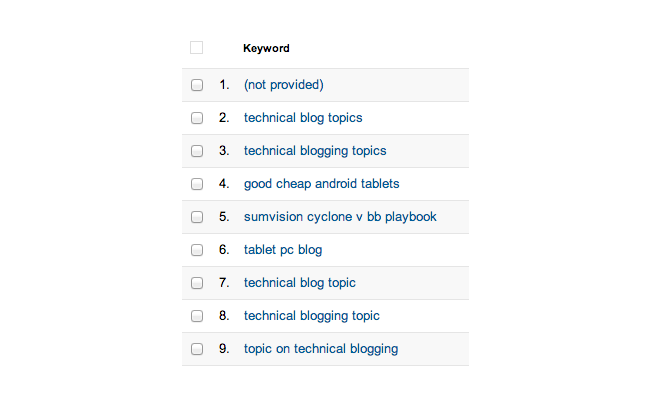
However, there is one area where Google Analytics frustrates its users: the organic search terms report. An increasing number of results in this part of Analytics are listed as ‘not provided’ – not much use when you’re trying to find out what people are searching for.
Note: the ‘not provided’ is lifted for paid search results. It’s just the organic search results that are often hidden from view.
Why Is Data Hidden and ‘Not Provided’?
In October 2011, Google changed the way it harvests data from search to protect users’ privacy.
If a user is logged into a Google product (such as Gmail or any Google Account) when searching, their search is conducted over SSL. As such, the referral data relating to that search is hidden.
Referral data includes some useful information such as the keywords used to perform that search. Google can still see this information, but website owners – and Analytics account holders – can’t access it.
This missing data leaves a gaping hole in our analytics reports, making it difficult for us to know the ROI of specific keywords we rank for in organic search.
Fortunately, there are a few workarounds that can reveal the data behind these figures.
How to Unlock ‘Not Provided’ Results
Before we get into this guide, it’s a good idea to verify just how many of your organic search keywords are listed as ‘not provided’, and whether this is increasing . You’ll need to assess whether it’s worth investing time into decoding these results before you proceed, since none of these techniques provides a single, foolproof solution.
Method 1: Understand the User’s Behavior With Landing Page Reports
The first way to get around the ‘not provided’ result is to mine Google Analytics for other information that will reveal more about those visitors and what they were doing on your site.
This method was described in detail in Dan Barker’s econsultancy blog:
- In your Analytics account, head to Admin, then Profiles.
- Click the name of the profile you want to work with, and select the Filters tab.
- Create a new filter in your Analytics account:
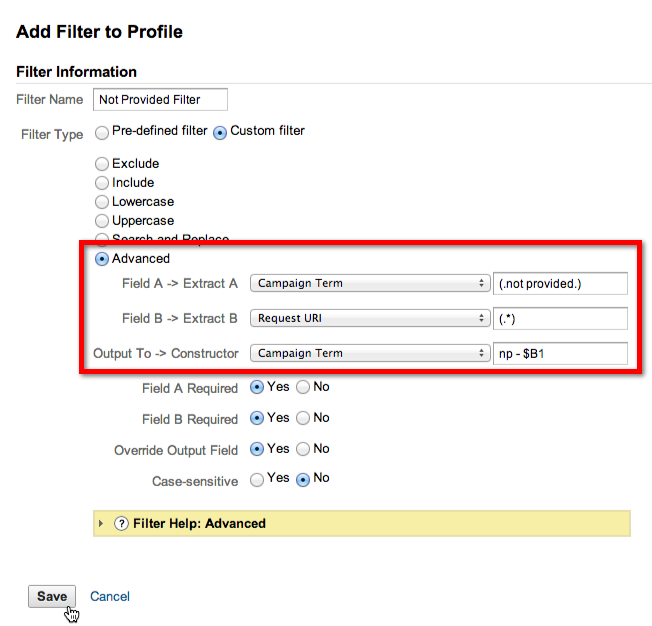
The purpose of this filter is to extract the ‘not provided’ terms. To do this, extract the URL and rewrite the two in place of the original ‘not provided’ text. Although this doesn’t reveal the exact keyword, it can help you to understand where that traffic is going and whether you need to dig deeper with other techniques. (The important part – the rewrite – is highlighted in red in our screenshot.)
Note that this filter can’t be applied to historical data; you’ll only see it in action for new visits.
There’s a similar technique on Avinash Kaushik’s blog that involves creating an advanced segment to examine which landing pages your ‘not provided’ results are leading to.
Method 2: Use Traffic Sources Data
Within Google Analytics, there’s a second set of metrics that can help you to decipher your most popular keywords. The Search Engine Optimization report is designed specifically for this purpose – specifically the Queries report.
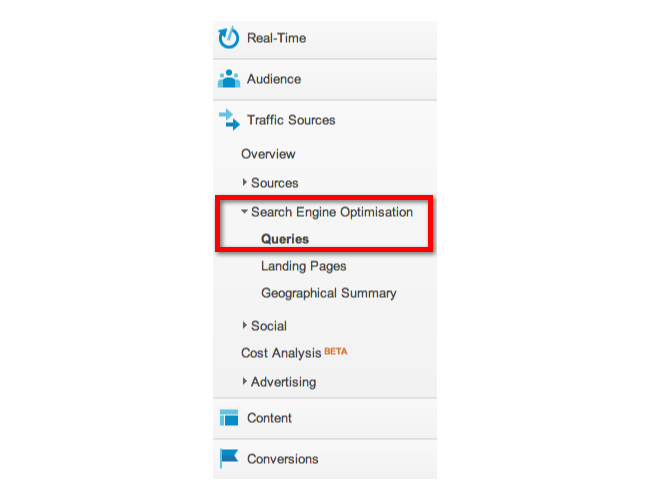
Data in this report is two days out of date, and it’s fair to say that the metrics here are limited in scope. If you’re managing a busy website, Traffic Sources simply won’t give you the detail you need to properly analyze your queries and landing pages; the number of results it can show is limited, for example.
However, for smaller sites, this report is worth a look for a very basic overview of what’s happening with organic search on your site.
Method 3: Examine AdWords Data
As mentioned at the beginning of this article, ‘not provided’ is only an issue for organic search queries. Paid search isn’t affected. That means you can circumvent the problems caused by ‘not provided’ results by paying for Adwords and measuring the response rates to keywords via PPC. These are shown in Google Analytics as Matched Search Queries.
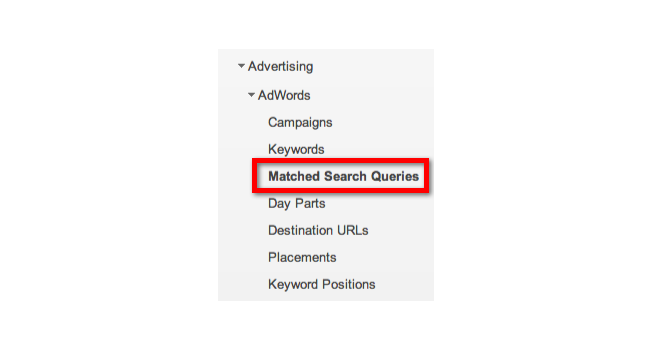
Note that, again, this isn’t an entirely accurate solution; the data shown in Adwords is only related to traffic that you’ve paid for – not the organic traffic. However, if you have the cash to spend on keyword research, it’s another way to boost your understanding of user behavior and make your SEO research more meaningful.
Method 4: Use Webmaster Tools
Google’s Webmaster Tools dashboard is nowhere near as comprehensive as Google Analytics, but in this situation, the metrics it gathers does add some value. Specifically, you can see a very basic overview of keywords that lead visitors to your site in the Traffic menu, under Search Queries.
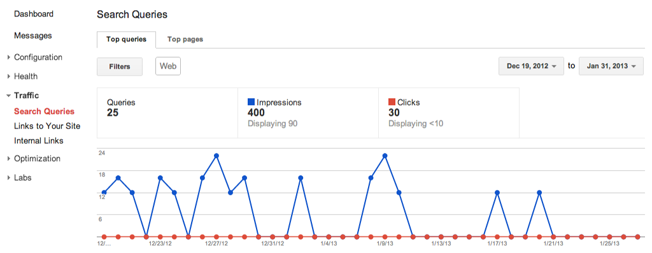
Underneath this graph you’ll find a pretty comprehensive list of your website’s keyword performance:
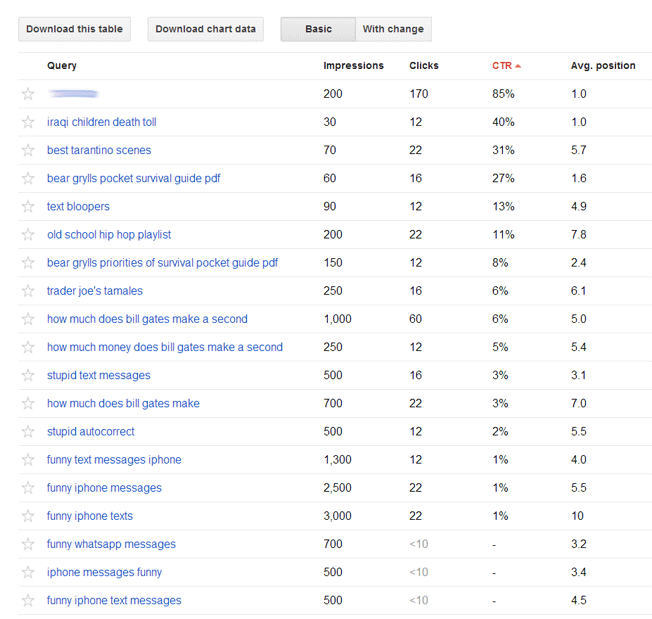
A nice treat that Google Webmaster Tools does give you: It will tell you the clickthrough-rate of your keywords from Google Search. Sometimes a little more polishing up on your title tags and meta-descriptions can help increase the clickthrough-rate of these keywords.
Finally, Google Webmaster Tools also tells you an approximate amount of search impressions your keywords are attracting. If you know that a certain keyword is attracting a large number of impressions, it might be in your best interest to put a little more effort towards ranking for that keyword to obtain more traffic. One way to do this is to simply expand your content related to this keyword.
Conclusion
Google’s ‘not provided’ data is a controversial topic, and there’s no failsafe way to access the data. However, if you’re losing a significant amount of statistical data to ‘not provided’, it’s certainly worth investing some time to overcome the problem. Implementing one or more workarounds may help you to improve your understanding of organic keywords and get a better insight into your missing statistics.
About the Author: Claire Broadley is a creative content writer working for WhoIsHostingThis.com, an independent hosting review website.