Sign In











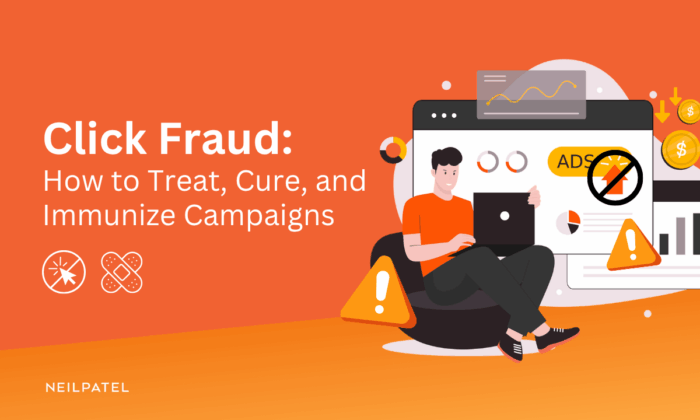
Click fraud happens when somebody deliberately generates fake clicks on your ads.
Such clicks don’t convert into real leads or sales, but you still need to pay for them, so click fraud attacks can bleed your marketing budget dry.
In the article, I will show you how to recognize, stop, recover from, and prevent click fraud. The treatment, the cure, and the immunization.
But first, let’s unpack key click fraud concepts: its kinds, causes, and consequences.
What Is Click Fraud
Click fraud is clicking on a pay-per-click (PPC) ad — either manually or automatically — to generate a fraudulent charge for the advertiser.
It is intentional and malicious.
Fraudsters launch click attacks to achieve a specific goal, and they hurt the advertiser in the process.
For example, your competitor can do it to drain your advertising budget. When it’s gone — often before your real customers get online — their ads replace yours.
This distinguishes click fraud from invalid clicks.
The latter may happen when somebody accidentally double-clicks on your ad or an SEO tool bot crawls it. There’s no ill intent, ulterior motives, or deceptive tactics.
Who commits click fraud?
Competitors aren’t the only group that benefits from click fraud.
Others include:
- Dishonest publishers — to boost their income at the expense of the advertisers.
- Publishers’ partners — to help them generate extra revenue.
- Publishers’ competitors — to tarnish their reputation and damage relationships with advertisers.
- Affiliates — to earn extra commission (if they’re paid for clicks rather than conversions).
Not all click fraud is motivated by financial gains.
Sometimes culprits commit it for personal or political reasons. For example, election candidates could do it to suppress the reach of their opponents’ ads, or disgruntled employees to get even with their former employers.
How Does Click Fraud Work?
Click fraud comes in various forms.
Your campaign may be hit by:
- Botnet clicks: Clicks come from a network of hijacked computers controlled by the fraudster to emulate legitimate user activity. Often, these don’t generate only clicks but also fake leads, like form completions, making it more difficult to detect.
- Data center clicks: Clicks originate from servers in a data center, typically using automated scripts.
- Click farm clicks: Clicks generated by groups of low-paid human workers mimicking real user engagement.
- Incentivized clicks: Clicks from real users who get rewards — like points or in-game currency — for clicking on an ad.
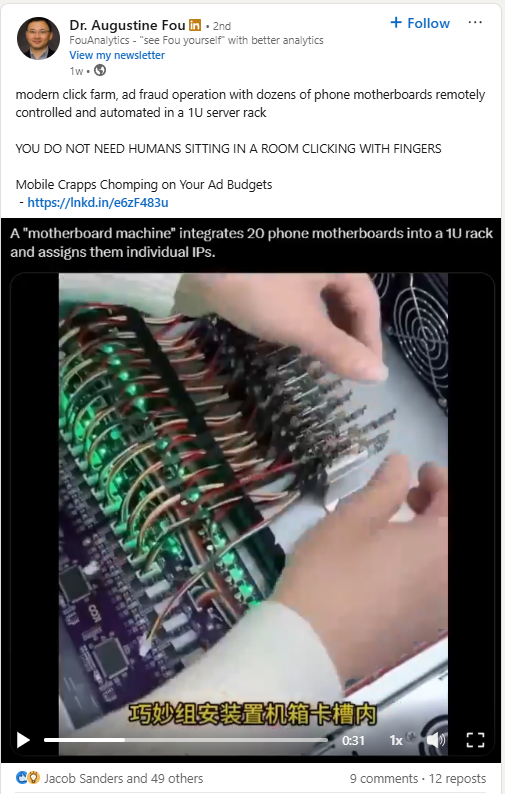
Fraudsters also use various dishonest tactics to generate and hide illegitimate clicks, including:
- Ad stacking: Layering multiple ads on top of each other in a single ad slot. When a user clicks on the visible top ad, it registers a click for all the hidden ads beneath it.
- Pixel stuffing: Placing ads into a webpage within a tiny, invisible 1×1 pixel frame, so it registers impressions without the user seeing the ad.
- Domain spoofing: Creating low-quality websites that impersonate premium domains to trick advertisers into paying for worthless ad space.
- Click injection: Generating fake ad clicks when the user installs a mobile app to take credit for the installation.
- Cookie stuffing: Dropping multiple affiliate tracking cookies onto a user’s browser to claim commissions on future purchases they didn’t influence.
- Ad hijacking: Illegally redirecting traffic from a legitimate ad to a different destination, or stealing the click attribution to get paid instead of the advertiser.
- Impression laundering: Routing ad impressions through reputable websites to hide their fraudulent nature.
How Does Click Fraud Affect Businesses?
Click fraud burns your marketing budget.
How badly?
Reliable up–to-date stats are hard to find.
We know it depends on the ad platform (TikTok and X have been reported to have the highest rates), your industry (the higher the cost-per-click, the higher the odds), and even geographical location, so it’s difficult to pinpoint an exact figure.
Based on various estimates, we can assume that on average, around 15-25% of all ad clicks come from illegitimate sources.
So if you spend $1000 on paid advertising a month, that’s $100-250 down the drain.
The financial damage doesn’t stop there: Investigating and documenting fraudulent clicks and implementing preventive measures is a resource sink, too.
Click fraud also has a knock-on effect on the effectiveness of future campaigns.
Fraudulent clicks skew the performance data, resulting in poor strategic decisions in subsequent ones.
For example, inflating CTRs for a particular keyword will lead you to invest in ads that don’t bring real leads.
Bot traffic and fake conversions also corrupt ad platform training data, so they send even more traffic to bots.
Treat: How to Recognize and Stop a Click Fraud Attack
With the basics covered, let’s look at practical steps to take to protect you from click fraud.
Here’s how you can recognize your campaign is under attack and what to do to limit its impact.
1. Recognize the Fraud Symptoms
Look for clues of an ongoing attack in your campaign performance data.
They include:
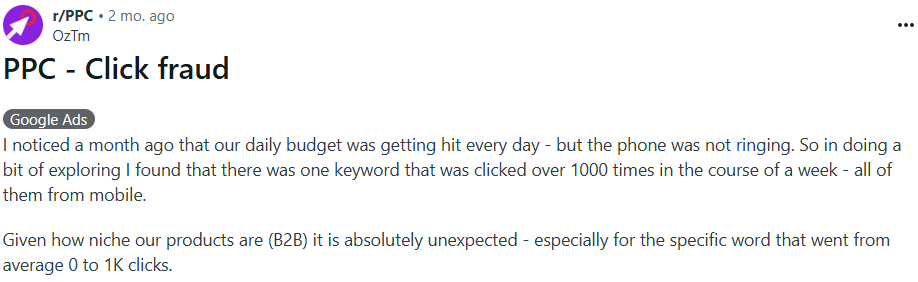
- Unexpected spikes in clicks (if you haven’t changed your bidding settings or added keywords, and there’s no major event or news, like a promotion or company announcement, that could trigger them)
- Increasing click-through rates while conversions remain the same
- Clicks from unusual geo locations
- High bounce rates and session duration under 1 second (A surge in near-instant bounces can be a red flag, as legitimate users — even if they click by mistake — often take a moment longer to hit the back button)
- Unusual spending patterns (For instance, if your daily ad spend hits a cap by 9 am or you spend considerably more than on similar campaigns, especially if it doesn’t translate into conversions)
- Inconsistent device type and OS use (For example, if your typical customers use mostly desktop PCs and you’re suddenly getting swamped with clicks from Android phones)
2. Pause the Campaign or Lower Budgets to Limit the Damage
One of the above symptoms doesn’t necessarily mean foul play. When you see 2 or 3 of them, start acting.
Pause suspicious campaigns or ad groups immediately to avoid further losses. If you can’t pause the affected campaign, lower its budget by 80-90%.
Next, notify relevant stakeholders — like your boss or client — about the suspected attack and the steps you’ve taken. Keep them in the loop as new details emerge.
Cure: How to Recover from the Attack
After stabilizing the ad campaign, administer the cure. This involves gathering evidence, reporting the fraud to recoup lost funds, and cleaning up your data.
3. Collect Evidence
Once you’ve stopped the immediate budget loss, record the evidence. You need it to build a strong refund case and prevent future attacks.
Log this information in a spreadsheet:
- Affected campaign name, ad group name, and keywords
- IP addresses (a high volume of clicks from a single IP address or a range of similar IPs is a sign of fraud)
- Click timestamps (the exact time of each suspicious click — to demonstrate the velocity of an attack and illustrate unusual patterns, like clicks outside of business hours)
- User-agent strings (data about the browser and operating system used for each click)
- Placement URLs (the specific websites and apps your ads are appearing on)
- GCLID values (Google Click ID is a URL parameter identifying the campaign and ad click attributes)
Server logs are the most accurate and detailed data source. However, accessing these may require technical expertise and specific server configurations.
If it’s too complex, the ad platform reports, for example, Google Ads Reports & Google Analytics, or third-party analytics platforms, are a more user-friendly alternative.
4. Report the Fraud to Your Ad Platform
How you report click fraud and claim a refund varies from platform to platform.
For example, Google monitors your ad traffic, detects invalid clicks, and returns credit for them automatically. So, before you make a claim, check your Billing Summary page to see how many clicks they charged you for.
If you don’t get the refund automatically, submit the collected evidence and a summary of the suspicious activity to Google support and request an investigation.
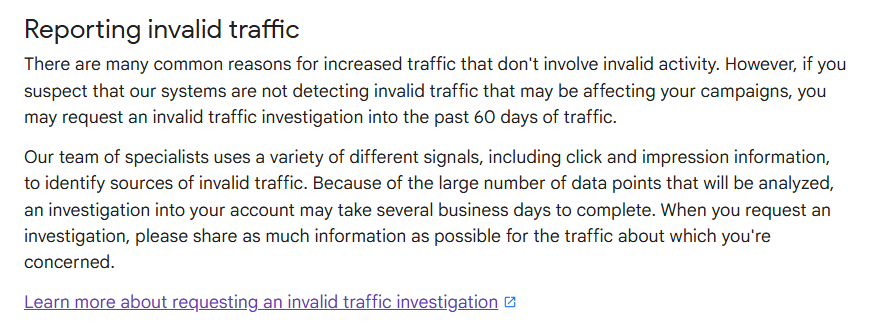
Although Google states the investigation takes several business days, it can take much more. Advertisers report that the process takes months and involves a lot of back and forth.
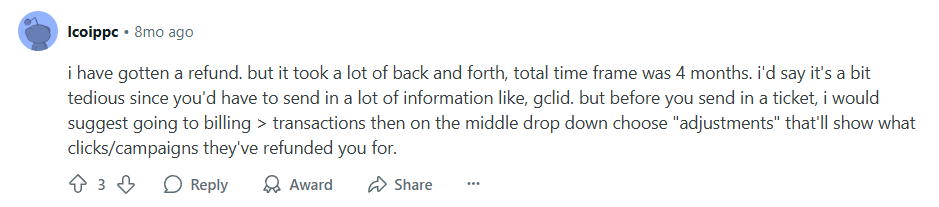
Advertisers also report that platforms are reluctant to issue refunds, and they usually don’t cover the full amount lost.
So be ready for a long battle, and manage your expectations.
5. Clean up the Data
As mentioned, click fraud attacks mess up your data. If you don’t clean it up, you will end up optimizing your campaigns for fake clicks.
Here’s how to perform a data detox:
- Annotate your data — for example, by using the annotation feature in Google Analytics during periods of suspected attacks — to help you and your team quickly find fraudulent interactions.
- Filter out the fraudulent traffic. The easiest way is to create a new segment based on the attack data, like IP addresses, geographic locations, or dates and times, and exclude it from your analysis.
- Rebuild your retargeting lists based on the real traffic data. Fraudulent clicks contaminate your remarketing lists with fake users. This means you’ll waste budget trying to remarket to bots. Any lookalike audiences built from the lists will be flawed, too.
Immunize: Build Long-Term Resilience
Spoiler alert: You can’t fully immunize your campaigns from future click fraud attacks.
However, you can limit their likelihood and scope.
6. Break Down Your Campaigns
Instead of running large campaigns targeting multiple keywords or audiences, break it down into smaller, tightly themed ones.
For example, if you’re a plumber based in Chicago, run three campaigns, each focusing on a different service. Build the campaigns around ad groups, each targeting different keywords.
Campaign 1: Emergency Plumbing
- Ad Group A: 24/7 Urgent Service. Keywords: “emergency plumber chicago,” “24/7 plumber near me”
- Ad Group B: Leak & Pipe Repair. Keywords: “leaky pipe fix,” “burst pipe repair chicago”
Campaign 2: HVAC & Water Heaters
- Ad Group A: Furnace Repair. Keywords: “furnace repair cost,” “fix broken furnace”
- Ad Group B: Water Heater Installation. Keywords: “new water heater cost,” “water heater installation chicago”
Campaign 3: Bathroom Remodeling
- Ad Group A: Full Bathroom Renovation. Keywords: “bathroom remodeling contractor,” “bathroom renovation chicago”
This makes it pinpoint click fraud attack targets.
More importantly, you can quickly isolate individual ad groups by switching them off or limiting their budgets without shutting down the whole campaign.
7. Build an Early Detection System
The next step is creating a click fraud detection system to quickly detect new threats and identify their sources.
Here are four best practices and tactics that will help:
- Record your baseline CTRs and CVRs across different campaigns to easily spot anomalies.
- Run low-budget ‘canary’ campaigns on new keywords to identify rogue IPs and geos.
- Use UTM parameters to track traffic origin.
- Set honeypot traps to identify bot visits. For example, place tracking pixels and invisible links or form fields that only bots can interact with.
8. Exclude IPs, Locations, and Device Types
Exclusions protect your campaigns from recurring attacks from the same sources.
In a nutshell, you block from your campaigns:
- IP addresses associated with past attacks on your ads and those of known data centers or VPN used for attacks (from fraud protection or threat intelligence lists like I-Blocklist or IPsum).
- Geo locations linked to past attacks or where you don’t sell.
- Device types that prospective customers aren’t likely to use (based on data, not assumptions).
- URLs of websites where the fraudulent clicks originated.
Does it sound like a whack-a-mole game?
It is. As soon as you block one dodgy IP range, new ones appear.
But it’s an essential part of your defense, and you can’t afford not to play it.
9. Restrict When and Where Your Ads Show
You can reduce your exposure to fraud attacks by limiting when and where you display your ads.
First, run your ads only when your real customers are online and likely to engage with content like yours, such as during your business hours. Many bot attacks happen overnight, so this prevents bots from draining your budget before your workday even begins.
Next, if you’re running Google ads, consider switching off Display Network and Search Partners. It may reduce your reach, but these networks are notorious for low-quality placements and are a common source of the bot traffic you want to avoid.
Finally, protect yourself from single-source attacks by setting a frequency cap. For example, set your ads so they do not show to the same user more than 3 times a day.
10. Invest in Fraud Protection Software
Manual monitoring of ad clicks and blocking suspicious sources doesn’t scale.
If you’re spending over $1,000/month, running campaigns on high-risk networks like Display or social media, or spending hours on manual checks every week, consider investing in click fraud detection software.
Most of the tools work in the same way: they analyze every ad click and automatically block fraudulent IP addresses before they can attack again. This includes IPs linked to attacks on other campaigns, not just yours.
When choosing a tool, look for one that supports:
- Real-time blocking.
- Automatic fraud spike alerts via email or text.
- Integrations with your ad platforms, analytics tools, and data warehouses.
- Customizable rules and sensitivity settings so you can adjust when and how strictly the tool flags potential fraud.
- Detailed reporting to help you understand the threats you’re facing and build your refund cases.
What’s the best tool out there?
I can’t say. Look for solutions that offer free trials and test them on your own campaigns.
FAQs
What is click fraud?
Click fraud happens when someone deliberately clicks on your pay-per-click (PPC) ads without any intention of converting. It can be done manually or through bots, and the goal is usually to drain your budget, inflate costs, or corrupt campaign data. Unlike accidental or invalid clicks, click fraud is intentional and often carried out by competitors, dishonest publishers, affiliates, or fraud networks.
How do you detect click fraud?
Look for unusual patterns in your ad data. Warning signs include sudden spikes in clicks without matching conversions, high bounce rates with session times under one second, traffic from unexpected locations or devices, or daily budgets draining unusually fast. Tracking IP addresses, timestamps, and user-agent data helps confirm whether suspicious clicks are fraudulent.
How do you prevent PPC click fraud?
You can’t stop click fraud entirely, but you can reduce its impact. Exclude suspicious IPs, geos, or device types from your campaigns, and limit when your ads run to cut down on overnight bot traffic. Install fraud protection tools that block suspicious clicks in real time and set frequency caps to avoid excessive impressions from one source. Regularly audit campaign data and refine targeting so attackers have fewer openings.
What is competitive click fraud?
Competitive click fraud happens when a rival deliberately clicks your ads to exhaust your budget. The goal is to push your ads offline so theirs can take your place, or simply to force you to spend more for fewer results.
Conclusion
Click fraud can damage your ad budget and pollute your performance data, making running data-driven campaigns challenging.
Unfortunately, fraudsters are always one step ahead, so you can’t eliminate click fraud completely.
However, you can reduce its impact by constantly monitoring ad clicks for anomalies, instantly containing identified attacks, and claiming back lost funds from ad platforms.