 Sign In






Key Takeaways
- Google Ads lets businesses reach potential customers quickly through paid advertising. Unlike SEO, which can take months to generate results, Google Ads can start driving traffic almost immediately.
- Google Ads operates on a pay-per-click (PPC) model. Advertisers bid on keywords and only pay when someone clicks on their ad.
- Ad quality matters just as much as budget. Google considers ad relevance, expected click-through rate (CTR), and landing page experience to determine ad placement. In other words, the highest bidder doesn’t always win.
- Performance Max uses AI to optimize campaigns across Google’s advertising channels. Google Ads also helps identify high-converting keywords to refine your strategy over time.
- Successful Google Ads campaigns require testing and ongoing optimization. Monitor conversions and costs while you experiment with ad copy, keywords, and landing pages.
- Small businesses can compete against larger brands using Google Ads by targeting the right audiences and creating relevant ads, even without strong organic rankings.
Google makes a lot of money from advertising. I mean a lot.
In 2025, Google collected nearly $295 billion in advertising revenue. That’s more than $800 million a day.
Why are businesses willing to spend so much? It’s simple.
Google Ads puts your business in front of people who are looking for what you sell. Best of all, they do it when they’re eager to buy.
Think about it. Someone searches for a plumber or a new laptop, and an ad pops up high on the page, right when that person’s ready to make their purchasing decision.
What’s more, you don’t need a huge advertising budget to get started with Google Ads.
You do need to know what you’re doing, though. Otherwise, you could burn through your budget pretty quickly.
That’s why I’m here to help. I’ll give you a complete Google Ads overview, from how they work and what they cost to how to set up your first campaign. I’ll also cover how to make sure your ads drive real clicks and conversions.
The main keys to this are threefold:
- Start small. You can always raise your budget once you start seeing results.
- Keep it simple. Start with one campaign and make sure it’s working as it should before launching more.
- Be patient. Results don’t happen overnight. Give yourself time to learn what works before you start making big tweaks in strategy.
Let’s get started.
What Is Google Ads?
Google Ads is Google’s advertising platform. Businesses use it to promote their products and services across Google Search, YouTube, Gmail, Maps, and millions of websites and apps.
Formerly known as AdWords, it’s a marketplace where companies pay to have their websites ranked at the top of a search results page, based on keywords.
Here’s how it works.
Say you own a pizza shop and want an ad to appear when someone searches for “pizza delivery near me.” You choose that keyword, create an ad, and tell Google how much you’re willing to spend.
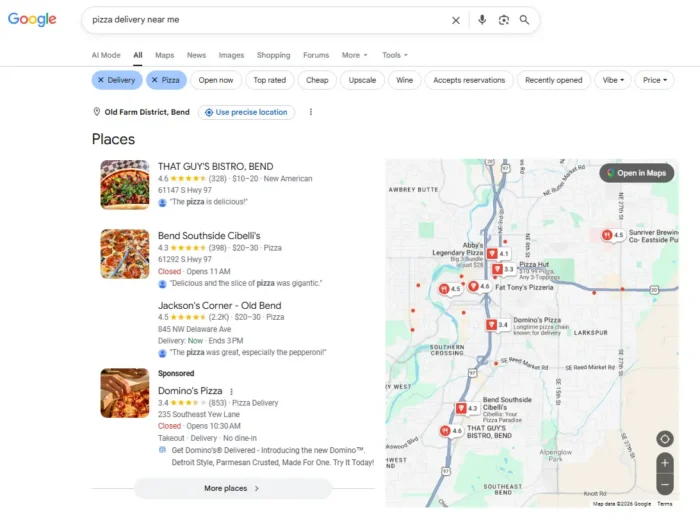
You do this in Google Ads’ marketplace, which works as an auction. People bid money for clicks, though the highest bid doesn’t always win.
That’s because Google also considers how useful your ad is to people searching.
One way Google evaluates this is through Quality Score, a diagnostic rating from 1 to 10 based on your expected click rate, ad relevance, and landing page experience.
Then there’s Ad Rank, which determines whether your ad appears and where it’s placed. Traditionally, advertisers explained Ad Rank as Quality Score multiplied by your max bid.
Today, though, Google’s actual calculation is more sophisticated. It considers your bid, the quality of your ad and landing page, auction competitiveness, and signals about the search itself, like the user’s location and device.
This is all to say that Google doesn’t just want to show people ads from the highest bidders. Ads deemed more relevant can outrank those with a bigger budget.
Your cost per click (CPC) can thus be lower than your maximum bid, depending on the competition and other auction factors.
That’s a basic overview of Google Ads. You compete for visibility, but how well your ad matches someone’s search can make a huge difference in placement and final costs.
Why Use Google Ads for Business?
Google Ads remains a major player in digital advertising. According to EMARKETER, Google accounts for approximately 26.4 percent of global digital ad spending.
Think about the last time you searched Google for a product or a service. You were probably looking for something specific, even if you weren’t quite ready to buy.
That’s one of the biggest advantages of Google Ads for business. You reach people who are already interested in what you have to sell. You’re not trying to grab their attention as they scroll through random social media posts or search results.
There’s real intention in these searches, and a Google Ad puts you front and center when someone’s about ready to make a purchase.
Other benefits of using Google Ads for business include:
- Fast results: Search engine optimization is a great long-term strategy. Earning organic rankings takes a lot of time and patience, though. Google Ads can start bringing visitors to your website within hours of launching a campaign. This assumes, of course, that your ads were approved and eligible to run.
- Spending controls: You decide how much you’re willing to spend. You also control who sees your ads and where they’ll appear. You can adjust your budget and pause a campaign whenever you want.
- Actionable insights: Google Ads lets you track clicks, impressions, conversions, and spending. That lets you see which ads are generating leads or sales and determine whether they’re worth the cost.
- Customer insights: Your campaign can reveal which search terms lead to conversions. That’s valuable information you can use to improve your SEO strategy, too.
Google Ads isn’t a guarantee you’ll get profitable traffic. You still need the right targeting and a compelling offer (with effective ad copy). Most importantly, you need a website that converts.
When those pieces come together, it’s like a cheat code with the power to help grow your business.
If you’re curious about how paid social compares, here’s my breakdown of how Facebook Ads work.
How Much Do Google Ads Cost?
One of the first questions people ask me about Google Ads is how much they should expect to spend.
The answer? It depends.
Google Ads pricing works primarily on a CPC basis. With Search ads, you generally pay when someone clicks on your ad, not every time it shows up in search results.
You also control your budget. Set an average daily budget of $10, for example, and Google will generally limit your monthly spending to $304. Google can spend up to twice your average daily budget on a particularly busy day.
What’s the Average Cost Per Click?
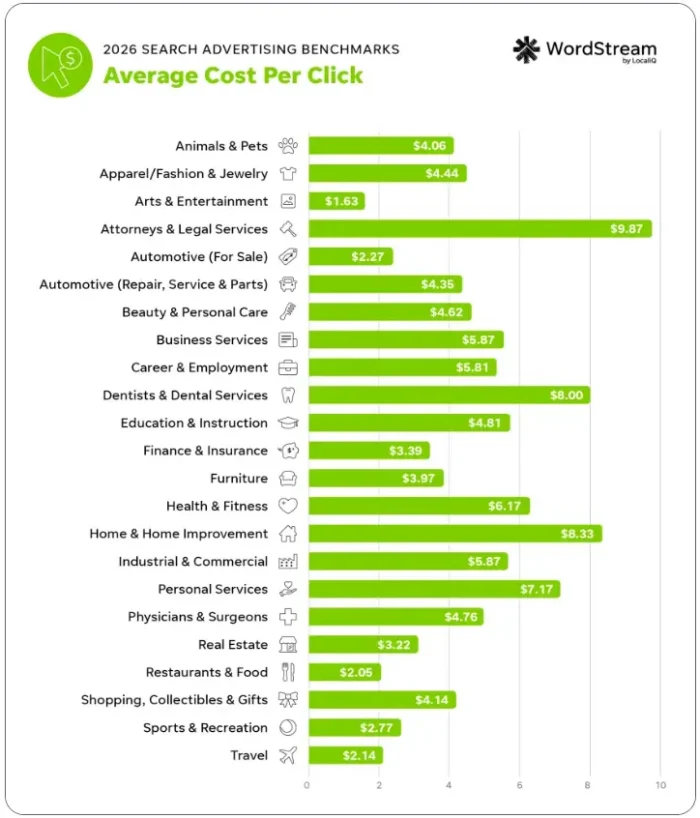
According to WordStream’s 2026 Google Ads benchmarks, the average CPC for search advertising in the U.S. is $5.42. The costs vary by industry, of course.
Art and entertainment ($1.63), restaurants and food ($2.05), and travel ($2.14) sit on the lower part of the CPC spectrum, while home and home improvement ($8.33) and attorneys and legal services ($9.87) land on the higher end.
WordStream breaks it down further:
Source: https://www.wordstream.com/blog/2026-google-ads-benchmarks
Your actual costs will also depend on competition, location, the keywords you’re targeting, and the quality of your ads.
How Much Should You Be Willing to Pay?
One thing that may surprise you is that a lower CPC doesn’t necessarily mean you’re getting a better deal. Here’s why.
Imagine two businesses paying $5 per click. One sells inexpensive products with thin profit margins, and the other sells a service worth thousands of dollars.
That same $5 click could be a losing proposition for one business and a bargain for the other.
Even a $50 CPC can make sense if enough of those visitors become profitable customers.
What matters is how much you earn from the customers your ads bring in compared to what you spend acquiring them. That’s why you need to understand your profit margins and conversion rates before ultimately deciding what a click is worth.
We’ll work through an example of how to calculate your target CPC when we set up your campaign budget.
For now, remember that the goal isn’t to get the cheapest clicks. It’s to get a positive return on your advertising investment.
Types of Google Ads Campaigns
Google Ads has come a long way from the days when you could only choose between search and display advertising.
Today, you can choose from several campaign types, each one designed to reach customers at different stages in the buying process, from discovering your business to making a purchase.
Here’s an overview of seven Google Ads campaign types and when you might consider using each of them.
Search Ads
These are the text-based ads you see at the top and bottom of Google search results.
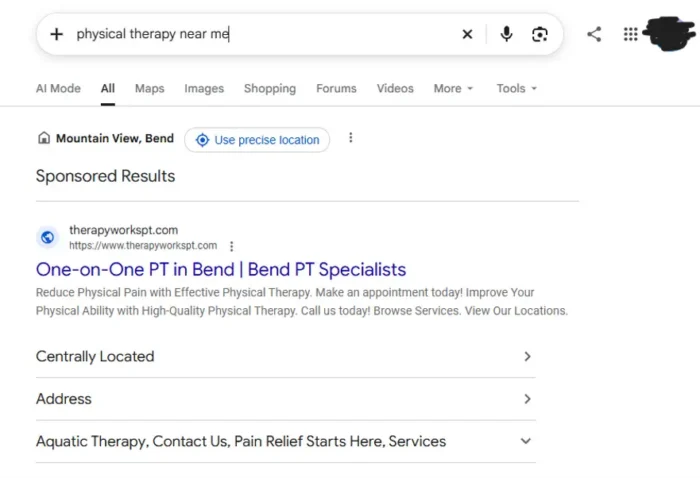
They’re ideal for reaching people actively searching for what you sell, whether that’s a local plumber or a new pair of kicks.
Search campaigns are a good starting point for beginners because you can target keywords and see which searches generate the best results.
Performance Max
Performance Max (PMax) uses Google’s AI to run ads across Search, YouTube, Gmail, Maps, and Discover, all from one campaign. It automatically adjusts bidding and ad combinations to help you reach your conversion goals.
Google claims PMax drives 18 percent more conversions than traditional campaigns.
PMax is worth considering if your business is focused on sales or leads, especially when conversion tracking is already in place.
Display Ads
Display ads use images and other visual elements to reach people as they browse websites and apps.
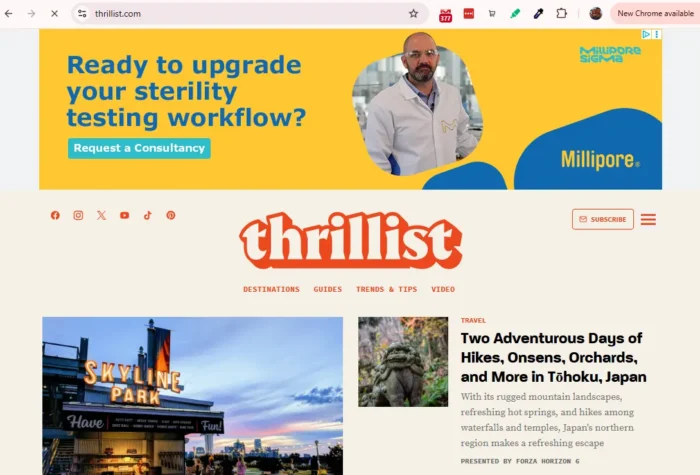
They’re useful for building awareness or reconnecting with people who’ve already been to your website.
Google is transitioning eligible “Display” campaigns into “Demand Gen,” a broader campaign type that serves ads across YouTube, Gmail, Discover, and the Display Network. If you’re starting fresh, consider setting up a Demand Gen campaign instead.
Shopping Ads
These ads show your product image, price, cost, and store information directly in Google’s shopping results.
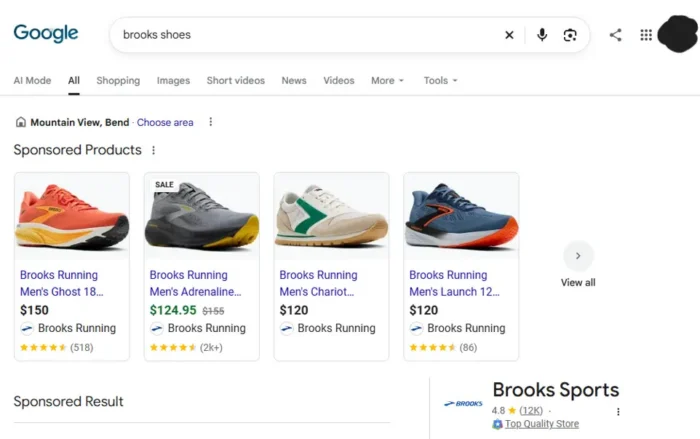
If you run an online store, shopping ads help shoppers compare products before visiting your website.
You’ll need a Google Merchant Center product feed to get started, though.
YouTube Ads
YouTube advertising lets you reach viewers through video ads that appear before, during, and alongside videos.
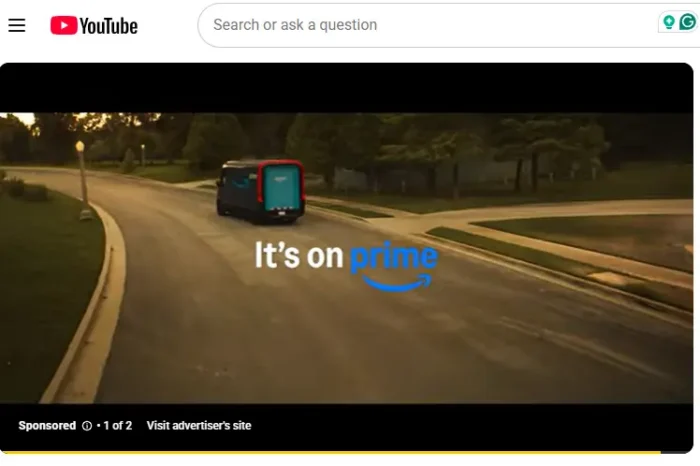
You can choose skippable or non-skippable formats, making these campaigns useful for building brand recognition by introducing and demonstrating products.
App Ads
Have a mobile app? App campaigns help you get new downloads and encourage existing users to return.
Google automatically creates and tests ads using information from your app listing and the creative assets you provide.
Smart Campaigns
Smart campaigns simplify advertising for small businesses that don’t want to manage everything themselves. You choose your goal and budget and provide basic details, and Google handles a lot of the targeting and bidding.
These campaigns are available through Google’s Smart Mode. Keep in mind that you’ll have fewer controls than with standard campaigns.
If you’re new to Google Ads, this is a lot to take in. My advice? Start with the campaign type that matches your business goal.
You don’t need to dabble in all seven campaign types to see results. Start simple, then expand as determined by performance and goals.
How to Set Up Your First Google Ads Campaign
Ready to give Google Ads a try?
Getting your first campaign up and running is easier than you might think. Google’s automated a lot of the setup, so you don’t need to be an advertising expert to get started.
You’ll still need to make some important decisions about your budget, audience, and goals, as well as how you want your ads to appear.
Now that you have a Google Ads overview, let’s walk through the process in five steps. We’ll keep things simple and focus on getting just one campaign launched.
Step 1: Set Up Your Google Ads Account
Head to ads.google.com and click the blue “Start Now” button. Google will guide you as you create an account.
You’ll enter your business name and website URL, and you’ll have the option to connect your Google Business Profile or YouTube channel, if you have one.
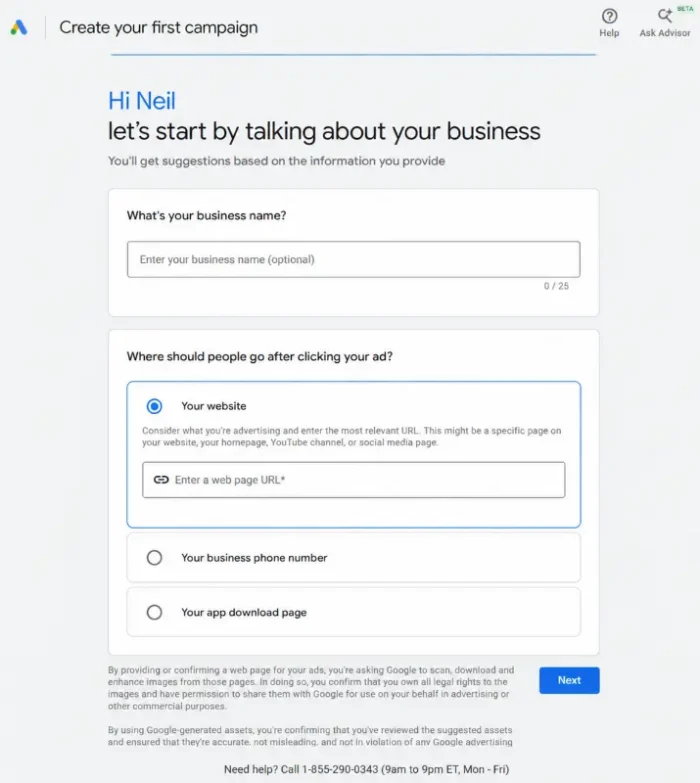
Google may also encourage you to start a Smart campaign right away. You don’t have to commit to this. You can choose different campaign types based on your business goals.
Finally, enter your billing information and payment details. Once your account’s ready, you can start building your first campaign.
Step 2: Choose Your Campaign Goal and Type
Next, Google will ask what you want your campaign to accomplish. You can choose from goals like purchases, submit lead form, phone leads, page views, and brand awareness.
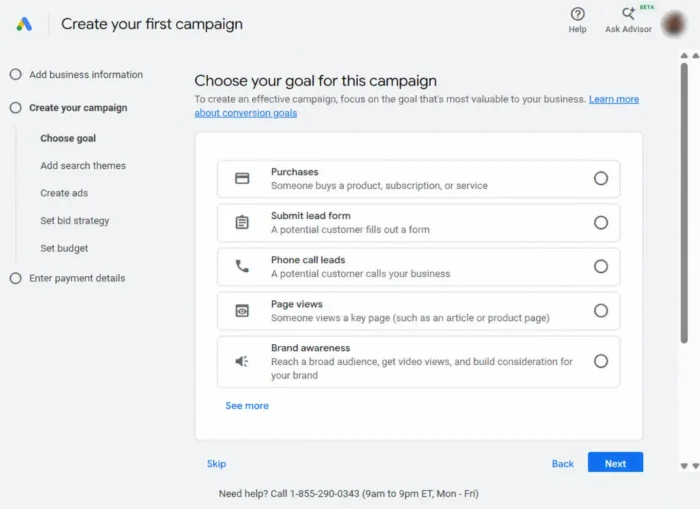
Don’t take shortcuts on this step. Put some real thought into this. Are you trying to sell products, generate leads, get more phone calls, or introduce your brand to new customers?
Your answer will help Google recommend a campaign type.
As we covered earlier, Performance Max uses Google’s AI to find potential customers across its advertising channels. This is worth considering if your goal is to generate sales or leads and you have conversion tracking set up.
If you’d rather choose specific keywords and focus on people searching for your products or services, a standard Search campaign gives you more control.
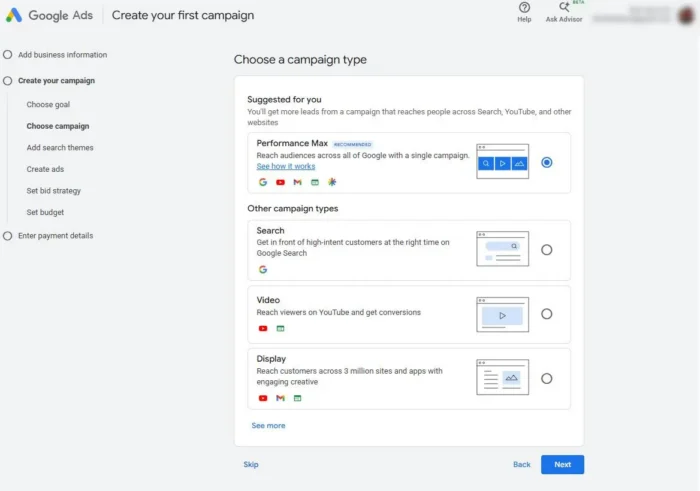
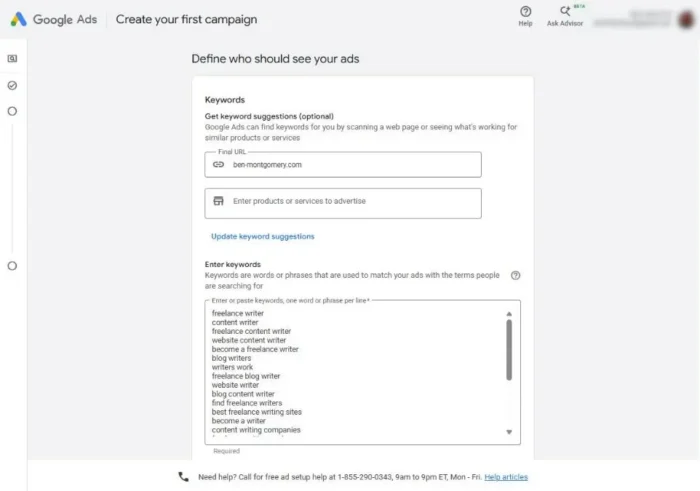
Don’t worry about trying every campaign type. Spreading yourself too thin early on makes it harder to learn what’s working.
You might pick the one type that best fits your goal and focus on mastering it. Get comfortable managing campaigns and generating consistent results before branching out.
Step 3: Set Your Budget and Bidding Strategy
Now let’s figure out what you’re willing to spend.
Start by setting an average daily budget. If you choose $10, for example, Google will generally limit your monthly spending to $304. It can spend up to $20 on a single day (up to twice your average daily budget), so keep that in mind.
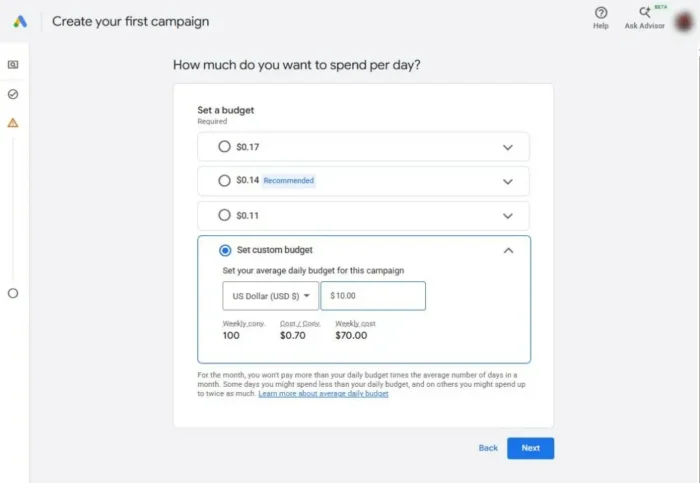
Next comes your bidding strategy. This tells Google what you’re trying to get for your money.
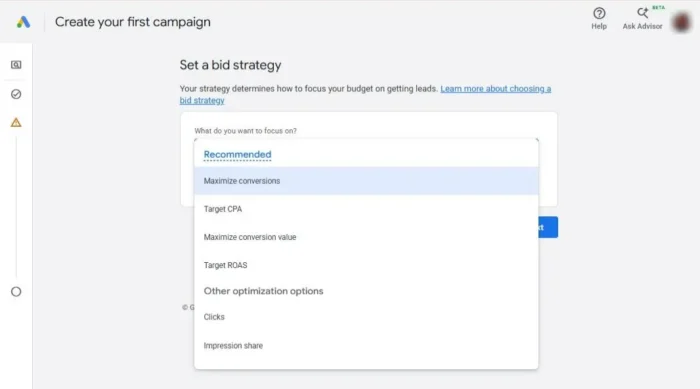
For most beginners, I’d recommend automated bidding instead of trying to manage every bid yourself. Two good options for beginners are:
- Maximize clicks: Google tries to bring as many visitors to your website as possible within your budget.
- Maximize conversions: Google adjusts your bids to generate as many sales or leads as possible. You’ll need conversion tracking set up first, however.
Once you’ve collected some performance data, you can explore Target CPA (cost per acquisition) or Target ROAS (return on ad spend) to work toward your cost or revenue goals.
How much should you be willing to pay for a click?
Say you sell bricks for $200 and make $100 in profit on each sale. You’re willing to spend 30% of that profit on advertising, and 1% of people who click your ad make a purchase.
Here’s the math:
Max CPC = Profit Per Sale x Advertising Percentage x Conversion Rate
$100 x 0.30 x 1% = $0.30 per click
In other words, paying more than 30 cents per click would probably push you behind your planned acquisition budget at your 1 percent conversion rate.
This calculation helps you calibrate a starting point. It’s not a bid you have to manually enter into Google Ads. Google’s automated bidding can handle the individual auctions while you monitor whether the overall results make financial sense.
If you want to explore more options, Google’s bidding strategy guide explains the advanced settings.
Step 4: Choose Your Keywords
Now let’s figure out which searches should trigger your ads.
Start with Google Keyword Planner, a free tool that helps you find relevant keywords and estimate their search volume and CPC. You can also use Ubersuggest to discover related keywords and get a better sense of what people are searching for.
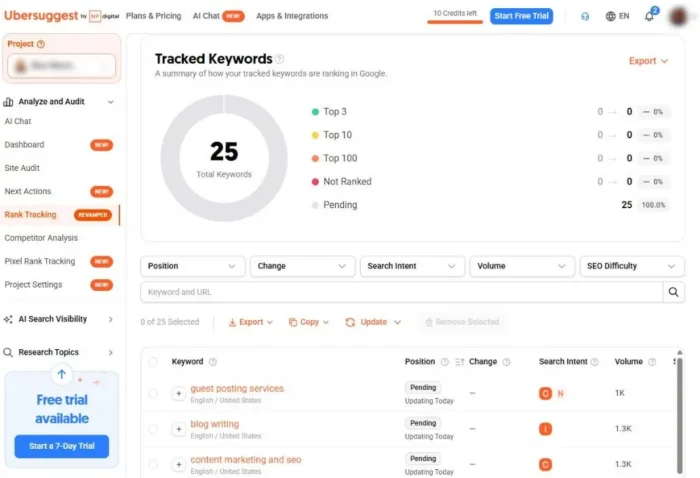
You don’t want to pick a keyword that has a ton of searches but is super competitive. Look at Keyword Planner’s competition column and top-of-page bid estimates before committing to a budget.
Next, think about search intent.
Someone searching for “best running shoes for beginners” is probably just researching. Someone searching for “buy Brooks Ghost running shoes” is much closer to making a purchase.
The closer you are to the bottom of the funnel, the higher your chances of converting. Those searches probably have less volume. Top- and mid-funnel keywords can help you reach more people, even if they’re not ready to buy right now.
Don’t overlook branded keywords, either. People searching for your company or product name may already know what they want, while non-branded terms mostly help you reach new customers.
Finally, you’ll need to choose a keyword match type. These are your options:
- Broad match: Gives Google the most flexibility to find relevant searches, including ones that don’t use your exact keyword. Google recommends pairing it with Smart Bidding.
- Phrase match: Provides more control by matching searches that include the meaning of your keywords.
- Exact match: Offers the tightest targeting, matching searches with the same meaning or intent as your keyword.
Broad match can work well with reliable conversion tracking. Phrase and exact match are worth considering when you have a limited budget or need tighter control.
My advice? Start with a small, focused group of keywords. You can expand once you know which searches bring leads and customers.
While you’re building out your keyword list, running a free SEO audit can show you where you already rank organically, so you’re not paying for clicks you could get for free.
Step 5: Write and Launch Your Ad
You’ve chosen your keywords and set your budget. Now it’s time to give people a reason to click by writing a clear and persuasive ad.
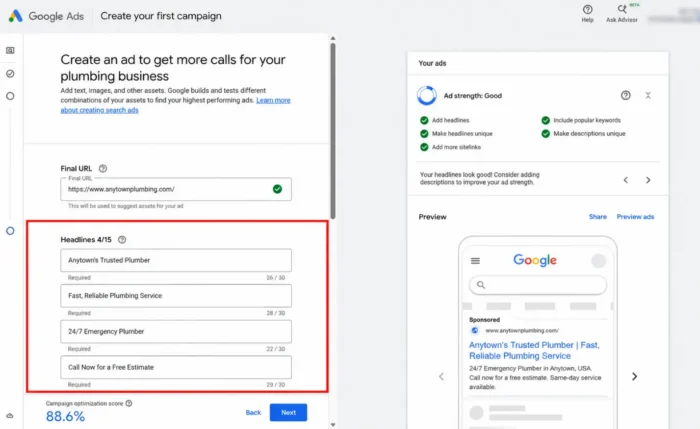
Start with your headline, which is most important because it stands out and helps people decide whether your business might have what they’re looking for.
Providing a clear benefit in your headline will help you stand out. Include your target keyword in at least one headline, and focus on giving people a specific reason to act.
Think about Domino’s Pizza. Its famous promise to deliver in 30 minutes or less worked because it clearly told customers exactly what to expect. No clever wordplay, yet we still remember this promise today.
The same principle applies to your Google Ads. Don’t try to be too clever or creative. Be clear about what you’re offering and why someone should choose you.
Also, be aware that Google now uses responsive search ads, which work a little differently than the old format.
Instead of writing one fixed ad, you can provide up to 15 headlines and four descriptions. Google’s AI tests different combinations to find those most likely to perform well.
A few things to keep in mind when writing your copy:
- Highlight what makes you different. Free shipping, same-day service, or a great warranty can help your ad stand out.
- Use a specific call to action. Tell people what to do next. Whether it’s requesting a quote or shopping your latest sale, don’t assume they know.
- Make your display URL relevant. You don’t need to include https:// in the visible URL. Use the original URL path fields to reinforce your keyword, like example.com/running-shoes.
Once you’re happy with your ad, review your campaign settings and make sure your destination URL works. Then, hit “Publish.” Google will review your ad before it starts running.
That’s your Google Ad overview from setup to launch. Once approved and eligible to serve, you’re officially in business.
Make Sure Your Landing Page Converts
You’re about to spend money to get traffic, and every click you pay for sends someone to your landing page.
If that page doesn’t convince them to take action, you’re wasting your advertising budget.
So, before you advertise, make sure that you’ve done everything possible to convert visitors via your landing page.
A high-converting landing page should deliver on the promise you made in your ad. Someone clicking an ad for affordable snowboard rentals shouldn’t land on a generic homepage where they have to dig for rental prices.
To keep things straightforward for your potential customer, focus on these four things:
- Simple design: Don’t overwhelm visitors with distractions. Unnecessary information and slow-loading animations could cause them to go elsewhere.
- Powerful headline: Make your headline stand out. It should immediately reinforce what your ad promised.
- Clear copy: Don’t fill space with a bunch of fluff. Clearly explain what you’re offering in language customers understand.
- Visual elements: Use photos, graphics, colors, and bullet points to help visitors understand your offer without making the page feel cluttered.
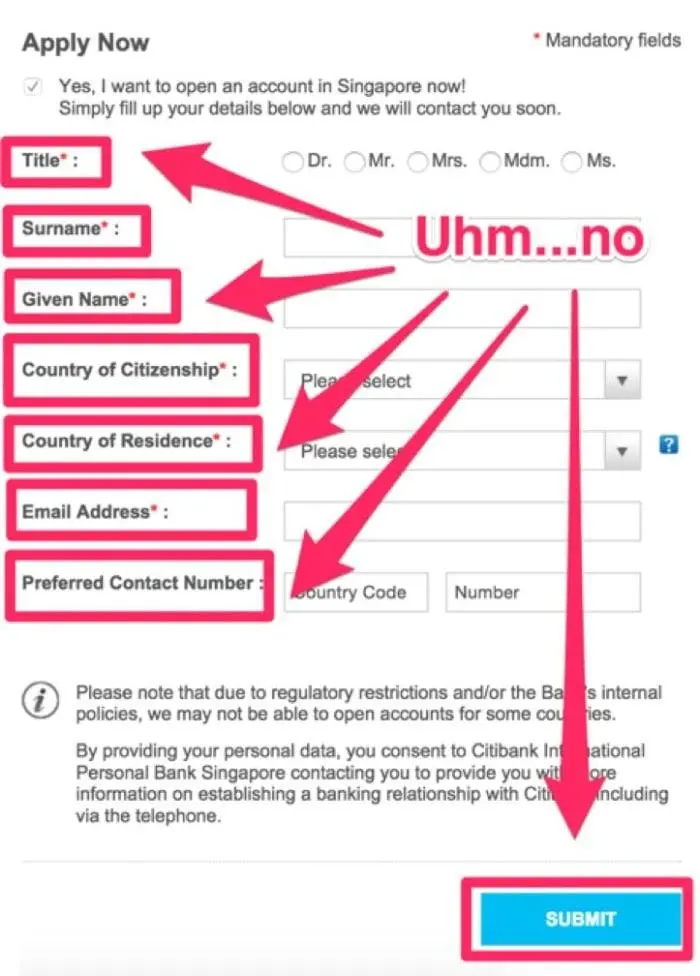
Also keep your conversion forms short. Someone requesting a free quote probably doesn’t want to answer 15 questions before hitting submit. So, only ask for the information you need.
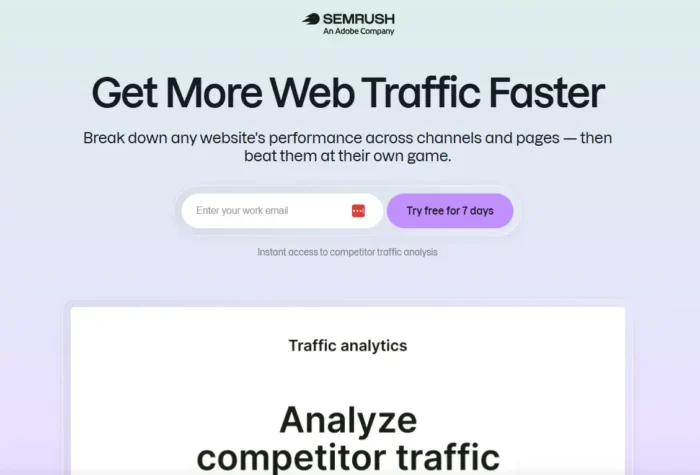
This landing page example from Semrush, for example, has a clear offer and only asks for an email address.
In comparison, this landing page asks for way too much from the would-be customer:
As for the copy itself, keep a simple PAS framework in mind. This stands for:
- Problem: Identify what your customer needs help with.
- Agitate: Explain how that problem will affect them if it’s not resolved.
- Solution: Show how your product or service solves it.
The landing page for a plumbing company, for example, might highlight the frustration and potential damage created by a leaking pipe, then offer same-day repairs with a prominent “Book Now” button.
Just always remember that your landing page has one purpose: to convert. Keep testing and improving it so more of those paid clicks turn into your customers.
How to Write Google Ads That Convert
Writing a great Google Ad is both an art and a science.
You have limited space to convince someone that your business is worth a click. You’re competing with other advertisers who want that same customer’s attention, too.
Here are four Google Ads best practices I’d like you to keep in mind as you write:
Lead with Benefits, Not Features
People don’t care about your product. They care about what it can do for them.
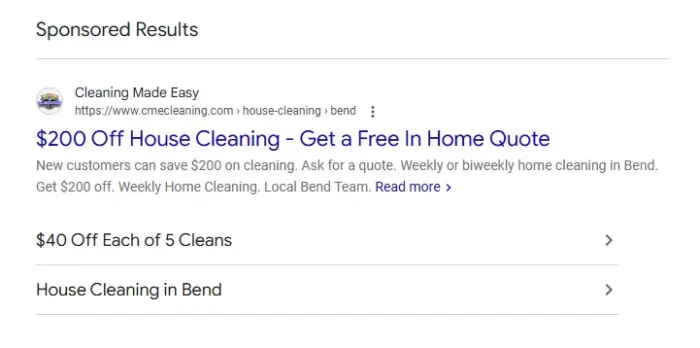
Say you own a household cleaning service. A headline like “Professional Housecleaning Services” tells people what you do. But “Come Home to a Spotless Home” gives them more of a reason to care.
Think about what your customers want and make that the focus of your message. This housecleaning ad, for example, is as unambiguous as it gets. It clearly tells you what you’ll get by clicking.
Work Your Keywords into the Copy
Make sure your ad matches the searcher’s intent.
If someone searches for “professional ghostwriter,” seeing those words in your headline helps reassure them that they’ve found the right business.
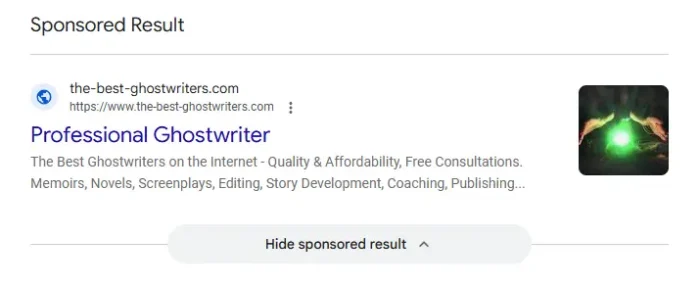
Google also considers ad relevance when evaluating ad quality, so matching your message to the search can help your campaign perform better.
Just don’t force keywords into every headline. Your ads should still sound natural.
Get Specific with Numbers
Specificity is key.
Compare “Save Money on Housecleaning” with “Save 30% on Your First Cleaning.” The second headline gives people a concrete reason to click.
The same principle applies to prices, delivery times, discounts, and other measurable benefits. This Domino’s ad puts a specific number front and center, giving searchers something concrete to act on rather than a vague promise.
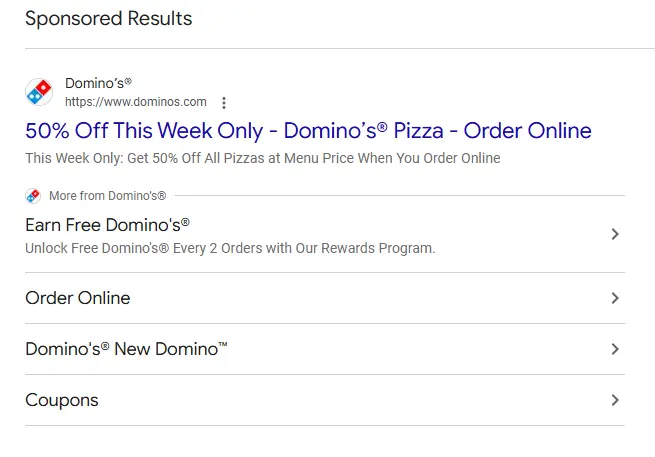
Specific claims build trust, but only if you follow through. If your ad says 50 percent off, make sure that discount is front and center when someone lands on your page.
Give People a Clear Next Step
Don’t make people guess what they’re supposed to do next. Tell them.
Like the housecleaning ad above, use direct calls to action like “Get a Free Quote,” “Shop Now,” “Book Today,” or “Schedule a Free Consultation.”
Remember, too, that responsive search ads let you provide up to 15 headlines. Aim to capitalize on that space by giving Google a variety of good options rather than repeating the same message.
For that very reason, each headline should also make sense on its own, as Google can combine them in lots of different ways.
One last tip: Use your ad’s optional display URL paths to reinforce what you’re advertising. The site example.com/house-cleaning, for instance, tells searchers more than a generic homepage URL.
The bottom line? Keep your ads relevant with clear copy that’s focused on what your customers want.
Google Ads Tools Worth Using
With Google Ads, you’re never really on your own. Plenty of tools can help you get more out of your campaigns, from keyword research and landing page optimization to customer insights and day-to-day management.
Here are a few places to start, including several free options:
Keyword Research
- Google Keyword Planner: Google’s free keyword research tool helps you find relevant search terms and estimate traffic. It also lets you see what other advertisers are bidding.
- Ubersuggest: My keyword research tool, Ubersuggest, helps you discover keyword opportunities, analyze competitors, track rankings, and explore trends. I offer a free tier to help you get started.
Landing Page Builders
- Unbounce: Build and test dedicated landing pages without writing code.
- Instapage: Create landing pages with customizable templates and tools to test different versions and improve conversions.
Behavior Analytics
- Microsoft Clarity: This free tool uses heatmaps and session recordings to show how people interact with your website.
- Contentsquare: Formerly Hotjar, this tool lets you see where visitors click and how far they scroll to see where they might be getting stuck.
Phone Call Tracking
- Google Ads Call Reporting: Track calls generated by your ads using Google’s built-in call reporting and call assets, formerly called call extensions.
- CallRail: A paid option for businesses that want to track phone leads across Google Ads, organic search, social media, and other marketing channels.
Campaign Management
- Google Ads Dashboard: Monitor spending, clicks, conversions, and overall campaign performance in one place. Smart campaigns and Performance Max automate much of the optimization, though you’ll still need to review the results.
- Google Ads Editor: Google’s free desktop application makes it easier to manage multiple campaigns and make changes in bulk.
Google Ads Strategy: Ongoing Optimization
Your job isn’t done once your ads are live. In fact, that’s when the real work begins.
A successful Google Ads strategy involves regularly checking your results and making adjustments based on what you learn.
You don’t need to spend hours in your account every day. That said, I recommend making these five best practices part of your Google Ads routine:
Review Your Search Terms Weekly
Check the Search Terms report to see what people searched before clicking your ads. Then add promising terms to your campaign while excluding irrelevant searches with negative keywords.
This process helps you keep your budget focused on potential customers.
Keep an Eye on Ad Placement
Google no longer reports average ad position. You can use top impression share and absolute top impression share to understand how prominently your ads appear.
Compare these numbers with your conversion costs before deciding whether to adjust bids or budgets.
Test Your Ad Copy
Experiment with different headlines, descriptions, offers, and other verbiage.
Responsive search ads automatically test combinations, but you can also compare ad variations. Give each test enough time and data before deciding what works best.
Check When and Where Your Ads Perform Best
Review conversions by location, day of the week, and time of day. You’re looking for certain areas or hours that generate the best leads.
Use these insights to refine your targeting and budget allocation.
Make Sure Conversion Tracking Works
Check that purchases and form submissions, along with all other important actions, are being recorded correctly. This is especially important after making changes to your website.
One More Tip for Performance Max
If you’re running Performance Max campaigns, regularly review your Asset Group reports.
Google’s AI combines your headlines, descriptions, images, and videos to create ads across its channels. Providing a variety of quality assets gives it more options to work with.
Check which assets are performing well and add new creative when needed. Also be sure to refresh weaker material. Just don’t remove something based on a few disappointing results.
The goal is simple: Keep improving what works and stop spending money on what doesn’t.
For a deeper look at paid search strategy beyond Google Ads, check out my complete pay-per-click (PPC) marketing guide.
FAQs
How do I advertise on Google?
Create an account on Google Ads, choose your campaign goal, set a budget, select your keywords or targeting, and create your ad. Google reviews all ads before they go live.
How much do Google Ads cost?
Costs vary by industry, competition, location, and the keywords you’re targeting. You control your average daily budget, but Google may spend up to twice that amount on any given day.
What is cost per click (CPC)?
CPC is the amount you pay when someone clicks your ad. It’s calculated by dividing your total click costs by the number of clicks.
How does Google Ads work?
Google Ads uses an auction to determine which ads appear when someone searches, taking into account your bid, ad quality, relevance, and the competitiveness of the auction. You can set your budget and targeting preferences, and Google determines when your ads are eligible to appear.
How can I check my Google Ads spending?
Open your Google Ads account and select “Billing > Summary” to review charges and payments. Use “Campaigns” to see advertising costs by campaign.
Conclusion
You now have what you need to get your first Google Ads campaign up and running. The good news is you don’t have to be an expert to get started.
Tools like Performance Max and Smart Bidding use Google’s AI to handle much of the optimization that advertisers once had to manage themselves.
That doesn’t mean you can just launch a campaign and forget about it.
My advice? Start small.
Set a budget you’re comfortable with, track conversions from day one, pay attention to what the numbers tell you, and then adjust as needed. Give your campaigns time to collect meaningful data before making big changes, though.
As you learn what works, you can invest more in the ads that bring in customers and cut back on the ones that don’t.
Want some help with your business campaigns? NP Digital offers professional Google Ads management for businesses looking to get more from their advertising budgets.
If you’d rather keep learning on your own, I suggest you check out Google’s free Skillshop courses.