 Sign In











Most marketers and businesses looking to start a website focus on design and design only.
They want it to impress people. Design should appeal to the masses and make headlines with its beauty.
But it doesn’t mean everything when it comes to driving real traffic and sales.
When launching a new site, you have a fresh chance to capture a ton of organic traffic.
But in a competitive field where SEO is the top priority for marketers, it’s paramount that you start off on the right foot.
Optimizing your website for organic traffic isn’t easy. And it can’t be ignored.
Make sure you check these eight SEO boxes before launching your new site, starting with improving site speed.
1. Speed is paramount to success
Speed is crucial for retaining visitors, and bounces will destroy your SEO. Most people fall short, though. So if your site is speedy, you’ll already be one step ahead of most businesses.
More than 70% of the pages recently analyzed by Google in a recent study took seven seconds to load content above the fold.
For content above and below the fold, it took a total of ten seconds.
On average, it takes most landing pages 22 seconds to fully load. But more than half of all mobile site visitors will leave a page if it takes more than three seconds to finish loading.
That’s a huge problem.
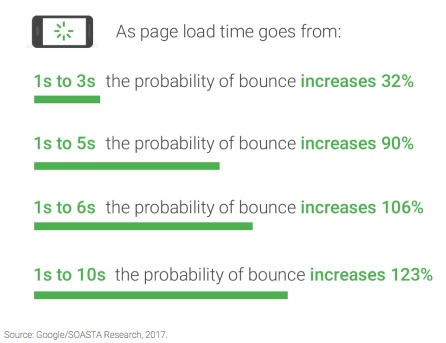
To make matters worse, as page load time increases from one to seven seconds, the changes of a mobile site visitor bouncing skyrockets to 113%.
The number of elements on a page, which can increase loading times, can also affect conversion rates.
As the amount of images, text, and titles on a page jumps from 400 to 6,000, the probability of a conversion occurring decreases by 95.6%.
Luckily, you can use Ubersuggest to check your site speed and make changes for the better.
Before you can make your web pages faster across all devices, you’ll have to enter your URL.
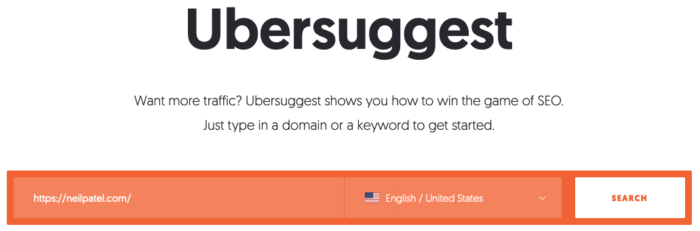 Once you have entered your site’s address, click “Search.” Then, you’ll be able to view your page’s site speed score for mobile and desktop by clicking “Site Audit” in the left sidebar and scrolling down to “Site Speed.”
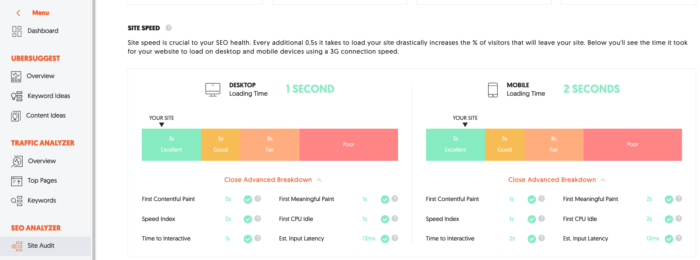
Now, you can check your desktop and mobile loading time, as well as a score ranging from “excellent” to “poor.”
If there are any site speed related issues, Ubersuggest outlines them in the “advanced breakdown” section.
If you aren’t putting mobile before desktop, you’d better start soon. Here’s why.
2. Mobile comes first
More people are accessing the web with a mobile device than ever before. People use mobile more often than desktop or tablet browsing around the world.
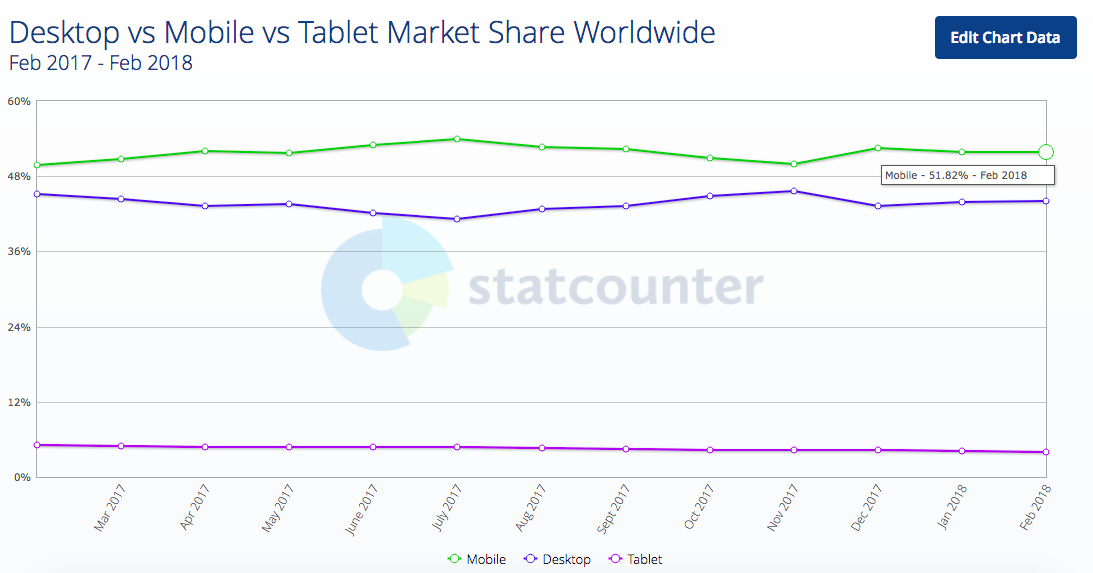
In the past, Google has indexed sites by the content on desktop versions. However, Google is about to start indexing and rating your pages based on mobile experiences instead.
If your site’s desktop and mobile experiences are similar, the switch probably won’t have a huge effect on your rankings.
As an example, below are both the desktop and mobile experience for the same page. Notice how the same exact content appears on both:

However, mobile-first indexing might cause you to rank lower if you have a site with different content across the mobile and desktop versions
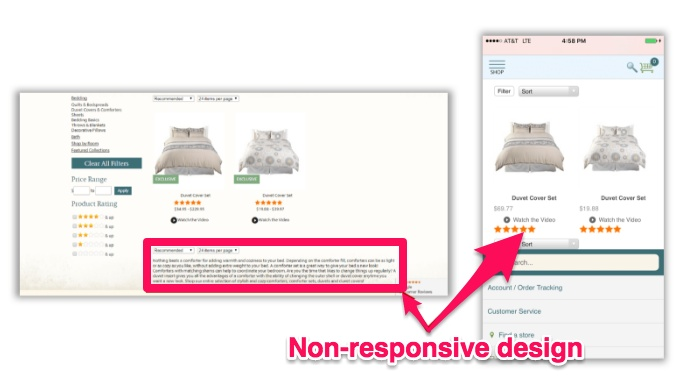
When the switch to mobile-first occurs, Google will be using the mobile version on the right to index and rank the pages, which is missing a ton of the content on the left.
This is known as non-responsive design.
If you’re planning on using it, you may want to make some changes.
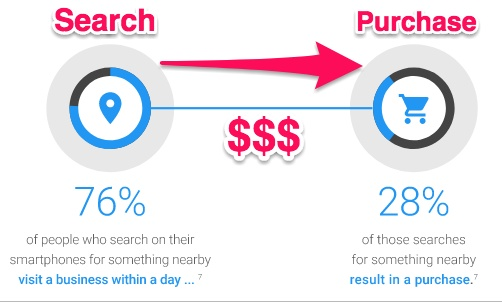
Mobile searches won’t just help with rankings. They also lead to more purchases.
At least 76% of people who search for an item on their smartphone visit the business within a day and 28% of those searches/visits end with a purchase.
You should also focus on improving your site’s overall mobile design. When your mobile site is easier to navigate, your conversion rates will be higher.
HubSpot tested this by switching to more straightforward layouts, which lead to a decrease in bounce rates by 27%.
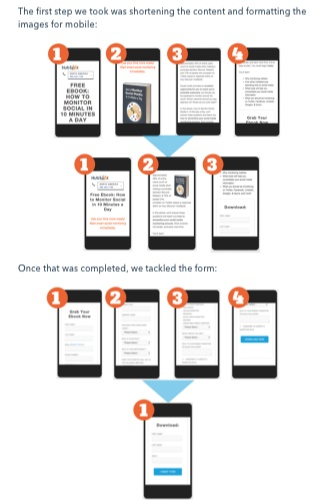
This proves that there really are certain instances where you should “keep it simple, stupid.” Keep your menus, search options, links, and filters as easily accessible as possible.
Less is more. Especially when it comes to the payment input.
Who wants to spend a ton of time entering a 16-digit credit card number? No one. And what if a customer isn’t near their credit card when they’re ready to buy?
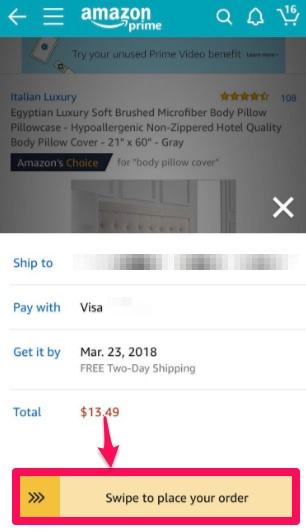
Make it easy for returning customers to make purchases with a “Swipe to buy” feature.
Amazon has introduced this to accompany the “Buy Now” button on their mobile app.
Wish also uses a “Slide to Pay” feature on their mobile application.
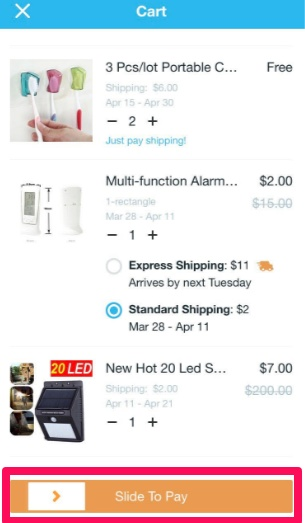
The ease of use will lead to more conversions because you’re literally making purchases as simple as one swipe for your customers.
Another great way to boost SEO is to create content before you launch.
3. Create content before launch (and post regularly after launching)
If you want to bring in organic traffic, you need to use content marketing.
One of the only ways to effectively target keywords is through your content. And blogging is the easiest, fastest way to do it.
Before your site goes live, stockpile content. Write dozens of articles targeting your top keywords before you push the site live.
Why? People want to see that your site is active and legit.
If you don’t have content, people won’t trust you or be able to find you in the first place.
HubSpot data shows that companies with over 16 blog posts every month get nearly 3.5X more traffic than companies that only publish zero to four monthly posts.
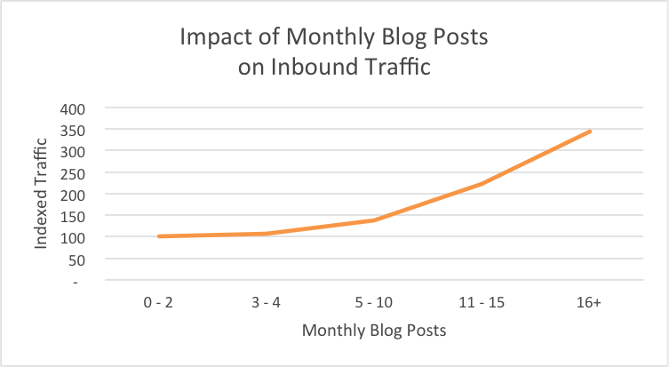
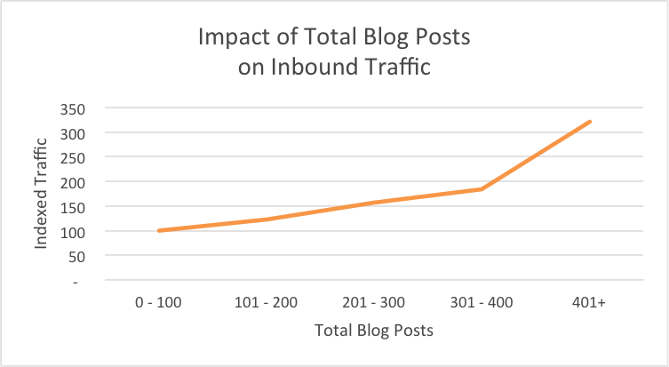
And as the number of blog posts a company has published overall increases, so doe inbound traffic.
Companies with more than 400 blog posts get about double the traffic as companies with just 301-400 posts.
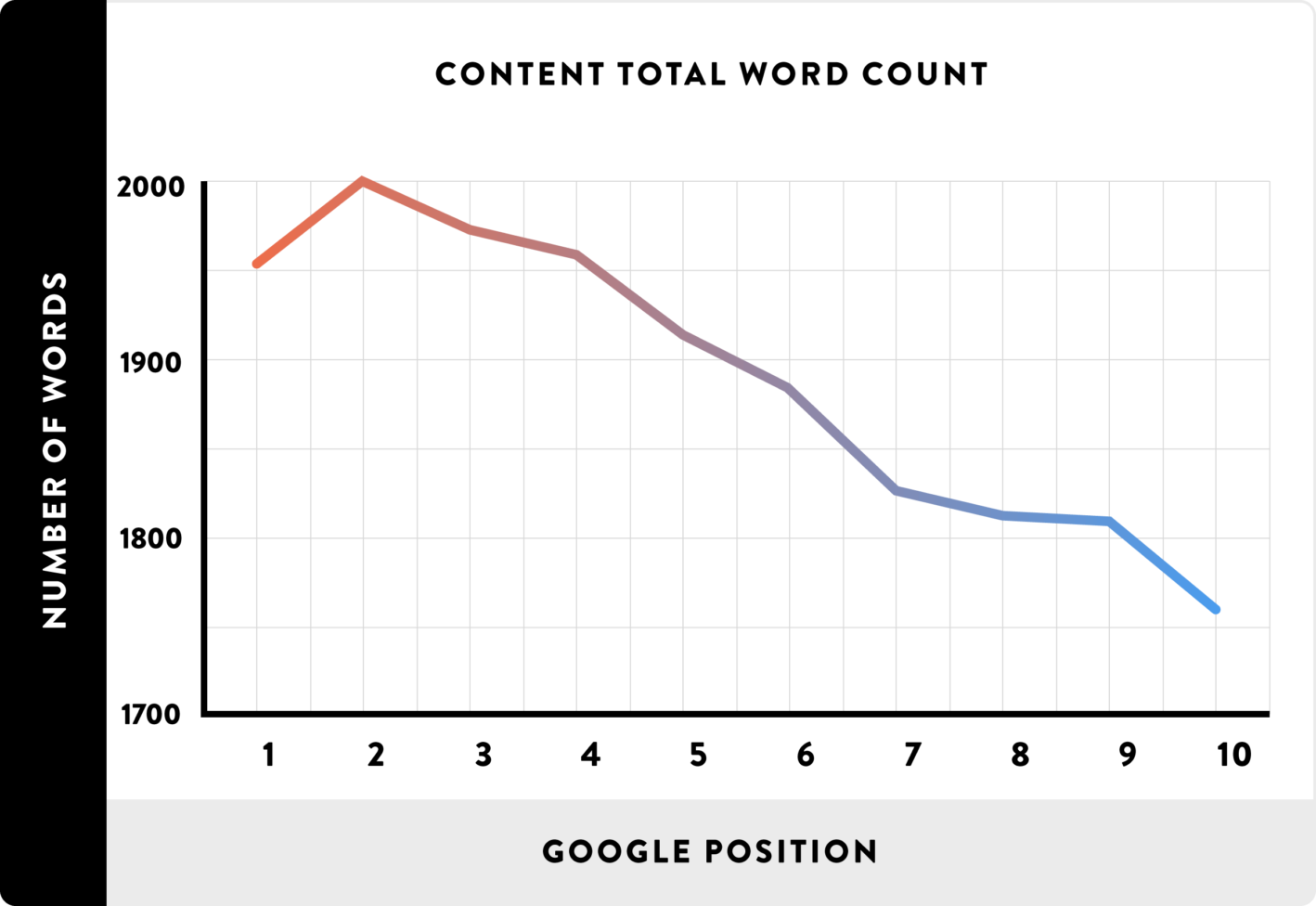
Long-form content can rank you even higher. Aim for at least 1,900 – 2,000 words per post for best results.
Next, set up Google Analytics and Search Console so that you can track site analytics.
4. Set up Google Analytics and Search Console
Analytics are key to growth in SEO.
If you don’t know what’s happening with your site, you can’t fix it. And if you don’t know what’s working, you can’t make sure to do it on every page.
Understanding organic traffic and where your links are coming from is critical.
Once you’ve built your site, set up Google Analytics to track how people will use and find your page.
You can view which channels traffic is coming in from, the number of sessions, the percentage of channel sessions that contributed to the total, and more.
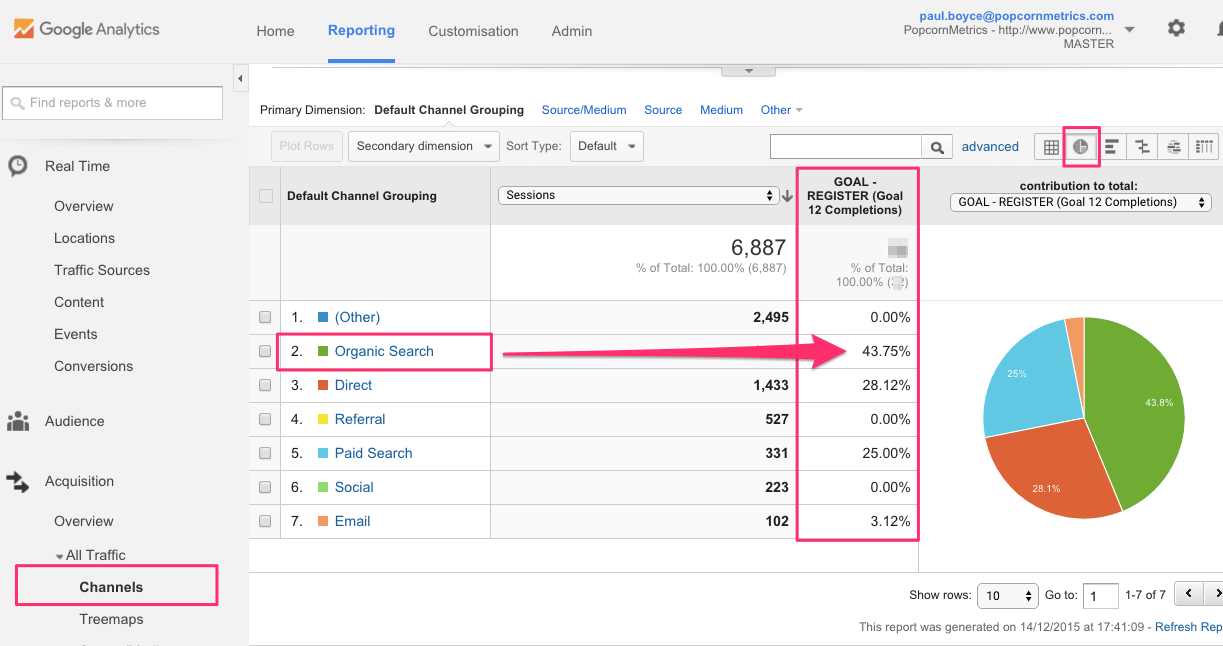
With this information, you can optimize your site for specific keywords, correct mistakes, and continue with the methods that are successful.
Installing it before you launch means that you’ll begin collecting data as soon as your site is live so that you can optimize it ASAP.
To install it, visit Google.com/Analytics and sign up with your Google account.
When you’ve configured your site, paste your unique Analytics tracking code onto it.
If you’ve built your site with WordPress, you can also add the code with the Google Analytics by MonsterInsights plugin.

Once you’ve set up Google Analytics, add your site to Google’s Search Console for more detailed reports.
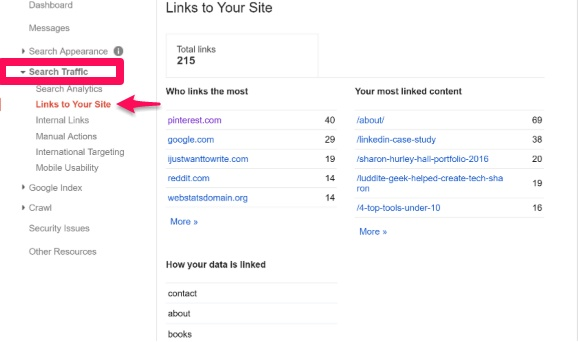
You can view data like search traffic, who is linking to your page the most, what your most-linked content is, and how your data is being linked.
You can also view keyword information, search CTR for each keyword, total keyword impressions, and more.
To add your website to Google Search Console, head to Google.com/Webmasters.
You can start using Search Console right away if your site is already linked to a Google Analytics account.
Once your site begins ranking keywords and bringing in traffic, you’ll have all of the insights you need. Check it every week or so to find new SEO optimization opportunities.
If you haven’t thought about on-page SEO yet, now is the time.
5. Master on-page SEO
If you’re starting a new website, there’s no reason to wait until you need to run an SEO audit to optimize on-page SEO.
Pick one keyword for every page. It helps to start out with lower-volume keywords that you can drum up interest for over time.
Next, write title tags that will attract search engines. Every page of your site should have its own unique title tag. Include modifiers like “2018” or “best” to pick up different long tail searches.
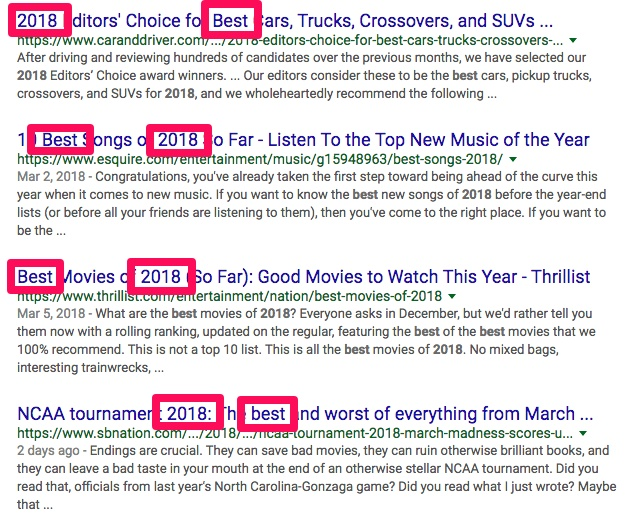
Keep title tags shorter than 55 characters so that they don’t get cut off in search results.
Use short, sweet URLs when building pages that also include the target keyword. For example, use www.yourwebsite.com/target-keyword instead of www.yourwebsite.com/2334905.
If you want to boost click-through rates, always use meta descriptions. Keep them shorter than 160 characters so that the full description appears in search results.

You should also optimize for Google Image search results. Add images to your pages. Create customized graphics with Canva or Stencil and add them to blog posts.
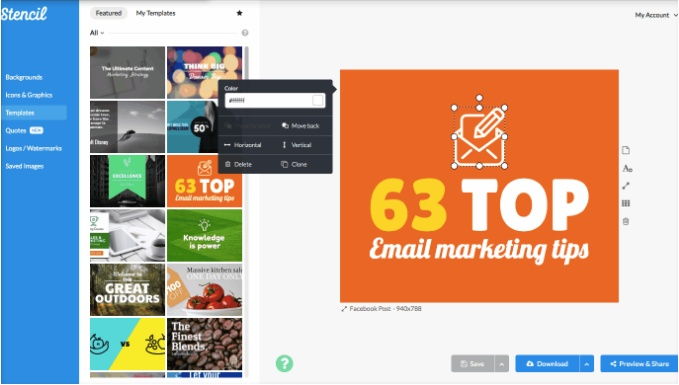
You should include target keywords in image filenames. Add keyword-rich alt text to all of your images when you upload them.
Reduce bounce rates by making the topic of your pages clear. Add the target keywords to the first 100 words of your article. Utilize keywords in heading tags for an even bigger SEO boost.
Include at least two outbound links to bigger authority sites in every piece of content that you create.
Add internal links, as well. Include at least two or three internal links to other articles in every new piece you write.
It also helps to use social sharing buttons that provide quick social proof and make it easy for readers to share content on social platforms.
Make sure that social sharing buttons are easy to see, like the ones used by Search Engine Journal.
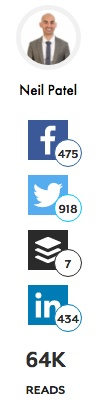
Use the DiggDigg WordPress plugin to add social sharing buttons in a pinch.
Finally, double-check your SEO once you’re live with the help of an SEO audit tool like SEOptimer.
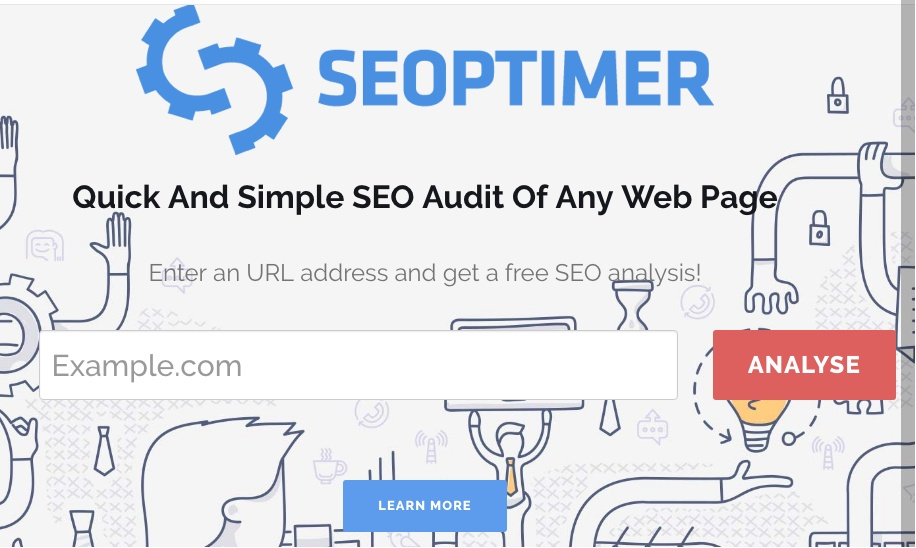
Long-tail keywords can help you convert sales. Do some research before you launch to gain the upper hand over competitors.
6. Perform long-tail keyword research
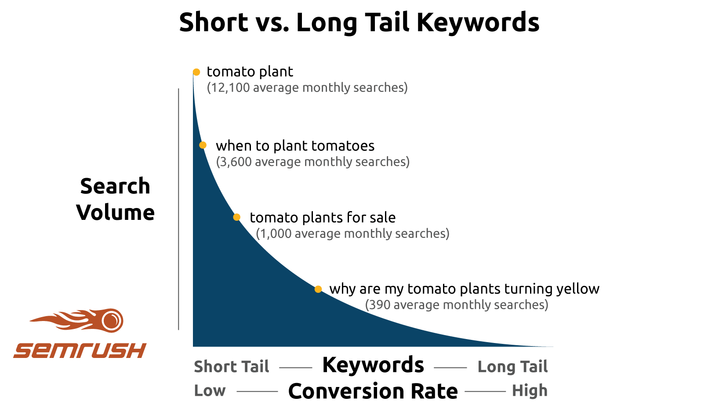
Long-tail keywords are those longer keyword phrases that are ultra-specific to what you’re selling or talking about.
When customers use these, they already know exactly what they’re looking for. By using them, you’ll be targeting those that are already ready to buy, which means even more conversions.
In the past year, I’ve generated 173,336 qualified visitors just using long-tail keyword phrases. That’s an increase of 91%.
You can drum up the same success, too.
Finding long-tail keywords is easy with a tool like Ubersuggest. Enter a term or phrase to begin.
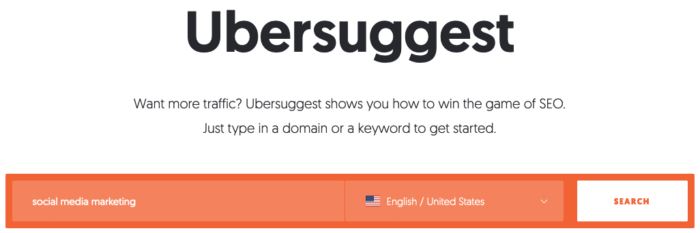
From there, click “Keyword Ideas” in the left sidebar and analyze the results.
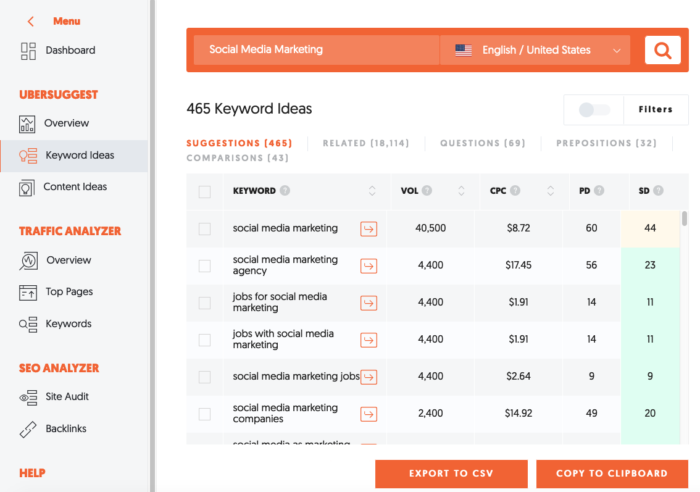
Focus on metrics like volume, SEO difficulty, and CPC. The best keywords have a volume of 1,000 or more, a high CPC (relative to other industry keywords), and an SD of lower than 40.
Collect your results and then target the keywords that are high in volume and low in difficulty. These will yield the best results.
7. SEO optimize your landing pages
A well-designed landing page can boost sales and lead generation.
The more landing pages your site has, the more opportunities you have to catch incoming search traffic.
But there aren’t many sites out there than use specific landing pages to capture users.
According to MarketingSherpa, 44% of clicks for B2B companies go to a homepage instead of a landing page.
Your homepage is extremely important, but it’s not always the best place to create a strong relationship with searchers.
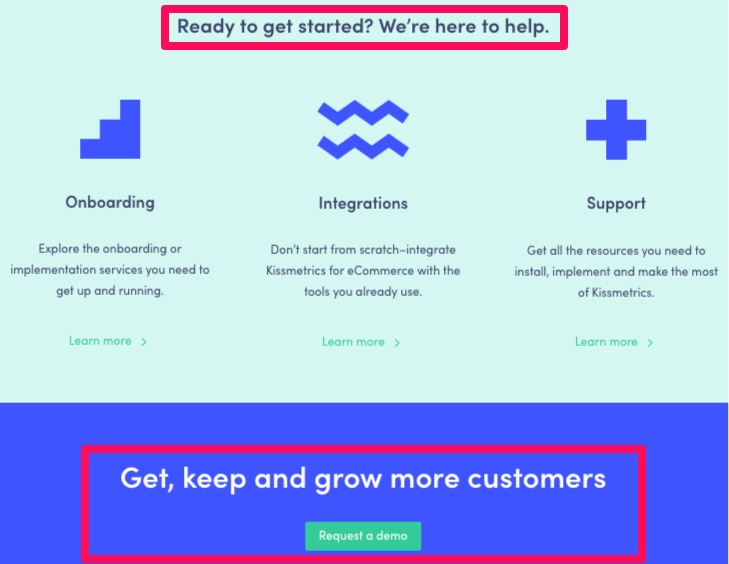
Here’s an example from the Kissmetrics “Product” landing page.
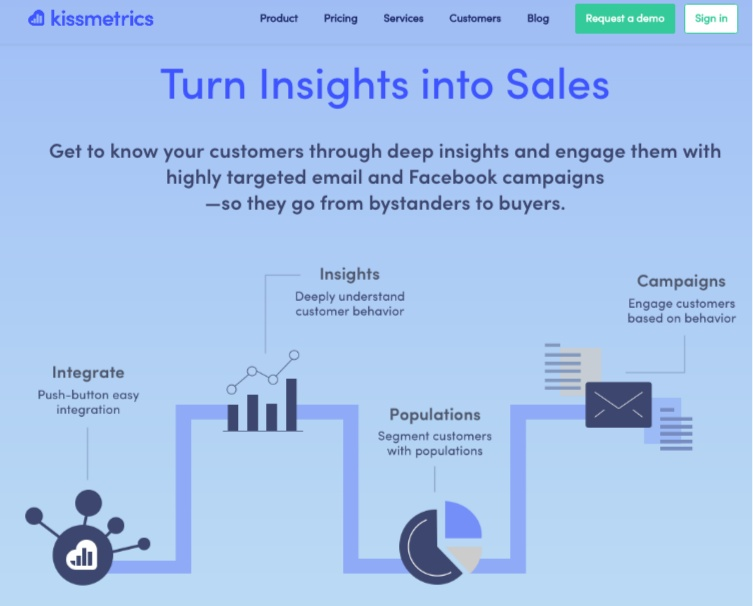
The professional graphics, modern layout, and bold color theme take the page to a new level.
Then, as you scroll down, you’ll learn even more about the features of their services. A video accompanies each section of text.
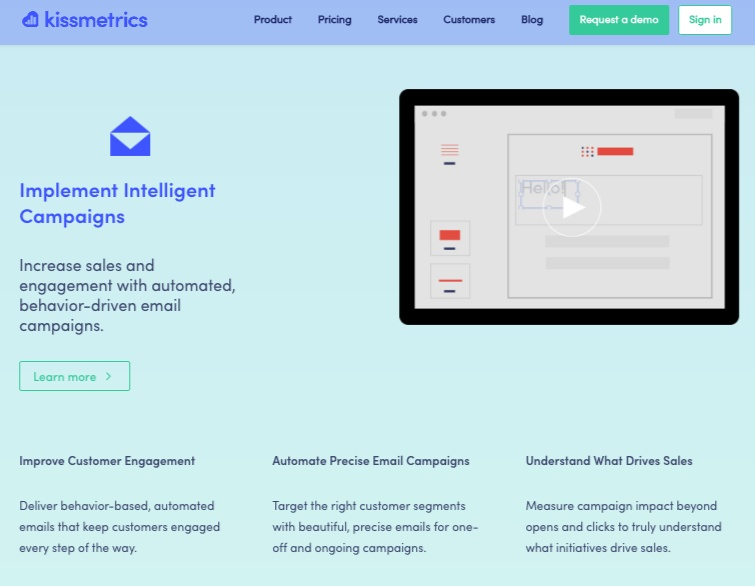
The brand also has clear, noticeable CTAs on their pages.
If you still aren’t convinced about what a money maker landing pages can be, pay attention.
Conversion Rate Experts made Moz $1 million just from a single landing page and a couple of emails.
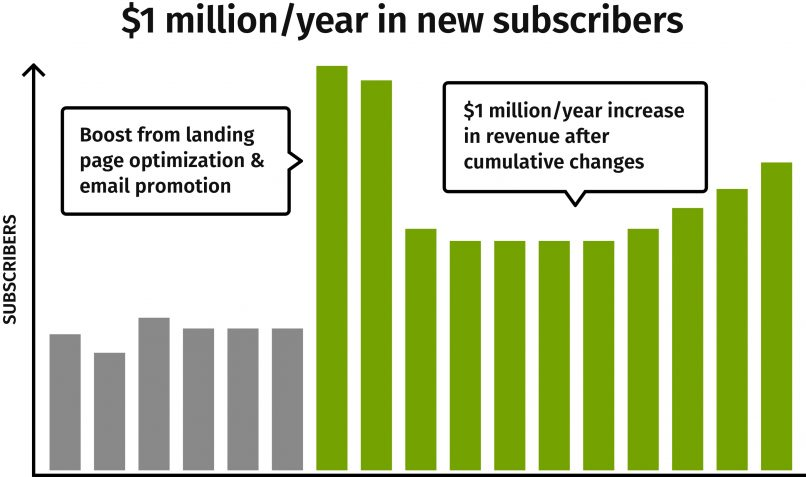
Businesses with over 40 landing pages get 500% more conversions.
But good landing pages don’t have to be limited to just one page. Look at this example from KlientBoost:

The landing page is interactive and draws visitors in by asking questions. First, you select your goals and list where you advertise.
The landing page then asks a series of questions, which also serve as the company’s pre-qualifying questions for finding new leads.
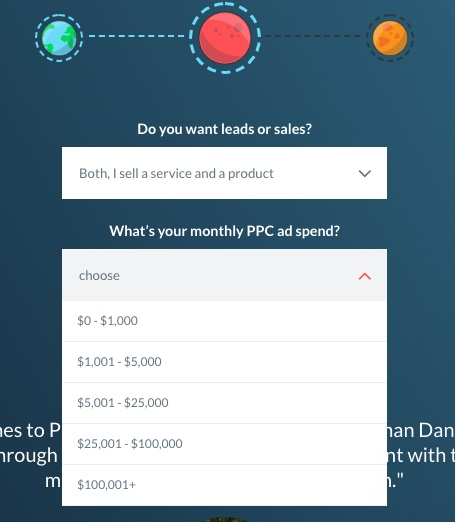
At the end of the questionnaire, you have to enter contact information to send your free proposal.
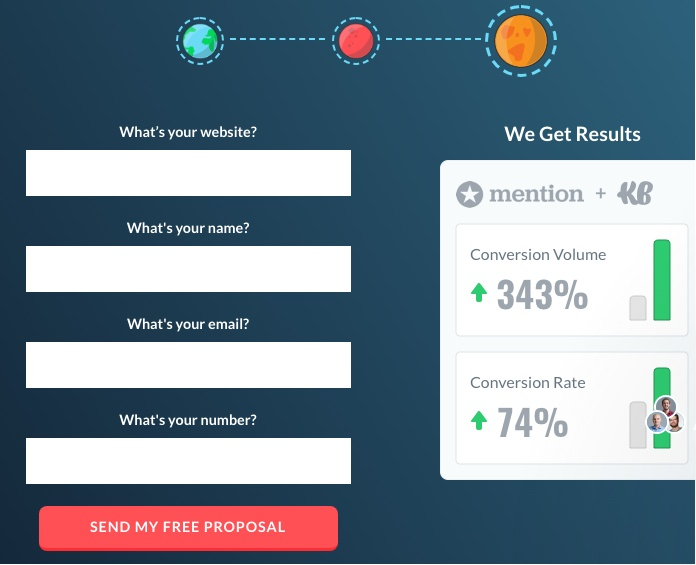
Some visitors may abandon the page at this point if they don’t want to be contacted, but the interested ones will go ahead and fill out the form.
This is a simple multi-page landing page that can help you gain thousands of new qualified leads every month.
Here’s how you can make sure that your landing page is optimized for SEO.
Find a long-tail keyword with the steps listed in number 6 and use it throughout your landing page.
Be sure to add title tags, additional keywords, and a meta tag description.
Make sure that the content on landing pages is useful. You have to include headlines that will keep readers engaged.
The goal of each sentence and headline is to get readers to the next line.
Once you’ve got a nice looking headline, complete an engaging secondary headline and some well-written copy.
It doesn’t hurt to add in a testimonial, a CTA, and CTA button, links, and images. Put all of this information above the fold if you can. You could even keep it all to one page.
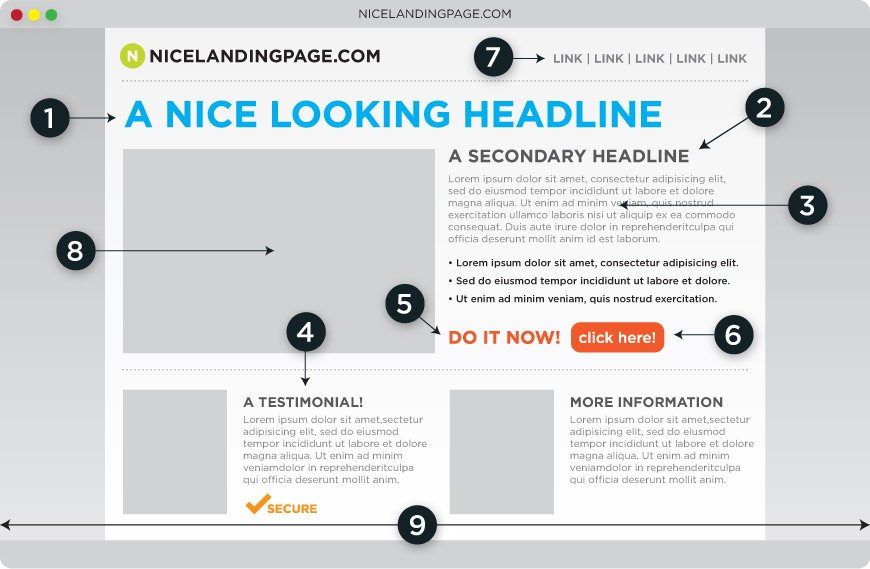
To sum it all up, the key elements of high-quality landing pages are:
- An engaging headline that uses a targeted keyword
- A catchy secondary headline
- Engaging, useful, informative copy that uses supporting keywords
- A testimonial or other form of social proof
- An actionable CTA (to sign up for your service or product, download a lead magnet, etc.)
- A CTA button to accompany your CTA
- Inbound and outbound links to boost your landing page SERP results
- High-quality imagery
- No navigation (you don’t want users leaving the page!)
Finally, generate an XML sitemap.
8. Generate an XML Sitemap
What is an XML sitemap, exactly?
XML stands for “Extensible Markup Language.” To put it simply, it lists all of the URLs that make up a website.
Then, it maps out how the site is structured and what it includes.
Hence the name sitemap.
Search engines use crawlers to index your website and organize the information on it. That’s why you need a sitemap.
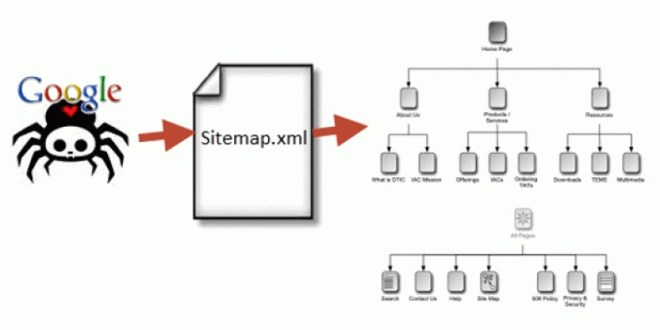
These crawlers can read tons of data about your page, but the map makes it easier for the crawler to do this efficiently and quickly. It acts as a “Table of Contents” for your pages.
Once the crawler does this, your site has a stronger chance of having improved rankings quickly.
Once it does this, your website has a stronger likelihood of improving its rank quickly.
When you create an XML sitemap, submit it to the search engine(s) of your choice so that they can crawl your pages quicker.
To build a sitemap online, you can use XML-Sitemaps.com. You can index a maximum of 500 pages for free with this tool, but you’ll have to pay a fee of $3.49 per month after that.
Once you’ve generated a sitemap, add your site to Bing Webmaster Tools and Google Webmaster Tools. This will allow these search engines to crawl the pages.
If you have a Google Account already, just sign up for Webmaster Tools and add your site to it.
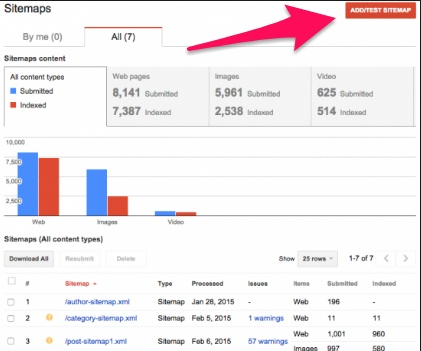
Go to Optimization > Sitemaps and click “Add/Test Sitemap” to submit your sitemap.
Conclusion
Most businesses are worried about design when looking to launch a new site, which is important.
But it won’t drive the majority of your traffic and sales. That’s why you need to focus on SEO before your site even goes live.
Speed is the number one factor that can make or break your website. If it takes longer than three seconds for your pages to load, you’ll lose tons of traffic. AKA potential customers.
Use Google’s PageSpeed Insights tool to test your speed. Improve your site with the suggestions given by Google.
Next, focus on optimizing for mobile. Mobile-first indexing will look at the mobile version of your site instead of the desktop version when it comes to rankings.
Make sure that your mobile site is showcasing the same content as your desktop site.
Create tons of long-form content before you ever launch, and post regularly once you do. Create at least 16 blog posts per month that are between 1,900 and 2,000 words for the best results.
From here, set up Google Analytics and Search Console so that you can get a clear picture of the traffic that you’re about to get.
Run a complete SEO audit before your page launches. Add in title tags, meta descriptions, images, and more.
Do some long-tail keyword research and add long-tail keywords to your pages for maximum conversions.
If you haven’t considered your landing pages when optimizing SEO, you need to. Create multiple landing pages that will capture specific needs.
Use engaging headlines that feature targeted keywords, informative copy, social proof, CTAs, inbound and outbound links, and try to keep all of this information above the fold.
Finally, generate an XML sitemap and submit the map to Bing and Google Webmaster tools. This will make it easier for search engines to crawl and index your pages.
Which of these SEO boxes have you checked off of your list before launching?