 Sign In










Key Takeaways
- Bounce rate measures the percentage of visitors who land on a page and leave without interacting further. It’s a key indicator of how well your content matches user intent and engages visitors.
- There’s no universal “good” bounce rate—performance varies widely based on page type, industry, and user intent. For example, informational pages may naturally have higher bounce rates than transactional pages.
- Bounce rate should be analyzed in context, not as a standalone metric. Segmenting by page, channel, or device provides more meaningful insights into what’s working and what isn’t.
- The best way to improve bounce rate is by focusing on user experience—aligning content with intent, improving site speed, and making pages more engaging. Better engagement naturally leads to lower bounce rates.
Bounce rate is a metric used in website analytics that is used to measure the amount of people who’ve landed on your website, then immediately left without taking any other actions. It’s a metric that can help marketers and business owners understand user engagement on their website, though many people misunderstand what bounce rate actually means.
To learn more about what bounce rate is, what it means for your website, and how to improve yours, dive into our guide below.
What is Bounce Rate?
Bounce rate is a website metric that measures the percentage of visitors who weren’t engaged with your website. An engagement, and therefore not a bounce, means the website visitor:
- Stayed on your website for longer than 10 seconds
- Clicked through to another page on your website
- Triggered a conversion action or event (like filling out a form or clicking a button)
So with that in mind, a bounce occurs if a user lands on your website, takes no action, and immediately leaves.
Bounce rate is often confused with exit rate. Each page has its own exit rate that tells you how many people that landed on a certain page left your website from that page. But someone could have clicked around several pages on your website before leaving, so exit rate tells you nothing about how engaging your website is like your bounce rate does.
How is Bounce Rate Calculated?
Bounce rate is calculated by dividing the number of unengaged sessions by the total number of sessions. So if 1,000 people landed on your website last month, and 400 of those people immediately left without engaging with your website at all, you would have a 40% bounce rate.
The formula looks like this:
Bounce Rate = # of Unengaged Sessions / Total # of Sessions x 100
However, you can also easily find your bounce rate within your Google Analytics so that you don’t have to worry about calculating it for yourself.
How to Find Your Bounce Rate in Google Analytics
There are two ways you can access your bounce rate in Google Analytics’s new GA4. The previous version used to share bounce rate on your home dashboard, but now you’ll have to search for it or manually add it to your reports.
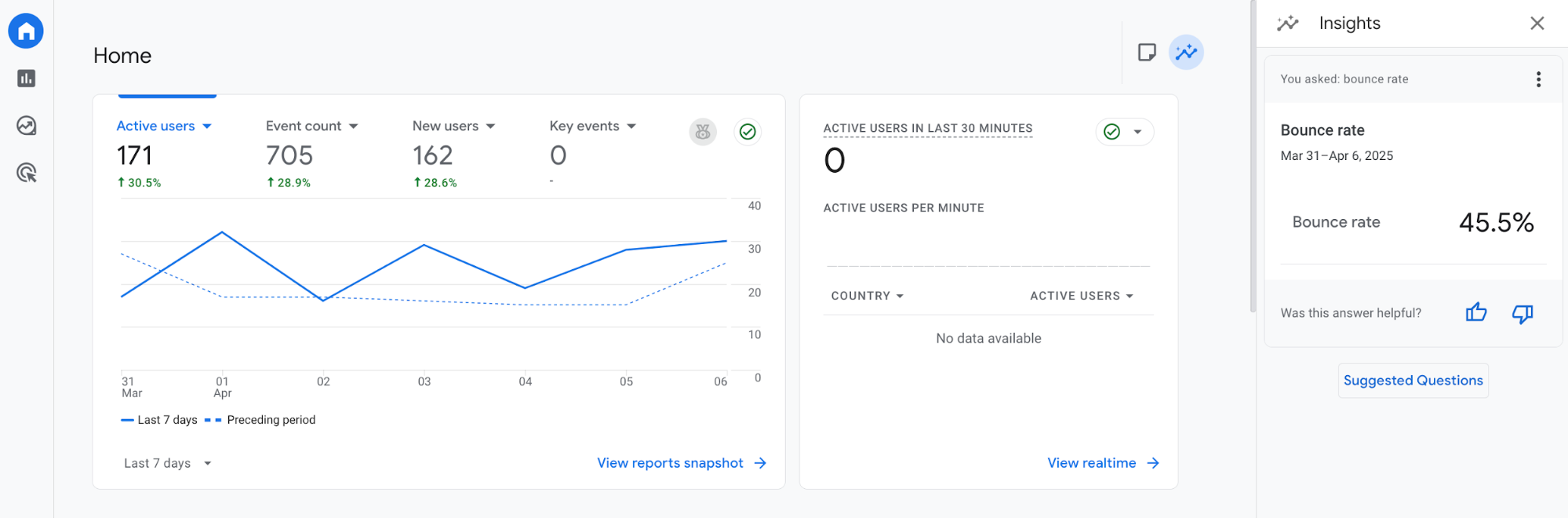
If you want to simply gauge your website’s overall bounce rate, type “bounce rate” into the search bar at the top. It’ll then pop up in a sidebar on the right side of your screen:
Or, you can go to Reports > Engagement > Pages and screens, where you’ll see this report:
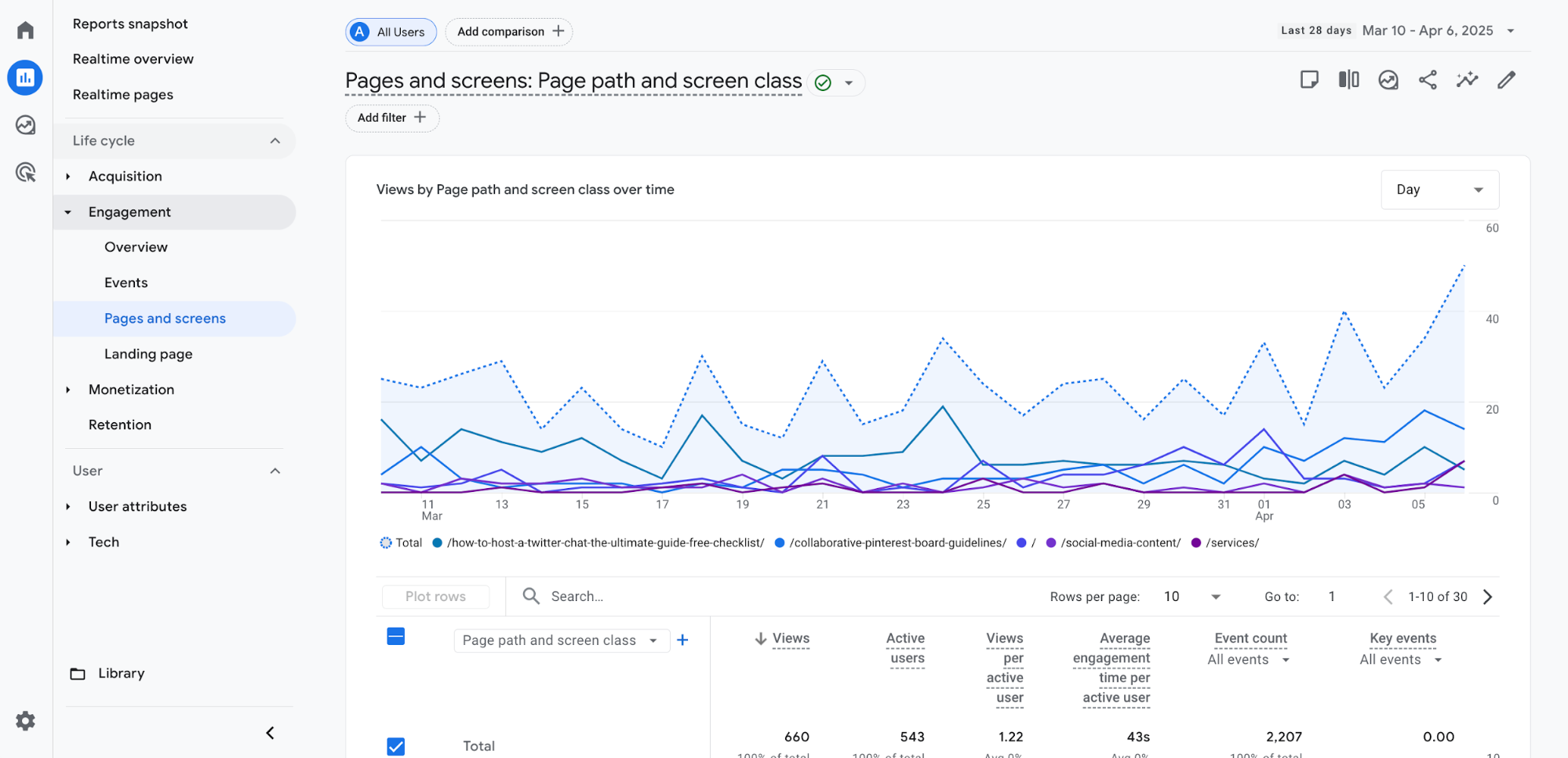
Click the pencil at the top right of your screen to customize the report. Then, under Report Data in the right sidebar, click Metrics.
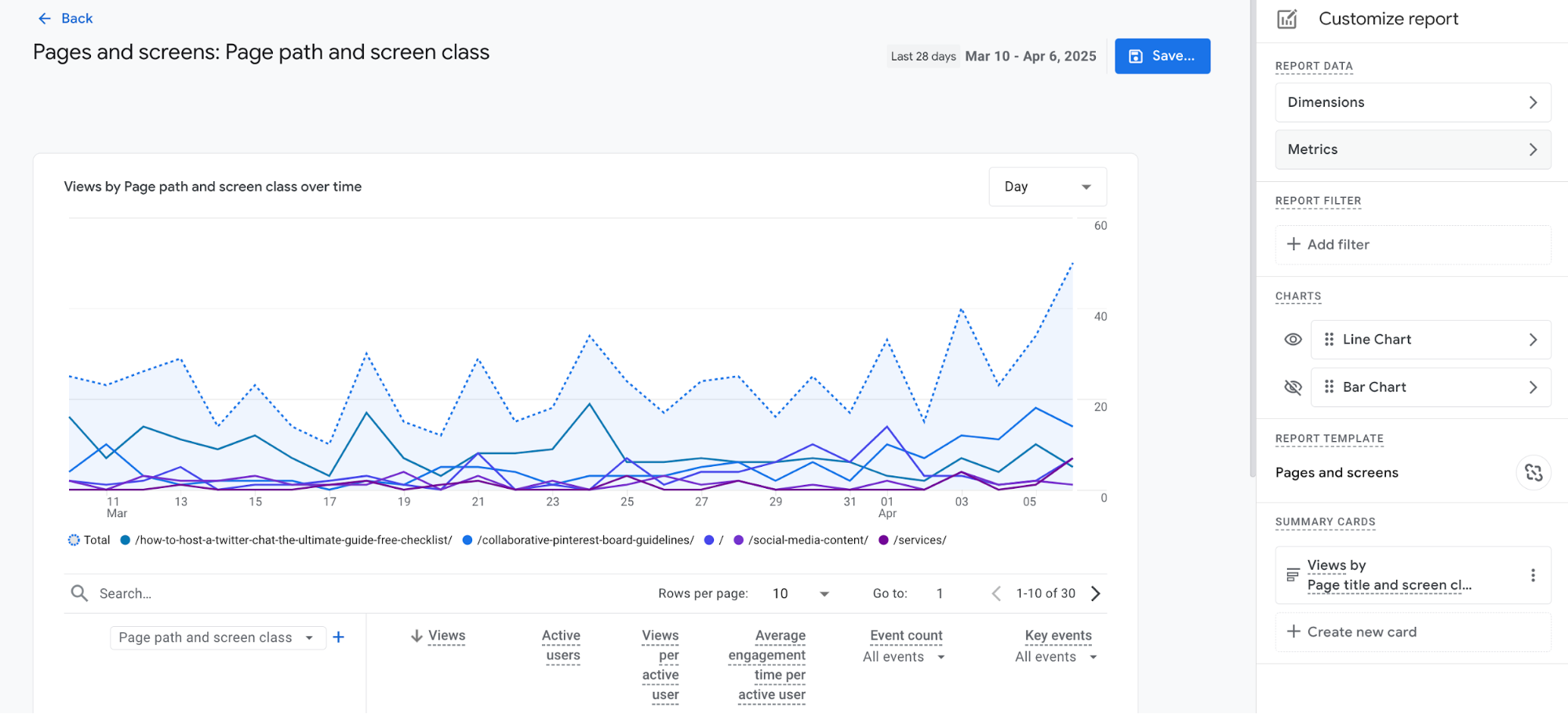
Then, click Add metric at the bottom of the list and start typing to find Bounce rate. Click it to add it to the list. You can click the six dots on the left side to drag it to where you want it to appear in the report, then click Apply.
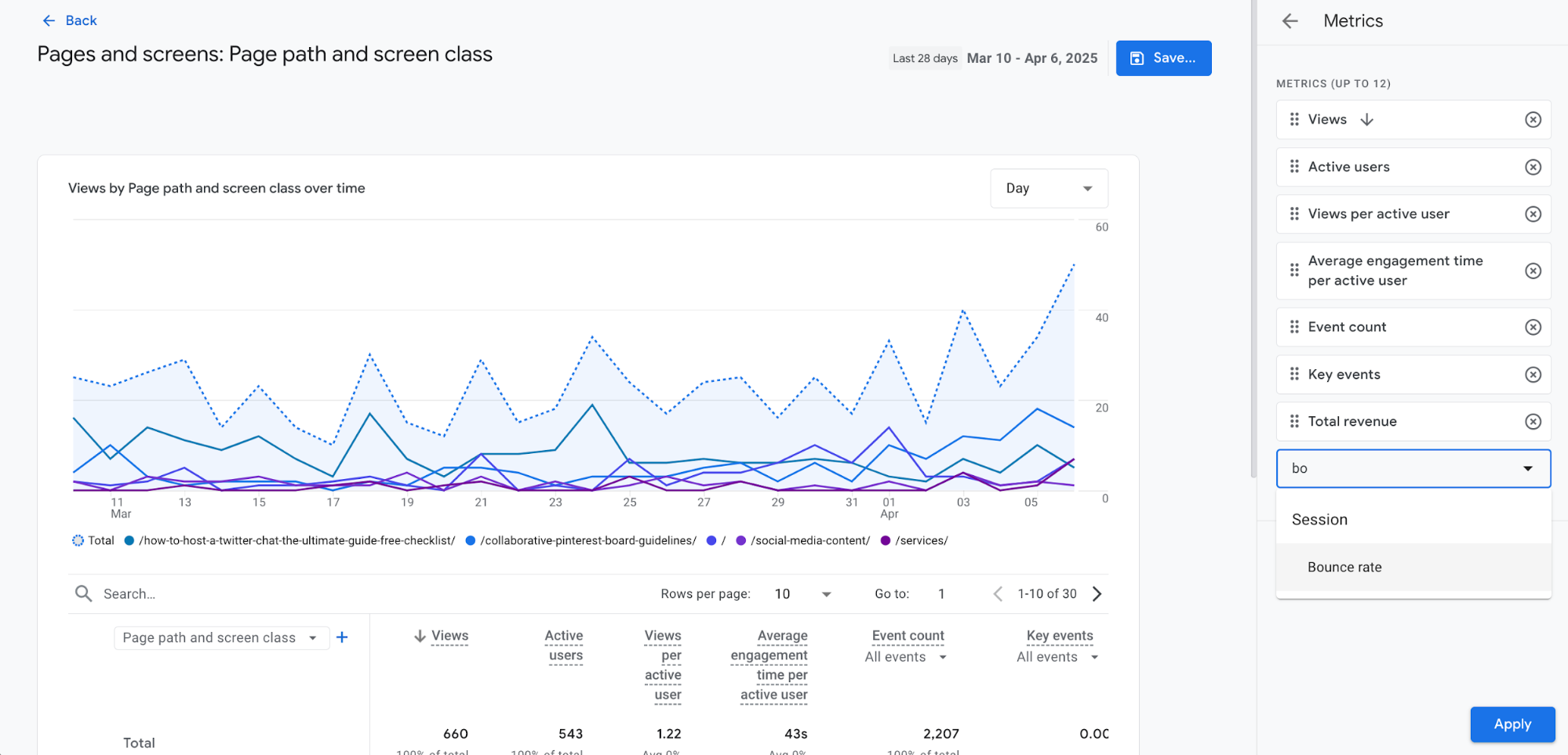
Click Save, then click Back to see the report. Now, you’ll be able to see Bounce rate as part of your page report in Google Analytics.
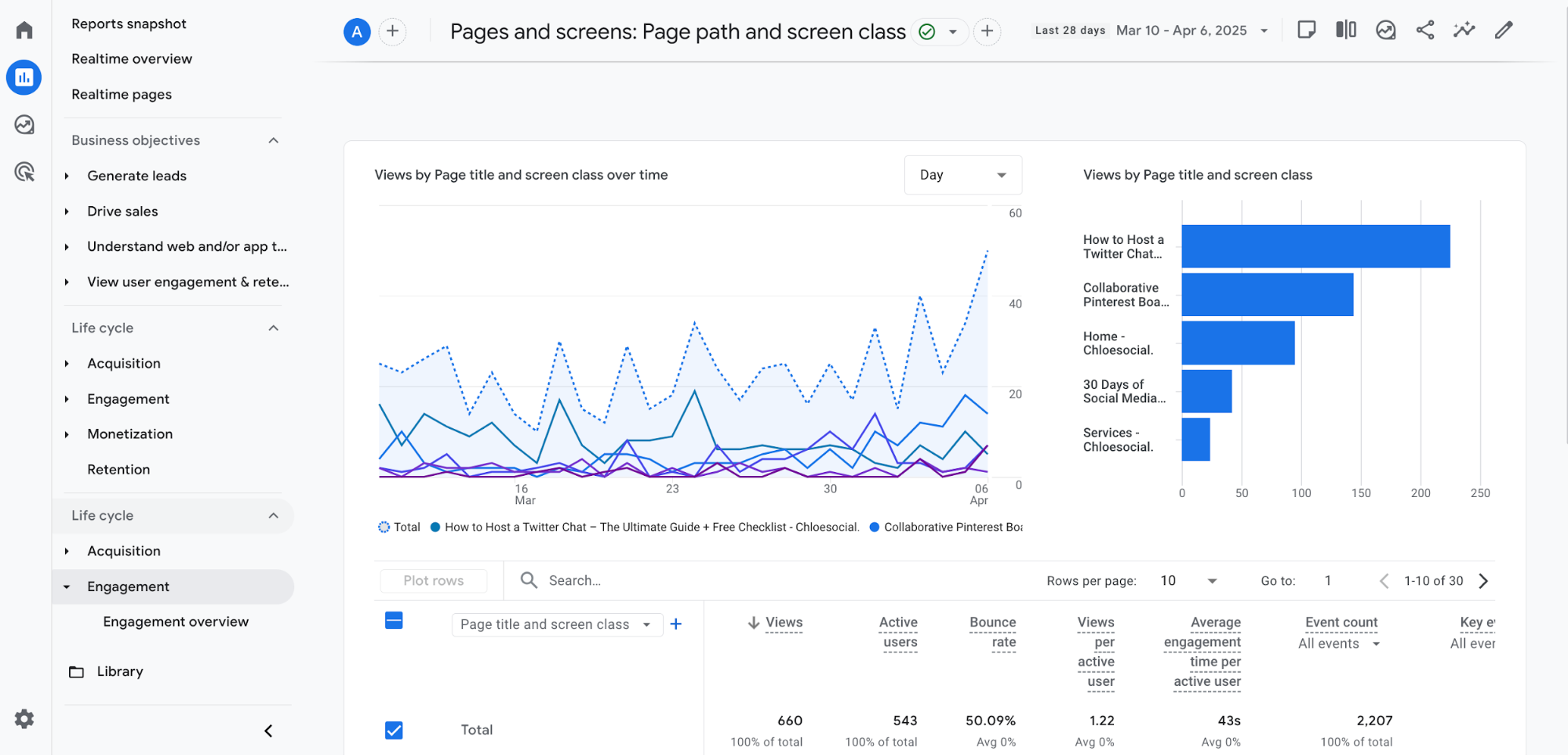
What is a Good Bounce Rate?
The question “what is a good bounce rate” is so subjective that it’s impossible to give a one-size-fits-all answer. Instead, we’re going to discuss marketing training platform CXL’s bounce rate benchmarks based on things like page type, industry, channel, and device.
First of all, it’s important to understand that different types of web pages or websites are going to experience bounces differently. As CXL explains, a page like a contact page with a small bit of information that the user looks at, then uses offsite (i.e., a phone number to call with or an address to drive to) is naturally going to have a higher bounce rate than, say, a product collection page.
In the same vein, a blog site, where a user might land on a post, do a quick skim, then exit the page, is likely to have a higher bounce rate overall than a retail site.
In fact, CXL’s data shows the following bounce rates for different types of websites:
- Ecommerce/retail websites: 20-45%
- B2B websites: 25-55%
- Lead generation websites: 30-55%
- Non-ecommerce content websites: 35-60%
- Landing pages: 60-90%
- Dictionaries, blogs, and portals: 65-90%
Industry can also have an impact on your website’s average bounce rate. Averages range from 44.50% for real estate websites up to 65.52% for food and drink related websites.
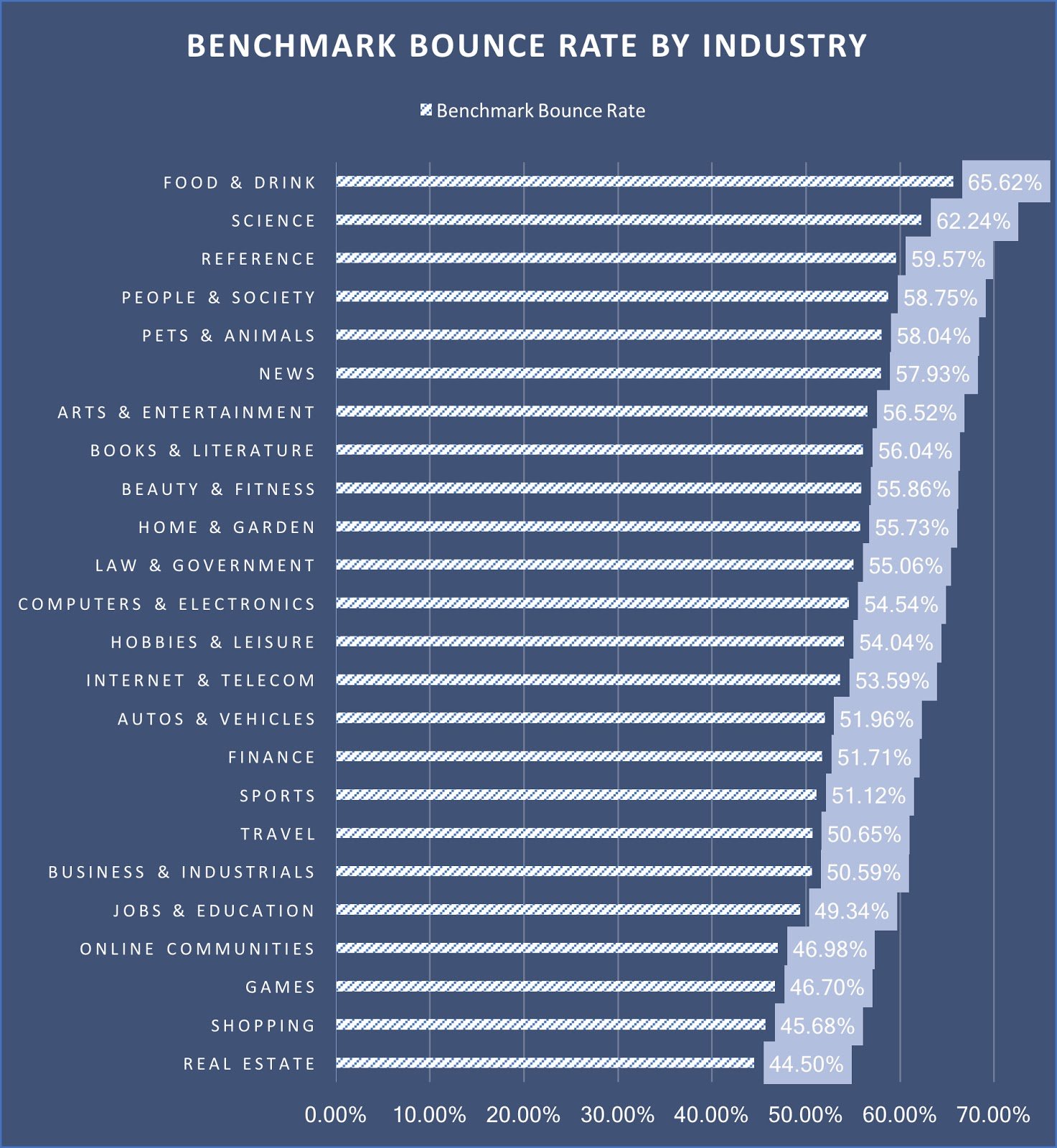
Source: CXL.com
For this data to make sense, you need to think about how these websites are used.
Real estate websites have a much lower bounce rate because website visitors are likely browsing multiple properties before leaving the site. Restaurant websites offer quick bits of information, like location, hours, or menus, and don’t require as much clicking around or engaging with the content.
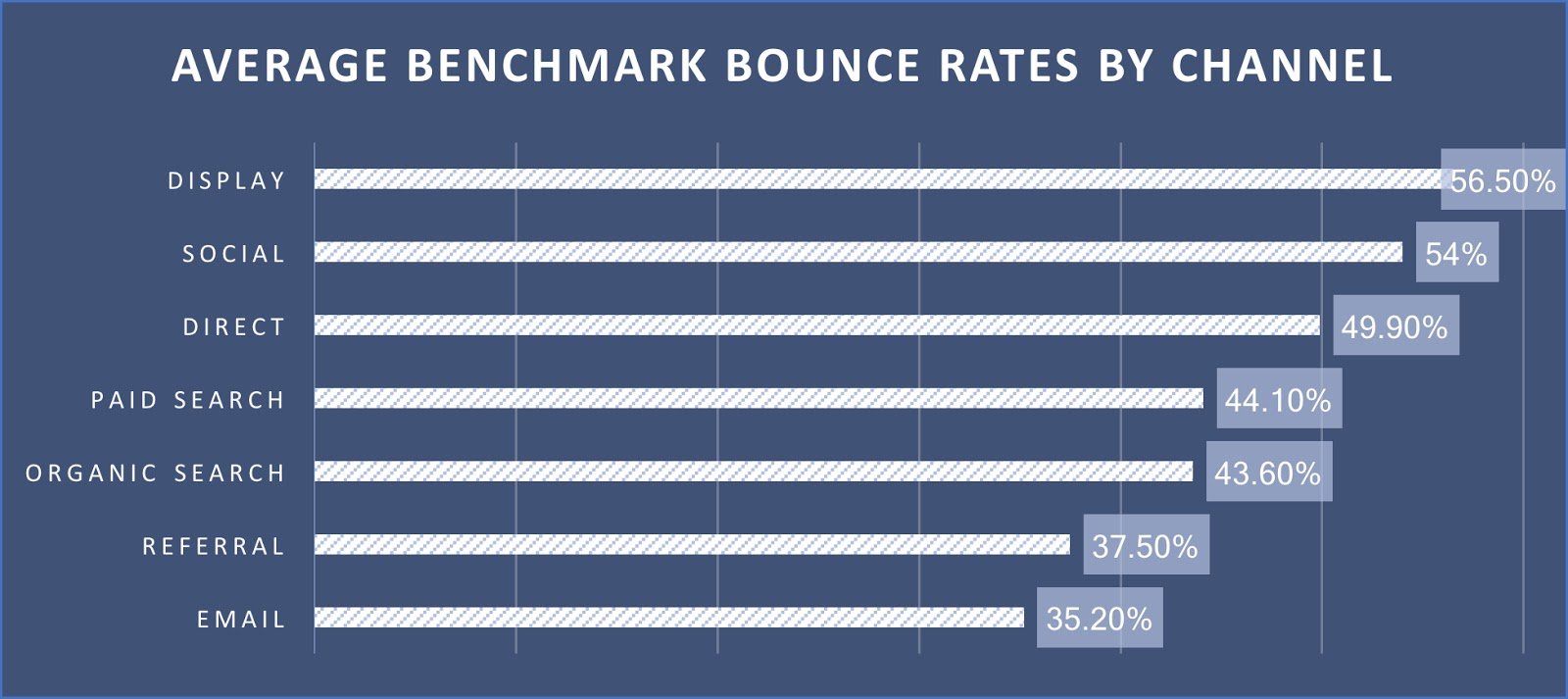
CXL also discovered that bounce rate can differ based on the channel through which a website visitor landed on your site. For example, someone who found your site organically through search doesn’t have as high of a bounce rate as someone who landed on your site from a social media link.
You can see the full scope of data below:
And finally, CXL also looked into bounce rate by device. As I’m sure you can imagine, mobile devices have a much higher bounce rate than desktop computers:
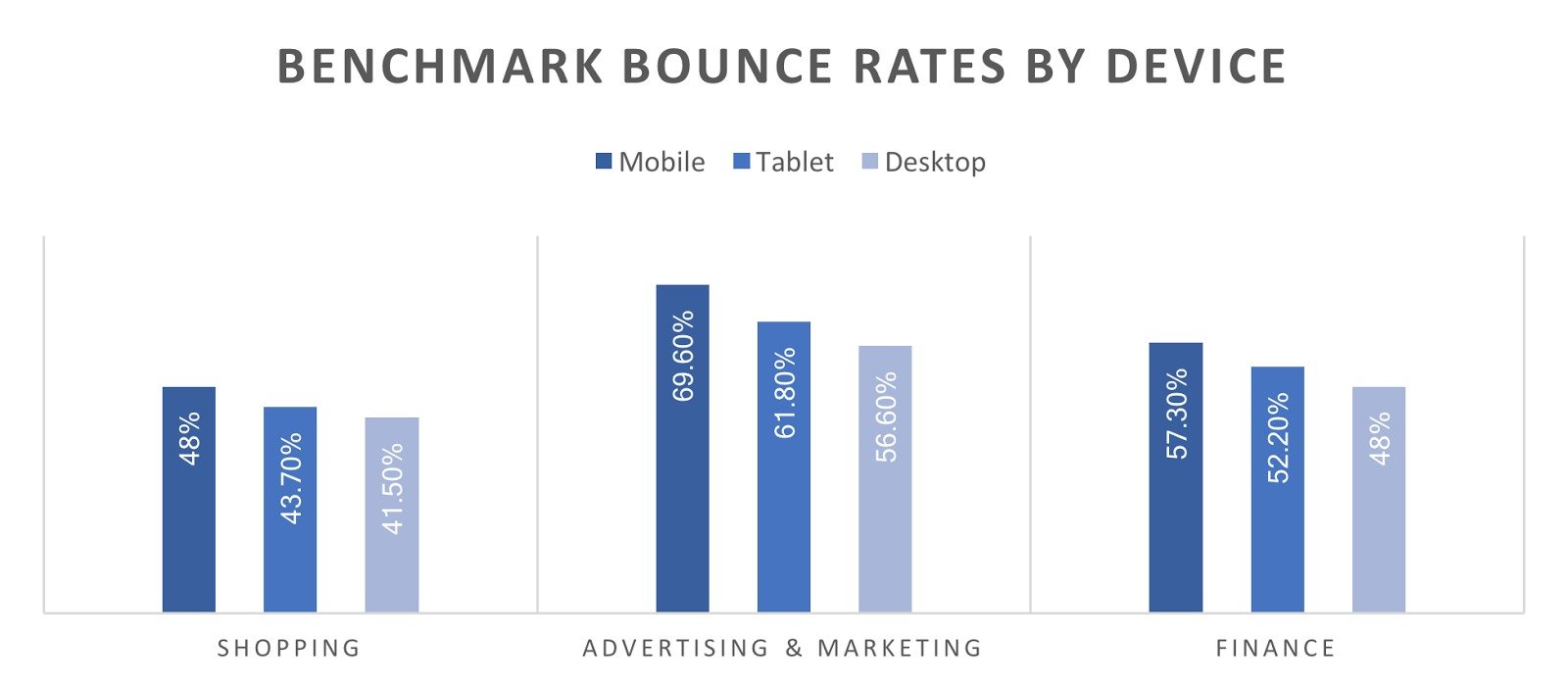
All in all, it’s impossible to know what a good bounce rate is without considering these other factors. However, using your industry’s average as a benchmark is a good place to start.
How to Improve Your Bounce Rate
If you want to reduce your bounce rate, you need to make your website more engaging and easier to use. These tactics can help you improve the user experience on your site, thereby enticing people to stay on your site longer, engaging them, and keeping them from bouncing.
1. Improve Your Page Load Time
If your website takes too long to load, people are going to immediately exit out, leaving you with an instant bounce. By first optimizing your site’s speed, you can ensure a faster loading time that can more quickly engage your website visitors.
While we’ve got a full guide on improving page load time here, the gist is:
- Ensure your website host is running swiftly and smoothly
- Compress your image files and clean up your coding
- Take advantage of optimization techniques like browser caching, content delivery networks, and reducing redirects
2. Optimize for Mobile Users
Similarly, you need to make sure your website loads well on mobile devices and is still navigable. Some key tips for mobile optimization include:
- Use a mobile responsive website design that is easy to navigate on a smaller device
- Use large, easy-to-read fonts for your headings and other copy
- Use contrasting colors that make buttons and other details easy to see
- Disable pop-ups and other elements that can make it difficult to interact with your website on a smaller screen
- Use a hamburger menu for your navigation links to make them easier to click
When your website is easy to use on a mobile device, your mobile website visitors can find what they need, keeping them on your website for longer.
3. Satisfy Search Intent
Search intent refers to the overall purpose or goal of someone’s search engine query. For example, if you type in “restaurants near me,” a page from a local travel guide highlighting top restaurants in your area would perfectly satisfy search intent.
On the other hand, a website for a restaurant in another state certainly wouldn’t be much help. And if you clicked that link and immediately noticed that the restaurant was not near you, you’d likely click the big red X in the corner of your browser.
Each time you create a new landing page or blog post, look at what people searching for your topic or keyword are looking for. Make sure your page answers that question or visitors might look elsewhere.
4. Focus on What’s “Above the Fold”
“Above the fold” is website-speak for the content that appears before a user starts scrolling down the page. You want your website, its design, and the content it holds to grab attention well enough that users want to keep scrolling and interacting with your site.
Some ideas to grab attention with your “above the fold” content include:
- Use visually appealing imagery that pulls users in
- Place a heading at the top of the page that immediately lets users know what to expect from the page
- Write an excerpt or subheading that teases the rest of the content in a way that makes visitors want to keep reading
Ideally, if the first part of the page that loads ropes your visitor in, they’ll keep scrolling and engaging with the rest of your content.
5. Make Your Content Easy to Digest
As a user scrolls, if all they see is a huge wall of text, they’re going to be instantly turned off from trying to find any more information on your website. A large jumble of text is not appealing in any medium, especially online content.
If your website visitor is trying to sift through your blog post to find an answer, a wall of words with no images, paragraph breaks, or bulleted lists is going to appear incredibly daunting, and not at all digestible.
Instead, infuse your blog and landing page content with elements like:
- Images or graphics
- Bullet points
- Calls to action
- Videos
- Short paragraphs
- Checklists
- Forms
- Informational call-outs
The more skimmable you can make your content, the better. While you might think that would make it easy for someone to find what they’re looking for and exit within 10 seconds (and in some instances, it still might—but at least your website was helpful), it also helps pull them in and make them want to read even more information on the page.
6. Strategically Use Internal Linking
Internal links are your BFFs when it comes to reducing your bounce rate. If you have a lot of website content, make it all interconnected by linking relevant pages and blog posts together.
As an example, simply scroll through this blog post and look at all of the links we’ve included. Most of them are links to other blog posts on NeilPatel.com.
That’s because some of the content we mention lightly here, due to the topic of this post, has a more in-depth guide elsewhere on the site. Linking to that guide provides an opportunity for website visitors to learn more about that topic if they so choose.
It also gives you the opportunity to reduce your bounce rate, increase session time, increase page views, and showcase your website’s overall value to new visitors.
7. Embed Videos and Other Visual Elements
Embedding videos on your website can also help to increase the amount of time a visitor spends on your landing page or blog post. Create YouTube videos that accompany your web pages and embed them to provide more context, additional information, or simply an alternative learning method.
For example, you could also watch this video on how to lower your bounce rate if you prefer to learn via video:
You can also use other visual elements like infographics, checklists, images, and informational call-outs to help make your content more engaging, keeping a visitor’s interest for longer.
8. Add a Table of Contents
Placing a table of contents at the top of each blog post immediately lets visitors know what they can learn by reading—or make it easier for them to find the exact section they’re looking for.
Plus, making your blog contents interactive helps to lower your bounce rate by letting readers click around to read the sections that interest them most.
9. Include a Call-to-Action
Include buttons that lead users to take a desired action. On a landing page, your call-to-action might be to request a demo, sign up for an account, purchase a product, or fill out a form. On a blog post, it might be to watch a video, read another blog post, or sign up for your email newsletter.
But including call-to-action buttons that tell users exactly what you’d like them to do next is your best chance of getting them to do just that.
10. Design a User-Friendly Website
Lastly, if nothing else, at least make sure your website is visually appealing and easy to use. If someone lands on your website and all they’re met with is a complicated or outdated looking website and they can’t figure out where to go next, they’re going to leave.
Keeping up with your website design so that it stays modern, fits trends, and is easy to navigate will increase the chances that your website visitors stick around.
FAQs
What is bounce rate?
Bounce rate is the percentage of website visitors who land on a page and leave without engaging further. In Google Analytics 4, an unengaged session means the visitor stayed less than 10 seconds, didn’t click to another page, and didn’t trigger a conversion event. It’s a measure of engagement and can reveal whether your site content meets visitor expectations.
What is a good bounce rate?
A good bounce rate depends on your industry, page type, traffic source, and device. For example, ecommerce sites often see bounce rates between 20–45%, while blogs and online portals can range from 65–90%. Use industry benchmarks as a guide, but focus on improving your own rate over time rather than hitting a universal number.
What is a bad bounce rate?
A bad bounce rate is one that’s significantly higher than the average for your industry or page type. It suggests visitors aren’t finding what they need or your site isn’t engaging them enough to take action. The definition of “bad” will vary, but large spikes or rates far above your benchmark should be a red flag.
How to improve bounce rate?
You can lower your bounce rate by making your site faster, more engaging, and easier to use. Strategies include:
- Optimizing page load speed
- Making your site mobile-friendly
- Matching content to search intent
- Placing attention-grabbing elements above the fold
- Breaking up text with visuals and bullet points
- Adding internal links and interactive elements
- Embedding videos or infographics
- Using clear calls-to-action
- Keeping your design modern and user-friendly
Conclusion
Bounce rate is an indicator that your website might not be very engaging or is otherwise difficult to use. Pay attention to your website’s bounce rate and conduct an audit to see if you can figure out the reason.
Then, implement some of our recommendations to boost engagement on your website and entice users to stay longer than 10 seconds. Discover some other tips for improving your website traffic so you can reach even more potential customers.