Sign In












A well executed AdWords Search Campaign can take your business to the next level.
However, if you’ve been running AdWords Search Campaigns for a while now, but feel as though your results aren’t improving – this blog post is for you.
That’s because today, we’re going to take a look at the tactics that you can use in order to improve the performance of an AdWords Search campaign.
We’ll go through a variety of strategies that you can put into action, some of which will most likely be new to you.
By the end of this post, you’ll leave feeling refreshed and confident, thanks to some new knowledge you have acquired on how to improve your Search Campaigns.
Let’s begin!
Pick better keywords
This is probably the most basic improvement that you can make to a search campaign, but it’s not something that you should overlook just because of that fact.
Remember, the fundamentals matter.
It’s often taking care of the fundamentals that can allow you to achieve a 226% increase in conversions for your campaigns.
If you don’t pick the right keywords, or don’t know how to pick the right keywords – you’re not getting the fundamentals right.
And, that can have a wide-reaching and negative impact on your campaigns.
So, how can you go about picking the right keywords?
First, you need to understand intent.
I’ve covered intent before.
Essentially, intent relates to the mindset of someone typing in a given keyword.
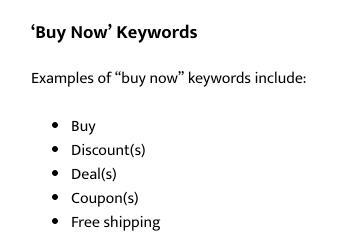
So if I was selling ‘dog food,’ and I wanted to catch people who wanted to ‘buy’ dog food, a good keyword to target would be ‘Buy dog food.’
Keywords like this are often referred to as keywords with ‘Commercial intent.’
That’s because people are already in the mindset of buying something here – I just need to get my product in front of them.
Here are examples of other keywords signaling ‘Commercial intent.’
Commercial intent is not the only kind of intent.
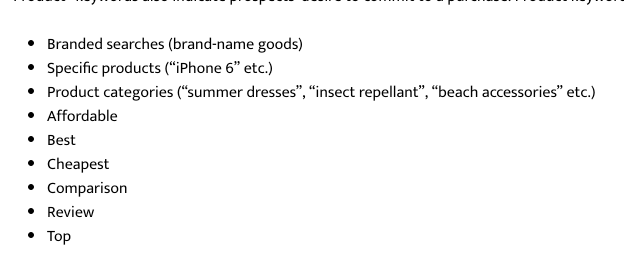
If I want to catch people who are researching dog food, so that they can find the best one, I could target the keyword ‘best dog food.’
With this keyword, I have the chance to grab someone’s attention, educate them and move them along the ‘funnel,’ eventually persuading them that I have the ‘best dog food.’
Such keywords are worth targeting, because they’re cheaper – but you’ll need to frontload a lot work that leads to visitors turning into customers.
In any case, here are some other keywords people might type, when doing research.
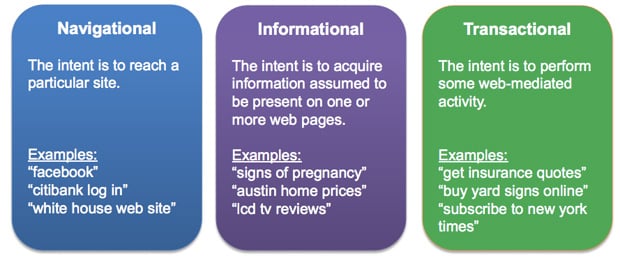
Additionally, below is a good overview of the types of intent that surround search terms.
As you probably know, the Google keyword tool can be used to come up with effective keyword ideas.
I’m not going to go through how you can use the keyword tool, as odds are you already know how to do that, if you’re reading about how to improve a campaign.
So, let’s just examine what you can do differently.
One thing that you can do is to enter in a ‘keyword’ that is coupled with a phrase/keyword that signals intent and then edit the settings of the keyword planner to only show ‘closely matched keywords.’
If I was selling tables, the keyword is ‘tables’ and then the intent phrase/keyword is ‘buy.’
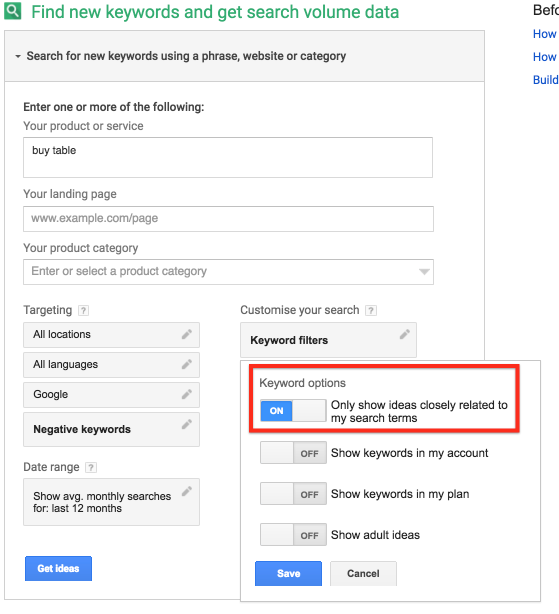
Upon running the search, I’m presented with some highly relevant Ad Groups that have the capacity to return a positive ROI. That’s because a lot of them are keywords that resemble ‘commercial intent.’
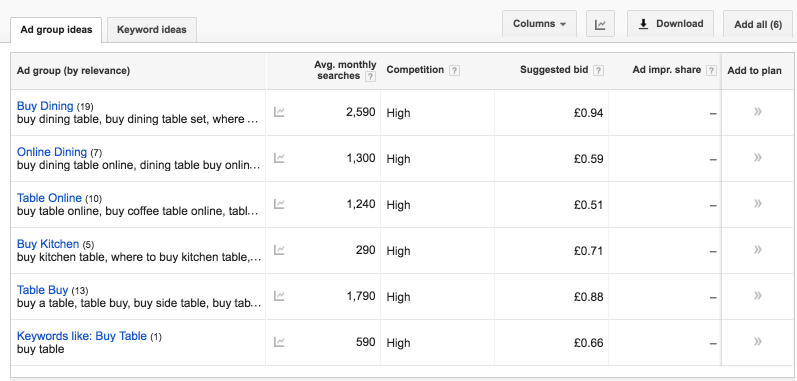
Remember, there are other ‘commercial’ intent keywords that you can couple your core keyword with.
It doesn’t have to be ‘buy tables’ – it can also be ‘discount tables,’ for example.
Change the Match Type
Another way that you can improve the performance of a search campaign is to change the ‘Match Type’ of your keywords.
On a very basic level, there are three Match Types that you can select.
Exact Match –

Phrase Match –

Broad Match –

If you find that your campaigns are generating a lot of clicks, but no results, it may be because you’ve picked a ‘Broad Match Type’ for your keywords, when you should have picked an ‘Exact Match Type’ – or at the very least, a ‘Phrase Match Type.’
If you’re new to AdWords and you don’t have a lot of money to spend, then picking ‘Exact Match Type’ is often a good idea. By choosing this Match Type, you’re given a lot of control over the keywords that can trigger your ad.
If you can afford to experiment with the other Match Types, but nevertheless want to practice caution, there are a few actions that you might want to consider, to ensure that your campaigns still generate a healthy ROI.
The first is the use of ‘Broad match modifiers.’
As you can see from the description above, using a ‘Broad match keyword’ opens your campaigns up, so that a huge number of keywords can trigger your ads.
While this represents a massive opportunity to get in front of a lot of people and also discover keywords that generate a high ROI, it can also be expensive.
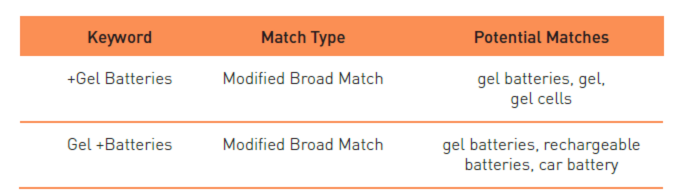
A ‘Broad match modifier,’ though, allows for you to take advantage of the features provided by the ‘Broad Match’ feature, while also providing you with a little bit more control.

With Broad match modifiers. you’re telling Google that a certain word or phrase must appear in the search term, for the ad to be triggered.
The image below should help you get a better understanding as to how a ‘Broad match modifier’ works. The use of a ‘+’ sign denotes what the ‘modifier’ is.
Negative Match Type represents another way that you can gain more control over your ad spend, especially while you run experimental campaigns.
With Negative Match Type, you’re picking keywords that you don’t want to trigger your ads. You generally pick these keywords, because you know that they’re not going to produce a good ROI.

For example, you might pick the keyword ‘free.’
In doing so, you’ll ensure that your ads will no longer appear if ‘free’ is included in the search term.
When picking keywords for Negative Match, keep in mind that concepts, such as ‘Broad/Phrase/Exact match’ still apply to your Negative match keyword.
Here’s a great explanation, from WordStream –
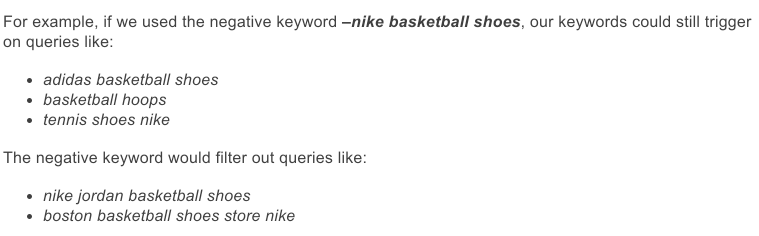
It’s important, therefore, that when you pick your ‘Negative’ keywords, you also pay attention to their ‘Match Type.’
The inclusion of Negative keywords is what contributed to this law firm reducing their ad spend 58% year over year.
You can find keywords that you should be setting to ‘Negative match,’ by going through your ‘Search Report.’
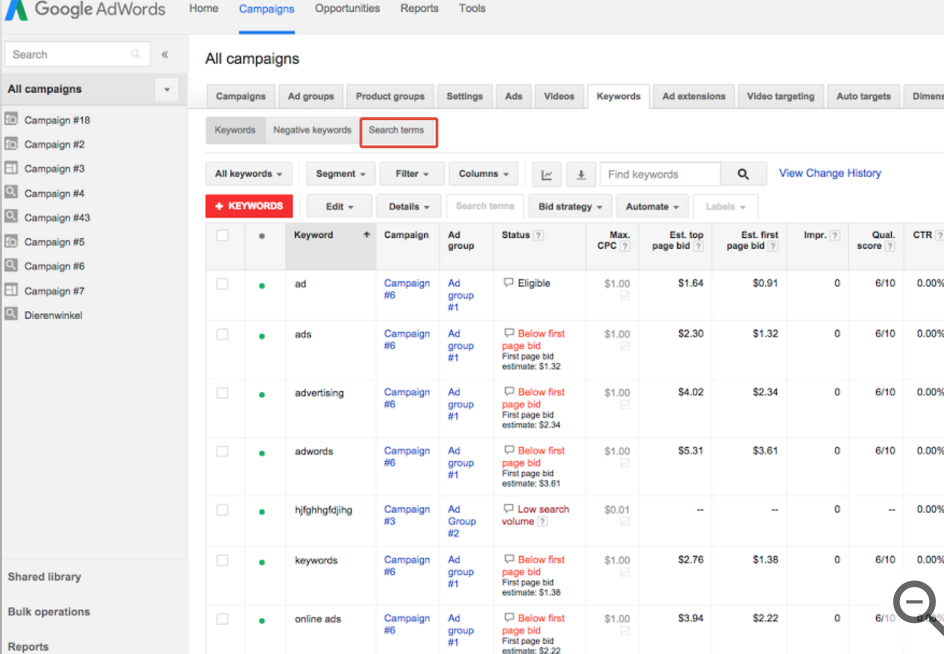
As you go through your report, you should be able to single out keywords that are costing you more than they’re making you.
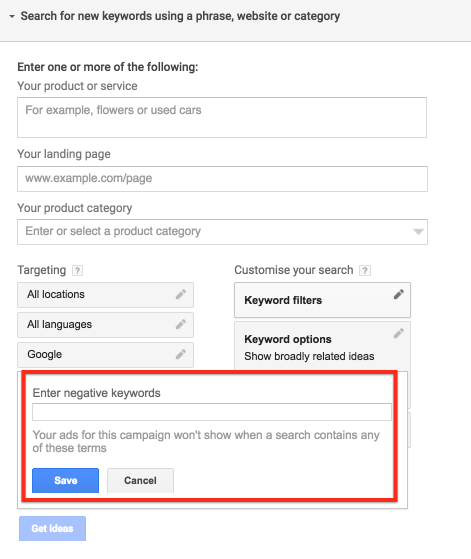
Once you attain a lot of experience with AdWords, you’ll be able to come up with negative keywords right away.
In such instances, you can add Negative keywords to the keyword planner, so that they don’t appear in your keyword suggestions.
Study your data
Studying the data produced by your campaigns can lead to insights that can turn an average campaign into an incredible campaign.
It helps to install a conversion pixel on your site, if you want to really get some insights when studying your data.
That way, you’ll be able to figure out which keywords are driving the best conversions, as well as a lot more.
If you want to set up ‘Conversion tracking’ on your site, AdWords provides an interactive feature that will take you step-by-step through the process.
You can find it here.
It also helps to pair your Google Analytics account with Google AdWords.
In doing so, you’ll be able to tell what people are doing after they click on your ad, but before they do something that counts as a conversion.
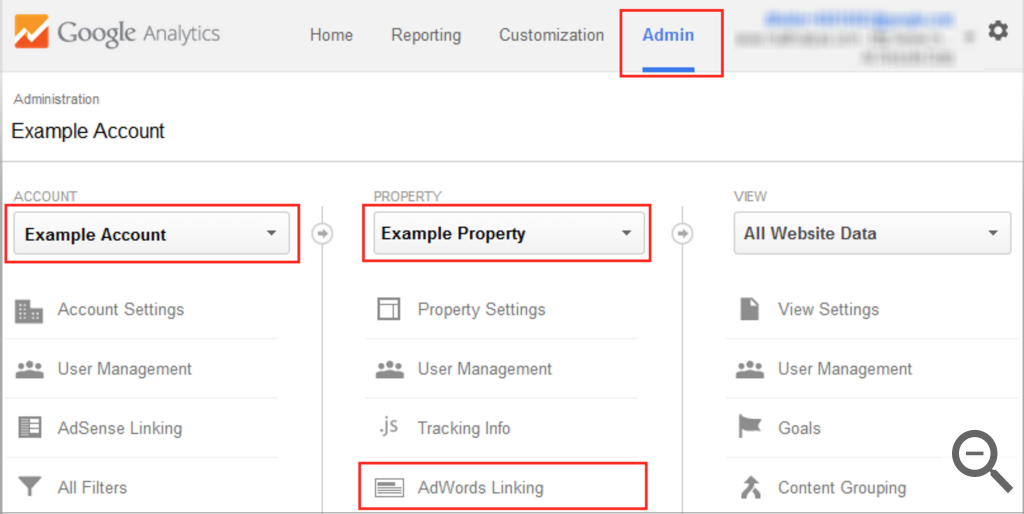
To link the two accounts, you need to log into your Google Analytics account and then click on ‘Admin.’
You then select the ‘Account’ and the ‘Property’ that you want to link with your AdWords account.
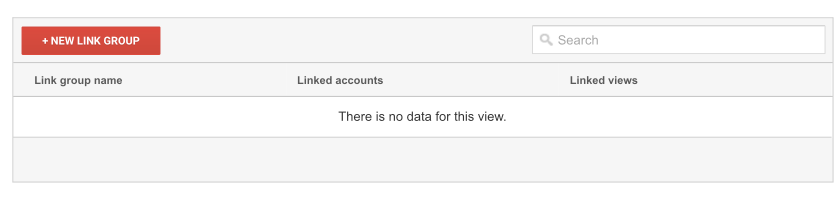
Then, click on ‘New link group’ and link the two accounts.
By linking the two accounts, it will be easy to find out which keywords are driving the most engagement. For example, you’ll see which keywords are causing a high bounce rate.
You’ll also be able to identify keywords that don’t necessarily lead to conversions, but do lead to people spending a lot of time on your site.
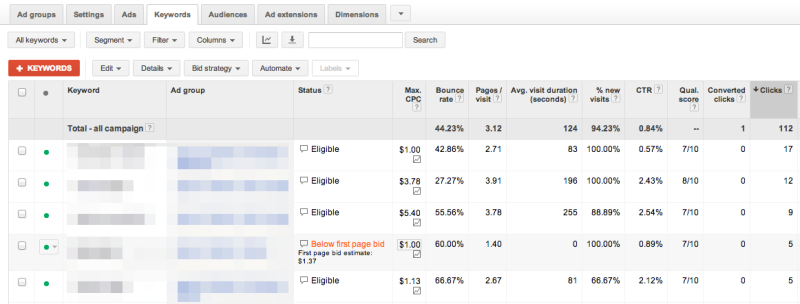
As a result of having this information, you’ll be able to make changes to your site and your campaigns that can improve conversions.
You can also use the ‘Reports’ tool, provided by Google, to gain insights on how you can adjust your campaigns.

Using the Report tool, you can pick the data that you want to analyze.
There are a number of things that you can study and will help you improve your campaigns.
The first is the ‘location data’ for your campaigns.
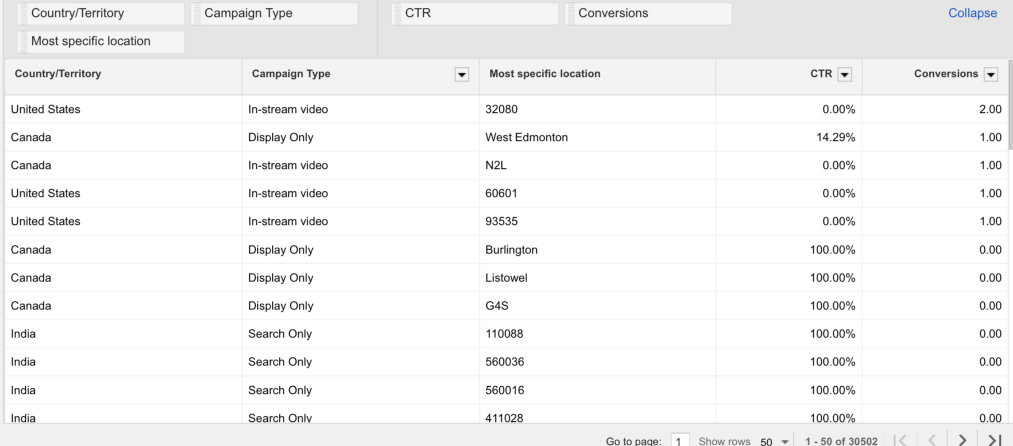
If you find that certain locations are driving more conversions that anywhere else, it might be a good idea to raise your bid for that location. If you do so, you’ll be able to capitalize on the opportunity that you have discovered.
Keep in mind that you will need to have conversion tracking enabled to monitor conversions.
You might even want to see what times your Campaigns or Ad Groups are converting the highest.
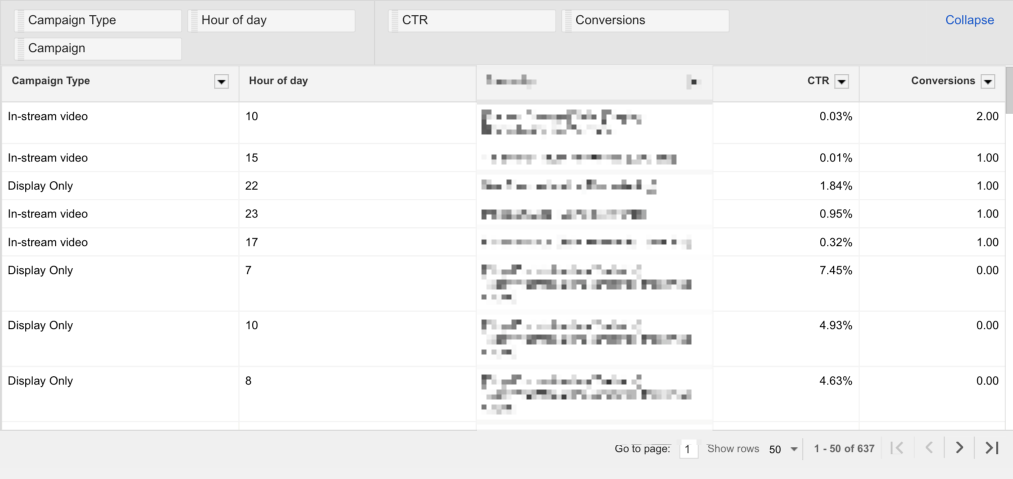
If you find that your campaigns do particularly well during a certain time of the day, then it might be beneficial to raise your bid just for that specific time of day.
You can do that by clicking on the ‘Settings’ tab.
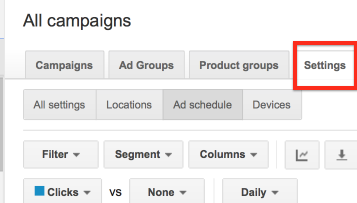
You then need to select ‘Ad schedule.’

What you need to do is to create an Ad Schedule.
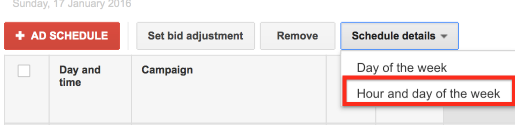
You have two options here. You can either use the data from your report, or you can study the data provided automatically by Google.
If you want to study the data automatically provided by Google, click on ‘Schedule details’ and then click on ‘Hour and day of the week.’
You’ll then be able to study the data and find when your ads are driving the most conversions.
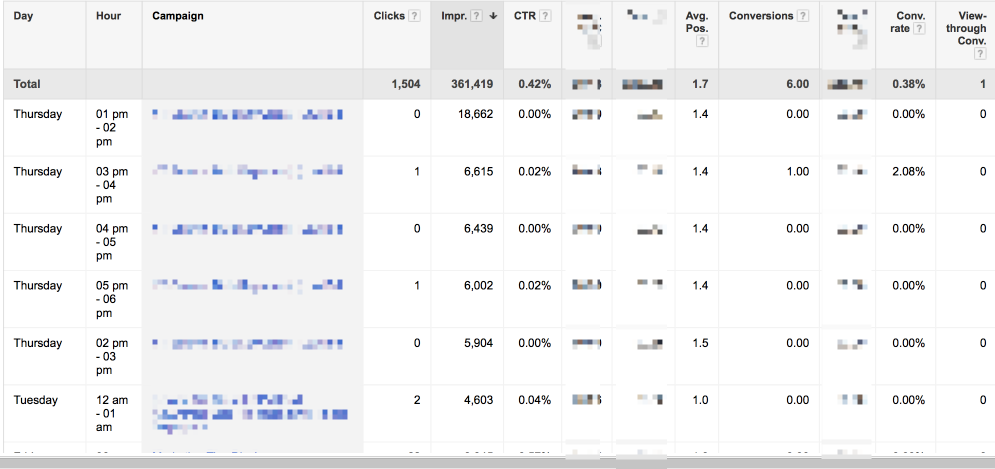
Once you’ve found a certain time, you then need to create an ‘Ad schedule.’
You can do that by clicking on ‘+Ad Schedule.’
Select a campaign and input the times when you found that this particular campaign was converting highly.
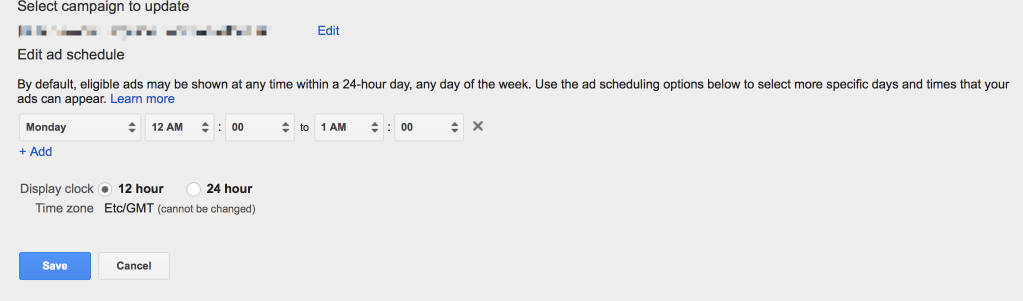
‘Save’ the Ad Schedule.
You then find the campaign and click on the adjacent section within the ‘Bid Adjustments’ column.
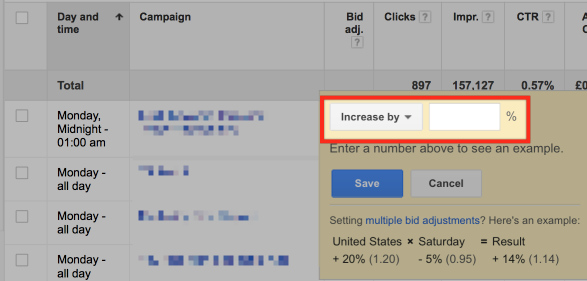
In doing so, you’ll be able to make it so that this specific campaign raises its bids during a certain hour of a certain day, ensuring that you can capitalize on any insights discovered.
This furniture company managed to increase conversions by 5%, as a result of raising their bids on Mondays.
Previously, their ads would have a low position, despite high conversion rates. Raising bids, just for that day, ensured that they benefited from great conversion rates, while still controlling their ad spend tightly.
Use the Opportunities tab
You may also want to check out the ‘Opportunities tab.’
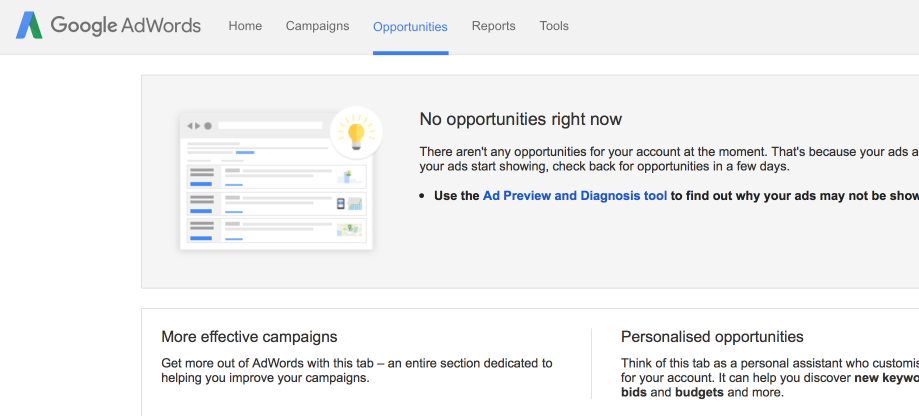
This tab provides you with a section where Google has come up with ways that you can improve your campaign.
Such suggestions often include different keywords that you should be targeting, as well as the improvements that you might experience, when making adjustments to the bids for your ads.
I think it’s worth mentioning that although this tool can provide you with some useful insights – you should carefully evaluate the information provided.
That’s because the suggestions made often rely on you spending more. Combing through the data yourself can often result in you finding better ways to optimize your campaigns.
Conclusion
AdWords Search Campaigns are relatively easy to set up.
Knowing how to improve the performance of a campaign, however, can be somewhat of a challenge.
After reading this post, you should now have a comfortable sense of how you can assess your existing campaign and make some improvements.
That might include adjusting the ‘Match Types’ of your keywords.
It might also include creating some custom ‘Reports,’ so that you can find golden nuggets within the data that you can use to make a campaign more effective.
You may even want to check out the ‘Opportunities’ tab, to see if Google has automatically provided some insights.
Whatever you decide to do, make sure that you do something to improve the performance of your campaigns.
Your AdWords campaigns will most likely be better off as a result.
Do you have any experience with improving the performance of an AdWords campaign? If so please share your thoughts below.