 Sign In











Accounting is a painful necessity.
It’s the boring side of the business. I don’t like dealing with it either.
But, if you want your business to grow, you can’t avoid it.
You could try tossing all your receipts into a shoebox and handing them to a stranger.
But you’ll be handing them financial control. That means risking the success of your business.
You’d be handing them a nice chunk of change to do it all for you too.
I promise it’s not as complex as you might fear, though.
And you shouldn’t need an accountant for day-to-day management.
Even if you do pay for help, you should still know the basics yourself.
This way you can understand and question what someone is telling you.
After all, it’s your business at stake.
The following ten accounting basics will cover everything you need to know to understand your money and ask the smart questions.
1. Get yourself accounting software
Don’t try to piece it all together using excel or a calculator.
Do yourself a favor and get accounting software. Freshbooks is marketed to customers who run e-commerce businesses.

Or if you use Shopify, there are a bunch of accounting software apps you can get right in their app store.
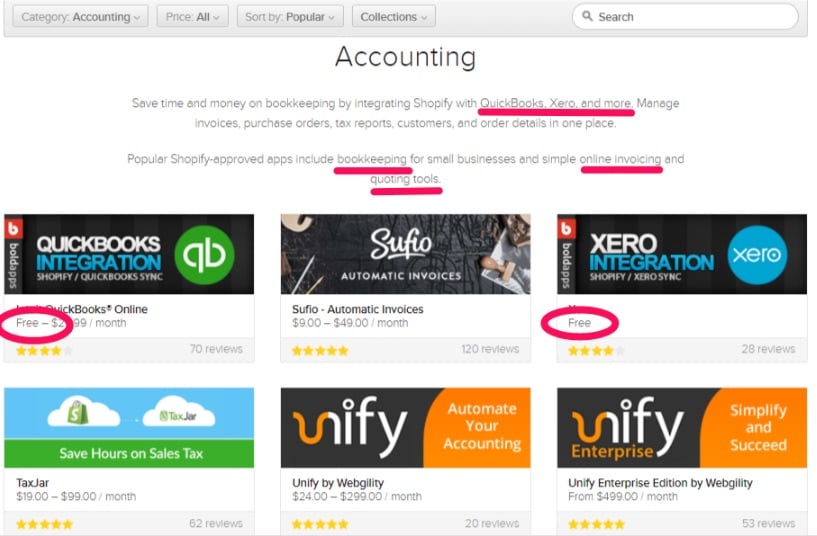
Not sure what you want? Test out a free one. Or pick one with a 30-day free trial.
The best option will depend on your business and preferences.
If you’re shopping through the app store, make sure you’re picking a bookkeeping system.
Look for an app that will track sales, costs, and inventory.
Avoid apps that only create invoices or just provide reports. You want a tool that can do it all for you.
Whether you pick software through Shopify or go with something else, pick one that will sync directly to your e-commerce store.
It will make life a whole lot easier.
2. Track your cash flows
Step two: watch your cash.
If you don’t have a separate bank account for your business yet, get one.
You need to know that your business is making money. And the easiest way to see this is to watch your cash flow.
If you have more coming in then going out, you’re probably doing well, right?
You also should be watching the timing of money going out and coming in.
After all, what if all your bills are due tomorrow?
It won’t matter a whole lot if you have $1 million coming in next month if you can’t pay your employees until then.
Keep in mind any holds you have on your accounts.
What payment methods do you offer your customers? Do any of them place a hold on the money?
Is there a five-day delay from the time a customer pays to the time the money is in your bank? You need to know this when you’re figuring out when you’ll have money to spend.
Shopify offers a free template for tracking cash. You can easily create your own in excel.
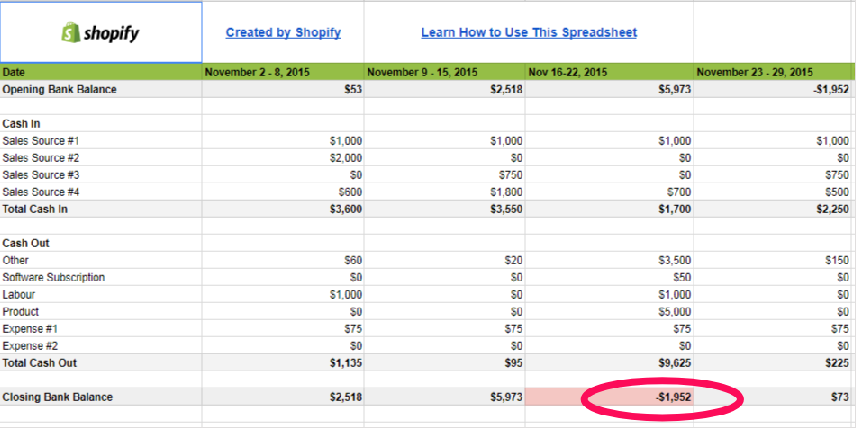
Track what you expect to spend each week. Track what money you expect to come in each week.
If what you need to spend is more than your current bank balance plus what’s coming in, you know you’re about to have a problem.
Follow these tips to help improve your cash flow:
- Don’t pay anything earlier than you have to. If it’s due in 30 days, pay it in 30 days.
- Consider offering monthly payment plans or subscriptions to customers to guarantee money coming in.
- Keep a reserve in your business bank account ‘just in case.’
- Don’t overcomplicate it. You don’t need huge technical cash flow statements.
3. Determine how to count inventory
If you’re selling a service, then ignore this step.
Inventory is the product you sell or all the materials you use to build that product.
Don’t forget to include any costs for wrapping or packaging your product.
Decide what minimum volume of inventory you want to have on hand, and make sure you are tracking inventory so you can reorder before you pass this point.
The last thing you want is to run out of inventory and lose sales.
Why is inventory part of accounting basics?
Inventory equals money.
It’s money you spent to buy the stuff. Money you won’t make back until you sell your product.
And the money tied to your inventory can change while it’s sitting in your warehouse (or store, or apartment).
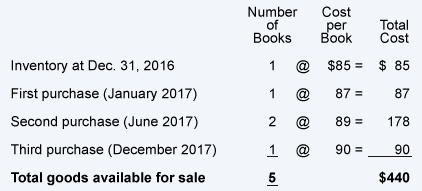
If I buy 50 products at $100 each, and tomorrow the price shoots up to $150, my inventory is suddenly worth more.
But if the price drops tomorrow to $50, my inventory is worth less.
And watch out for ‘shrinkage’!
That’s when you suddenly have less inventory than what you’re supposed to.
You know you bought 50 products. You know you’ve sold and shipped 40.
You should have 10 left, right?
What if you only have 8 left?
That is ‘shrinkage.’
Maybe an item got lost, or stolen, or was ruined and had to be thrown out. There are lots of reasons it happens.
The good news is shrinkage is lower when you don’t have a physical retail store.
Warehouse shrinkage is actually pretty low. Typical shrinkage is less than 1% of your total inventory.
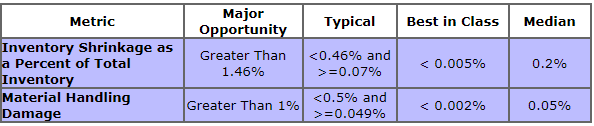
If you’re operating a business out of your home, it’s even less likely you will have shrinkage.
After all, you’re less likely to have someone steal inventory if you’re the only one around it.
It’s also a lot harder to lose inventory in an apartment compared to a huge warehouse.
That said, shrinkage can happen to anyone.
This is why it’s important to physically count inventory regularly. You need to know if you just ‘lost’ $100 worth of product and factor that into your accounting.
4. Understand your cost of goods sold
Cost of goods sold is the expense directly tied to the products you sold.
This is the inventory sold plus how much it cost to make that inventory.
Let’s say you sell one widget. Whatever it cost you for the parts plus whatever it cost to build it should be the cost of goods sold for that widget.
If the parts of the widget cost $50, packaging cost $10, and you paid someone $25 to put it together, your cost for that widget is $85.
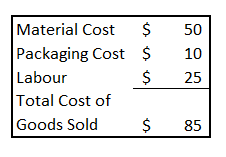
This can get a lot more confusing to figure out if you bought a lot of widgets at different prices, and you’re paying different people different salaries to put them together.
Don’t overcomplicate things.
The easiest way to figure it out is to use a weighted average. Here’s an example of calculating a weighted average:
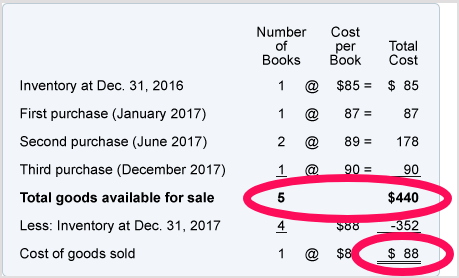
($440 divided by 5 is $88.)
Anything that is tied directly to your products and has a cost increase when you make more stuff should be in cost of goods sold.
If you pay employees per every widget they make, include their labor.
If you pay them a flat hourly rate even if they don’t make a single thing that day, don’t include their labor in the cost of goods sold.
The retail price of an item minus the cost of that item is your ‘gross margin.’
This is not your profit. It just tells you how much you’re making on each item before you add in all your other expenses.
Things can get pretty complicated here if you have different costs for different sales conditions.
For example, do you offer free shipping on all orders over $100?
This means your cost of goods sold is going to increase every time a customer buys more than $100 worth of stuff.
It will also change for each different location you ship to.
Some websites will tell you not to include shipping in costs of goods sold.
I disagree. ‘Freight out’ goes up or down with the volume you sell.

To simplify it, let your accounting system track your actual cost of goods sold. If it’s linked to your e-commerce site, it should be able to do this automatically.
For predicting your future cost of goods sold, save yourself a headache and just use an average.
If last month you sold $1,000 and paid $150 for shipping, that’s 15%.
So you can assume that if next month you sell $2,000 you will probably pay $300 (or 15%) for shipping.
It won’t be perfect, but it’s better than just leaving the cost out of planning.
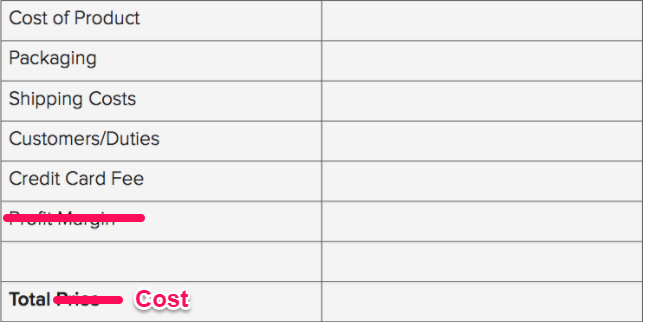
Here’s a simple way to calculate your rough average cost of goods sold, including shipping, packaging and any other e-commerce fees:
5. Calculate all other expenses
Now you know your costs directly tied to sales volume.
Next, you need to understand how much everything else is costing you.
Any expenses that don’t increase when you sell more or decrease when you sell less are called ‘fixed expenses.’
For example, if you pay a monthly rent, the amount is fixed. It won’t change whether you sell one widget or one million.
These costs aren’t part of the cost of goods sold and aren’t factored into your gross margin.
They do affect your profit and your cash flow, though.
Common fixed expenses are:
- Rent
- Utilities
- Insurance
- Property Tax
- Interest on loan payments
- Salaries
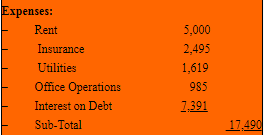
These expenses are considered ‘fixed’ since you have to pay them even if you sell nothing next month.
Don’t get this confused with an expense being the exact same amount every month.
An expense like utilities might be more one month than the next. Or it might be more in the winter than in the summer.
It’s still a fixed expense in accounting terms.
If any expense changes month-to-month, you should use an average for budgeting.
6. Figure out your break-even sales requirement
Budgeting and planning are important parts of running a business.
After all, you’re not going to just want to know if you made a profit last month, you’re going to want to know if you expect to make one this month and next.
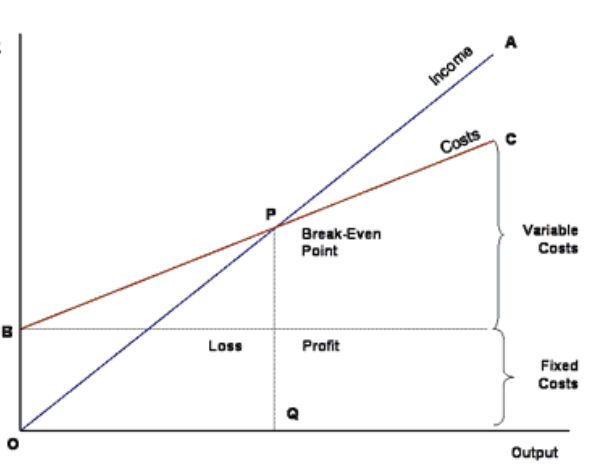
Your break-even sales amount is the amount of sales dollars you need to earn to cover all of your costs.
For example, let’s say all your ‘fixed costs’ add up to $5,000 per month.
This means you have to sell enough of your product to cover the cost of making them (including the labor) plus an additional $5,000 just to break-even (no profit and no loss).
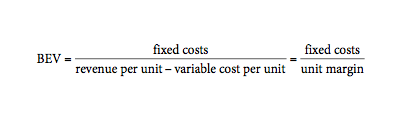
Figure out your gross margin per unit (from the fourth basic).
Then divide your fixed costs by that amount to figure out the number of units you need to sell.
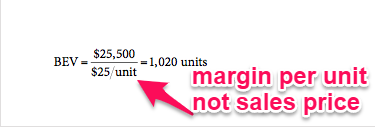
If your break-even number of units is 5,000 and you think you can only make or sell 3,000, you know you’re in trouble.
If break-even is 5,000 and you think you can make and sell at least 10,000 then you know you should be making money.
Remember that your fixed costs don’t easily change.
For example, if you’re in a five-year lease, you’re going to struggle to find a way to lower your rent.
This means if your break-even seems too high, you should first look at either raising your prices of trying to lower your costs of goods sold.
You could do this by charging more for shipping, using cheaper materials or finding cheaper labor.
Here’s a visual of break-even:
7. Track your sales and profits before tax
Now you know how many items you need to sell to break even.
Next, you need a way to track your sales.
This lets you know early on if you’re going to have an issue. It will also help you manage your money.
Let’s say you figured out you need to sell 5,000 units to break even.
It’s now the 15th of the month, and you’ve only sold 1500.
If you’re tracking your sales, you’re able to notice this. Now you have time to do something about it.
You still have two weeks left to try and drum up more business with some extra digital marketing efforts.
Just make sure that if it’s paid marketing, you figure the cost of that into your budget.
After all, if you spend $2000 to increase sales by $1000 then it wasn’t worth it, right?
One way to track your sales is by linking Google Analytics to your e-commerce site.
Google Analytics even has a plug-in for your e-commerce site to make it easier.
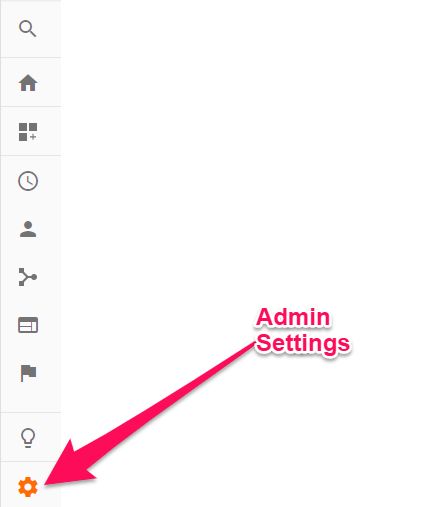
Log in to your Google Analytics and go to your Admin Settings.
Next, go to your e-commerce settings.
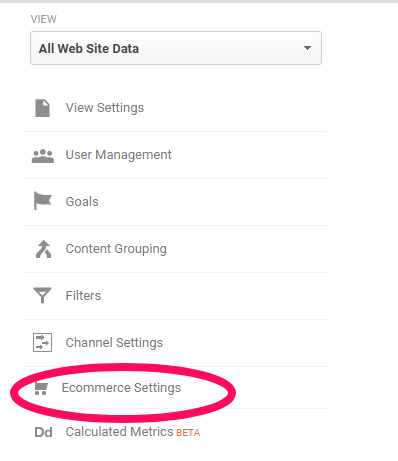
Then turn on the ‘Enable e-commerce’ switch and ‘submit.’

You can learn more about Google Analytics in some of my other posts, or check out my video.
But let’s get back to accounting.
Now that you know sales, cost of goods sold and all your other ‘fixed’ expenses, you know your earnings before tax as well.
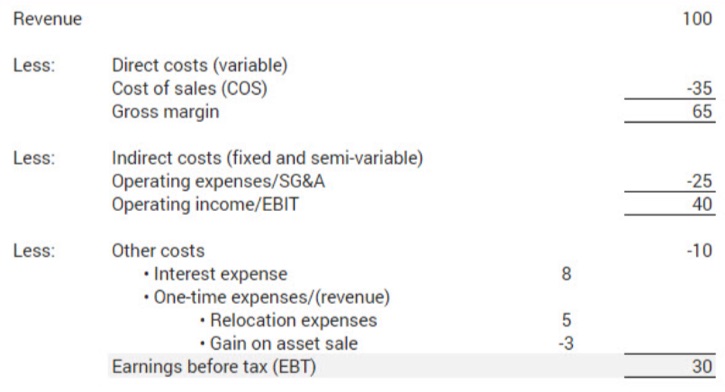
Keep in mind profits don’t mean cash in hand!
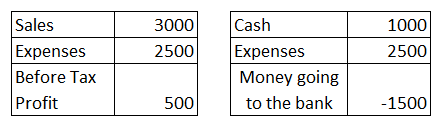
Let’s say you sell a service worth $3,000, but you offer a three-month payment plan.
Your sales would show $3,000, but your bank account may only show $1,000.
That means even if your accounting software says you made a profit of $500 after all expenses, you won’t have an extra $500 in your bank account.
If all of your expenses are actually paid out this month, then your bank out could go into the red.
There are tons of accounting rules around when to recognize revenue.
The timing for when to recognize sales and expenses can get pretty complex.
Leave this for your accountant and tax time. It’s not important when it comes to the day-to-day management of your business.
If you ever go public, you’ll need to know the more advanced accounting reporting requirements, but they’re not needed for managing your business.
8. Set up the proper tax rates for customers
Here’s the part most people groan about: taxes.
Taxes are unavoidable, and they can get pretty complicated.
If you sell a lot of different products and services to a lot of people around the world, you may want to consult a professional at this point.
Thankfully, systems are pretty smart these days.
Your e-commerce software should take care of most of this for you.
As long as you flag a product as something that is taxable, once your customer puts in their address, it should calculate the tax payable.
If you use Shopify, you can set this up on the Tax settings:
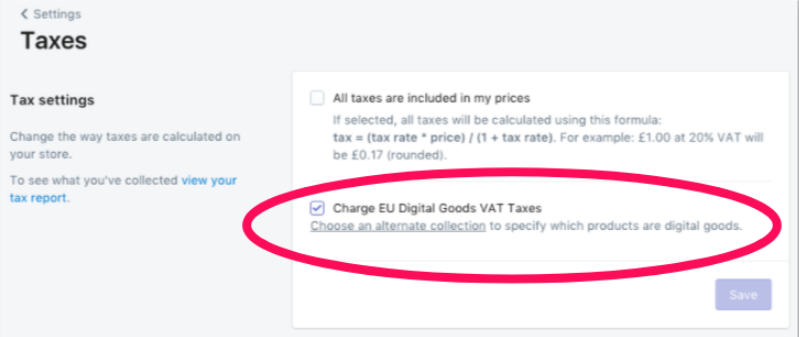
And if you have tax exempt products or customers, you can set up exemptions directly in your e-commerce store.
The detailed instructions for Shopify exemptions can be found here.
9. Plan for your tax payments
Now that you’re properly set up to collect tax, you also need to make sure you’re ready to pay it.
Your tax rules will depend on where you’re physically located.
At a minimum, expect that you need to submit as much in tax as you’ve collected.
This means it’s important to recognize that money as tax and set it aside. If not, it could hurt when it comes time to file!
Some online shopping services, such as Shopify, allow you to include tax into your sales price.
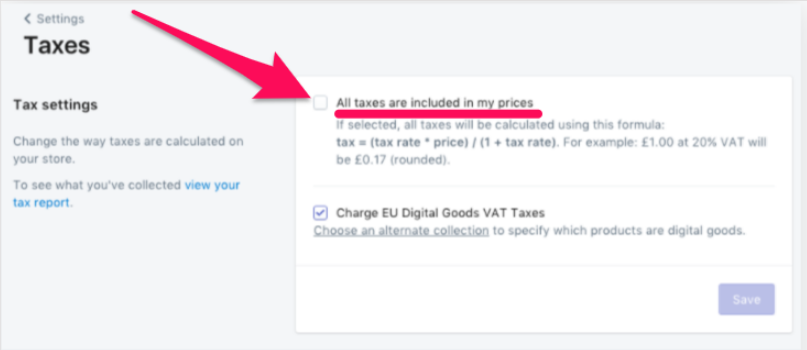
This means that your product is always $40.00 whether you’re selling it to a customer who pays no tax or one who pays 15% tax.
The difference is that your sales price, and profit, are lower whenever your customer is in a region of higher tax.
I wouldn’t recommend using this function.
It can make it more difficult to plan actual sales dollars you expect to earn.
It can also make it easy to lose track of how much profit you collected and how much tax you collected (which you will then have to pay out).
If you do want to include tax in your prices, make sure you can run a tax report.
This should easily tell you how much you collected in taxes, so you can still identify it and put it aside.
For Shopify tax reports, go to Reports, then Finances.
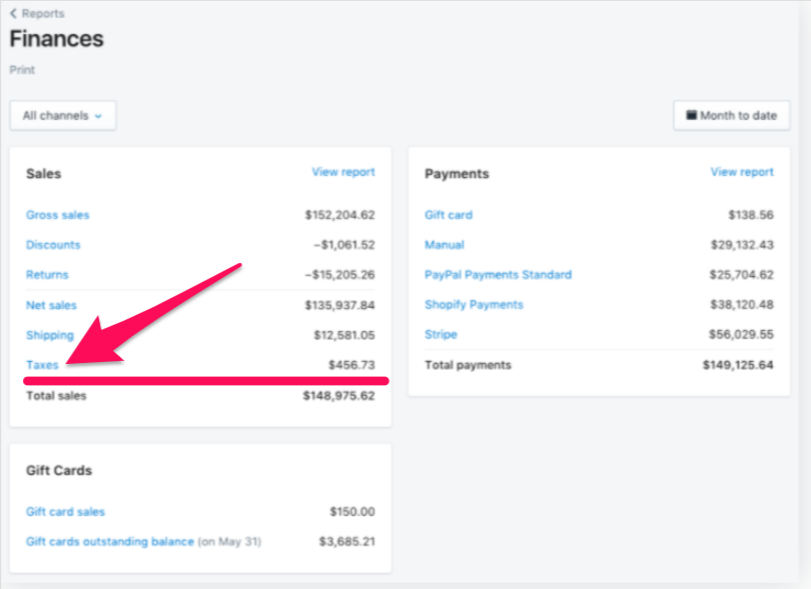
Then, click on ‘Taxes,’ and it will bring you to the detailed tax report:
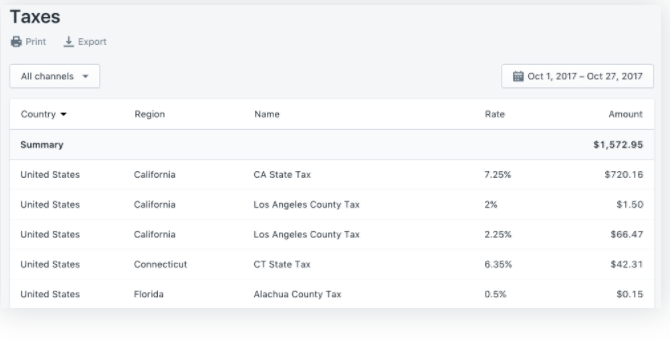
It’s a good idea to set aside any taxes you will need to pay out, so they don’t get lost in your bank balance or included in your cash flow.
Consider opening a separate account just for taxes.
10. Understand your balance sheet
We’ve now covered everything on your income statement, as well as cash flow.
The final thing to cover is the balance sheet.
This is what helps you track your company’s long-term health to see overall how your company is doing.
An income statement is a snapshot in time. A balance sheet is the bigger picture.
The balance sheet is made up of assets, liabilities, and equity.
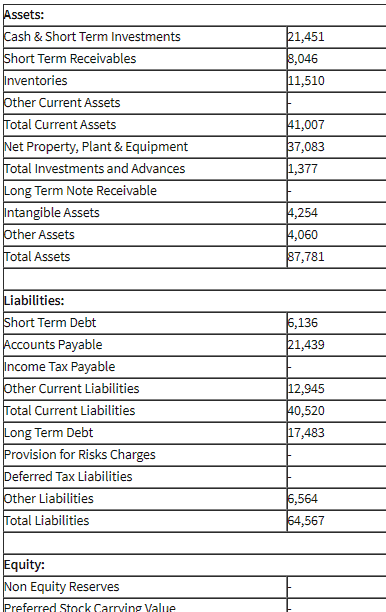
Assets are things you have of value, like cash in the bank.
Liabilities are debts or payments you owe.
Equity is the difference between the two.
Let’s say your car is worth $50,000 and you have $30,000 you still owe on it.
That means your asset is $50,000, your liability is $30,000, and your equity is $20,000.
If you sold the car today, you’d get $50,000 in cash. Then you have to pay off the $30,000 in debt that you owe, and you’re left with $20,000 in your pocket.
This means you have equity and if you had to get rid of the car today, you’d make money.
This is how you want your business’ balance sheet to look.
Here’s a more common scenario:
Your car was worth $50,000 when you bought it. You took out a $50,000 loan to purchase it.
As soon as you drove it off the lot, it dropped in value and is now only worth $40,000. It’s depreciation, which means that things decrease in value as they get older.
If you need to sell it now, you will sell it for $40,000, and pay off $40,000 in debt.
You will be left with no car and still owe $10,000 in debt.
This is ‘negative equity.’ It means you owe more than you own.
This is a bad place to be.
If your business is in this state, it means you’re losing money.
If your income statement makes it look like you’re making a profit but your balance sheet is telling a different story, then you’re missing something in your expenses.
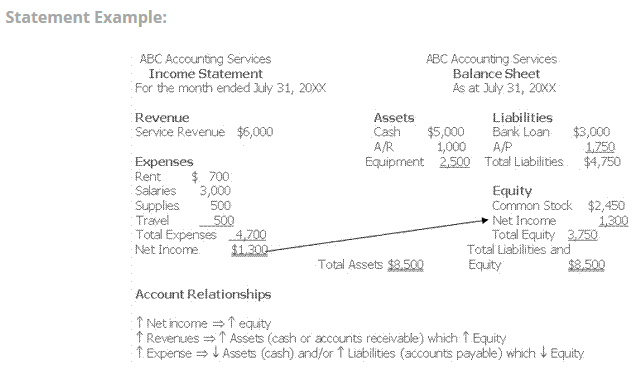
Things like interest payments on loans are an easy one to miss.
If you have a high-interest loan that keeps increasing your liability, it can easily kill your profits without you even realizing it.
That’s why the balance sheet is a good second look to make sure you don’t miss anything.
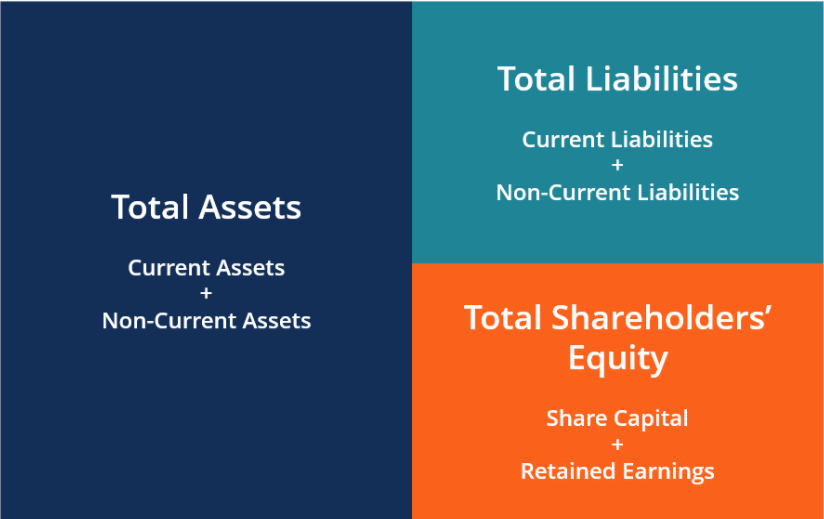
A simple check to make sure your balance sheet is right is to remember that assets = liabilities + equity.
Conclusion
I’ve now covered all the accounting basics you should be following day-to-day and month-to-month.
Start with a basic accounting software. It will make your life a lot simpler.
Then, remember ‘cash is king,’ and get a handle on your cash flow. You should be managing this on a weekly basis unless you have a big cash reserve built up.
Next, you need to understand your sales, expenses, and profits. This is your income statement, and lets you know if you’re making money each week, month, or year.
Don’t forget to plan for taxes. Set up your e-commerce site to collect them if you need to. Put the money aside to pay them when you need to.
Finally, build your balance sheet. Or let your accounting software do it for you.
This will let you know how ‘healthy’ your company is long term. It’s an easy way to tell if you have too much debt.
There are lots of additional accounting rules and tricks that can help you save money at tax time.
There are also reporting options that should be considered if you’re trying to get investors or a loan for expansion.
But for running your business, don’t get sucked into the complicated rules. It will just distract you from your critical day job of running your business.
An accountant can help you with everything above and beyond the basics if you need it.
What software do you currently use to handle your accounting needs?